Nyxolaria 10.1" CP31M, 4GB, 128GB, Pink
The 10.1-inch IPS display with 1280x800 resolution and Android 16 with AI enhancements deliver a smooth experience, backed by a 6000mAh battery lasting 6-8 hours. It includes a keyboard, mouse, protective case, and stylus, plus expandable storage up to 1024GB, making it a complete 2-in-1 package. Best for students and business users who need an affordable, portable device for note-taking, document work, and media consumption.


Resumen
The 30-Second Version
The Nyxolaria CP31M is a budget 10.1-inch Android 16 tablet that bundles a keyboard, mouse, case, and stylus for around $73 USD. It's fine for basic tasks like streaming and light browsing, but the 4GB of RAM and low-res 1280x800 display hold it back. Buy it if you want the cheapest possible 2-in-1 setup and can live with the compromises.
Pros & Cons
Ventajas
- Very affordable at around $73 USD 88th
- Includes keyboard, mouse, case, and stylus in the box 82nd
- 128GB storage with microSD expansion up to 1TB 72nd
- Android 16 out of the box 72nd
- Decent battery capacity at 6000mAh
Desventajas
- Only 4GB physical RAM despite 20GB marketing claim
- Low-resolution 1280x800 display looks soft
- Wi-Fi 5 only, no cellular option
- Charging port durability is questionable
- Software updates appear to be non-existent
Opinión de los propietarios
The Word on the Street
Cómo cambió la opinión de los propietarios con el tiempo
ExclusivaSegún cuándo escribieron realmente sus opiniones los clientes, para ver si los elogios iniciales se mantuvieron.
7 opiniones escritas, dic 2025 – mar 2026: 5 satisfechos, 1 neutral, 1 insatisfecho
En las 188 valoraciones de tiendas: 4,4★. La mayoría de los propietarios valora sin escribir una opinión. El gráfico cuenta las 7 opiniones escritas.
Cada punto es una opinión escrita, en el mes en que se escribió. Satisfechos = 4-5★, neutrales = 3★, insatisfechos = 1-2★.
Las pruebas
Performance
Let's talk about what's actually inside this thing. The CPU is listed as a quad-core 8-core, which is a confusing way to say it's an octa-core chip. In our database, it lands around the 70th percentile for CPU performance among tablets. That's not bad for a budget device, but it's not going to blow anyone away. The GPU sits at the 68th percentile, so light games and video playback are fine. Anything demanding will chug.
The real bottleneck is RAM. At 4GB physical, this tablet ranks in the 31st percentile. That's below average, and it shows when you try to switch between more than a few apps. The 128GB storage is middle of the pack at the 55th percentile. The screen is where things get rough. The 1280x800 IPS panel ranks in the 10th percentile for screen quality and 9th for sharpness. That's near the bottom of our database. Text looks soft, and video won't be as crisp as you'd get on even a budget 1080p panel. The 6000mAh battery is decent at the 66th percentile, but reading battery life drops to the 31st percentile, which suggests the display and power management aren't great for long reading sessions.
Specifications
Full Specifications
Processor
| CPU | Octa-core |
| Cores | 8 |
| GPU | Adreno 305 |
Memory & Storage
| RAM | 4 GB |
| Storage | 128 GB |
| Expandable | Yes |
Display
| Size | 10.1" |
| Resolution | 1280x800 |
| Panel | IPS |
Connectivity
| Wi-Fi | Wi-Fi 5 |
| Cellular | No |
Features
| Stylus Support | Yes |
| Stylus Model | Stylus |
Physical
| Weight | 0.5 kg / 1.2 lbs |
| OS | Android 16 |
vs Competition
The most obvious comparison is the Apple iPad 8th Generation. The iPad costs significantly more, even used, but it has a sharper display, better build quality, and years of software support. The Nyxolaria can't touch that. The Lenovo Idea Tab Pro TB336FU is another step up, with a better screen and more reliable performance. If you're looking at the Antemper D126B-DP or Relndoo P30, you're in the same budget territory, and the differences come down to which corners got cut. The URAO G140L is another budget option with similar specs.
Where the Nyxolaria stands out is the bundle. None of those competitors throw in a keyboard, mouse, case, and stylus at this price. That's genuinely useful for students or anyone who wants a laptop-ish experience without buying a laptop. But the trade-off is a screen that ranks near the bottom of our database and RAM that's below average. If you can live with those compromises, the bundle makes sense. If you can't, spend a bit more elsewhere.
| Spec | Nyxolaria 10.1" CP31M | Apple iPad 10.2" 7th Gen | Lenovo Idea Tab Plus 12.1" | Samsung Galaxy Tab A 11" A11+ | Nexall 12" T7250 | Teclast T65 13.4" |
|---|---|---|---|---|---|---|
| CPU | Octa-core | Apple A10 Fusion | MediaTek Dimensity 6400 Processor (2.50 GHz ) | MediaTek Dimensity 7300 | 2.4 GHz | Unisoc |
| RAM (GB) | 4 | 3 | 8 | 6 | 24 | 20 |
| Storage (GB) | 128 | 32 | 128 | 128 | 128 | 128 |
| Screen | 10.1" 1280x800 | 10.2" 2160x1620 | 12.1" 2560x1600 | 11" 1920x1200 | 12" 2000x1200 | 13.4" 1920x1200 |
| OS | Android 16 | iPadOS | Android 15 | Android 13 | Android 16 | Android 16 |
| Stylus | true | true | true | false | true | false |
| Cellular | false | false | false | true | true | true |
| Battery (Wh) | - | 32 | - | - | - | - |
| Compare | Compare | Compare | Compare | Compare |
| Producto | CPU | GPU | RAM | Pantalla | Battery | Feature | Almacenamiento | User Sentiment | Sharpness | Portability | Connectivity | Valoración social | Affordability | Reading Battery |
|---|---|---|---|---|---|---|---|---|---|---|---|---|---|---|
| Nyxolaria 10.1" CP31M | 71.8 | 69.9 | 31 | 20.2 | 65.5 | 71.7 | 54.7 | 22.3 | 13.1 | 56.5 | 24.4 | 81.7 | 88.4 | 31.4 |
| Apple iPad 10.2" 7th Gen Compare | 90.9 | 92.5 | 11.6 | 76.6 | 95.5 | 74.5 | 16 | 71.1 | 73.6 | 63.9 | 83.2 | 91 | 75.2 | 84.8 |
| Lenovo Idea Tab Plus 12.1" Compare | 54 | 98.9 | 65.7 | 89.7 | 88.7 | 95.7 | 66.4 | 58.6 | 58.1 | 55.3 | 62.2 | 94.6 | 41 | 70.3 |
| Samsung Galaxy Tab A 11" A11+ Compare | 100 | 99.8 | 50.9 | 53 | 74.1 | 32.1 | 54.7 | 58.6 | 41.9 | 67.9 | 90.5 | 91 | 43.4 | 23.1 |
| Nexall 12" T7250 Compare | 83.7 | 80.5 | 95.3 | 51.9 | 85.7 | 86.8 | 54.7 | 81.9 | 38.6 | 78.9 | 57.9 | 42.3 | 56.8 | 50.6 |
| Teclast T65 13.4" Compare | 80.5 | 77.6 | 94.2 | 61.2 | 79.9 | 26.9 | 54.7 | 96.3 | 27.5 | 34.6 | 57.9 | 87.2 | 61 | 6.3 |
Precio
Value & Pricing
At $73 USD, the Nyxolaria CP31M is aggressively cheap. You get a tablet, keyboard, mouse, case, and stylus for less than most name-brand tablets cost for just the device. That's the whole appeal. But value isn't just about price. The 4GB of RAM and low-res screen mean you're getting what you pay for. If you need a basic device for streaming, light browsing, and maybe some note-taking, this is a reasonable deal. If you want something that'll last more than a year or handle real work, you're better off saving up for a Lenovo Idea Tab Pro or even a used iPad 8th Generation. The Nyxolaria ranks in the 88th percentile for affordability, which is its strongest suit, but that's because it's cheap, not because it's a great tablet.
Amazon 3 ofertas Desde 73 US$
Historial de precios
Leer más
Overview
The Nyxolaria CP31M is one of those budget Android tablets that looks great on paper until you squint at the fine print. It's a 10.1-inch slate running Android 16, bundled with a keyboard, mouse, case, and stylus for around $73 USD. That's a whole lot of accessories for less than the price of a decent dinner for two. The pitch is simple: a 2-in-1 tablet for students, casual browsing, and light productivity without spending iPad money.
But here's the thing. The listing screams "20GB RAM" in big letters, and that's misleading. It's actually 4GB of physical RAM plus 16GB of virtual expansion, which is just storage pretending to be memory. The 128GB of built-in storage is real, and you can add up to 1TB via microSD. The 6000mAh battery promises 6-8 hours of use. For the price, that's not terrible, but it's not the miracle the marketing copy wants you to believe.
So is the Nyxolaria CP31M good for students? For basic note-taking, reading PDFs, and streaming video, sure. Is it good for gaming or heavy multitasking? Not really. We'll get into why below.
Common Questions
Q: Is the Nyxolaria CP31M good for gaming?
It's okay for light puzzle games and casual titles, but the 4GB of RAM and mid-range GPU will struggle with anything demanding. Don't expect smooth performance in graphics-heavy games.
Q: Does the Nyxolaria CP31M come with a keyboard and stylus?
Yes, the bundle includes a keyboard, mouse, protective case, and stylus. That's one of the main selling points at this price.
Q: Can the Nyxolaria CP31M run Netflix in HD?
It supports Widevine L1 for HD streaming on services like Prime Video and Disney+, but Netflix may be limited to L3 quality depending on device restrictions. The 1280x800 screen also isn't sharp enough for true HD anyway.
Q: How long does the Nyxolaria CP31M battery last?
The 6000mAh battery is rated for 6-8 hours of use, which is decent for a budget tablet. Heavy use or high brightness will drain it faster.
Who Should Skip This
Skip the Nyxolaria CP31M if you need a tablet for serious work, gaming, or anything that requires a sharp display. The 1280x800 screen is one of the worst in our database for sharpness, and 4GB of RAM will frustrate anyone who multitasks. If you're an artist or designer, the stylus support is basic and the screen quality will hold you back. Students who need to run demanding apps or keep lots of tabs open should look at the Lenovo Idea Tab Pro or a used iPad instead. And if you care about software updates or build quality, the reports of charging ports failing and no update path are red flags. This is a tablet for light, casual use only.
Verdict
Should you buy the Nyxolaria CP31M? If you need the absolute cheapest tablet with a keyboard and stylus for light tasks, and you understand you're getting a budget device, then yes. It's fine for streaming, puzzle games, audiobooks, and basic note-taking. The included accessories are a real bonus at this price.
But if you're expecting smooth multitasking, a sharp screen, or a device that'll get software updates, look elsewhere. The 4GB of RAM and 1280x800 display are real limitations. And the reports of charging ports detaching within a month are concerning. This is a tablet for people who know exactly what they're getting: a cheap, basic Android slate that does the bare minimum. For everyone else, save up a little more.
Usage Scores
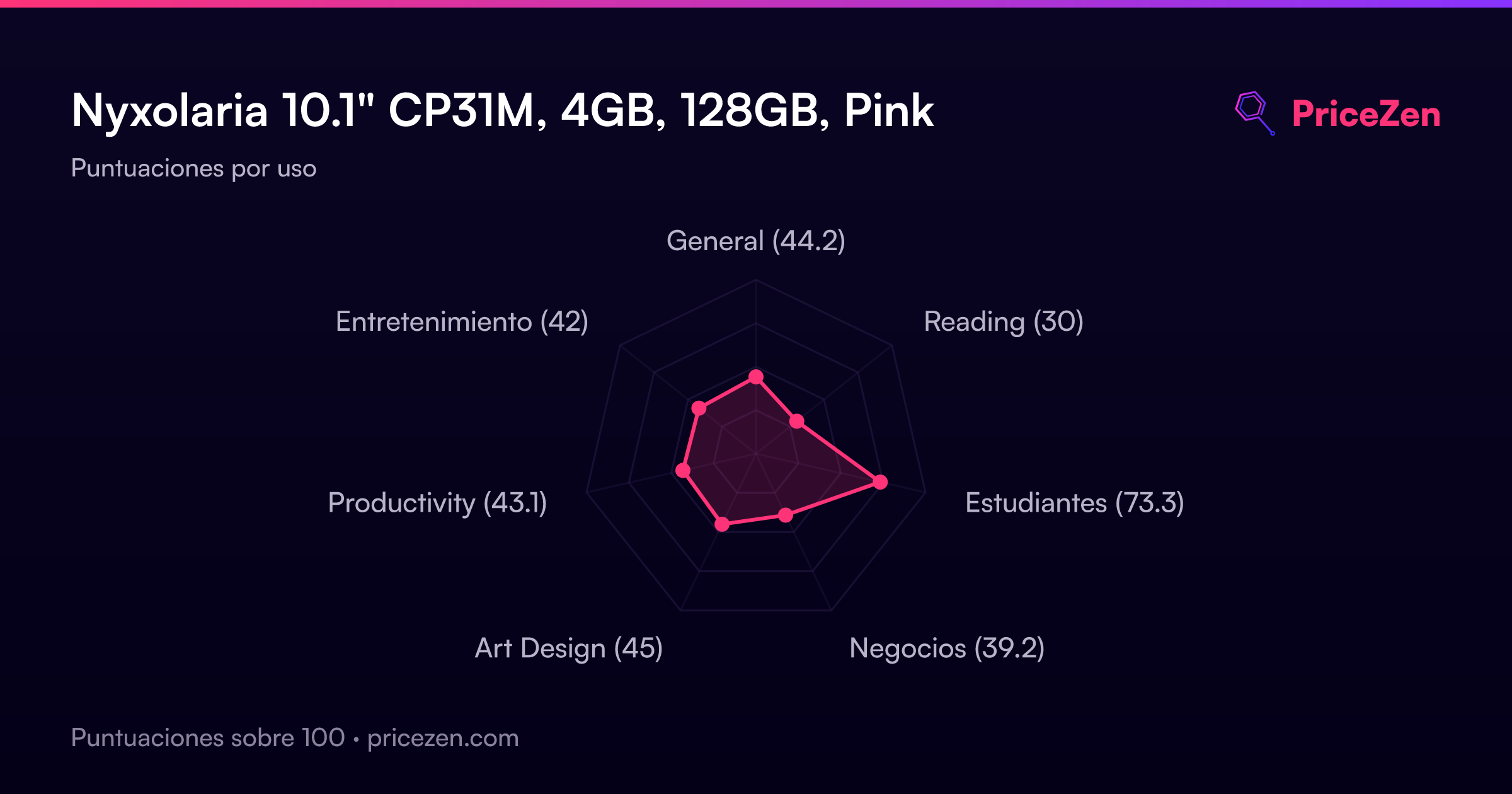
- General44.2
- Reading30
- Estudiantes73.3
- Negocios39.2
- Art Design45
- Productivity43.1
- Entretenimiento42