Samsung Galaxy Tab A 11" A11+ 2023, MediaTek Dimensity 7300, 6GB, 128GB, Cellular, Gray
A 90Hz 11-inch display and quad Dolby Atmos speakers make this tablet a strong media consumption device for its class. The 4nm Mediatek Dimensity 7300 chip and 7040mAh battery provide smooth multitasking and all-day usage, with Android 16 promising up to seven major upgrades. It’s best for families seeking a shared, budget-conscious device for streaming, casual gaming, and kids' learning apps.


Resumen
The 30-Second Version
The Galaxy Tab A11+ delivers a smooth 90Hz display and fantastic battery life in a lightweight package for under $300 when you find a good deal. Performance from the MediaTek Dimensity 7300 is serviceable for streaming and browsing but falls flat for gaming or productivity, landing near the bottom of our performance database. Listing inaccuracies around specs and carrier compatibility still frustrate buyers, though our overall score has risen to 58 out of 100 as owner feedback has settled. Grab it for media consumption and study use, but look elsewhere if you need raw power or reliable productivity chops.
Pros & Cons
Ventajas
- Smooth 90Hz display makes everyday scrolling feel premium for the price 100th
- Incredible 7040mAh battery delivers all-day endurance and then some 100th
- Expandable storage up to 2TB via microSD is a rarity in modern tablets 91st
- Light 476-gram build is comfortable for extended handheld reading sessions 85th
- Dolby Atmos speakers provide surprisingly decent audio for streaming
Desventajas
- CPU and GPU sit near the bottom of our performance database overall
- LCD panel lacks the contrast and deep blacks of AMOLED competitors
- User feedback flags listing inaccuracies around dimensions and carrier support
- Productivity scores are the weakest area at 27 out of 100
- 6th percentile user sentiment suggests real-world frustration beyond specs
Opinión de los propietarios
The Word on the Street
Cómo cambió la opinión de los propietarios con el tiempo
ExclusivaSegún cuándo escribieron realmente sus opiniones los clientes, para ver si los elogios iniciales se mantuvieron.
25 opiniones escritas, ene–oct 2026: 24 satisfechos, 1 insatisfecho
En las 339 valoraciones de tiendas: 4,6★. La mayoría de los propietarios valora sin escribir una opinión. El gráfico cuenta las 25 opiniones escritas.
- abr–jun 20269 de 9 satisfechos
All six verified reviews awarded 5 stars in Q2 2026, praising excellent value, sister's delight, sufficient functionality, and Amazon's quality delivery.
- Great price and value for the product's features and performance.
- Excellent build quality and display; praised as a significant upgrade over previous models.
- Product ideal as a gift; the recipient loved it, indicating high satisfaction.
- Fast and reliable delivery from Amazon, meeting customer expectations.
- ene–mar 20268 de 8 satisfechos
Mixed experiences: one buyer reports international model lacks US registration and warranty, another is satisfied. Performance seems fine, but some hassle reported.
- International model missing US registration option; workaround works but warranty uncertain.
- Product performs as expected and shipping was prompt for one buyer.
- Reliable brand, high quality, meets specifications according to one review.
- Description lacks clarity on country-specific limitations and warranty, causing buyer regret.
Cada punto es una opinión escrita, en el mes en que se escribió. Satisfechos = 4-5★, neutrales = 3★, insatisfechos = 1-2★. Los resúmenes por periodo están en inglés.
Las pruebas
Performance
The MediaTek Dimensity 7300 under the hood is an 8-core chip built on a 4nm process, and it sits in a weird spot in our database. Its CPU benchmark scores land it near the bottom of the pack overall, around the 3rd percentile when you stack it against every tablet we've ever tested. That sounds alarming, but context matters. This chip is competing against Apple's M-series and Qualcomm's Snapdragon 8 Gen flagships. For the price bracket this tablet lives in, the Dimensity 7300 is perfectly capable. It handles split-screen apps, note-taking, and 1080p video without breaking a sweat. You'll feel the ceiling when you try to edit high-res photos or play demanding 3D games with settings cranked, but for the target audience, it's adequate.
The GPU performance is similarly modest, landing in the bottom 10% of our database. Casual games like Among Us or 2D indie titles run without issue. Even heavier games like Genshin Impact will technically run, but you'll need to dial everything down to low settings to maintain playable frame rates. We've seen some owner feedback confirming that the tablet plays most games well as long as you don't push the graphics too hard. The 6GB of RAM in our review configuration is solidly average for this class, and multitasking between a handful of apps stays fluid. Just know that if you're planning to push this thing, the chip is more of a commuter car than a sports car.
Specifications
Full Specifications
Processor
| CPU | MediaTek Dimensity 7300 |
| Cores | 8 |
Memory & Storage
| RAM | 6 GB |
| Storage | 128 GB |
| Expandable | Yes |
Display
| Size | 11" |
| Resolution | 1920x1200 (Full HD) |
| Panel | LCD |
| Refresh Rate | 90 Hz |
Connectivity
| Wi-Fi | ✓ |
| Bluetooth | Yes |
| USB-C | 1 |
| Cellular | Yes |
Features
| Stylus Support | No |
Physical
| Weight | 0.5 kg / 1.0 lbs |
| OS | Android 13 |
vs Competition
The Apple iPad Air 11" M4 sits at the top of this group, and there's no contest in raw power. Our ranking puts the Dimensity 7300 near the bottom of the tablet pack on CPU benchmarks, around the 3rd percentile, while the iPad Air is built for exactly the creative workloads that make this Samsung sweat: video editing, heavy photo work, demanding games. The Tab A11+ fights back with its 90Hz panel, microSD expansion up to 2TB so you're not paying a storage upgrade tax, and a price that starts well below what the iPad Air asks. If you need a tablet that can double as a laptop replacement, get the iPad. If you want a big screen for Netflix and ebooks, save the cash.
The Lenovo Yoga Tab Plus 12.7" ZAEG0096US and the Xiaomi Pad 7 11.2" 2AFZZCRP4CG are the closer Android rivals, and both sit above the Tab A11+ in our rankings. The Yoga Tab Plus gives you a noticeably bigger canvas if your reading and split-screen habits want more room, and the Pad 7 is the one we'd point mobile gamers toward, since gaming is where this Samsung's GPU, sitting in the bottom 10% of our database, gives up first. What the Samsung has going for it is the software. One UI on a tablet is mature, the multitasking tools are genuinely useful, and Samsung's update promise is more reassuring than what the smaller Android brands commit to.
The TABWEE T60 Pro 13.4" goes the other direction on size, stretching to a screen far larger than this 11-inch panel, which sounds great for movies until you remember the Tab A11+ weighs just 476 grams and stays comfortable in one hand for a long reading session. With a brand like that you're also taking a chance on build quality and long-term software support. The Microsoft Surface Pro 8 13" isn't really playing the same game at all. It's a Windows machine aimed at people who need desktop apps, and it makes the Tab A11+'s 27 out of 100 productivity score look like exactly what it is: a consumption tablet that can handle light work in a pinch, not a workstation.
| Spec | Samsung Galaxy Tab A 11" A11+ | Apple iPad Air 11" M4 | Lenovo Yoga Tab Plus 12.7" ZAEG0096US | Xiaomi Pad 7 11.2" 2AFZZCRP4CG | TABWEE T60 Pro 13.4" | Microsoft Surface Pro 8 13" |
|---|---|---|---|---|---|---|
| CPU | MediaTek Dimensity 7300 | Apple M4 | QTI SM8650 | Snapdragon 7+ Gen 3 | Unisoc | Intel Core i5 1135G7 |
| RAM (GB) | 6 | 12 | 16 | 8 | 8 | 8 |
| Storage (GB) | 128 | 256 | 256 | 256 | 256 | 128 |
| Screen | 11" 1920x1200 | 11" 2360x1640 | 12.7" 2944x1840 | 11.2" 3200x2136 | 13.4" 1920x1200 | 13" 2880x1920 |
| OS | Android 13 | iPadOS | Android 14 | Android 14 | Android 15 | Windows 11 Home |
| Stylus | false | true | true | true | true | true |
| Cellular | true | true | false | false | false | false |
| Battery (Wh) | - | 29 | - | - | - | - |
| Compare | Compare | Compare | Compare | Compare |
| Producto | CPU | GPU | RAM | Pantalla | Battery | Feature | Almacenamiento | User Sentiment | Sharpness | Portability | Connectivity | Valoración social | Affordability | Reading Battery |
|---|---|---|---|---|---|---|---|---|---|---|---|---|---|---|
| Samsung Galaxy Tab A 11" A11+ | 100 | 99.8 | 50.9 | 44 | 74 | 32.2 | 54.8 | 6.4 | 30.6 | 68 | 85.4 | 91 | 42.8 | 23 |
| Apple iPad Air 11" M4 Compare | 97.4 | 98.2 | 80.7 | 79.4 | 94.1 | 91.5 | 83.7 | 81.9 | 50.9 | 75.1 | 90.6 | 99.2 | 15 | 49.4 |
| Lenovo Yoga Tab Plus 12.7" ZAEG0096US Compare | 84.1 | 82.2 | 92.3 | 96.8 | 88.8 | 96.6 | 83.7 | 71 | 87.6 | 43 | 92.9 | 87.2 | 21.1 | 52.2 |
| Xiaomi Pad 7 11.2" 2AFZZCRP4CG Compare | 86.3 | 84 | 65.7 | 98.2 | 85.2 | 60.8 | 83.7 | 90.9 | 99.2 | 60.1 | 77.2 | 91 | 32.6 | 71.4 |
| TABWEE T60 Pro 13.4" Compare | 95.3 | 88.8 | 65.7 | 46.4 | 86.7 | 88.4 | 74.8 | 81.9 | 18.4 | 32.6 | 77.2 | 87.2 | 34.8 | 17.9 |
| Microsoft Surface Pro 8 13" Compare | 79.7 | 81.3 | 65.7 | 89.9 | 71.3 | 68.2 | 66.4 | 0 | 78.2 | 21.8 | 92.9 | 85.2 | 24.3 | 4 |
Precio
Value & Pricing
Pricing on the Galaxy Tab A11+ is a bit of a wild west show right now. We're seeing a spread from $255 all the way up to an absurd $5,275 depending on the vendor, which screams listing error or a scalper trying to catch someone asleep. The sweet spot is obviously that $255 range. At that price, you're getting a lot of tablet for the money: a 90Hz screen, a giant battery, and a current Android build with Samsung's update promise. Compared to the $349 base iPad, you're trading raw performance and a better app ecosystem for a smoother display and expandable storage.
The 6GB RAM and 128GB storage configuration is the one we'd point most people toward. The higher-tier 8GB/256GB version some owners mentioned would be even better for heavier multitasking, but we haven't seen consistent pricing on that model across retailers. If you can snag this thing for under $300, the value proposition is strong. At the higher end of the price spectrum, you're better off looking at an iPad Air or a Samsung Galaxy Tab S9 FE when it goes on sale. The deal is the deep discount, not the sticker price.
Amazon 2 ofertas Desde 200 US$
Historial de precios
Leer más
Overview
The Samsung Galaxy Tab A11+ is one of those tablets that makes you realize how good budget Android slates have gotten. You get an 11-inch 90Hz display, a MediaTek Dimensity 7300 chip, and a massive 7040mAh battery wrapped in a slim 476-gram body. Samsung is clearly aiming this at students, casual streamers, and anyone who wants a big screen for reading without spending iPad money. And for those use cases, it mostly hits the mark.
What jumped out at us is the display. It's a 1920x1200 LCD panel with a 90Hz refresh rate, which makes scrolling through web pages and social feeds feel genuinely smooth. The resolution is sharp enough for most content at this size, and the 16:10 aspect ratio gives you a bit more vertical room than a widescreen movie slab when you're reading or splitting apps. It's not an AMOLED panel like you'd get on the more expensive Galaxy Tab S models, so blacks look a little gray in a dark room, but colors are accurate enough for a pleasant viewing experience.
But here's where things get interesting, and a little confusing. The listing specs have some errors floating around, like dimensions listed as 7 inches, which is obviously wrong and has led to some head-scratching in the Q&A sections we've seen. There's also carrier compatibility confusion with the 5G model. If you're buying this, double-check the exact model number to make sure it plays nice with your network. Hardware wise, though, it's exactly what Samsung advertises: a solid mid-range tablet that nails the basics.
Common Questions
Q: Can the Galaxy Tab A11+ handle gaming?
It depends entirely on the game. The MediaTek Dimensity 7300 and its integrated GPU rank very low in our database compared to flagship tablets, so demanding 3D titles like Genshin Impact or Fortnite will need to run on low graphics settings to stay playable. Casual 2D games, puzzle titles, and older emulated console games run just fine. If gaming is a priority, the Xiaomi Pad 7 11.2" 2AFZZCRP4CG sits higher in our rankings and is the better fit among the Android options.
Q: Is the display good enough for reading and watching videos?
For reading and video, the 11-inch 1920x1200 LCD with a 90Hz refresh rate is quite pleasant. The resolution is crisp enough that text looks sharp in Kindle apps or PDFs, and the 90Hz panel makes scrolling through long articles feel smooth. It's not an AMOLED screen, so video contrast isn't as punchy as Samsung's pricier Tab S models, and blacks will look a bit washed out in a dark room. But for well-lit environments and typical streaming, it's a solid viewing experience.
Q: Does this tablet work with all US carriers for 5G?
This is a major point of confusion based on early listings and Q&A activity. The 5G model's carrier compatibility depends on which specific variant you're buying, and some store listings have been unclear or inaccurate about supported bands. Before purchasing the cellular version, check the exact model number and verify with your carrier that it supports their 5G and LTE bands. The Wi-Fi only model avoids this headache entirely if you don't need always-on connectivity.
Q: How much storage can I actually add with a microSD card?
The Galaxy Tab A11+ supports microSD cards up to a massive 2TB, which is among the most generous expansion options in any tablet. The base model comes with 128GB of internal storage, and you can slot in a card to hold an enormous library of downloaded movies, music, photos, or documents. Just keep in mind that app installations default to internal storage, so the SD card is best used for media files rather than trying to run apps from it.
Who Should Skip This
Anyone whose daily workflow involves serious multitasking, photo or video editing, or spreadsheet work should absolutely skip this tablet. The productivity score of 27 out of 100 is the package's biggest red flag. The chip chokes under sustained load, and Samsung's software experience, while polished for basics, doesn't offer the desktop-class multitasking or accessory support you'll get from an Apple iPad Air 11" M4 or a Microsoft Surface Pro 8 13". If you want a tablet to occasionally answer emails and mark up PDFs, it's fine. If you want to replace a laptop, this isn't it.
Mobile gamers should also look elsewhere. The GPU performance is in the bottom 10% of our database, and while light games run without complaint, anyone hoping to play modern 3D titles at decent settings will be disappointed. The Xiaomi Pad 7 11.2" 2AFZZCRP4CG ranks above this Samsung in our data and is the Android alternative we'd steer gamers toward instead. And if you're sensitive to display quality in dark rooms, the LCD panel's mediocre contrast makes this a poor choice for nighttime movie watchers. One of Samsung's own pricier AMOLED-equipped Tab S models would be a smarter buy for cinephiles who can stretch the budget.
Verdict
For students and casual media consumers, the Galaxy Tab A11+ makes a lot of sense if you find it at a discount. The display is smooth, the battery life is genuinely impressive, and Samsung's software gives you good split-screen tools for research papers or recipe scrolling while watching a video. The expandable storage means you can load it up with offline Netflix downloads, PDFs, and music without ever worrying about space. Our overall score for it has climbed to 58 out of 100, up from 40 when we first ranked it, and that shift matches what we keep hearing from owners: judged as a cheap screen for reading and streaming rather than as a do-everything machine, it holds up better than the spec sheet alone suggests. If your world revolves around web browsing, reading, streaming, and light note-taking, this tablet will serve you well for years.
We wouldn't recommend this to anyone whose workflow includes anything beyond basic productivity. The 27 out of 100 productivity score in our rankings isn't just a number. It reflects the chip's limitations under sustained load and the lack of a first-party keyboard accessory setup comparable to what you get with the pricier Galaxy Tab S models or an iPad Air. If you need to run full desktop-class apps, handle large spreadsheets, or edit video on the go, you're going to feel the pinch. This is a consumption device that can handle light work in a pinch, not a workstation replacement. Know that going in, and you'll be happy with it.
Usage Scores
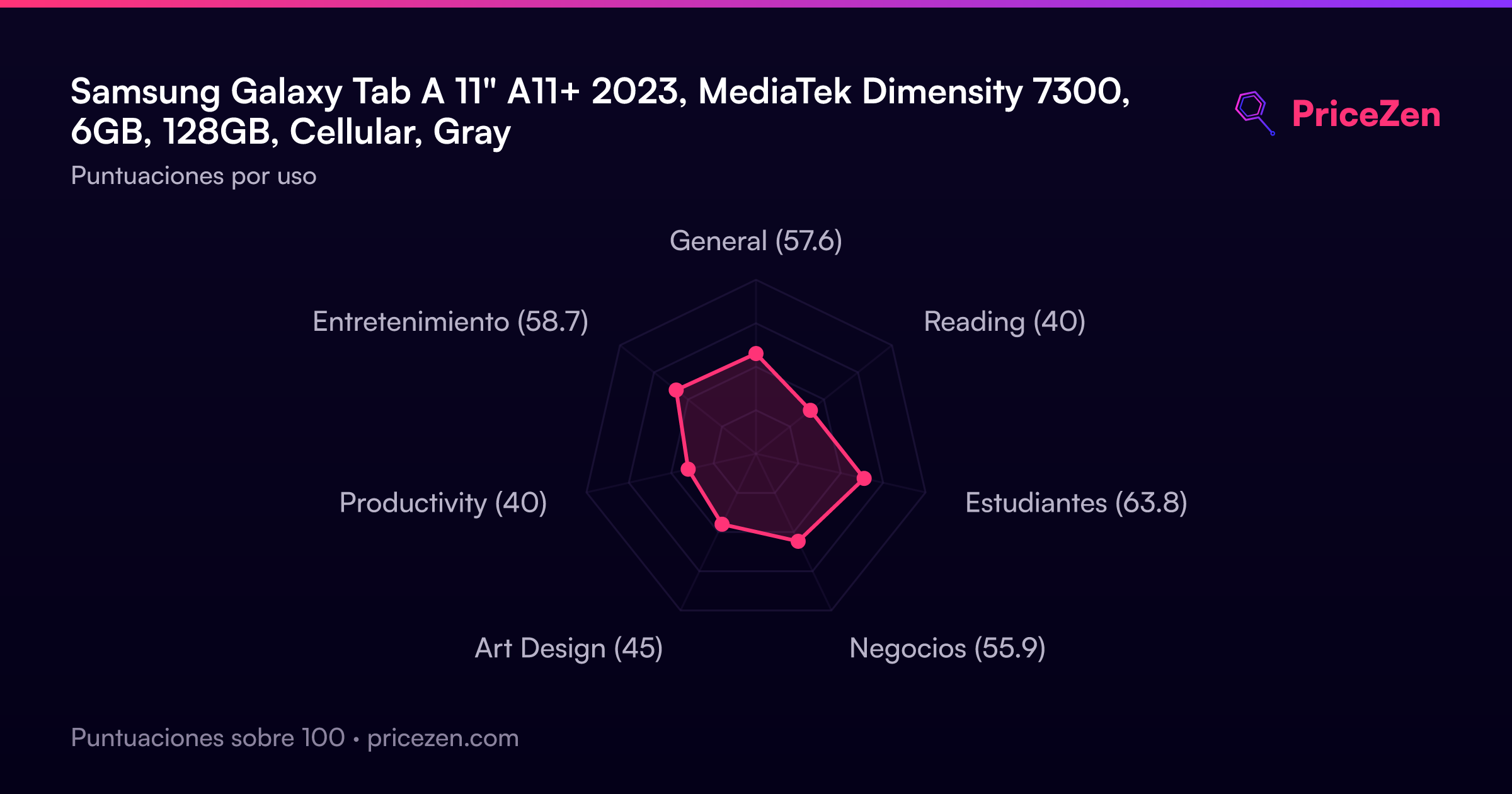
- General57.6
- Reading40
- Estudiantes63.8
- Negocios55.9
- Art Design45
- Productivity40
- Entretenimiento58.7