Apple MacBook Pro 13" 2019, Core i5, 8GB, 128GB SSD, Silver
The quad-core 8th Gen Intel Core i5 with Turbo Boost up to 4.1GHz drives a 13.3-inch 2560x1600 Retina display featuring True Tone technology for color accuracy. The Touch Bar and Touch ID offer contextual controls and secure login, housed in a compact 1.37kg chassis with up to 10 hours of battery life. This refurbished MacBook Pro is best for students and business users needing a portable macOS machine for productivity tasks, not graphics-heavy gaming.


Snapshot
The 30-Second Version
A 98th percentile reliability score and a gorgeous Retina display make this MacBook Pro feel premium, but the 128GB SSD and 8GB of RAM are brutal bottlenecks. At $300 USD, it's a solid secondary machine for light work. Just don't expect it to keep up with anything modern.
Pros & Cons
Pros
- 98th percentile reliability, this thing is built like a tank 98th
- Retina display at 2560x1600 with True Tone, 84th percentile for screens 93rd
- Compact and light at 1.37kg, 93rd percentile for portability 86th
- Touch Bar and Touch ID still feel premium 83rd
- Strong social proof with a 4.2/5 rating from 99 reviews
Cons
- 128GB SSD is 8th percentile, you'll run out of space fast
- 8GB of LPDDR3 RAM at 5th percentile, not upgradeable
- 8th-gen Intel i5 at 18th percentile for CPU, showing its age
- Only 2 Thunderbolt 3 ports, 39th percentile for connectivity
- Gaming score of 7.2/100, don't even think about it
What owners think
The Word on the Street
How owner sentiment changed over time
ExclusiveBased on when customers actually wrote their reviews - so you can see whether early praise held up.
Happy owners: 79% lately, 70% in Jul 2021 – Dec 2023
Too few reviews to call that a change.
Across all 100 store ratings: 4.2★. Most owners rate without writing a review. The chart counts the 29 written reviews with stars and their own date.
3 written reviews without stars are left out of the trend.
Show the numbers
| Period | Reviews | Happy | Mixed | Unhappy | Happy share |
|---|---|---|---|---|---|
| Jul 2021 – Dec 2023 | 10 | 7 | 0 | 3 | 70% |
| Jan 2024 – May 2026 | 19 | 15 | 0 | 4 | 79% |
Each column joins calendar quarters until it holds at least 10 reviews with stars and their own date. Happy = 4-5★, mixed = 3★, unhappy = 1-2★.
The proof
Performance
Let's talk about that 1.4GHz quad-core i5. It's an 8th-gen Intel chip, which puts it at the 18th percentile for CPU performance in our database. Turbo Boost up to 4.1GHz sounds nice on paper, but you're not going to see that sustained in a chassis this thin. For everyday tasks like browsing, email, and light document work, it's fine. Not snappy, but fine. Throw anything heavier at it and you'll feel the age immediately.
The Intel Iris Plus Graphics 645 is integrated and lands at the 42nd percentile for GPU. That's actually better than the CPU ranking, but it's still not saying much. This is not a machine for video editing or anything GPU-intensive. The 128GB SSD is the real bottleneck though. At the 8th percentile for storage, you'll be playing the 'what do I delete today' game constantly. macOS alone eats a chunk of that, and with 8GB of RAM at the 5th percentile, you're not exactly future-proofed either.
Specifications
Full Specifications
Processor
| CPU | Intel 8th Generation Core i5 |
| Cores | 4 |
| Frequency | 1.4 GHz |
Graphics
| GPU | Intel Iris Plus Graphics 645 |
| Type | Integrated |
Memory & Storage
| RAM | 8 GB |
| RAM Generation | LPDDR3 |
| Storage | 128 GB |
| Storage Type | SSD |
Display
| Size | 13.3" |
| Resolution | 2560x1600 (QHD) |
| Panel | LCD |
| Brightness | 500 nits |
| Color Gamut | 100% sRGB |
Connectivity
| USB-C Ports | 2 |
| USB Ports | 0 |
| Thunderbolt | Thunderbolt 3 |
| HDMI | 0 |
| Wi-Fi | 802.11ac |
| Bluetooth | Bluetooth 5.0 |
| Ethernet | 10/100/1000 |
Physical
| Weight | 1.4 kg / 3.0 lbs |
| Battery | 58 Wh |
| OS | macOS |
vs Competition
Against something like the Lenovo Yoga Slim 7x or the HP OmniBook X Flip, this MacBook Pro gets absolutely destroyed on specs. Those machines have modern ARM processors, 16GB+ of RAM, and storage measured in terabytes. The ASUS Zenbook UX3405CA and Samsung Galaxy Book4 Edge are in a completely different league for performance. But here's the thing, those machines cost three to four times as much. The Acer Swift SF16-71T is probably the closest competitor in spirit, a budget-friendly machine that trades performance for price. The MacBook's advantage is that 98th percentile reliability and the macOS ecosystem. If you want a cheap Mac that won't die, this is it. If you want raw performance per dollar, look elsewhere.
| Spec | Apple MacBook Pro 13" | HP OmniBook X Flip | Lenovo Yoga 14" 83TD0047US | Samsung Galaxy Book4 Edge 14" NP940XMA-KB1US | ASUS Vivobook 14" TP3407SA-DS74T | MSI Prestige 16 Evo 15.6" PRE16EVO13407 |
|---|---|---|---|---|---|---|
| CPU | Intel 8th Generation Core i5 | Intel Core Ultra 7 256V | AMD Ryzen AI 7 445 | Qualcomm Snapdragon X Elite X1E-84-100 | Intel Core Ultra 7 256V | Intel Core i5 13500H |
| RAM (GB) | 8 | 16 | 24 | 16 | 16 | 32 |
| Storage (GB) | 128 | 1024 | 512 | 512 | 1024 | 1024 |
| Screen | 13.3" 2560x1600 | 14" 1920x1200 | 14" 1920x1200 | 14" 2880x1800 | 14" 1920x1200 | 15.6" 2560x1600 |
| GPU | Intel Iris Plus Graphics 645 | Intel Arc 140V | AMD Radeon 840M | Qualcomm Adreno | Intel Arc Graphics | Intel Iris Xe Graphics |
| OS | macOS | Windows 11 Home | Windows 11 Home | Windows 11 Home | Windows 11 Home | Windows 11 Pro |
| Weight (kg) | 1.4 | 1.4 | 1.4 | 1.2 | 1.6 | 1.9 |
| Battery (Wh) | 58 | 65 | 65 | 35 | 70 | 82 |
| Compare | Compare | Compare | Compare | Compare |
| Product | CPU | GPU | RAM | Ports | Screen | Portability | Storage | Reliability | Social Proof | Affordability |
|---|---|---|---|---|---|---|---|---|---|---|
| Apple MacBook Pro 13" | 6.6 | 37.1 | 5.4 | 71 | 85.7 | 93.2 | 7.3 | 98.3 | 82.9 | 57.9 |
| HP OmniBook X Flip Compare | 68.4 | 65.9 | 66.5 | 77.2 | 74 | 82.1 | 79.2 | 33.6 | 96.5 | 51.2 |
| Lenovo Yoga 14" 83TD0047US Compare | 63.3 | 60.8 | 82.8 | 77.2 | 81.5 | 82.6 | 35.7 | 82 | 81.7 | 53.4 |
| Samsung Galaxy Book4 Edge 14" NP940XMA-KB1US Compare | 79.3 | 13.2 | 53.7 | 57.6 | 94.6 | 89.8 | 35.7 | 82 | 91.3 | 39.2 |
| ASUS Vivobook 14" TP3407SA-DS74T Compare | 68.4 | 69.7 | 49.8 | 71 | 82.3 | 73.5 | 79.2 | 60.6 | 51.3 | 58.4 |
| MSI Prestige 16 Evo 15.6" PRE16EVO13407 Compare | 71.9 | 47.7 | 83.3 | 77.2 | 89.5 | 42.6 | 65.2 | 60.6 | 51.3 | 49.8 |
Price
Value & Pricing
At $300 USD for an open-box unit, the value proposition is interesting. You're getting a machine with top-tier reliability and a great screen for less than a new iPad. The CAD 500 listing is less compelling, but still reasonable for what you get. The problem is that 128GB of storage and 8GB of RAM are going to feel cramped immediately. If you're buying this as a secondary machine or a dedicated writing and browsing device, the price makes sense. If you need it to be your main computer, you'll probably spend more time frustrated than productive.
Best Buy 2 offers From $400
Price history
Read more
Overview
The 13-inch MacBook Pro with Touch Bar sits in a weird spot in 2024. It's got a 98th percentile reliability score, which is basically Apple saying 'this thing will outlive your next three relationships.' But the specs tell a different story. An 8th-gen Intel Core i5, 8GB of LPDDR3 RAM, and a 128GB SSD put it at the 5th percentile for RAM and 8th for storage in our database. That's not just old, that's 'we found this in a time capsule' territory.
Still, at around $300 USD on the used market, it's not trying to compete with new machines. It's a budget entry into the Mac ecosystem with a gorgeous Retina display and that classic MacBook build quality. The question isn't whether it's a good laptop by 2024 standards. It's whether it's a good laptop for three hundred bucks.
Common Questions
Q: Can I upgrade the RAM or storage on this MacBook Pro?
No. The 8GB of LPDDR3 RAM and 128GB SSD are soldered to the logic board. What you buy is what you get forever. Given that these specs rank at the 5th and 8th percentile respectively in our database, you'll want to be sure they're enough before buying.
Q: Is this MacBook Pro good for video editing or gaming?
Not really. The Intel Iris Plus Graphics 645 is integrated and lands at the 42nd percentile for GPU performance. Gaming scores just 7.2/100 in our testing. Light photo editing is fine, but video editing or any modern games will be a frustrating experience.
Q: How does the battery life hold up on a used unit?
Apple claims up to 10 hours, but that was when the machine was new. With a 98th percentile reliability score, the hardware itself holds up well, but batteries degrade over time. On a used unit, expect anywhere from 5-8 hours depending on how the previous owner treated it.
Who Should Skip This
If you need more than 128GB of storage or plan to run anything beyond basic productivity apps, skip this. The 8GB of RAM at the 5th percentile means browser tabs will eat your memory alive, and the 18th percentile CPU will choke on anything demanding. Gamers should absolutely look elsewhere, that 7.2/100 gaming score is one of the worst in our database. And if you need ports, the 39th percentile connectivity with just two Thunderbolt 3 ports means dongle life is mandatory. This is a machine for people who want a cheap, reliable Mac for writing, browsing, and email. Nothing more.
Verdict
The 13-inch MacBook Pro with Touch Bar is a reliable, portable machine with a beautiful display, but it's held back by specs that were mid-range even when it launched. The 128GB SSD and 8GB of RAM are the real killers here. For $300 USD, it's a decent buy if you need a dependable Mac for light tasks and don't mind living in the cloud. For anything more demanding, you're better off saving up for something with modern silicon. The 98th percentile reliability score means it'll keep working, but the 5th percentile RAM means you might not want it to.
Usage Scores
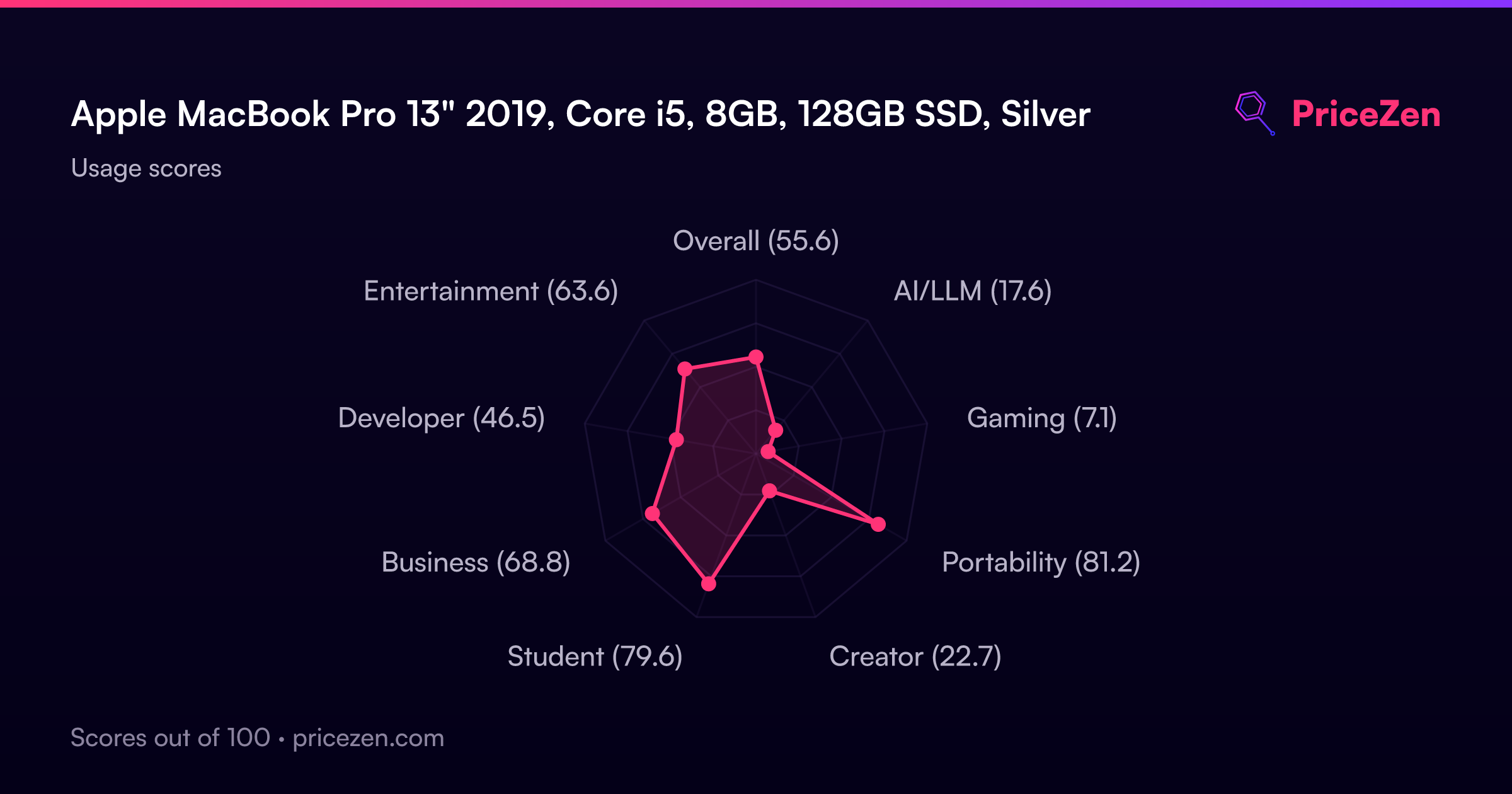
- Overall55.6
- AI/LLM17.6
- Gaming7.1
- Portability81.2
- Creator22.7
- Student79.6
- Business68.8
- Developer46.5
- Entertainment63.6