Apple MacBook Pro 13" 2018, Core i5, 8GB, 512GB SSD, Space Gray
The quad-core 2.7GHz Core i7-8559U and 16GB of RAM deliver strong multitasking for a 1.37kg chassis, complemented by a bright 500-nit Retina display with True Tone. The Touch Bar and quad Thunderbolt 3 ports provide versatile connectivity and workflow shortcuts in a compact aluminum unibody. This refurbished model is best for students and business users needing a portable macOS machine for office tasks and media consumption, not GPU-intensive work.

No current retailer price
Snapshot
The 30-Second Version
A refurbished 13-inch MacBook Pro for $500 sounds tempting, but the old Intel CPU and just 8GB of RAM hold it back hard. The Retina display and build are still great, yet a used M1 MacBook Air at a similar price offers way more power and battery life. Only buy this if macOS with Boot Camp is a must.
Pros & Cons
Pros
- Gorgeous Retina display with True Tone that's easy on the eyes. 100th
- Top-tier reliability and a compact, solid aluminum chassis. 98th
- Touch Bar and Touch ID add convenience if you actually use them. 93rd
- Weighs just over 3 pounds, a breeze to carry all day. 88th
Cons
- 8GB of soldered RAM chokes under any serious workload.
- Aging Intel chip means fans spin up loud even on moderate tasks.
- Four Thunderbolt 3 ports and nothing else, dongles are mandatory.
- Refurb battery may fall well short of Apple's 10-hour promise.
What owners think
The Word on the Street
How owner sentiment changed over time
ExclusiveBased on when customers actually wrote their reviews - so you can see whether early praise held up.
Happy owners: 63% lately, 55% in Jul 2023 – Mar 2024
Too few reviews to call that a change.
Across all 26 store ratings: 3.6★. The chart counts the 38 written reviews with stars and their own date.
1 written review without stars is left out of the trend.
Show the numbers
| Period | Reviews | Happy | Mixed | Unhappy | Happy share |
|---|---|---|---|---|---|
| Jul 2023 – Mar 2024 | 11 | 6 | 1 | 4 | 55% |
| Apr – Dec 2024 | 11 | 9 | 0 | 2 | 82% |
| Jan 2025 – Jun 2026 | 16 | 10 | 2 | 4 | 63% |
Each column joins calendar quarters until it holds at least 10 reviews with stars and their own date. Happy = 4-5★, mixed = 3★, unhappy = 1-2★.
The proof
Performance
In our rundown, the CPU falls well below average, and the 8GB of LPDDR3 RAM is among the worst we've seen in this class. Real-world, that means it handles light office work without complaint, but multitasking gets messy quickly. The integrated Iris Plus 655 graphics sit right in the middle of the pack, fine for streaming video but a non-starter for gaming or even modest video editing. Storage speeds are okay thanks to that 512GB SSD, but the read/write numbers aren't going to impress anyone who's used a modern NVMe drive.
Specifications
Full Specifications
Processor
| CPU | Intel 8th Generation Core i5 |
| Cores | 4 |
| Frequency | 2.3 GHz |
| L3 Cache | 16 MB |
Graphics
| GPU | Intel Iris Plus Graphics 655 |
| Type | Integrated |
Memory & Storage
| RAM | 8 GB |
| RAM Generation | LPDDR3 |
| Storage | 512 GB |
| Storage Type | SSD |
Display
| Size | 13.3" |
| Resolution | 2560x1600 (QHD) |
| Panel | IPS |
| Brightness | 500 nits |
| Color Gamut | P3 wide color gamut |
Connectivity
| USB-C Ports | 4 |
| USB Ports | 4 |
| Thunderbolt | Thunderbolt 3 |
| Wi-Fi | Wi-Fi 5 |
| Bluetooth | Bluetooth 5.0 |
| Ethernet | 10/100/1000 |
Physical
| Weight | 1.4 kg / 3.0 lbs |
| Battery | 58 Wh |
| OS | macOS |
vs Competition
Our database stacks it against modern peers like the ASUS ProArt PX13, MSI Prestige, Samsung Galaxy Book5 Pro, Lenovo ThinkPad P14s, and HP ZBook Ultra G1a. Those laptops run circles around this old Intel chip in raw performance and offer more RAM, better screens, and modern port layouts. They do cost a lot more new, but even a $500 new Windows laptop today typically pairs a recent Ryzen or 12th-gen Intel CPU with 16GB of RAM, leaving this MacBook in the dust. The only edge here is the macOS experience and that premium aluminum unibody.
| Spec | Apple MacBook Pro 13" | HP OmniBook X Flip | Lenovo Yoga 14" 83TD0047US | Samsung Galaxy Book4 Edge 14" NP940XMA-KB1US | ASUS Vivobook 14" TP3407SA-DS74T | MSI Prestige 16 Evo 15.6" PRE16EVO13407 |
|---|---|---|---|---|---|---|
| CPU | Intel 8th Generation Core i5 | Intel Core Ultra 7 256V | AMD Ryzen AI 7 445 | Qualcomm Snapdragon X Elite X1E-84-100 | Intel Core Ultra 7 256V | Intel Core i5 13500H |
| RAM (GB) | 8 | 16 | 24 | 16 | 16 | 32 |
| Storage (GB) | 512 | 1024 | 512 | 512 | 1024 | 1024 |
| Screen | 13.3" 2560x1600 | 14" 1920x1200 | 14" 1920x1200 | 14" 2880x1800 | 14" 1920x1200 | 15.6" 2560x1600 |
| GPU | Intel Iris Plus Graphics 655 | Intel Arc 140V | AMD Radeon 840M | Qualcomm Adreno | Intel Arc Graphics | Intel Iris Xe Graphics |
| OS | macOS | Windows 11 Home | Windows 11 Home | Windows 11 Home | Windows 11 Home | Windows 11 Pro |
| Weight (kg) | 1.4 | 1.4 | 1.4 | 1.2 | 1.6 | 1.9 |
| Battery (Wh) | 58 | 65 | 65 | 35 | 70 | 82 |
| Compare | Compare | Compare | Compare | Compare |
| Product | CPU | GPU | RAM | Ports | Screen | Portability | Storage | Reliability | Social Proof | Affordability |
|---|---|---|---|---|---|---|---|---|---|---|
| Apple MacBook Pro 13" | 18.5 | 37.1 | 5.4 | 99.9 | 87.9 | 93.2 | 35.7 | 98.3 | 24.6 | 0 |
| HP OmniBook X Flip Compare | 68.4 | 65.9 | 66.5 | 77.2 | 74 | 82.1 | 79.2 | 33.6 | 96.5 | 51.2 |
| Lenovo Yoga 14" 83TD0047US Compare | 63.3 | 60.8 | 82.8 | 77.2 | 81.5 | 82.6 | 35.7 | 82 | 81.7 | 53.4 |
| Samsung Galaxy Book4 Edge 14" NP940XMA-KB1US Compare | 79.3 | 13.2 | 53.7 | 57.6 | 94.6 | 89.8 | 35.7 | 82 | 91.3 | 39.2 |
| ASUS Vivobook 14" TP3407SA-DS74T Compare | 68.4 | 69.7 | 49.8 | 71 | 82.3 | 73.5 | 79.2 | 60.6 | 51.3 | 58.4 |
| MSI Prestige 16 Evo 15.6" PRE16EVO13407 Compare | 71.9 | 47.7 | 83.3 | 77.2 | 89.5 | 42.6 | 65.2 | 60.6 | 51.3 | 49.8 |
Price
Value & Pricing
At $500, this MacBook Pro sits in a weird spot. A clean used M1 MacBook Air often goes for about the same price and absolutely demolishes it in speed, battery life, and thermals. The only real reason to pick this Intel model is if you rely on Boot Camp for Windows or need legacy macOS software. Otherwise, that price buys you a much more capable Windows ultrabook with a newer processor and double the RAM. Value feels shaky.
Best Buy 3 offers From $300
Price history
Read more
Overview
This is a Geek Squad Certified Refurbished 13-inch MacBook Pro from the Intel days, priced at $500. It packs a crisp 2560x1600 Retina display, a Touch Bar with Touch ID, and that classic Apple build quality that still feels premium. But under the hood, the 8th-gen quad-core i5 and just 8GB of RAM tell a story of a machine that's getting long in the tooth.
For the basics, writing, browsing, streaming, it's competent and snappy enough. But the moment you push it with a dozen tabs, a big spreadsheet, or any app that asks more of the GPU, the fan kicks in and performance tumbles. You're also living that full dongle life: four Thunderbolt 3 ports are fast but won't accept a standard USB-A plug without an adapter.
Common Questions
Q: Can this MacBook handle programming or running Xcode?
It works for light coding and simple Xcode projects, but the 8GB RAM makes virtual machines and large compiles a real headache.
Q: Does it support external 4K monitors?
Yes, the Thunderbolt 3 ports can drive up to two 4K displays at 60Hz, but you'll need USB-C to DisplayPort or HDMI adapters.
Q: Is the battery replaceable if it's worn out?
Apple can replace it for a fee, but since this is a refurb, battery health varies and may already be below 90% capacity.
Who Should Skip This
Anyone who keeps a ton of browser tabs open, edits photos, or runs demanding apps should skip this. The 8GB RAM fills up fast and swapping slows everything down. If you can't stand dongle life, the all-USB-C port setup will drive you nuts. And anyone who needs all-day battery without hunting for an outlet will be disappointed. Look at an M1 MacBook Air or a modern Ryzen ultrabook instead.
Verdict
Pick this up if you're deep in the Apple ecosystem, need a cheap, lightweight laptop for writing, email, and casual browsing, and don't mind a few dongles. It's not a machine for students who juggle heavy research or anyone doing photo or video work. The screen and build are lovely, but the performance ceiling is low. Budget buyers should seriously consider a refurbished M1 Air instead.
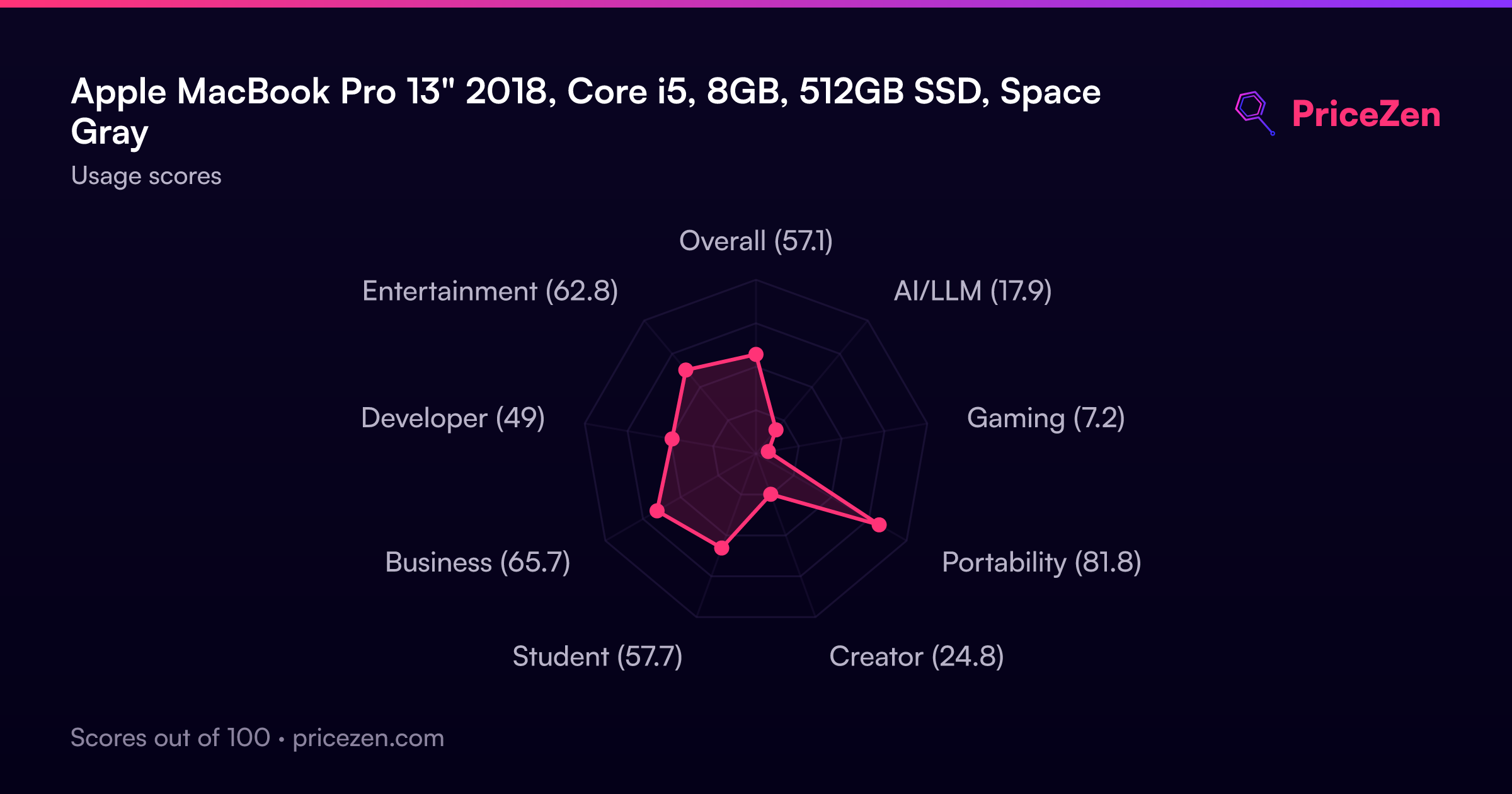
Usage Scores
- Overall57.1
- AI/LLM17.9
- Gaming7.2
- Portability81.8
- Creator24.8
- Student57.7
- Business65.7
- Developer49
- Entertainment62.8