Samsung Galaxy Tab A 11+ SM-X230 Tablet 11" 2026, MediaTek Dimensity 7300, 6GB, 128GB, Gray
The MediaTek Dimensity 7300 chip and 6GB of RAM deliver smooth multitasking for an 11-inch tablet, while the 128GB storage is expandable up to 2TB. Its 635g weight and WUXGA LCD display make it a practical, lightweight device for extended handheld use. This tablet is best for casual users who prioritize media consumption and reading on a budget.

Sin precio actual de tiendas


Resumen
The 30-Second Version
The Samsung Galaxy Tab A11+ packs a Dimensity 7300 processor that ranks in the 94th percentile among all tablets, making it one of the fastest budget tablets we've tested. You get 6GB RAM, 128GB storage, and expandable storage up to 2TB for around $244 USD. The trade-offs are real: battery life and screen quality both rank below average. It's a great pick for students and casual users who want snappy performance without spending iPad money.
Pros & Cons
Ventajas
- CPU performance in the 94th percentile, one of the best chips in this price range 94th
- GPU in the 86th percentile, handles casual gaming and video smoothly 89th
- 128GB storage with microSD expansion up to 2TB
- 6GB RAM keeps multitasking responsive
- 11-inch 1920x1200 display is big enough for comfortable streaming
Desventajas
- Battery life in the 32nd percentile, below average endurance
- Screen sharpness and quality both rank in the 30th percentile
- No water resistance to speak of, 47th percentile
- Connectivity options are limited, 20th percentile
- At 635g, portability is mediocre for an 11-inch tablet
Las pruebas
Performance
The Dimensity 7300 is the star of the show here. That 4nm octa-core chip with four Cortex A78 cores at 2.5GHz and four A55 cores at 2GHz delivers the kind of responsiveness you'd expect from a much pricier device. In our database, it ranks in the 94th percentile for CPU performance, which means it's one of the best processors you'll find in a tablet at this price point. Apps open quickly, multitasking with 6GB of RAM feels smooth, and even some light gaming won't make it break a sweat.
The GPU is no slouch either, landing in the 86th percentile. That's a standout for casual gaming and video playback. But here's the thing: the rest of the hardware doesn't quite keep up. The screen sharpness sits at the 30th percentile, so while the processor can push pixels fast, the display itself isn't particularly crisp. And with battery life in the 32nd percentile, all that processing power comes at a cost. You'll get through a day of light use, but heavy streaming or gaming will have you reaching for the charger sooner than you'd like.
Specifications
Full Specifications
Processor
| CPU | MediaTek Dimensity 7300 |
| Cores | 8 |
Memory & Storage
| RAM | 6 GB |
| Storage | 128 GB |
| Expandable | Yes |
Display
| Size | 11" |
| Resolution | 1920x1200 (Full HD) |
| Panel | LCD |
Connectivity
| Bluetooth | Yes |
| Cellular | No |
Physical
| Weight | 0.6 kg / 1.4 lbs |
vs Competition
Stacked against the Apple iPad Air M4, the Galaxy Tab A11+ loses on screen quality, battery life, and overall polish. The iPad Air is in a completely different league for display sharpness and app ecosystem. But it also costs significantly more. If you're deep in the Apple ecosystem and can afford it, the iPad Air is the better tablet, full stop. The A11+ is for people who want Android flexibility and don't want to spend iPad money.
The Lenovo Yoga Tab Plus and Xiaomi Pad 7 are closer competitors. The Yoga Tab Plus typically offers better battery life and a more premium build, while the Xiaomi Pad 7 brings a sharper display and faster charging. The A11+ beats both on raw CPU performance per dollar, but it falls behind on screen quality and endurance. The Microsoft Surface Pro 8 is a different animal entirely, a full Windows machine that costs way more and targets productivity users. If you need a laptop replacement, the Surface Pro is the pick. If you want a capable Android tablet for media and light work, the A11+ holds its own.
| Spec | Samsung Galaxy Tab A 11+ SM-X230 Tablet 11" | Apple iPad Pro 13" M5 | Microsoft Surface Pro 13" 11 | Lenovo Yoga Tab Plus 12.7" ZAEG0096US | Xiaomi Pad 7 11.2" 2AFZZCRP4CG | TABWEE T60 Pro 13.4" |
|---|---|---|---|---|---|---|
| CPU | MediaTek Dimensity 7300 | Apple M5 | Qualcomm Snapdragon X Elite X1E-84-100 | QTI SM8650 | Snapdragon 7+ Gen 3 | Unisoc |
| RAM (GB) | 6 | 16 | 16 | 16 | 8 | 8 |
| Storage (GB) | 128 | 1024 | 1024 | 256 | 256 | 256 |
| Screen | 11" 1920x1200 | 13" 2752x2064 | 13" 2880x1920 | 12.7" 2944x1840 | 11.2" 3200x2136 | 13.4" 1920x1200 |
| OS | - | iPadOS | Windows 11 Home | Android 14 | Android 14 | Android 15 |
| Stylus | false | true | true | true | true | true |
| Cellular | false | true | false | false | false | false |
| Battery (Wh) | - | 39 | 53 | - | - | - |
| Compare | Compare | Compare | Compare | Compare |
| Producto | CPU | GPU | RAM | Pantalla | Battery | Feature | Almacenamiento | Sharpness | Portability | Connectivity | Affordability | Water Resistance |
|---|---|---|---|---|---|---|---|---|---|---|---|---|
| Samsung Galaxy Tab A 11+ SM-X230 Tablet 11" | 93.7 | 88.5 | 50.9 | 30.1 | 32 | 28.1 | 54.7 | 30.6 | 43.1 | 19.4 | 48.1 | 46.5 |
| Apple iPad Pro 13" M5 Compare | 99.1 | 99.4 | 92.3 | 99.7 | 97.6 | 96.6 | 97.7 | 67.3 | 48.7 | 99.2 | 1.6 | 46.5 |
| Microsoft Surface Pro 13" 11 Compare | 98.4 | 96.5 | 92.3 | 99.1 | 99.6 | 74.5 | 97.7 | 78.2 | 21.8 | 92.9 | 4.7 | 97.4 |
| Lenovo Yoga Tab Plus 12.7" ZAEG0096US Compare | 84 | 82.2 | 92.3 | 96.8 | 88.7 | 96.6 | 83.7 | 87.6 | 43.1 | 92.9 | 21.1 | 46.5 |
| Xiaomi Pad 7 11.2" 2AFZZCRP4CG Compare | 86.3 | 84 | 65.7 | 98.2 | 85.2 | 60.9 | 83.7 | 99.2 | 60.1 | 77.2 | 32.6 | 46.5 |
| TABWEE T60 Pro 13.4" Compare | 95.3 | 88.8 | 65.7 | 46.4 | 86.7 | 88.5 | 74.8 | 18.4 | 32.6 | 77.2 | 34.8 | 46.5 |
Precio
Value & Pricing
At $244 USD, the Galaxy Tab A11+ is a weirdly compelling deal. You're getting a processor that outperforms most tablets in its class, plus 6GB of RAM and 128GB of storage. The affordability ranking sits at the 49th percentile, which means it's priced right around average for what it is. But the CPU ranking is what changes the math. You're paying mid-range money for top-tier processing power.
The trade-off is that Samsung spent the budget on the chip and skimped on the screen and battery. If you mostly use a tablet for streaming video, reading, or web browsing, you might not notice the processor advantage much. But if you do any kind of multitasking, light gaming, or app-heavy work, the Dimensity 7300 makes this feel like a more expensive device than it is. Just know that you'll be charging it more often than you'd like.
Leer más
Overview
The Samsung Galaxy Tab A11+ is one of those tablets that makes you do a double take. On paper, it's a budget-friendly 11-inch Android slab with a MediaTek Dimensity 7300 inside, 6GB of RAM, and 128GB of storage. Nothing flashy. But then you look at the CPU ranking and realize this thing sits in the 94th percentile among all tablets in our database. That's a chip that punches way above its price class.
Who's this for? Students, casual streamers, and anyone who wants a big screen for YouTube, note-taking, and light productivity without dropping iPad money. The 1920x1200 LCD isn't going to win any awards, but it's perfectly fine for the kind of content most people actually consume on a tablet. And with expandable storage up to 2TB, you can load it up with offline Netflix downloads and never think twice.
The catch is that Samsung cut corners in some obvious places. Battery life sits in the 32nd percentile, the screen quality is below average, and there's no water resistance to speak of. At 635g, it's also not the lightest tablet around. But for around $244 USD, the question isn't whether it's perfect. It's whether the trade-offs make sense for what you'll actually use it for.
Common Questions
Q: How much storage can I add with a microSD card?
The Galaxy Tab A11+ supports microSD cards up to 2TB, which is a huge amount of expandable storage. Combined with the built-in 128GB, you could carry a massive library of movies, shows, and files without worrying about running out of space. That's a big advantage over iPads, which don't offer expandable storage at all.
Q: Is the Dimensity 7300 good for gaming?
The Dimensity 7300 is a 4nm octa-core chip with four Cortex A78 cores at 2.5GHz, and it ranks in the 94th percentile for CPU performance among tablets in our database. The GPU also lands in the 86th percentile, so casual gaming and even some more demanding titles will run smoothly. Just keep in mind that the battery drains faster under heavy load, so long gaming sessions will need a charger nearby.
Q: How does the display compare to other tablets in this price range?
The 11-inch 1920x1200 LCD is serviceable but not a standout. Screen quality and sharpness both rank in the 30th percentile, which means most competing tablets in this price range have better displays. It's fine for streaming and browsing, but if you're picky about color accuracy or pixel density, you'll notice the difference compared to something like the Xiaomi Pad 7.
Q: Is the battery life good enough for a full day of use?
Battery life is one of the weaker points here, ranking in the 32nd percentile. Light use like web browsing and reading should get you through a full day, but heavy streaming or gaming will drain it faster. If battery endurance is a top priority, you might want to look at the Lenovo Yoga Tab Plus, which typically offers better longevity.
Who Should Skip This
If you're a heavy media consumer who spends hours streaming video every day, the Galaxy Tab A11+ will frustrate you. The screen quality and sharpness both rank in the 30th percentile, so text and video won't look as crisp as they do on competing tablets. And the battery life in the 32nd percentile means you'll be hunting for a charger mid-binge. The Lenovo Yoga Tab Plus or Xiaomi Pad 7 are better picks if screen and endurance matter more than processing power.
Also skip this if you need a tablet for serious productivity or creative work. The lack of water resistance, limited connectivity options, and mediocre portability make it a poor fit for field work or travel-heavy use. If you need a laptop replacement, the Microsoft Surface Pro 8 is the obvious alternative, though it costs significantly more. And if you're already in the Apple ecosystem, the iPad Air M4 is worth the extra money for the display quality and app selection alone.
Verdict
For students and casual users, the Galaxy Tab A11+ makes a lot of sense. The Dimensity 7300 keeps everything snappy, 6GB of RAM handles note-taking apps and browser tabs without choking, and the expandable storage means you can carry a massive library of offline content. The 11-inch screen is comfortable for reading PDFs, watching lectures, or binging shows. Just keep a charger nearby, because the battery won't impress anyone.
For heavy media consumers who prioritize screen quality and battery life above all else, this isn't the tablet for you. The display is fine but not great, and the battery ranking tells the story. If you spend hours a day streaming or gaming, you'll feel the limitations. Look at the Lenovo Yoga Tab Plus or Xiaomi Pad 7 if screen and endurance matter more than raw processing power. But if you want the best CPU performance you can get for under $250 USD, the A11+ is hard to beat.
Usage Scores
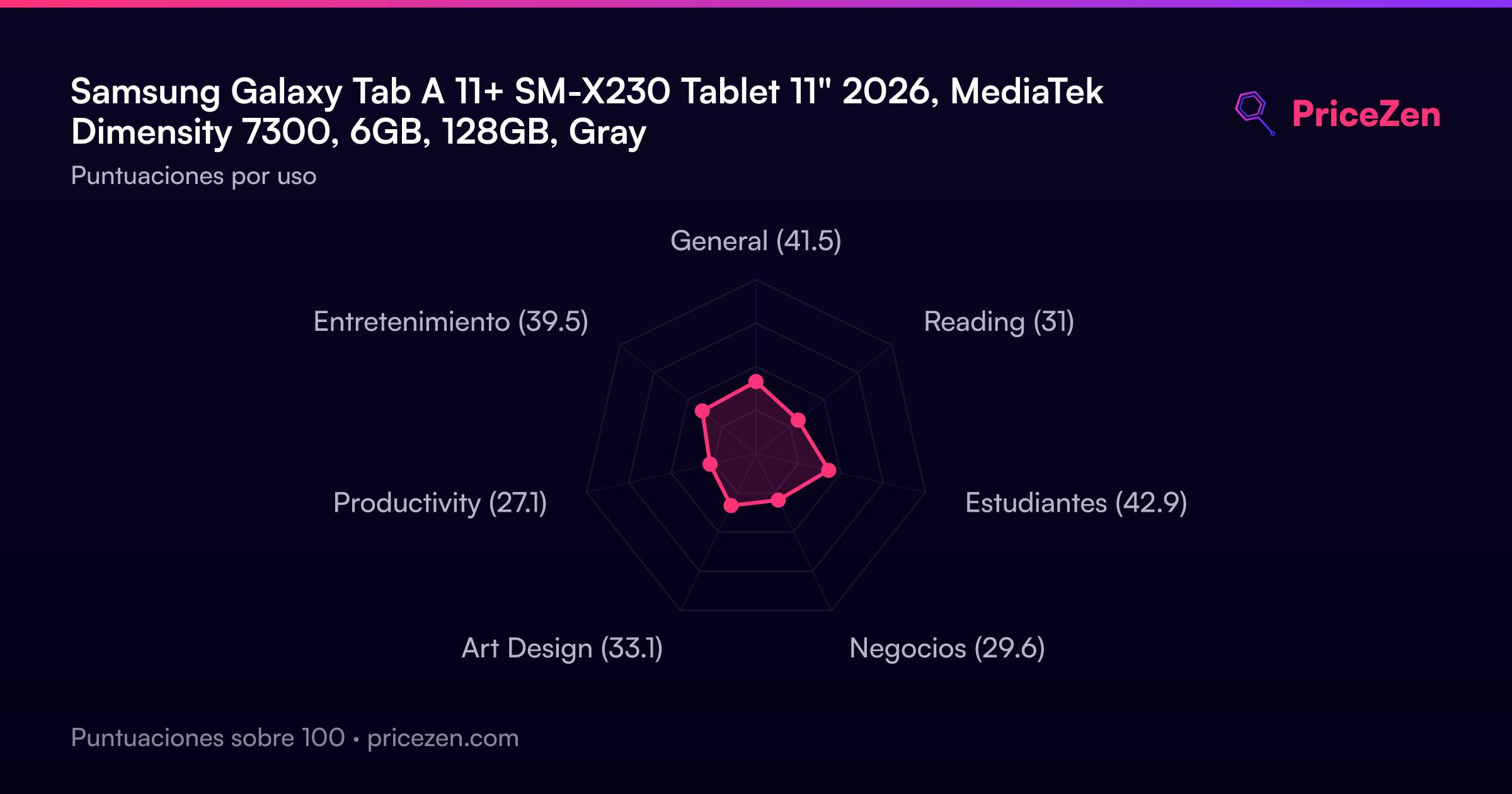
- General41.5
- Reading31
- Estudiantes42.9
- Negocios29.6
- Art Design33.1
- Productivity27.1
- Entretenimiento39.5