Samsung Galaxy Tab A 11+ SM-X230 Tablet 11", MediaTek Dimensity 7300, 8GB, 256GB, Gray
The 4nm MediaTek Dimensity 7300 chip and 8GB of RAM deliver smooth performance for an 11-inch tablet weighing just 396g. Its 256GB of onboard storage is expandable up to 2TB via microSD, offering massive capacity for offline media at a budget-friendly position. This device is best for casual users who prioritize a lightweight build for reading and streaming video, not productivity tasks.

Sin precio actual de tiendas
Resumen
The 30-Second Version
The Samsung Galaxy Tab A11+ is an 11-inch Android tablet with a surprisingly fast Dimensity 7300 chip and 8GB of RAM for around $285 USD. It's great for streaming and casual gaming, but the screen and battery life are below average. Buy it for entertainment, skip it for productivity.
Pros & Cons
Ventajas
- Dimensity 7300 CPU is a 94th percentile performer, shockingly fast for the price 94th
- 8GB RAM and 256GB storage is generous at this budget 89th
- microSD support up to 2TB gives you tons of room for media 88th
- GPU handles casual gaming better than most budget tablets 75th
- Lightweight at 396g, easy to hold for long sessions
Desventajas
- Screen quality and sharpness are below average, 30th percentile
- Battery life is a weak spot at 32nd percentile
- No water resistance to speak of
- Connectivity options are limited, 20th percentile
- Productivity score of 26.9 out of 100 means it's not a work machine
Las pruebas
Performance
The Dimensity 7300 is the star here. With a 94th percentile CPU score in our database, this tablet punches way above its price class for raw processing power. Apps open quickly, multitasking with 8GB of RAM feels smooth, and even some light gaming is on the table. The GPU also lands in the 85th percentile, so titles like Genshin Impact or Call of Duty Mobile will run at reduced settings without turning into a slideshow. That's not something we say often about a sub-$300 tablet.
But the performance story gets complicated when you look at the screen. A 1920x1200 resolution on an 11-inch panel gives you about 206 pixels per inch, which is fine for video but not sharp enough for heavy reading or detailed photo work. The 30th percentile sharpness score reflects that. And while the CPU is fast, the 32nd percentile battery score means sustained heavy use will drain things quicker than we'd like. For streaming and casual use, you'll get through a day. For gaming marathons, keep the charger nearby.
Specifications
Full Specifications
Processor
| CPU | MediaTek Dimensity 7300 |
| Cores | 8 |
Memory & Storage
| RAM | 8 GB |
| Storage | 256 GB |
| Expandable | Yes |
Display
| Size | 11" |
| Resolution | 1920x1200 (Full HD) |
| Panel | LCD |
Connectivity
| Bluetooth | Yes |
Physical
| Weight | 0.4 kg / 0.9 lbs |
vs Competition
Against the Apple iPad Air M4, the Tab A11+ loses on screen, battery, and overall polish, but it costs a fraction of the price. The iPad Air's display is in a completely different league, and its M4 chip is faster, but you'll pay two to three times more. The Lenovo Yoga Tab Plus ZAEG0096US is another strong competitor with a better screen and battery, though it's also pricier. The Xiaomi Pad 7 Pro 62751 offers a sharper display and better all-around specs for a bit more money, making it a tempting step up if you can stretch your budget.
The Microsoft Surface Pro 9 is a full Windows machine, so it's not really a fair fight, but if you need productivity, the Surface is the obvious choice despite the price gap. The BESTTAB T60 is a budget alternative that undercuts the Tab A11+ on price, but its specs are nowhere near the Dimensity 7300's performance. For pure processing power per dollar, the Tab A11+ is hard to beat. For overall experience, the screen and battery hold it back.
| Spec | Samsung Galaxy Tab A 11+ SM-X230 Tablet 11" | Apple iPad Pro 13" M5 | Microsoft Surface Pro 13" 11 | Lenovo Yoga Tab Plus 12.7" ZAEG0096US | Xiaomi Pad 7 11.2" 2AFZZCRP4CG | TABWEE T60 Pro 13.4" |
|---|---|---|---|---|---|---|
| CPU | MediaTek Dimensity 7300 | Apple M5 | Qualcomm Snapdragon X Elite X1E-84-100 | QTI SM8650 | Snapdragon 7+ Gen 3 | Unisoc |
| RAM (GB) | 8 | 16 | 16 | 16 | 8 | 8 |
| Storage (GB) | 256 | 1024 | 1024 | 256 | 256 | 256 |
| Screen | 11" 1920x1200 | 13" 2752x2064 | 13" 2880x1920 | 12.7" 2944x1840 | 11.2" 3200x2136 | 13.4" 1920x1200 |
| OS | - | iPadOS | Windows 11 Home | Android 14 | Android 14 | Android 15 |
| Stylus | false | true | true | true | true | true |
| Cellular | false | true | false | false | false | false |
| Battery (Wh) | - | 39 | 53 | - | - | - |
| Compare | Compare | Compare | Compare | Compare |
| Producto | CPU | GPU | RAM | Pantalla | Battery | Feature | Almacenamiento | Sharpness | Portability | Connectivity | Affordability | Water Resistance |
|---|---|---|---|---|---|---|---|---|---|---|---|---|
| Samsung Galaxy Tab A 11+ SM-X230 Tablet 11" | 93.8 | 88.5 | 65.7 | 30.1 | 32 | 21.5 | 74.9 | 30.6 | 88.4 | 19.4 | 44.1 | 46.5 |
| Apple iPad Pro 13" M5 Compare | 99.1 | 99.4 | 92.4 | 99.7 | 97.6 | 96.7 | 97.7 | 67.2 | 48.7 | 99.2 | 1.6 | 46.5 |
| Microsoft Surface Pro 13" 11 Compare | 98.4 | 96.5 | 92.4 | 99.1 | 99.6 | 74.5 | 97.7 | 78.1 | 21.8 | 92.9 | 4.7 | 97.4 |
| Lenovo Yoga Tab Plus 12.7" ZAEG0096US Compare | 84 | 82.1 | 92.4 | 96.8 | 88.8 | 96.7 | 83.7 | 87.6 | 43 | 92.9 | 21.1 | 46.5 |
| Xiaomi Pad 7 11.2" 2AFZZCRP4CG Compare | 86.3 | 84 | 65.7 | 98.2 | 85.3 | 60.9 | 83.7 | 99.2 | 60 | 77.3 | 32.7 | 46.5 |
| TABWEE T60 Pro 13.4" Compare | 95.3 | 88.8 | 65.7 | 46.4 | 86.8 | 88.6 | 74.9 | 18.4 | 32.6 | 77.3 | 34.5 | 46.5 |
Precio
Value & Pricing
At $285 USD, the Tab A11+ is a strange value proposition. The processor and RAM combo would normally cost you $400 or more in a tablet, so in that sense it's a steal. But the display and battery are where Samsung cut corners, and those are the two things you interact with most on a tablet. If you mainly want a streaming device for the kitchen or a casual browsing machine for the couch, the price is fair. If you need something for school or work, the 26.9 out of 100 productivity score tells you everything. The iPad Air M4 and Lenovo Yoga Tab Plus both cost significantly more, but they also don't make you squint at a mediocre panel all day.
Leer más
Overview
The Samsung Galaxy Tab A11+ is an 11-inch Android tablet that sits in the budget to mid-range bracket, currently listed around $285 USD. It's aimed at people who want a big screen for streaming, light browsing, and casual apps without spending iPad money. The spec sheet is a bit of a mixed bag, but there are a couple of surprises here that make it more interesting than the average cheap slab.
Samsung paired a MediaTek Dimensity 7300 octa-core chip with 8GB of RAM and 256GB of storage. That's a genuinely solid combo for this price. The Dimensity 7300 is built on a 4nm process and uses four Cortex A78 cores at 2.50 GHz plus four Cortex A55 cores at 2 GHz. In our database, that CPU lands in the 94th percentile for tablets, which is wild for a device in this price range. You also get expandable storage up to 2TB via microSD, so the 256GB onboard is really just a starting point.
Where the Tab A11+ stumbles is the display and battery. The 11-inch WUXGA panel runs at 1920x1200, which sounds fine on paper, but it lands in the 30th percentile for both screen quality and sharpness. That means it's usable, but don't expect vibrant colors or deep contrast. Battery life also sits in the 32nd percentile, so this is more of a couch tablet than a travel companion.
Common Questions
Q: Is the Samsung Galaxy Tab A11+ good for gaming?
Yes, for casual gaming. The Dimensity 7300 chip and 85th percentile GPU handle most mobile games at medium settings without issues, though the battery drains faster than we'd like during long sessions.
Q: Does the Samsung Galaxy Tab A11+ support expandable storage?
Yes, it supports microSD cards up to 2TB, which is plenty for movies, music, and apps on top of the built-in 256GB.
Q: Is the Samsung Galaxy Tab A11+ good for students?
It's okay for light note-taking and reading, but the 37 out of 100 student score and weak productivity performance mean it's not ideal for heavy schoolwork. A Surface Pro or iPad would serve students better.
Q: What is the screen resolution of the Samsung Galaxy Tab A11+?
The screen resolution is 1920x1200, which is fine for video but not particularly sharp for an 11-inch display. It lands in the 30th percentile for sharpness in our database.
Who Should Skip This
Skip the Tab A11+ if you need a tablet for work, school, or serious productivity. The 26.9 out of 100 productivity score is one of the weakest we've seen, and the below-average screen makes long reading or document editing sessions uncomfortable. If you're a student, the iPad Air M4 or Microsoft Surface Pro 9 are much better fits, though they cost more. If you mainly care about display quality for movies and photos, the Lenovo Yoga Tab Plus or Xiaomi Pad 7 Pro are worth the extra money. And if you travel a lot and need all-day battery life, the 32nd percentile battery score here will leave you hunting for outlets.
Verdict
Should you buy the Samsung Galaxy Tab A11+? If you want a fast, affordable tablet for streaming, casual gaming, and light browsing, yes. The Dimensity 7300 and 8GB of RAM make this feel snappier than anything else in its price range, and the 256GB storage plus 2TB microSD support means you'll never run out of space for movies and apps. It's a genuinely fun device for entertainment, which is exactly what its 38.8 out of 100 entertainment score suggests.
But if you need a tablet for school, work, or anything involving a keyboard and productivity apps, look elsewhere. The 26.9 out of 100 productivity score is a clear warning sign. And if you're picky about displays or battery life, the 30th percentile screen and 32nd percentile battery will frustrate you. This is a couch tablet, not a workhorse.
Usage Scores
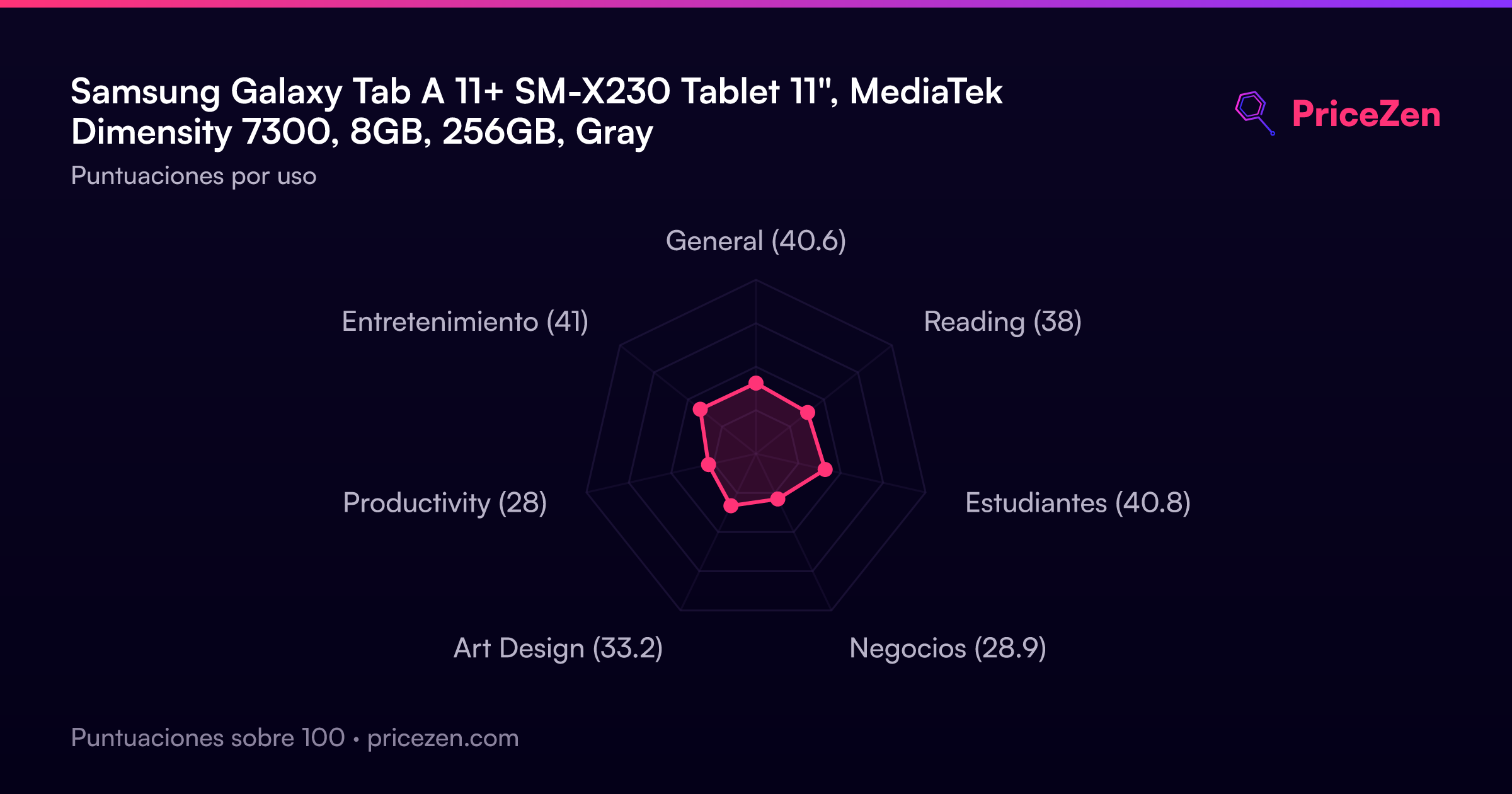
- General40.6
- Reading38
- Estudiantes40.8
- Negocios28.9
- Art Design33.2
- Productivity28
- Entretenimiento41