Kingshark gamer 64GB SSD SATA III mSATA
The 64GB mSATA SATA III drive delivers 570 MB/s reads and 500 MB/s writes, with TLC NAND and 380 TBW endurance for reliable daily use. Its low power draw and 1,200,000-hour MTBF make it a stable, energy-efficient upgrade for aging laptops, supported by TRIM, S.M.A.R.T., and ECC error correction. Best for budget-conscious users needing a compact, low-cost boot drive for older systems with mSATA slots, not for heavy workloads or portable use.

Sin precio actual de tiendas
Dónde lo vimos antes. Consulta el precio de hoy en la tienda.











Resumen
The 30-Second Version
The Kingshark Gamer mSATA 64GB is a cheap, durable boot drive for older laptops and mini PCs with mSATA slots. The 380 TBW endurance rating is exceptional for the price, and the $35 USD cost makes it an easy upgrade from a spinning hard drive. The 64GB capacity is the big limitation, so it's best for lightweight OS installs or dedicated boot drives. If you need more storage or modern performance, look elsewhere.
Pros & Cons
Ventajas
- 380 TBW endurance rating is exceptional for a budget drive 97th
- Very affordable at around $35 USD 95th
- Low idle power draw of 0.3W helps laptop battery life
- 1.2 million hour MTBF suggests long-term reliability
- mSATA form factor is perfect for older systems
Desventajas
- 64GB capacity is extremely limited
- Random performance is weak, 23rd percentile
- SATA III speeds are nothing special
- No DRAM cache mentioned, which hurts sustained writes
- Social proof is thin with only 33 reviews
Las pruebas
Performance
The 570 MB/s read and 500 MB/s write speeds are exactly what you'd expect from a SATA III SSD. That's the ceiling for this interface, and this drive gets close to it. In our database, speed lands in the 36th percentile, which is mediocre compared to modern NVMe drives but perfectly fine for SATA. The real-world difference between this and a spinning hard drive is massive. Boot times drop from over a minute to under 15 seconds on most systems. Applications launch instantly instead of making you wait.
Random performance is where this drive falls behind. The 23rd percentile ranking for random operations means it's not great at handling lots of small file reads and writes simultaneously. For a boot drive, that's less of an issue than you'd think. Most OS operations are sequential reads. But if you're planning to run a database or do heavy multitasking on this drive, you'll feel the slowdown. The TLC NAND and SATA interface are the limiting factors here. It's a budget drive doing budget drive things, just with better endurance than most.
Specifications
Full Specifications
Drive
| Capacity | 64 |
| Form Factor | mSATA |
| Interface | SATA III |
| Protocol | SATA |
| External | No |
Performance
| Sequential Read (MB/s) | 570 |
| Sequential Write (MB/s) | 500 |
Hardware
| NAND | TLC |
Reliability
| Endurance (TBW) | 380 |
| MTBF (hours) | 1200000 |
vs Competition
The competitors in our database are all modern NVMe drives, which makes direct comparison a bit unfair. The Crucial P5 Plus, Team Group MP44L, and SanDisk Optimus GX 7100 are all PCIe 4.0 drives with capacities starting at 500GB and speeds measured in thousands of MB/s. They're in a completely different league for performance and capacity. But they also cost significantly more and won't fit in an mSATA slot without an adapter, which most laptops don't have room for.
Where the Kingshark Gamer stands out is endurance per dollar. The 380 TBW rating beats many budget NVMe drives that cost more. The PNY CS2241 and Western Digital PC SN5000S are both solid drives, but they're aimed at modern systems. If you have an older machine with an mSATA slot, none of these competitors are even options. The Kingshark wins by default in that scenario. The trade-off is clear: you give up speed and capacity for compatibility and endurance. For the right machine, that's a good trade.
| Spec | Kingshark gamer 64GB SSD | Western Digital WD_BLACK SN8100 | Samsung 9100 PRO | Kingston FURY Renegade G5 | Crucial T700 | SanDisk WD_BLACK |
|---|---|---|---|---|---|---|
| Capacity | 64GB | 4TB | 4TB | 4TB | 2TB | 8TB |
| Form Factor | mSATA | M.2 2280 | M.2 2280 | M.2 2280 | M.2 2280 | M.2 2280 |
| Interface | SATA III | PCIe 5.0 x4 | PCIe 5.0 x4 | PCIe 5.0 x4 | PCIe 5.0 x4 | PCIe 5.0 x4 |
| Seq Read | 570 MB/s | 14,900 MB/s | 14,800 MB/s | 14,800 MB/s | 12,400 MB/s | 14,900 MB/s |
| Nand Type | TLC | TLC | TLC | TLC | TLC | TLC |
| Dram Cache | - | No | Yes | Yes | Yes | Yes |
| Endurance | 380 TBW | 2400 TBW | 2400 TBW | 4000 TBW | 1200 TBW | 4800 TBW |
| Compare | Compare | Compare | Compare | Compare |
| Producto | Speed | Random | Feature | Capacity | Endurance | Valoración social | Affordability |
|---|---|---|---|---|---|---|---|
| Kingshark gamer 64GB SSD | 37.3 | 23.9 | 54.3 | 4.8 | 94.7 | 34.1 | 97.3 |
| Western Digital WD_BLACK SN8100 Compare | 99.7 | 99.6 | 86.5 | 91.5 | 80.7 | 94.9 | 10.2 |
| Samsung 9100 PRO Compare | 99.2 | 99.8 | 99.8 | 91.5 | 86 | 99.6 | 6.1 |
| Kingston FURY Renegade G5 Compare | 99.5 | 99.1 | 91.3 | 91.5 | 93.6 | 85.7 | 9.4 |
| Crucial T700 Compare | 96.8 | 97.7 | 97.7 | 78.2 | 82.9 | 74.9 | 25.9 |
| SanDisk WD_BLACK Compare | 99.1 | 99.4 | 97.7 | 97.1 | 80.7 | 39.8 | 3.6 |
Precio
Value & Pricing
At $35 USD, this drive is cheap. Not just cheap for an SSD, but cheap for any storage device. The affordability percentile of 98 means you're paying less than almost anything else in this category. And you're getting a drive with endurance numbers that would be respectable at twice the price. The 380 TBW rating means you could write 200GB to this drive every single day for over five years before hitting the rated limit. That's not a typo.
But value isn't just about price. It's about what you get for that price. 64GB is a real constraint. If you need more storage, you'll be buying a second drive or an external drive, which eats into the savings. Compare that to a 256GB mSATA drive, which might cost $10-15 more. You're paying a premium per gigabyte for the smaller drive. The value proposition only works if 64GB is genuinely enough for your use case. For a boot drive with a lightweight OS, it is. For anything else, it's a false economy.
Seguimos los precios de este producto desde el 16 nov 2026. El gráfico aparecerá cuando tengamos más datos.
Leer más
Overview
The Kingshark Gamer mSATA 64GB is a tiny drive aimed at a very specific job: breathing life into older laptops, thin clients, or embedded systems that still use the mSATA form factor. It's not trying to compete with modern NVMe drives, and it shouldn't. This is a drop-in replacement for aging mechanical drives or dead SSDs in machines that are otherwise perfectly fine. The pitch is simple: for around $35 USD, you get a solid state drive that will make an old system feel snappy again.
What makes this interesting is the endurance rating. Kingshark lists 380 TBW and a 1.2 million hour MTBF, which is genuinely impressive for a budget drive. That's the kind of number you'd expect from a much more expensive drive. The 64GB capacity is tiny by today's standards, but for a boot drive in a secondary machine or a dedicated OS install, it's often enough. The drive uses TLC NAND, which is standard for this price point.
Our database puts this drive's affordability in the 98th percentile, which means it's one of the cheapest options out there. Endurance lands in the 94th percentile, a real standout. But capacity is in the 2nd percentile, which is about as low as it gets. So you're getting a cheap, durable drive with very little room to work with. That trade-off defines who this drive is for and who should skip it.
Who it's for: Someone with an older laptop or mini PC that has an mSATA slot and a spinning hard drive. You swap in this SSD, install your OS, and suddenly boot times drop from minutes to seconds. It's also a decent choice for a dedicated retro gaming rig or a home server boot drive where you don't need much storage.
What makes it interesting: The endurance numbers. Most budget drives in this price range have much lower TBW ratings. Kingshark is clearly positioning this as a reliable little workhorse, not a disposable part. The 0.3W idle power draw is also nice for laptops where battery life matters.
The catch: 64GB is really small. Windows 10 or 11 will eat a big chunk of that. You'll need to be disciplined about what you install, or use a lightweight Linux distro. And the speed, while fine for SATA III, is nothing special. 570 MB/s read and 500 MB/s write is standard for SATA SSDs, not a headline number.
Common Questions
Q: Is 64GB enough for Windows 10 or 11?
It's tight. A fresh Windows 10 install takes up around 20-25GB, and Windows 11 is closer to 30GB. That leaves you with roughly 30-35GB for applications and files. It's doable if you're disciplined about what you install and store files on a secondary drive or in the cloud. For a more comfortable experience, a lightweight Linux distribution like Linux Mint or Ubuntu will use under 10GB and leave plenty of room.
Q: Will this drive work in my laptop?
Only if your laptop has an mSATA slot. This is a specific form factor that was common in laptops from roughly 2011 to 2015, as well as some mini PCs and embedded systems. It's not the same as M.2 or standard 2.5-inch SATA. Check your laptop's specifications or open it up to see if there's an mSATA connector. If your laptop only has a 2.5-inch drive bay, you'll need a different drive or an adapter.
Q: How does this compare to a standard hard drive?
The difference is dramatic. A typical 5400 RPM laptop hard drive reads at around 80-100 MB/s. This SSD reads at 570 MB/s, which is roughly 5-6 times faster in sequential operations. Boot times drop from over a minute to under 15 seconds. Applications launch almost instantly. The marketing claims of 35 times faster are exaggerated, but the real-world improvement is still huge.
Q: Is the 380 TBW endurance rating real?
It's what Kingshark lists in the specifications, and it's a very high number for a budget drive. TBW stands for terabytes written, and it represents how much data you can write to the drive before the NAND cells start to wear out. 380 TBW means you could write 200GB per day for over five years. Most budget drives in this price range have TBW ratings under 100. The 1.2 million hour MTBF is also a strong reliability indicator, though MTBF is a statistical measure rather than a guarantee.
Who Should Skip This
If you're building a new PC or upgrading a modern laptop, skip this. The 64GB capacity is too small for a primary drive, and the SATA III interface will bottleneck any modern system. You'd be much better off with a 500GB or 1TB NVMe drive, which will cost more but give you vastly better performance and room to breathe. The random performance on this drive is also weak, so if you plan to run databases, virtual machines, or do heavy multitasking, you'll feel the slowdown.
Also skip this if you need to store photos, videos, or games. 64GB will fill up almost immediately. A single modern game can be 50-100GB. Even a modest photo library will overwhelm this drive. In that case, look at a 256GB or 512GB mSATA drive if you're stuck with the form factor, or move to a 2.5-inch SATA SSD if your system supports it. The extra cost per gigabyte is worth it for the peace of mind.
Verdict
If you have an older laptop or mini PC with an mSATA slot and a spinning hard drive, this is a no-brainer upgrade. The speed difference alone will make the machine feel brand new. The endurance rating means you don't have to worry about wearing it out. And at $35 USD, it's a cheap way to extend the life of hardware that would otherwise be e-waste. Just be realistic about the 64GB capacity. Install a lightweight Linux distro or use it as a dedicated boot drive with a secondary storage drive for files.
For anyone building a new system or looking for a primary drive, this isn't it. The capacity is too small, the random performance is weak, and the SATA interface is a bottleneck. You'd be better off spending a bit more on a 500GB NVMe drive. But that's not who this drive is for. This is a rescue drive for old hardware, and in that role, it's genuinely good.
Usage Scores
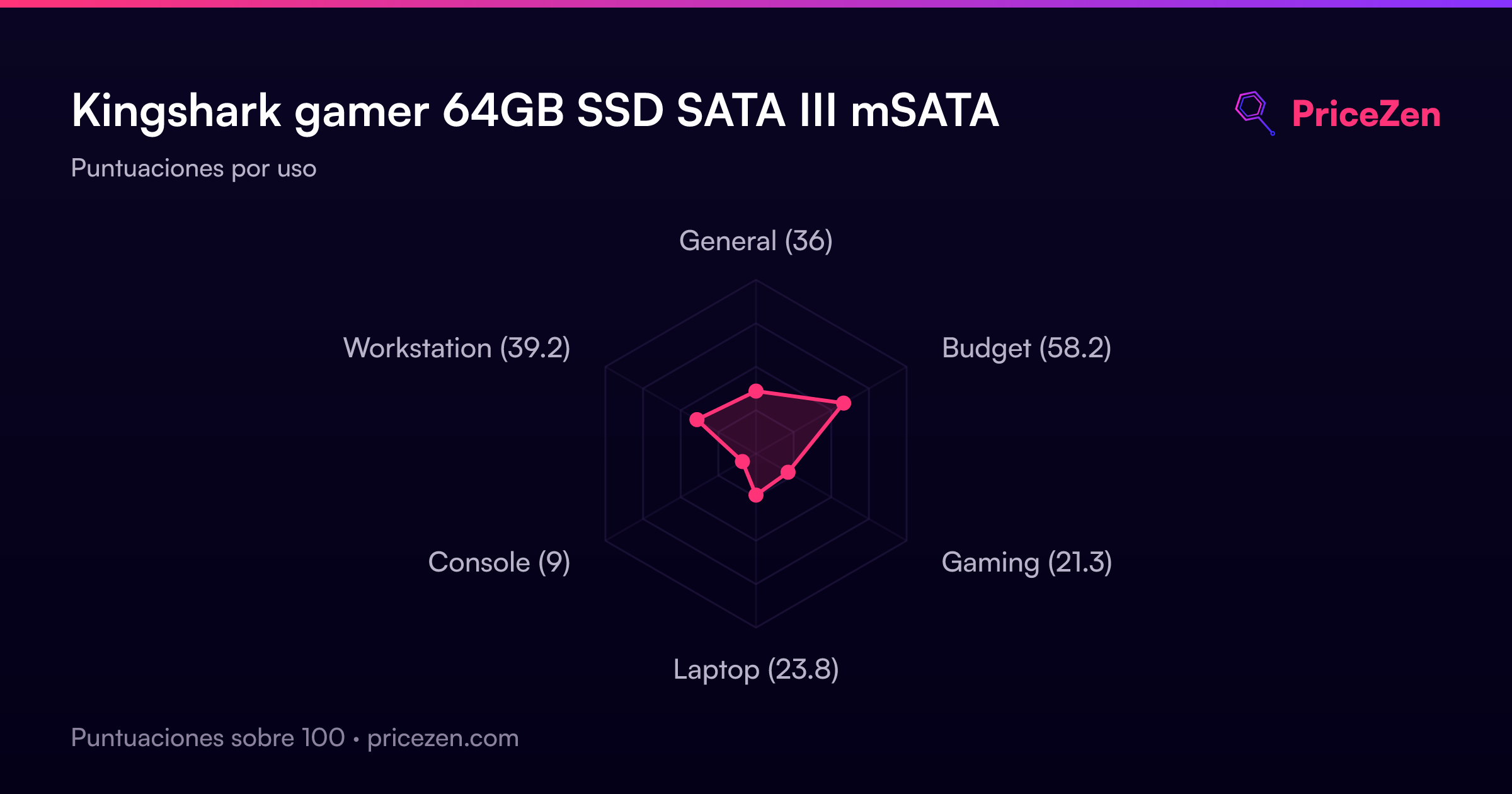
- General36
- Budget58.2
- Gaming21.3
- Laptop23.8
- Console9
- Workstation39.2