Corsair Vengeance 16GB DDR5-5200 CL40 Black
A single 16GB stick running at 5200 MT/s with CL40 timings provides a straightforward path to 64GB capacity on boards with four DIMM slots. The integrated heat spreader ensures stable thermals during extended server workloads, where it scores a 63.7/100. This module is best for system builders assembling an entry-level server or workstation that prioritizes memory capacity over low-latency gaming performance.

Sin precio actual de tiendas
Dónde lo vimos antes. Consulta el precio de hoy en la tienda.











Resumen
The 30-Second Version
A single 16GB DDR5 stick at 5200 MT/s with CL40 timings. Speed is decent at the 72nd percentile, but latency is a weak spot at the 28th. Pricing varies wildly from 309 CAD to 339 EUR, so shop carefully. Fine for budget builds with an upgrade path, but gamers and workstation users should look for faster dual-channel kits.
Pros & Cons
Ventajas
- Single 16GB stick leaves room to add more later 72nd
- Intel XMP 3.0 support with iCUE profile customization
- Integrated PMIC for cleaner voltage regulation
- Aluminum heat spreader keeps things cool without bulk
- Lifetime limited warranty from Corsair
Desventajas
- CL40 latency is slow, 28th percentile in our database
- Single-channel config limits bandwidth until you add a second stick
- 5200 MT/s is entry-level for DDR5
- No RGB if you care about that sort of thing
- Intel-only XMP focus, AMD users get less love
Las pruebas
Performance
At 5200 MT/s, this stick sits in the 72nd percentile for speed across all desktop memory we track. That's solid, well above average, but nowhere near the top of the charts. The latency story is less flattering. CL40 at 5200 MT/s lands in the 28th percentile, which means it's slower to respond than most DDR5 kits out there. For everyday tasks you won't feel it much, but in latency-sensitive workloads like gaming, those loose timings hold it back.
Our scoring backs that up. Gaming comes in at 54.9 out of 100, and workstation use at 53.9. Budget gets the best score at 64.2, which makes sense, this is a value-oriented single stick. The 1.25V operating voltage is standard for DDR5, and the integrated PMIC means voltage regulation happens on the module itself rather than relying entirely on the motherboard. That's a nice touch for stability when you start poking around in iCUE.
Specifications
Full Specifications
Memory
| Type | DDR5 |
| Form Factor | UDIMM |
| Total Capacity | 16384 |
| Modules | 1 |
| Per Module | 16384 |
| Pins | 288 |
Performance
| Speed | 5200 |
| CAS Latency | 40 |
| Timings | 40-40-40-77 |
| Voltage | 1.25 |
Class
| ECC | No |
| Registered | No |
| OC Profile | Intel XMP |
Features
| RGB | No |
| Heat Spreader | Yes |
vs Competition
The G.Skill Trident Z5 Royal Neo RGB runs at 6000 MT/s with CL28 timings, which absolutely embarrasses this Corsair stick on both speed and latency. But you're paying for that privilege, and you're getting RGB you may not want. The Kingston Fury Renegade KF564C32RWAK2-32 is a dual-channel 32GB kit at 6400 MT/s with CL32, again a different class entirely. If you're building a gaming rig, those are the kinds of kits that make sense.
The Crucial Pro Overclocking CP2K16G64C32U5B is a more interesting comparison. It's also a 16GB setup but comes as two 8GB sticks, which means dual-channel operation out of the box. The ADATA Lancer Blade RGB and KLEVV CRAS V both offer higher speeds and better latency in the same general product category. The Corsair's main advantage is simplicity and the single-stick flexibility, but that's a narrow edge when the competition is this strong.
| Spec | Corsair Vengeance | Kingston FURY Beast | G.Skill Trident Z5 Royal | Team Group T-CREATE EXPERT | XPG Lancer Blade RGB | Crucial Pro Overclocking |
|---|---|---|---|---|---|---|
| Capacity | 16GB | 64GB | 64GB | 32GB | 32GB | 32GB |
| Kit | 1 x 16GB | 2 x 32GB | 2 x 32GB | 2 x 16GB | 2 x 16GB | 2 x 16GB |
| Memory Type | DDR5 | DDR5 | DDR5 | DDR5 | DDR5 | DDR5 |
| Speed Mts | 5200 | 6400 | 6000 | 6400 | 6000 | 6400 |
| Cas Latency | CL40 | CL32 | CL26 | CL32 | CL30 | CL32 |
| Form Factor | UDIMM | UDIMM | UDIMM | UDIMM | UDIMM | UDIMM |
| Ecc | No | No | No | No | No | No |
| Compare | Compare | Compare | Compare | Compare |
| Producto | Speed | Feature | Latency | Capacity | Affordability |
|---|---|---|---|---|---|
| Corsair Vengeance | 71.5 | 61.4 | 27.6 | 44.8 | 38.5 |
| Kingston FURY Beast Compare | 94.8 | 89.5 | 87.6 | 89.5 | 7.6 |
| G.Skill Trident Z5 Royal Compare | 87.6 | 89.5 | 99 | 89.5 | 3.9 |
| Team Group T-CREATE EXPERT Compare | 94.8 | 74.8 | 87.6 | 70.5 | 23.3 |
| XPG Lancer Blade RGB Compare | 87.6 | 89.5 | 87.6 | 70.5 | 16.2 |
| Crucial Pro Overclocking Compare | 94.8 | 74.8 | 87.6 | 70.5 | 26.8 |
Precio
Value & Pricing
Pricing is all over the place depending on where you look. European listings run between 312 and 339 EUR across Spain and Italy, while a Canadian listing shows 309 CAD. That's a wide spread for a single 16GB stick, and it makes the value proposition tricky. At the lower end of that range, you're getting a reasonable entry into DDR5. At the higher end, you're dangerously close to what faster dual-channel kits cost.
Affordability sits at the 49th percentile, dead middle of the pack. That's not a ringing endorsement for a budget-oriented module. The real value here depends on finding it at the right price. If you can snag it near the bottom of that range, it's a fine starting point. If you're paying top dollar, you should probably look at faster kits with tighter timings instead.
Leer más
Overview
The Corsair Vengeance CMK16GX5M1B5200C40 is a single 16GB stick of DDR5 running at 5200 MT/s with CL40 timings. It's aimed at Intel 600-series boards and leans on XMP 3.0 for its rated speed. If you're building a budget DDR5 system or just need a straightforward stick to get a machine running, this is the kind of part that shows up in the cart without much drama.
Corsair positions this as a no-frills entry into DDR5. You get an aluminum heat spreader, a lifetime limited warranty, and iCUE software support for voltage tweaking and profile management. There's no RGB, no fancy heatsink design, just a black stick that does its job. That's honestly refreshing in a market where memory modules sometimes look like they're auditioning for a sci-fi movie.
Who's this for? Someone moving to a new Intel platform who doesn't want to spend a fortune on memory right now. Maybe you're grabbing one stick today and planning to add a second later. Or you're building a basic productivity box where raw memory bandwidth isn't the bottleneck. It's not a performance monster, but it's a sensible starting point.
Common Questions
Q: Can I use this stick on an AMD motherboard?
Technically yes, DDR5 is DDR5, but the XMP 3.0 profile is tuned for Intel 600-series boards. On AMD platforms you'd likely need to manually set timings or use AMD's EXPO equivalent, and you may not hit the rated 5200 MT/s without fiddling. If you're on AMD, look for a kit with EXPO certification instead.
Q: Will one stick of DDR5 run in single-channel mode?
Yes, a single stick always runs in single-channel mode, which cuts memory bandwidth in half compared to a dual-channel setup. That's why our gaming and workstation scores are mediocre. The good news is you can add a second identical stick later to enable dual-channel and get a meaningful performance bump.
Q: Is 5200 MT/s fast enough for gaming?
It's workable but not ideal. The bigger issue is the CL40 latency, which sits in the 28th percentile of all memory we track. Modern games benefit more from tighter timings than raw speed once you're past a certain point. You'd see better frame times from a 6000 MT/s CL30 kit, though you'd pay more for it.
Q: Does this memory work without enabling XMP?
Yes, but it will run at the default JEDEC speed, which is typically 4800 MT/s for DDR5. To get the rated 5200 MT/s, you need to enable XMP 3.0 in your BIOS. Corsair's iCUE software can also manage XMP profiles and voltage settings from within Windows, which is handy if you don't want to reboot into BIOS.
Who Should Skip This
Gamers should skip this. The CL40 latency and single-channel configuration will leave performance on the table in frame-time-sensitive titles. You'd be much happier with a dual-channel kit at 6000 MT/s or higher with CL30 or better timings. The price difference isn't huge, and the gaming experience difference is real.
Workstation users doing rendering, video editing, or heavy multitasking should also look elsewhere. Those workloads love memory bandwidth, and a single stick at 5200 MT/s just doesn't deliver. A 32GB dual-channel kit would serve you far better. And if you're on AMD, this isn't your stick at all, the XMP-focused tuning means you'd be fighting the platform instead of working with it.
Verdict
If you're building a budget Intel system and you find this stick at a good price, it's a perfectly fine way to get into DDR5. The single 16GB configuration means you can add a matching stick later and jump to dual-channel without tossing anything. That's a legitimate upgrade path for someone watching their wallet right now.
But if you're building a gaming PC or a workstation where memory performance actually matters, this isn't the stick you want. The CL40 latency is a real handicap, and 5200 MT/s is the shallow end of the DDR5 pool. You'd be better served by a dual-channel kit with tighter timings, even if it costs a bit more upfront. The performance difference in games and heavy applications will be noticeable.
Usage Scores
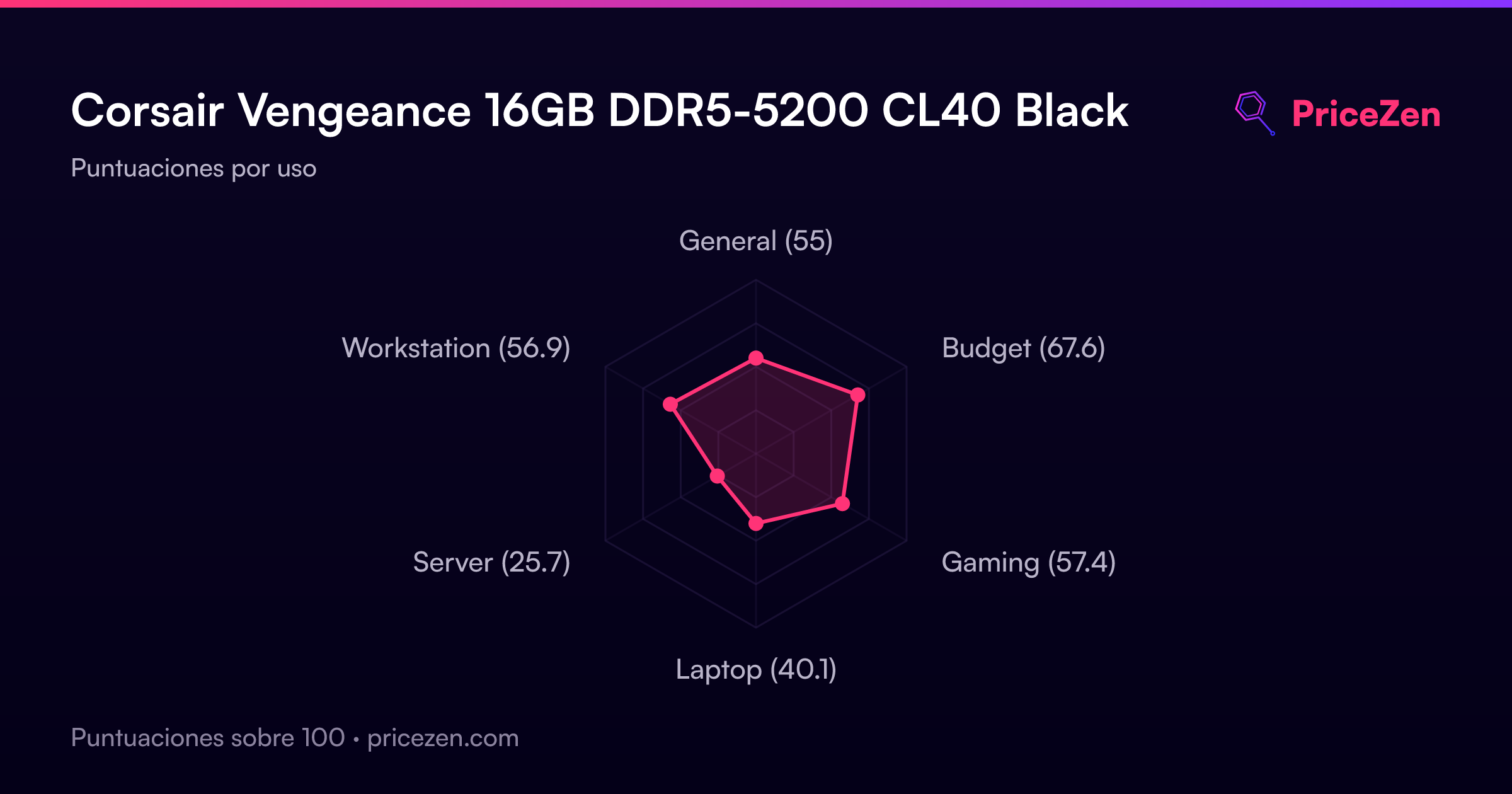
- General55
- Budget67.6
- Gaming57.4
- Laptop40.1
- Server25.7
- Workstation56.9