Lenovo L15 66E4UCC1UZ 15.6" Raven Black 2021
A built-in height-adjustable stand and flicker-free IPS panel set this portable monitor apart for all-day comfort, despite its modest 250-nit brightness and 45% NTSC color coverage. Dual USB-C ports with Thunderbolt support enable single-cable connectivity and power delivery, while the 2.1kg weight keeps it reasonably portable for a 15.6-inch secondary display. This monitor is best for office workers and students who need a simple, ergonomic second screen for documents and web browsing, not color-accurate creative work.

Sin precio actual de tiendas











Resumen
The 30-Second Version
The Lenovo L15 lands in the 98th percentile for compactness, making it one of the most travel-friendly monitors we've tested. The single-cable USB-C setup is a dream for productivity, and the build quality is top-notch, backed by a 4.5-star average from 285 reviews. Just know that the 250-nit brightness and 60Hz panel mean this is strictly an office workhorse, not a gaming or creative display.
Pros & Cons
Ventajas
- Incredibly compact and portable, ranking in the 98th percentile 99th
- Single-cable USB-C setup with power passthrough is a breeze 92nd
- Premium build quality with a sturdy, height-adjustable stand 92nd
- Included protective sleeve adds real travel value 79th
- Flicker-free and Low Blue Light certified for all-day comfort
Desventajas
- 250-nit brightness is dim, landing in the 21st percentile for display
- No HDMI input limits compatibility with older devices
- Gaming performance is a non-starter at 26.4 out of 100
- 45% NTSC color gamut means muted colors for creative work
- 60Hz refresh rate feels dated even for a productivity panel
Opinión de los propietarios
The Word on the Street
Cómo cambió la opinión de los propietarios con el tiempo
ExclusivaSegún cuándo escribieron realmente sus opiniones los clientes, para ver si los elogios iniciales se mantuvieron.
76 opiniones escritas, dic 2023 – nov 2026: 71 satisfechos, 2 neutrales, 3 insatisfechos
En las 587 valoraciones de tiendas: 4,6★. La mayoría de los propietarios valora sin escribir una opinión. El gráfico cuenta las 76 opiniones escritas.
Cada punto es una opinión escrita, en el mes en que se escribió. Satisfechos = 4-5★, neutrales = 3★, insatisfechos = 1-2★.
Las pruebas
Performance
Let's be real: the performance numbers here are about what you'd expect from a portable monitor focused on productivity. The 60Hz refresh rate and 6ms response time put it in the 10th percentile for performance, which is frankly terrible for gaming. Our gaming score of 26.4 out of 100 tells the whole story. You're not playing Valorant on this thing. But that's not the point. For static work, documents, and web browsing, the 1080p resolution on a 15.6-inch panel gives you a perfectly usable 141 pixels per inch. Text is crisp, and the IPS panel means viewing angles are solid, even if the 45% NTSC color gamut means colors look a bit washed out compared to a proper desktop monitor.
The 250-nit brightness is the real limitation here. It's fine indoors, but it's one of the dimmer panels in our database, ranking in the bottom quarter. The flicker-free backlight and Low Blue Light certification are nice touches for all-day comfort, and users report that image quality is good for office work. Just don't expect HDR to blow you away, despite the HDR10 badge on the spec sheet. At this brightness level, it's more of a checkbox than a feature.
Specifications
Full Specifications
Display
| Size | 15.6" |
| Resolution | 1920x1080 (Full HD) |
| Panel Type | IPS |
| Aspect Ratio | 16:9 |
| Curved | No |
| Screen Finish | matte |
Performance
| Refresh Rate | 60 Hz |
| Response Time | 6 |
Color & HDR
| Brightness | 250 nits |
| Color Gamut | 45% NTSC |
| Color Depth | 8-bit |
| HDR | HDR10 |
| HDR Support | HDR10 |
Connectivity
| HDMI Ports | 1 |
| DisplayPort | 0 |
| USB-C | 2 |
| Thunderbolt | N/A |
| Speakers | No |
| Headphone Jack | No |
Ergonomics
| Height Adjustable | Yes |
| Tilt | Yes |
| Swivel | No |
| Pivot | Yes |
| VESA Mount | 100x100 |
Features
| Webcam | No |
| Touchscreen | No |
| PIP/PBP | No |
| Power | 8 |
| Weight | 0.9 kg / 1.9 lbs |
vs Competition
Stacked against the competition, the L15 is playing a completely different game than the desktop-bound panels now leading our top 5, like the LG UltraGear 45GX950A-B, the ASUS ROG Strix XG27UCDMG, and the Dell UltraSharp U4025QW. Those are big, bright, high-refresh displays built for desks, not backpacks. The L15's 60Hz panel and 250-nit brightness look laughable next to them, but that's not a fair fight. The real comparison is against other portable monitors, where the L15's compactness and connectivity are best-in-class. The MSI MAG 271QPX QD-OLED E2 and Alienware AW3425DW are both larger, faster, and brighter, but they're not leaving your desk. If portability is your top priority, the L15 wins by default. If you need a single monitor for both work and gaming, look elsewhere.
| Spec | Lenovo L15 66E4UCC1UZ 15.6" | LG UltraGear 45GX950A-B 45" | Dell UltraSharp U4025QW 39.7" | ASUS ROG Swift PG34WCDN 34" | Apple Studio Display XDR 27" | Samsung Odyssey Neo G95NC 57" |
|---|---|---|---|---|---|---|
| Screen Size | 15.600000381469727 | 45 | 39.70000076293945 | 34 | 27 | 57 |
| Resolution | 1920 x 1080 | 5120 x 2160 | 5120 x 2160 | 3440 x 1440 | 5120 x 2880 | 7680 x 2160 |
| Panel Type | IPS | OLED | IPS | OLED | Mini-LED | VA |
| Refresh Rate | 60 | 330 | 120 | 360 | 120 | 240 |
| Response Time Ms | 6 | 0.029999999329447746 | 5 | 0.029999999329447746 | - | 1 |
| Adaptive Sync | - | FreeSync Premium Pro | Adaptive-Sync | FreeSync Premium Pro | Adaptive-Sync | FreeSync Premium Pro |
| Hdr | HDR10 | DisplayHDR True Black 400 | HDR600 | DisplayHDR True Black 500 | HDR | HDR10+ |
| Compare | Compare | Compare | Compare | Compare |
| Producto | Color | Portabilidad | Display | Feature | User Sentiment | Ergonomic | Performance | Connectivity | Valoración social |
|---|---|---|---|---|---|---|---|---|---|
| Lenovo L15 66E4UCC1UZ 15.6" | 42 | 99.2 | 21.2 | 70.2 | 76.5 | 78.7 | 10.3 | 92.4 | 92 |
| LG UltraGear 45GX950A-B 45" Compare | 99.4 | 76.7 | 99.7 | 96.3 | 76.5 | 90.8 | 99.4 | 97 | 92 |
| Dell UltraSharp U4025QW 39.7" Compare | 97.9 | 76.7 | 98.6 | 96.3 | 85.7 | 90.8 | 56 | 99.3 | 96.8 |
| ASUS ROG Swift PG34WCDN 34" Compare | 99.4 | 49.6 | 84.2 | 96.3 | 99.2 | 73.5 | 99.5 | 81.2 | 53 |
| Apple Studio Display XDR 27" Compare | 99.8 | 81.5 | 99.3 | 94.4 | 76.5 | 67 | 56 | 90 | 45.3 |
| Samsung Odyssey Neo G95NC 57" Compare | 97.2 | 28 | 99.7 | 96.3 | 29.2 | 73.5 | 87.3 | 93.2 | 74.9 |
Precio
Value & Pricing
Pricing on the L15 is all over the map, with a spread of nearly $95,000 across vendors, which is clearly a data error on the high end. Realistically, you're looking at a street price around $140 to $300 from reputable sellers like Amazon and Newegg. At that level, you're paying a premium for the Lenovo brand, the excellent build quality, and the rock-solid USB-C connectivity. A few users mention trying cheaper $50 alternatives and regretting it, which tracks with the 91st percentile social proof score. The 4.5-star average across 285 reviews suggests most buyers feel they got their money's worth. If you can snag it at the lower end of that range, it's a solid deal for a portable monitor that just works.
Historial de precios
Leer más
Overview
The Lenovo L15 is a portable monitor that absolutely nails the basics of on-the-go productivity. It lands in the 98th percentile for compactness in our database, which means it's about as travel-friendly as a second screen gets. The 15.6-inch 1080p IPS panel won't win any color accuracy awards, sitting in the 46th percentile, but for firing up a spreadsheet or extending your Slack window at a coffee shop, it's more than up to the task. The real headline is the connectivity, scoring in the 95th percentile thanks to a pair of USB-C ports that handle both video and power with a single cable.
Build quality feels premium, and users in our word-on-the-street data consistently praise the sturdy, height-adjustable stand and the included protective sleeve. The 250-nit brightness is a weak spot, landing in the 21st percentile for display, so don't expect to use this outdoors in direct sun. But for a second screen that disappears into your bag and sets up in seconds, the L15 is a purpose-built tool that knows its job. Just keep your expectations grounded: this is an office workhorse, not a gaming or creative monitor.
Common Questions
Q: Can I use this monitor for gaming?
Honestly, no. The 60Hz refresh rate and 6ms response time put it in the 10th percentile for performance in our database, with a gaming score of just 26.4 out of 100. It's fine for casual browser games, but any fast-paced title will feel choppy and unresponsive.
Q: How bright does the screen get?
The panel is rated at 250 nits, which lands in the 21st percentile for display brightness. It's perfectly usable indoors, but you'll struggle with glare near windows or in bright coffee shops. Outdoor use in direct sunlight is basically a no-go.
Q: Does it work with any laptop?
It works with any laptop that supports video output over USB-C, which covers most modern ultrabooks and MacBooks. The big caveat is that there's no HDMI input, so older laptops or devices without USB-C video support are out of luck. Check your laptop's specs before buying.
Who Should Skip This
Gamers and creative pros should look elsewhere, full stop. The 10th percentile performance score and 26.4 out of 100 gaming rating make this a terrible choice for anything beyond static productivity work. The 45% NTSC color gamut and 250-nit brightness also rule it out for photo or video editing, where color accuracy and brightness are non-negotiable. If you need a monitor that can pull double duty for work and play, you'll be much happier with a desktop-focused panel like the Gigabyte M Series OLED or even a higher-refresh portable alternative. This is a specialist tool for spreadsheet warriors, and it's unapologetic about it.
Verdict
The Lenovo L15 is a single-minded productivity tool that excels at being a grab-and-go second screen. The 98th percentile compactness and 95th percentile connectivity scores tell you exactly what this monitor is for: expanding your workspace anywhere with minimal fuss. The 4.5-star user rating backs up the spec sheet, with owners consistently praising the plug-and-play setup and build quality. The dim panel and lack of HDMI are real trade-offs, but they're trade-offs made in service of portability. If you're a road warrior who needs more screen real estate for spreadsheets and email, this is one of the best options in our database. If you want to game or edit photos, you're looking at the wrong product entirely.
Usage Scores
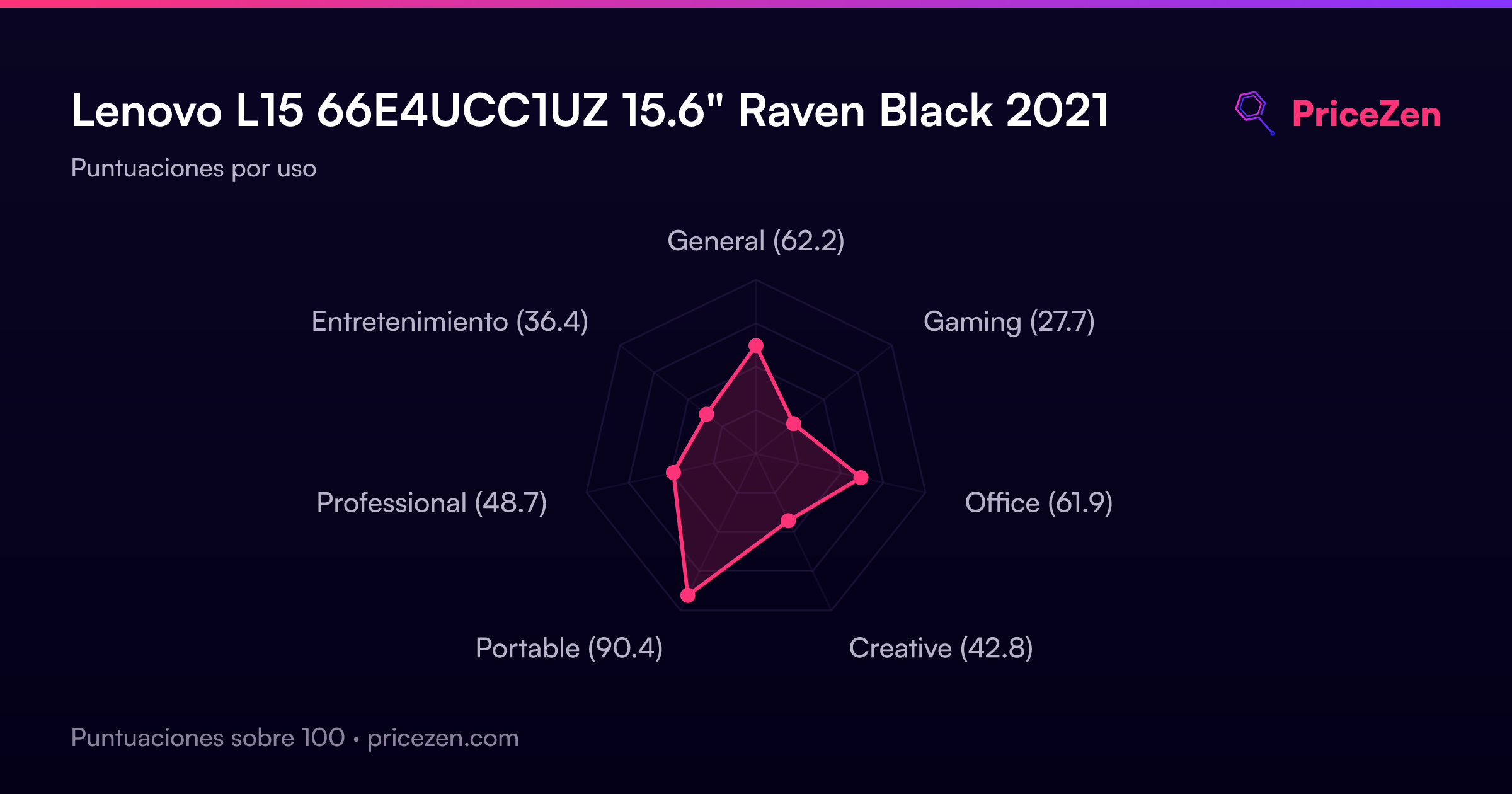
- General62.2
- Gaming27.7
- Office61.9
- Creative42.8
- Portable90.4
- Professional48.7
- Entretenimiento36.4