ASUS Radeon RX 7800 XT ATS OC 16GB GDDR6
The RDNA 3 architecture and 16GB of GDDR6 memory provide ample headroom for high-resolution textures, while the dual BIOS switch lets you prioritize silent operation or peak cooling performance. The Axial-tech dual fan design and reinforced backplate deliver reliable, durable cooling without excessive noise. This card is best for 1440p gamers who value a straightforward, no-frills upgrade with a focus on build quality and longevity.

Sin precio actual de tiendas
Resumen
The 30-Second Version
The ASUS RX 7800 XT ATS is a capable 1440p card with 16GB VRAM and a handy dual BIOS switch. Gaming performance is middle of the pack, but AI and compute scores are strong. Worth buying if you find it at a good price and skip the ray tracing hype.
Pros & Cons
Ventajas
- 16GB VRAM gives you headroom for high-res textures 83rd
- Dual BIOS switch is genuinely useful for noise tuning 81st
- Strong AI and compute performance for the class 73rd
- Dual ball bearing fans should outlast cheaper designs
Desventajas
- Only two video outputs, one DP and one HDMI
- Dual fan cooling runs warmer than triple fan rivals
- Ray tracing performance is just average
- Feature set is thin compared to newer cards
Las pruebas
Performance
The 7800 XT pushes 37.3 FP32 TFLOPS and hits a 2430MHz boost clock, which translates to solid 1440p frame rates in most titles. PassMark G3D comes in at 24,397, putting it in the upper-middle of our charts. Ray tracing is there if you want it, but it's not the star of the show. The 263W TDP is manageable, though the dual fan setup means thermals sit below average compared to triple fan designs. For pure raster gaming, this card holds its own. For heavy RT workloads, it falls behind the newer competition.
Specifications
Full Specifications
Chipset
| GPU Chipset | Radeon RX 7800 XT |
| Brand | AMD |
| Architecture | RDNA 3 |
| Class | consumer |
| Process | 5 |
Memory
| VRAM | 16 GB |
| Memory Type | GDDR6 |
| Memory Bus | 256 |
| Bandwidth | 624.1 |
Compute
| Tensor Cores | 120 |
| RT Cores | 60 |
| Base Clock | 1295 |
| Boost Clock | 2430 |
| FP16 TFLOPS | 74.65 |
| FP32 TFLOPS | 37.32 |
Performance
| PassMark G3D | 24397 |
| GPU Compute | 13562 |
Power & Cooling
| TDP | 263 |
| Recommended PSU | 600 |
| Cooler | Dual Fan |
| Fans | 2 |
Connectivity
| Interface | PCI Express 4.0 x16 |
| DisplayPort | 1 |
| HDMI | 1 |
Physical
| Form Factor | Full Height |
Features
| Ray Tracing | Yes |
vs Competition
Stacked against the MSI Ventus RTX 5070 Ti and Gigabyte AERO 5070 Ti, the 7800 XT gives up a lot in ray tracing and features. Those newer cards have more modern architectures and better RT cores. The Sapphire NITRO+ is the closest direct competitor, and it typically runs cooler with a triple fan design. The ZOTAC APOCALYPSE and PNY ARGB OC are also in the mix, mostly offering better connectivity and cooling. For pure raster at 1440p, the 7800 XT can hang. For anything else, the newer cards pull ahead.
| Spec | ASUS Radeon RX 7800 XT ATS OC | Gigabyte GeForce RTX 5070 Ti Eagle Ice | MSI GeForce RTX 5070 Ti Ventus 3X OC | ZOTAC GeForce RTX 5080 APOCALYPSE | PNY GeForce RTX 5080 ARGB OC | Sapphire Radeon RX 7900 XTX PULSE |
|---|---|---|---|---|---|---|
| Chipset | Radeon RX 7800 XT | GeForce RTX 5070 Ti | GeForce RTX 5070 Ti | GeForce RTX 5080 | GeForce RTX 5080 | Radeon RX 7900 XTX |
| Vram | 16GB GDDR6 | 16GB GDDR7 | 16GB GDDR7 | 16GB GDDR7 | 16GB GDDR7 | 24GB GDDR6 |
| Boost Clock Mhz | 2430 | 2542 | 2482 | 2730 | 2620 | 2525 |
| Tdp W | 263 | 300 | 300 | 360 | 360 | 370 |
| Memory Bus Bits | 256 | 256 | 256 | 256 | 256 | 384 |
| Ray Tracing | true | true | true | true | true | true |
| GPU Class | consumer | consumer | consumer | consumer | consumer | consumer |
| Compare | Compare | Compare | Compare | Compare |
| Producto | AI | Rt | Vram | Raster | Compute | Feature | Thermal | Efficiency | Connectivity | Valoración social | Affordability |
|---|---|---|---|---|---|---|---|---|---|---|---|
| ASUS Radeon RX 7800 XT ATS OC | 83.4 | 63.1 | 72.6 | 63.9 | 81.1 | 34 | 42.8 | 52.7 | 36.2 | 56.8 | 33 |
| Gigabyte GeForce RTX 5070 Ti Eagle Ice Compare | 79.6 | 88.6 | 85.9 | 89 | 88.2 | 96 | 91.6 | 72.3 | 94 | 95.4 | 26 |
| MSI GeForce RTX 5070 Ti Ventus 3X OC Compare | 79.6 | 92.4 | 85.9 | 89 | 88.2 | 96 | 91.6 | 72.3 | 94 | 88.9 | 23.1 |
| ZOTAC GeForce RTX 5080 APOCALYPSE Compare | 85.6 | 97.5 | 89 | 94.5 | 93.5 | 96 | 91.6 | 57.3 | 94 | 99.1 | 19.1 |
| PNY GeForce RTX 5080 ARGB OC Compare | 85.6 | 97.5 | 89 | 94.5 | 93.5 | 96 | 91.6 | 57.3 | 94 | 82.8 | 14.2 |
| Sapphire Radeon RX 7900 XTX PULSE Compare | 95.1 | 96.2 | 91.9 | 83.5 | 95.6 | 96 | 72.2 | 40.8 | 86 | 78.7 | 17.6 |
Precio
Value & Pricing
Pricing is a bit of a moving target here. The only listing we see is CAD 1,490, which is steep for a card that sits in the middle of our gaming charts. Affordability lands in the bottom third of all GPUs we track, so you're not getting a bargain. That said, 16GB of VRAM and solid raster performance mean it'll stay relevant for a while. If you can find it at a discount, it's worth a look. At full retail, you're paying a premium for the ASUS name and that dual BIOS feature.
Leer más
Overview
The ASUS ATS RX 7800 XT is a 1440p gaming card that leans on raw raster muscle instead of fancy extras. 16GB of GDDR6 on a 256-bit bus gives it plenty of memory bandwidth, and the dual BIOS switch is a nice touch for folks who want quiet or max cooling. It's not the flashiest card in the stack, but it gets the job done.
Our database puts this card's AI and compute chops well above average, which makes sense given RDNA 3's architecture. But the gaming score lands right in the middle of the pack, and the feature set is pretty bare bones. One DisplayPort and one HDMI port is a bit stingy for a card at this level.
Common Questions
Q: Is this card good for 4K gaming?
It can handle some 4K titles, but it's really built for 1440p. The 16GB VRAM helps, but the raster performance sits in the middle of our charts, so don't expect max settings at 4K.
Q: How loud does this card get under load?
The dual fan design runs warmer than triple fan cards, so fans may spin up more under heavy load. The dual BIOS switch lets you pick a quieter profile, but you'll trade some cooling for it.
Q: Does this card support ray tracing well?
It supports ray tracing, but performance is just average compared to newer cards. If RT is a priority, look at the RTX 5070 Ti options instead.
Who Should Skip This
Skip this if you need strong ray tracing or plan to push 4K. The RT performance is mediocre, and the dual fan cooler runs warmer than triple fan competitors. If you need more than two video outputs, look elsewhere too. Workstation users should also pass, as the workstation score is the weakest area here.
Verdict
This card is for 1440p gamers who don't care about ray tracing and want a reliable, no-nonsense GPU with plenty of VRAM. The dual BIOS is a nice bonus if you're picky about fan noise. It's not a workstation card, and it's not a 4K monster. But for the right buyer, it's a solid pick.
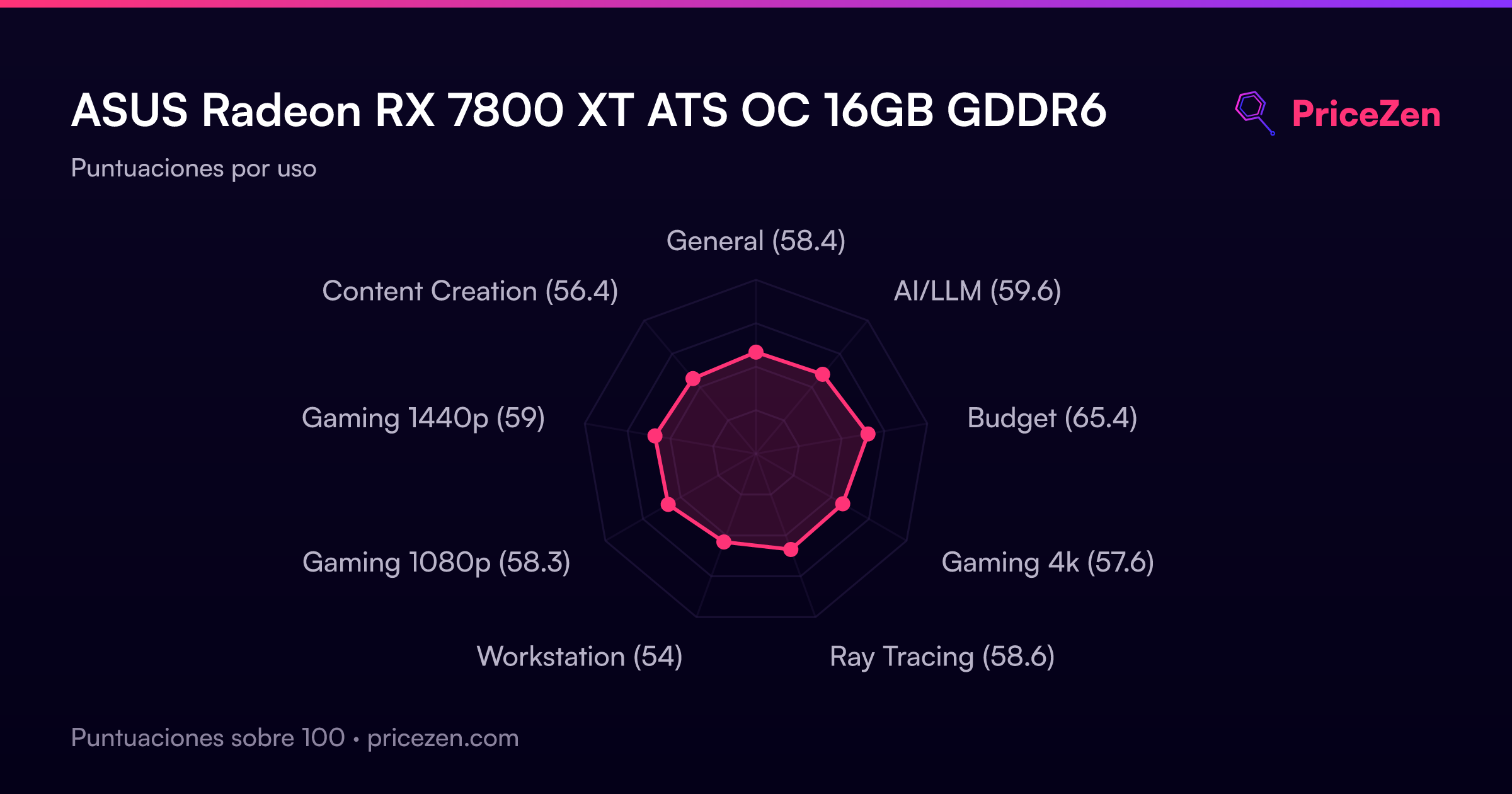
Usage Scores
- General58.4
- AI/LLM59.6
- Budget65.4
- Gaming 4k57.6
- Ray Tracing58.6
- Workstation54
- Gaming 1080p58.3
- Gaming 1440p59
- Content Creation56.4