Samsung Odyssey Neo G95NC 57" Black 2023
The 57-inch 7680x2160 Quantum Mini-LED VA panel delivers dual 4K resolution at 240Hz with 140 PPI, wrapping your field of view in a 1000R curve. Its 420 nits brightness, 95% DCI-P3 coverage, and FreeSync Premium Pro support make fast action smooth and colors accurate. Best for hardcore gamers and sim enthusiasts who want an immersive ultrawide desktop without compromising on refresh rate or clarity.

No current retailer price











Snapshot
The 30-Second Version
The Samsung Odyssey Neo G9 G95NC is a 57-inch dual-4K curved monster with a 240Hz refresh rate and Quantum Mini-LED backlighting that delivers near-OLED brightness. It's a legitimate dual-monitor replacement for productivity and an immersion machine for gaming. Pricing varies wildly from USD 1,450 to USD 4,800, so shop around. Just be aware of recurring reliability complaints around sleep/wake glitches and G-Sync flickering before you commit.
Pros & Cons
Pros
- Massive 57-inch 7680 x 2160 screen replaces dual monitors without a bezel gap 100th
- 240Hz refresh rate with 1ms response time is top-tier for gaming 97th
- Quantum Mini-LED backlighting delivers near-OLED brightness and contrast 96th
- 140 PPI pixel density keeps text sharp for productivity work 93rd
- DisplayHDR 1000 and 95% DCI-P3 coverage make HDR content shine
Cons
- Sleep/wake issues reported by multiple owners, sometimes requiring a reboot
- G-Sync flickering at native resolution is a recurring complaint
- VA panel shows color uniformity issues, especially at the edges
- Heavy at 19kg, needs a sturdy desk or monitor arm
- Included DisplayPort cable is too short for many setups
What owners think
The Word on the Street
How owner sentiment changed over time
ExclusiveBased on when customers actually wrote their reviews - so you can see whether early praise held up.
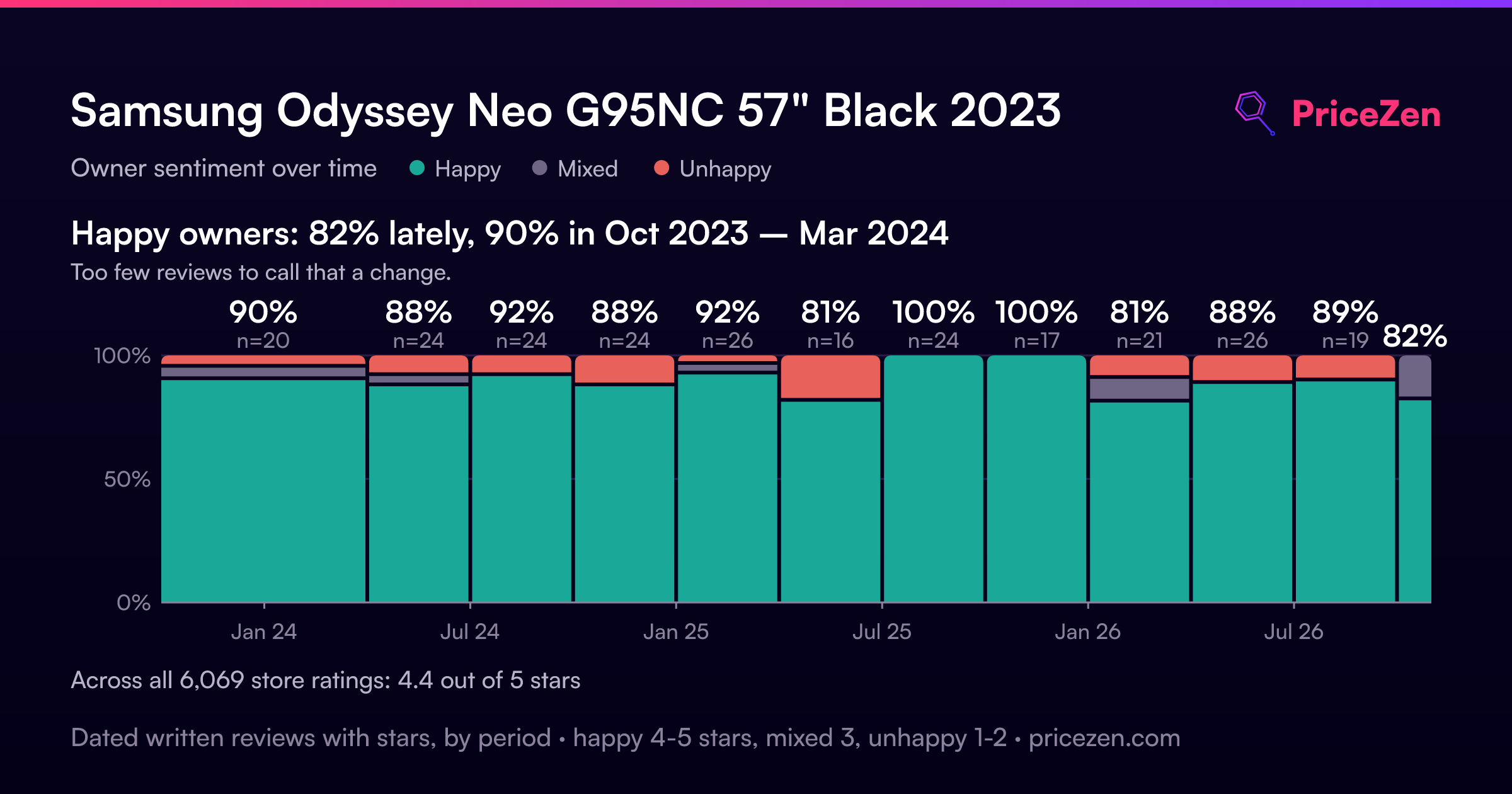
Happy owners: 82% lately, 90% in Oct 2023 – Mar 2024
Too few reviews to call that a change.
Across all 6,069 store ratings: 4.4★. Most owners rate without writing a review. The chart counts the 252 written reviews with stars and their own date.
6 written reviews without stars are left out of the trend.
Show the numbers
| Period | Reviews | Happy | Mixed | Unhappy | Happy share |
|---|---|---|---|---|---|
| Oct 2023 – Mar 2024 | 20 | 18 | 1 | 1 | 90% |
| Apr – Jun 2024 | 24 | 21 | 1 | 2 | 88% |
| Jul – Sep 2024 | 24 | 22 | 0 | 2 | 92% |
| Oct – Dec 2024 | 24 | 21 | 0 | 3 | 88% |
| Jan – Mar 2025 | 26 | 24 | 1 | 1 | 92% |
| Apr – Jun 2025 | 16 | 13 | 0 | 3 | 81% |
| Jul – Sep 2025 | 24 | 24 | 0 | 0 | 100% |
| Oct – Dec 2025 | 17 | 17 | 0 | 0 | 100% |
| Jan – Mar 2026 | 21 | 17 | 2 | 2 | 81% |
| Apr – Jun 2026 | 26 | 23 | 0 | 3 | 88% |
| Jul – Sep 2026 | 19 | 17 | 0 | 2 | 89% |
| Oct 2026 | 11 | 9 | 2 | 0 | 82% |
- Oct – Dec 20269 of 11 happy
Buyers praise the monitor's brightness, clarity, contrast, and 240Hz refresh rate for gaming and productivity. Some report issues with the 5120x1440 resolution causing blurry BIOS and poor legacy game support, plus setup quirks with KVM and input switching.
- Brightness, clarity, contrast, and 240Hz refresh rate are consistently praised as top-tier for gaming and productivity.
- 5120x1440 resolution causes blurry BIOS/CMOS display and poor compatibility with older games, limiting usability.
- Setup quirks: KVM rejects hub-chained connections, manual input switching, no EDID emulation, and Mac compatibility needs a dock.
- Excellent for productivity with ample screen real estate, effectively replacing multi-monitor setups.
- Jul – Sep 202617 of 19 happy
Buyers praised the monitor's immersive size, resolution, and gaming performance, but several reported screen cracking, black screens, and poor shipping/order support.
- Multiple reviews highlight the immersive 32:9 ultrawide size, dual 4K resolution, and 1000R curve as top-tier for gaming and productivity.
- Two reviews report the screen popping, cracking, or dying, with one noting the same issue on a previous model, raising reliability concerns.
- One buyer waited a month for shipping with no updates, unhelpful AI chats, and inability to cancel, causing significant frustration.
- Several reviews mention the monitor's high price and demanding GPU requirements, but consider it worth it if you have the hardware.
- Apr – Jun 202623 of 26 happy
Buyers praise the monitor's visuals, immersion, and performance, but several report serious issues: a defect causing a dim line at 240Hz, false advertising claims about refresh rate, and a screen tear not covered by warranty.
- Excellent image quality, contrast, and immersion for gaming and productivity, with high refresh rate and HDR praised.
- Reports of a defect causing a dim line at 240Hz, a screen tear, and claims of false advertising about refresh rate support.
- Running at full 240Hz requires DP2.1 and a powerful GPU; some say it works, others say it doesn't at native resolution.
- Warranty issues: screen tear not covered for second owner, and one reviewer calls it a room heater due to excessive heat.
- Jan – Mar 202617 of 21 happy
Buyers praised the monitor's resolution and gaming visuals, but one reported many bad pixels and another noted screen tearing and stretched images in games.
- Resolution and widescreen gaming visuals praised as superb and jaw-dropping.
- One unit had about 10 bad pixels clustered, raising quality concerns.
- Screen tearing during gaming, requiring monitor restart to fix.
- Many games don't support ultra-wide, causing stretched sides and reducing peripheral benefit.
Each column joins calendar quarters until it holds at least 10 reviews with stars and their own date. Happy = 4-5★, mixed = 3★, unhappy = 1-2★. Period summaries are in English.
The proof
Performance
Let's talk raw specs first. The 7680 x 2160 resolution at 240Hz is genuinely impressive. That's pushing nearly 33 million pixels at a refresh rate most 1080p monitors struggle to hit. The 1ms response time and FreeSync Premium Pro support mean fast-paced games should feel smooth, assuming your GPU can keep up. And that's a big assumption. You'll need a serious graphics card to drive this thing at native resolution and high refresh rates. One owner noted you need HDMI 2.1 support or you'll get stuck at lower resolutions.
The Quantum Mini-LED backlighting is the star here. With 420 nits of typical brightness and DisplayHDR 1000 certification, this monitor gets bright enough to make HDR content pop. The 95% DCI-P3 coverage and 10-bit color depth put it in the 97th percentile for color performance in our database. That's near-OLED quality without the burn-in anxiety. But the VA panel has its limits. Color uniformity suffers at the edges, and some users report the curve isn't perfectly consistent across the panel, which can cause eye strain during long sessions.
Specifications
Full Specifications
Display
| Size | 57" |
| Resolution | 7680x2160 |
| Panel Type | VA |
| Aspect Ratio | 32:9 |
| Curved | Yes |
| Curvature | 1000 |
| Screen Finish | matte |
Performance
| Refresh Rate | 240 Hz |
| Response Time | 1 |
| Adaptive Sync | FreeSync Premium Pro |
Color & HDR
| Brightness | 420 nits |
| Color Gamut | 95% DCI-P3 |
| Color Depth | 10-bit |
| HDR | HDR10+ |
| HDR Support | HDR10+ |
Connectivity
| HDMI Ports | 3 |
| DisplayPort | 1 |
| USB-C | 0 |
| Thunderbolt | 0 |
| Speakers | No |
| Headphone Jack | Yes |
Ergonomics
| Height Adjustable | Yes |
| Tilt | Yes |
| Swivel | Yes |
| Pivot | No |
| VESA Mount | 100x100 |
Features
| Webcam | No |
| Touchscreen | No |
| PIP/PBP | Yes |
| Power | 300 |
| Weight | 26.9 kg / 59.2 lbs |
vs Competition
The most direct competitor in our database is the LG UltraGear 45GX950A-B. LG's 45-inch ultrawide uses an OLED panel, which means perfect blacks and better viewing angles, but it can't match the Neo G9's sheer size or pixel density. The Samsung wins on resolution and screen real estate, while the LG wins on color uniformity and response time. If you're sensitive to VA panel color shift, the LG might be the safer bet.
The ASUS ROG Strix XG27UCDMG and MSI MPG 271QR QD-OLED X50 are both 27-inch QD-OLED panels. They're completely different animals. Those are competitive gaming monitors built for speed and pixel response, not immersion. The Samsung crushes them on size and productivity potential, but the smaller OLEDs will have better motion clarity and no backlight bleed. The Dell UltraSharp U4025QW is closer in spirit, a 40-inch ultrawide aimed at productivity, but it tops out at 120Hz and can't touch the Neo G9's gaming chops. The Gigabyte M Series OLED MO27U2 SA is another 27-inch OLED that's not really in the same conversation.
| Spec | Samsung Odyssey Neo G95NC 57" | BenQ MOBIUZ EX381U 37.5" | Gigabyte M Series M32U 31.5" | Dell UltraSharp U4320Q 27" | Acer CB342CU UM.CB2AA.004 34" | MSI MAG 273QP QD-OLED X24 26.5" |
|---|---|---|---|---|---|---|
| Screen Size | 57 | 37.5 | 31.5 | 27 | 34 | 26.5 |
| Resolution | 7680 x 2160 | 3840 x 2160 | 3840 x 2160 | 3840 x 2160 | 3440 x 1440 | 2560 x 1440 |
| Panel Type | VA | IPS | IPS | IPS | IPS | QD-OLED |
| Refresh Rate | 240 | 144 | 144 | 60 | 75 | 240 |
| Response Time Ms | 1 | 1 | 1 | 5 | 1 | 0.029999999329447746 |
| Adaptive Sync | FreeSync Premium Pro | FreeSync Premium Pro | FreeSync Premium Pro | - | FreeSync | Adaptive-Sync |
| Hdr | HDR10+ | HDR10 | HDR400 | HDR400 | HDR400 | DisplayHDR True Black 400 |
| Compare | Compare | Compare | Compare | Compare |
| Product | Color | Portability | Display | Feature | User Sentiment | Ergonomic | Performance | Connectivity | Social Proof |
|---|---|---|---|---|---|---|---|---|---|
| Samsung Odyssey Neo G95NC 57" | 97.2 | 27.8 | 99.7 | 96.3 | 29.1 | 73.5 | 87.2 | 93.1 | 74.8 |
| BenQ MOBIUZ EX381U 37.5" Compare | 93.6 | 68 | 95.1 | 70.2 | 0 | 73.5 | 72.6 | 99.8 | 0 |
| Gigabyte M Series M32U 31.5" Compare | 90 | 63 | 87 | 85.1 | 0 | 73.5 | 72.6 | 87.5 | 0 |
| Dell UltraSharp U4320Q 27" Compare | 91.1 | 82.7 | 87 | 85.1 | 0 | 90.8 | 22.4 | 96.9 | 0 |
| Acer CB342CU UM.CB2AA.004 34" Compare | 79 | 63 | 78.8 | 70.2 | 0 | 78.7 | 65.7 | 70.3 | 74.8 |
| MSI MAG 273QP QD-OLED X24 26.5" Compare | 74.4 | 12.7 | 72.6 | 70.2 | 0 | 90.8 | 97.9 | 53.2 | 0 |
Price
Value & Pricing
Pricing on this monitor is all over the place. In the US, we're seeing listings from USD 1,450 to USD 4,800 across 11 vendors. That's a USD 3,350 spread, which is wild. The best deal in our database is at USD 1,450, and if you can find it at that price, it's a steal for what you're getting. At the high end, you're paying a serious premium for availability and convenience. In Canada, the spread is tighter but still significant, ranging from CAD 2,471 to CAD 3,493 across 8 listings, with the best price at CAD 2,471.
Value is a mixed bag with this monitor. At USD 1,450, you're getting a display that outperforms monitors costing twice as much in raw specs. The 100th percentile display score and 97th percentile color score put it at the top of our charts. But you're also buying into some reliability risk. If you get a unit with the sleep/wake issues or G-Sync flickering that some owners report, the value proposition crumbles fast. Make sure you buy from a retailer with a solid return policy.
Price history
Read more
Overview
The Samsung Odyssey Neo G9 G95NC is the kind of monitor that makes people do a double take when they walk into your office. It's a 57-inch curved behemoth with a 7680 x 2160 resolution, which is basically two 4K panels stitched together into one massive 32:9 canvas. Samsung packed it with Quantum Mini-LED backlighting, a 240Hz refresh rate, and a 1000R curve that wraps around your field of view. This thing isn't subtle, and it's not trying to be.
Who's this for? Honestly, two very different crowds. Gamers who want maximum immersion in racing sims, flight sims, and open-world games will love the sheer width and speed. But the more interesting buyer might be the productivity nut. We're seeing scores of 96.6 for gaming, 96 for office work, and 95 for entertainment in our database. That office score is telling. This monitor replaces a dual-monitor setup without the bezel gap in the middle, and the 140 PPI pixel density means text stays crisp.
The catch is that this monitor has some real quirks. A 4.6-star average from over 4,700 reviews sounds great, but our sentiment analysis shows a more mixed picture. Owners love the screen real estate and brightness, but there are recurring complaints about sleep/wake glitches, G-Sync flickering, and color uniformity issues with the VA panel. It's a monitor that can be incredible when it works, and incredibly frustrating when it doesn't.
Common Questions
Q: What GPU do I need to run this monitor at full resolution and refresh rate?
You'll need a high-end GPU with HDMI 2.1 or DisplayPort 2.1 to drive 7680 x 2160 at 240Hz. Realistically, an RTX 4080 or RX 7900 XTX is the minimum for gaming at native resolution, and even then you may need to lower settings in demanding titles. For productivity use, a mid-range card with HDMI 2.1 will handle the resolution fine at 60Hz.
Q: Does this monitor work well as a dual-monitor replacement?
Yes, and that's actually one of its strongest use cases. The 32:9 aspect ratio gives you the equivalent of two 4K monitors side by side without a bezel in the middle. The 140 PPI pixel density keeps text sharp, and our database shows a 96/100 office score. Multiple owners report it seamlessly replaced their dual-monitor setups.
Q: Is the VA panel a problem for color accuracy?
The Quantum Mini-LED backlighting helps a lot, with 95% DCI-P3 coverage and 10-bit color putting it in the 97th percentile for color performance. However, VA panels inherently have viewing angle limitations, and some owners report color uniformity issues at the edges of the screen. If you do color-critical work, you may want to calibrate the panel or consider an OLED alternative.
Q: How heavy is this monitor and what kind of stand or arm do I need?
The monitor weighs about 19kg (42 pounds), which is substantial. The included stand supports height, tilt, and swivel adjustments, but if you want to use a monitor arm, you'll need one rated for at least 20kg with a VESA 100x100 mount. Several owners specifically mention needing a strong desk arm to handle the weight safely.
Who Should Skip This
If you're a competitive esports player, this monitor is overkill in the wrong direction. The 32:9 aspect ratio means you'll be turning your head to see minimaps and HUD elements, and the VA panel's response time, while good, can't match a 27-inch OLED like the ASUS ROG Strix XG27UCDMG or MSI MPG 271QR QD-OLED X50 for pure motion clarity. You'd be paying for screen real estate you don't need and adding input latency risk.
Also skip this if you're sensitive to VA panel color shift or if you sit close to your monitor. The 1000R curve is aggressive, and some owners report eye strain from the inconsistent curvature. If you do color-critical work where uniformity matters, an OLED like the LG UltraGear 45GX950A-B or a flat IPS panel will serve you better. And if you don't have a powerful GPU, you'll be leaving a lot of this monitor's potential on the table.
Verdict
If you're a sim racer, flight sim enthusiast, or someone who wants the most immersive gaming experience short of VR, the Neo G9 G95NC is hard to beat. The 1000R curve wraps around your peripheral vision, and the 240Hz refresh rate keeps everything smooth. Just make sure your GPU can actually push 7680 x 2160 at high frame rates. You'll want at least an RTX 4080 or RX 7900 XTX, and even then you might need to dial back settings in demanding titles.
For productivity users, this monitor is a legitimate dual-monitor replacement. The 140 PPI text clarity is excellent, and the 32:9 aspect ratio lets you run three or four windows side by side without feeling cramped. But the reliability concerns give us pause. If this is your primary work monitor and you can't afford downtime, the sleep/wake issues some owners report are a real risk. Buy from a retailer with easy returns, and test the monitor thoroughly in the first week.
Usage Scores
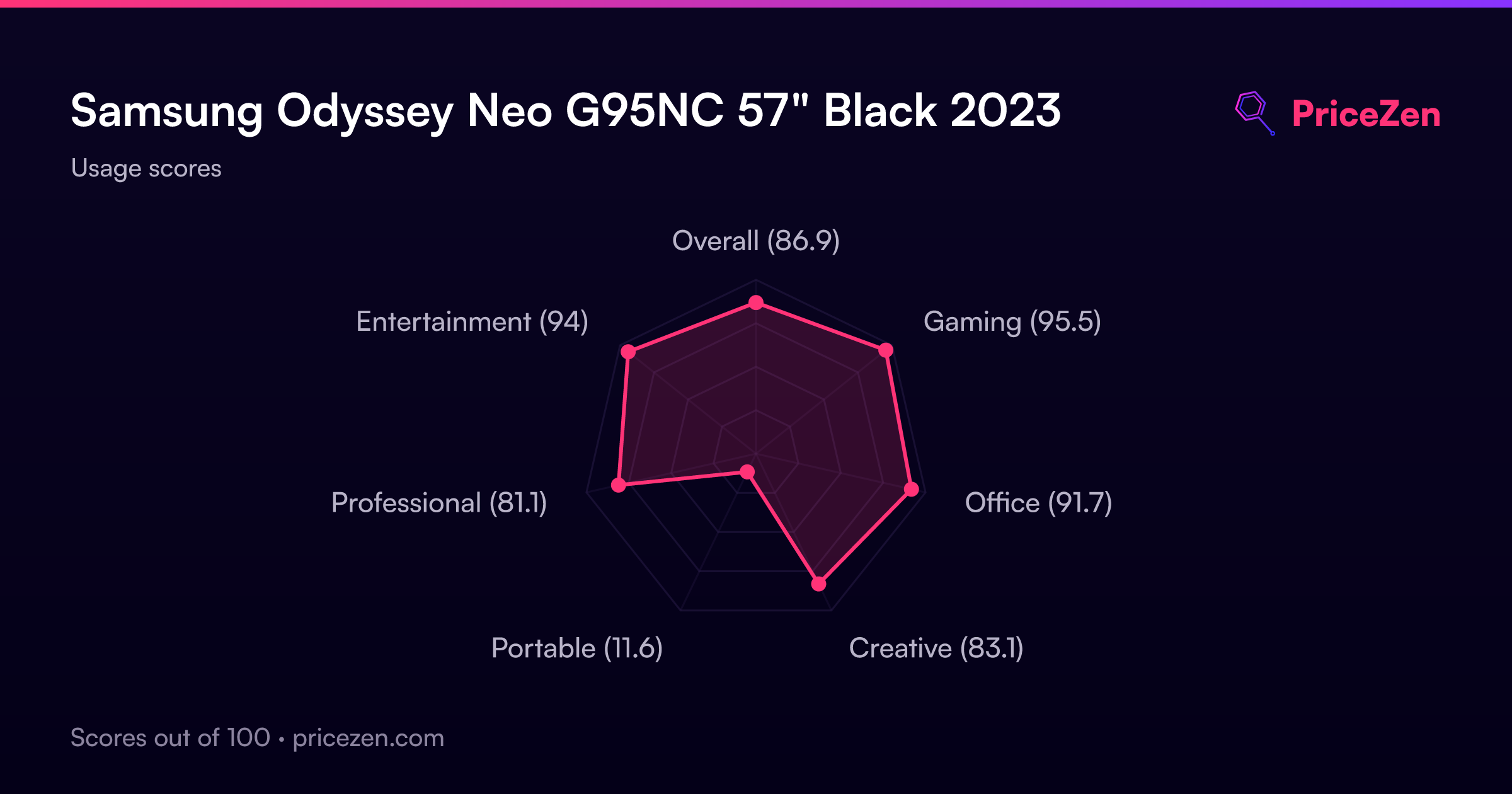
- Overall87.1
- Gaming95.5
- Office91.7
- Creative83.1
- Portable11.6
- Professional81.1
- Entertainment94