Microsoft Surface Pro 10 13" 2025, Core Ultra 7 165U, 32GB, 512GB, Platinum

Wi-Fi 6Eで、ダウンロードが速い 11月28日に確認済み
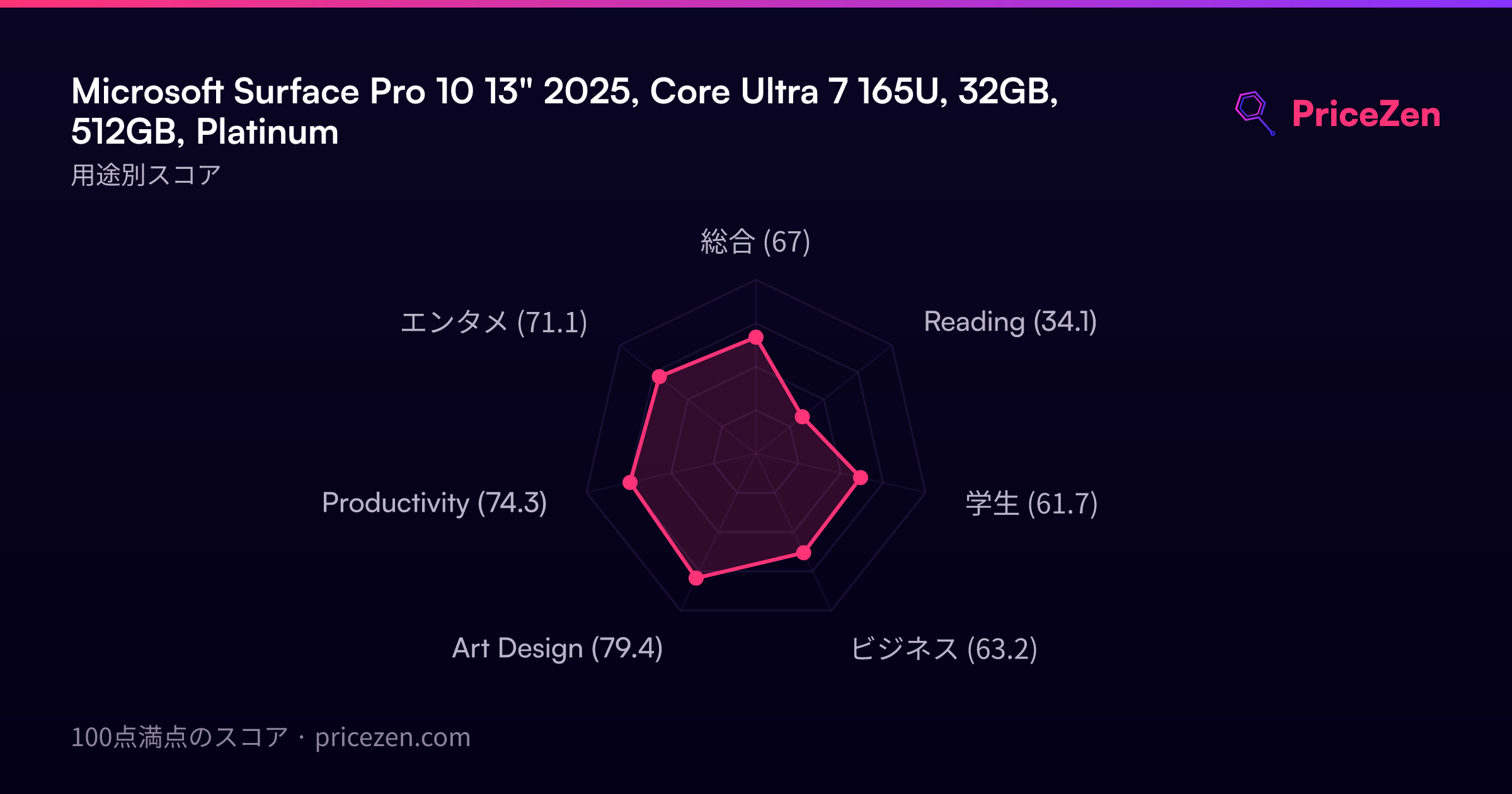
67/100 総合スコア 5.0 オーナー評価1件の平均
- CPU
- Intel Core Ultra 7 165U
- RAM
- 32 GB
- Storage
- 512 GB
- Screen
- 13" 2880x1920
- OS
- Windows 11 Pro
- Stylus
- はい


概要
The 30-Second Version
A brilliant Windows tablet with a stunning screen and laptop-grade RAM that's held back by mediocre battery life. It's the ultimate portable office, as long as your office has a power outlet.
Pros & Cons
長所
- Gorgeous 120Hz PixelSense display is best-in-class 98th
- 32GB of RAM makes multitasking a breeze 96th
- Kickstand and keyboard connector add real laptop flexibility 96th
- Anti-reflective screen is a lifesaver in bright rooms 94th
短所
- Battery life is a weak spot, falling behind most competitors
- Intel Graphics can't keep up with dedicated GPUs for heavy rendering
- Pricey, especially once you add the essential keyboard and pen
- Reading experience is mediocre due to the 3:2 aspect ratio and weight
オーナーの声
購入者の評価が時間とともにどう変化したか
独自顧客が実際にレビューを書いた時期に基づいています。発売当初の高評価が続いたかどうかがわかります。
書かれたレビュー 1件、2025年10月:満足 1件
ストア評価全1件:5.0★。 グラフは書かれたレビュー1件を数えています。
各点は書かれたレビュー1件で、書かれた月に置いています。満足 = 4〜5★、普通 = 3★、不満 = 1〜2★。
実証データ
Performance
The 32GB of RAM is the real star here, sitting in the 98th percentile for this class of device. It chews through dozens of browser tabs, Slack, and a hefty Photoshop file without breaking a sweat. The Core Ultra 7 165U is a solid performer, but what surprised us is how well the integrated Intel Graphics handle light creative work. It's not a gaming rig by any stretch, but for a thin tablet, the responsiveness is impressive.
Specifications
Full Specifications
Processor
| CPU | Intel Core Ultra 7 165U |
| Cores | 12 |
| GPU | Intel Graphics |
Memory & Storage
| RAM | 32 GB |
| Storage | 512 GB |
| Storage Type | SSD |
Display
| Size | 13" |
| Resolution | 2880x1920 |
| Refresh Rate | 120 Hz |
| Brightness | 600 nits |
Connectivity
| Wi-Fi | Wi-Fi 6E |
| Bluetooth | Bluetooth 5.3 |
| USB-C | 2 |
Features
| Stylus Support | Yes |
| Stylus Model | Surface Slim Pen 2 |
| Fingerprint Reader | Yes |
| Face Unlock | Yes |
Physical
| Weight | 0.9 kg / 1.9 lbs |
| OS | Windows 11 Pro |
vs Competition
The Surface Pro 10's real fight is with the iPad Pro and the Lenovo Idea Tab Pro. The iPad A16 has a smoother tablet experience and vastly better battery life, but iPadOS still feels like a toy for serious multitasking. The Lenovo Idea Tab Pro is a strong Android alternative that's often cheaper, but it lacks the raw RAM and Windows flexibility of the Surface. If your workflow demands full desktop apps, the Surface wins. If you want a pure media and drawing slate, the iPad is still king.
| Spec | Microsoft Surface Pro 10 13" | Apple iPad Pro 13" M5 | Samsung Galaxy Tab S 12.4" S10+ | Lenovo Yoga Tab Plus 12.7" ZAEG0096US | Xiaomi Pad 11.2" 2AFZZCRP4CG | TABWEE T60 Pro 13.4" |
|---|---|---|---|---|---|---|
| CPU | Intel Core Ultra 7 165U | Apple M5 | MediaTek Dimensity 9300+ | QTI SM8650 | Snapdragon 7+ Gen 3 | Unisoc |
| RAM (GB) | 32 | 16 | 12 | 16 | 8 | 8 |
| Storage (GB) | 512 | 1024 | 512 | 256 | 256 | 256 |
| Screen | 13" 2880x1920 | 13" 2752x2064 | 12.4" 2800x1752 | 12.7" 2944x1840 | 11.2" 3200x2136 | 13.4" 1920x1200 |
| OS | Windows 11 Pro | iPadOS | Android 14 | Android 14 | Android 14 | Android 15 |
| Stylus | Yes | Yes | Yes | Yes | Yes | Yes |
| Cellular | No | Yes | No | No | No | No |
| Battery (Wh) | - | 39 | - | - | - | - |
| Compare | Compare | Compare | Compare | Compare |
| 製品 | CPU | GPU | RAM | 画面 | Battery | Feature | ストレージ | Sharpness | Portability | Connectivity | ユーザー評価 | Affordability | Water Resistance |
|---|---|---|---|---|---|---|---|---|---|---|---|---|---|
| Microsoft Surface Pro 10 13" | 93.3 | 96 | 97.5 | 94 | 31.9 | 95.5 | 93.1 | 82.8 | 23.4 | 92.9 | 20.1 | 0.9 | 46.4 |
| Apple iPad Pro 13" M5 Compare | 99.1 | 99.4 | 92.7 | 99.7 | 97.7 | 96.3 | 97.9 | 73.9 | 48.3 | 99.3 | 99.2 | 2.7 | 46.4 |
| Samsung Galaxy Tab S 12.4" S10+ Compare | 82.6 | 79.4 | 81.3 | 95.2 | 87.9 | 96.3 | 93.1 | 82.8 | 49.8 | 76.8 | 90.9 | 5.7 | 97.3 |
| Lenovo Yoga Tab Plus 12.7" ZAEG0096US Compare | 84.5 | 82.6 | 92.7 | 96.2 | 88.6 | 96.3 | 84.1 | 90.1 | 42.7 | 92.9 | 87 | 21.2 | 46.4 |
| Xiaomi Pad 11.2" 2AFZZCRP4CG Compare | 86.8 | 84.4 | 66.3 | 97.9 | 85.1 | 54.6 | 84.1 | 99.3 | 59.9 | 76.8 | 90.9 | 33.9 | 46.4 |
| TABWEE T60 Pro 13.4" Compare | 95.5 | 89 | 66.3 | 55.2 | 86.6 | 88.5 | 75.3 | 28 | 32.7 | 76.8 | 87 | 37 | 46.4 |
価格
Value & Pricing
With prices swinging wildly from $130 to $1999 across vendors, you need to shop smart. The sweet spot for this spec is around $1,500, and Newegg currently has the best deal with fast shipping. At that price, it's a fair deal for a premium Windows tablet with this much RAM. Paying anywhere near the $1,999 high end is a mistake, you're getting into high-performance laptop territory without the graphics power to match.
詳細情報
Overview
Microsoft's Surface Pro 10 is the 2-in-1 for people who are tired of pretending an iPad can replace their laptop. This configuration with the Core Ultra 7, 32GB of RAM, and a 512GB SSD is a serious productivity machine crammed into a tablet body. The one thing to know? It finally feels like a no-compromise Windows device, as long as you're near an outlet.
Common Questions
Q: Can this replace my laptop?
For most people, absolutely. With 32GB of RAM and a full Windows 11 Pro install, it runs all your desktop software. Just know you'll need the keyboard cover to get the full laptop feel, and it won't handle heavy video editing or AAA gaming like a chunky workstation.
Q: Is the screen good for drawing?
Yes, the 120Hz PixelSense display is fantastic for inking with the Surface Slim Pen 2. The anti-reflective coating and adaptive color make it comfortable for long creative sessions. It's one of the best drawing experiences on a Windows device.
Q: How bad is the battery life really?
It's the Achilles' heel. Expect around 6-7 hours of real-world work, not the 19-hour marketing claim. It falls into the bottom third of tablets we've tested, so you'll be hunting for a USB-C charger by mid-afternoon if you're pushing it hard.
Who Should Skip This
If you're looking for a device to primarily read ebooks or watch movies on the couch, this isn't it. The 3:2 screen is awkward for videos and the weight gets tiring for one-handed reading. Go get an iPad Air or a Samsung Galaxy Tab S10 FE instead. You'll save a ton of cash and get a better media experience.
Verdict
Buy this if you need a single device that's a capable laptop replacement and a decent tablet, and you live in the Microsoft ecosystem. The 32GB model is the one to get for future-proofing. Just budget for the keyboard and pen, and keep a charger handy. It's a fantastic machine for the right person, but it's not for everyone.
Usage Scores
- 総合67
- Reading34.1
- 学生61.7
- ビジネス63.2
- Art Design79.4
- Productivity74.3
- エンタメ71.1