Microsoft Surface Pro 10 13" 2024, Core Ultra 7, 64GB, 1TB, Cellular, Platinum

1TBのストレージで、ファイルもメディアも 11月28日に確認済み
68/100 総合スコア 4.4 オーナー評価7件の平均
- CPU
- Intel Core Ultra 7 165U
- RAM
- 64 GB
- Storage
- 1 TB
- Screen
- 13" 2880x1920
- OS
- Windows 11 Pro
- Stylus
- はい
- Cellular
- はい
1店舗の価格を比較
安い順。新品・整備済み品・バンドルのオファーは分けて表示するので、同じ条件どうしで比較できます。
| 店舗 | 販売元 | カラーと状態 | 価格 | 最安との差 | 最終確認 | リンク |
|---|---|---|---|---|---|---|
| 新品1件の価格単品 | ||||||
| 最後の確認時に在庫なし | ||||||
| Amazon | 不明 | 記載なし | 価格なし | 在庫切れ | 11月12日 | 店舗へ |
 出典: PriceZen, 2026年11月12日に確認
過去7日以内に確認した価格を「現在の価格」としています。 「マーケットプレイス出品者」とは、その店舗自身ではなく、店舗上の第三者の出品者を指します。







概要
The 30-Second Version
The Surface Pro ZEA-00001 is a business-focused 2-in-1 with a Core Ultra 7, a best-in-class 64GB of RAM, and a 1TB SSD. The 13-inch 120Hz display and Wi-Fi 7 plus 5G connectivity are standouts. Battery life is below average for tablets, and the keyboard and pen cost extra. Prices range from USD 2,988 to USD 4,000, so shop around before buying.
Pros & Cons
長所
- 64GB LPDDR5X RAM is best-in-class for tablets, handles heavy multitasking easily 100th
- 1TB SSD storage near the top of the charts, plenty of room for files and media 99th
- Wi-Fi 7 and 5G cellular connectivity among the best available 98th
- 13-inch 2880x1920 120Hz display with 600 nits is a standout for this size 96th
- 880g weight makes it genuinely portable for a full Windows 11 Pro machine
短所
- Battery life ranks around the 30th percentile, below average for tablets
- GPU performance is middle of the pack, not great for gaming or 3D work
- Keyboard and pen sold separately, which catches buyers off guard
- Price spread of USD 2,988 to USD 4,000 is steep for a tablet
- Social proof is weak, only 11 reviews in our database
オーナーの声
The Word on the Street
- A recurring theme is that business users find this the best work machine they've owned, with several owners praising it as their favorite device for professional use.
- A common complaint is that the product photos show a keyboard, but the keyboard and pen are not included in the box, which several buyers felt was misleading.
- Some owners are happy with the performance but note that the total cost climbs quickly once you add the keyboard, pen, and other accessories.
購入者の評価が時間とともにどう変化したか
独自顧客が実際にレビューを書いた時期に基づいています。発売当初の高評価が続いたかどうかがわかります。
書かれたレビュー 5件、2024/06~2025/12:満足 3件、不満 2件
ストア評価全7件:4.4★。 グラフは書かれたレビュー5件を数えています。
各点は書かれたレビュー1件で、書かれた月に置いています。満足 = 4〜5★、普通 = 3★、不満 = 1〜2★。
実証データ
Performance
The Core Ultra 7 here is a 12-core chip, and in our database it lands around the 68th percentile for CPU performance among tablets. That's solid but not chart-topping. For everyday business tasks, Office apps, browser tabs, and light photo editing, you won't feel any lag. The 64GB of RAM is the real story. That's best-in-class, the absolute top of the charts for tablets, and it means you can run virtual machines, huge spreadsheets, or memory-hungry design apps without breaking a sweat. Most tablets in this category ship with 8 or 16GB, so this is a different league entirely.
The integrated GPU sits around the 58th percentile, which is about average for this class. Don't expect to play modern games at high settings or render 3D scenes quickly. This is a productivity and creative work machine, not a gaming rig. The 1TB SSD is near the top of the charts for storage, so you've got room for plenty of files, and the 120Hz display makes scrolling and pen input feel responsive. Just keep expectations realistic: the CPU is good, the RAM is exceptional, and the graphics are middle of the pack.
Specifications
Full Specifications
Processor
| CPU | Intel Core Ultra 7 165U |
| Cores | 12 |
| GPU | Intel Graphics |
Memory & Storage
| RAM | 64 GB |
| RAM Generation | LPDDR5X |
| Storage | 1 TB |
| Storage Type | SSD |
| Expandable | No |
Display
| Size | 13" |
| Resolution | 2880x1920 |
| Panel | LCD |
| Refresh Rate | 120 Hz |
| Brightness | 600 nits |
Connectivity
| Wi-Fi | Wi-Fi 7 |
| Bluetooth | Bluetooth 5.4 |
| USB-C | 2 |
| Cellular | Yes |
Features
| Stylus Support | Yes |
| Stylus Model | Surface Slim Pen for Business |
| Fingerprint Reader | No |
| Face Unlock | Yes |
Physical
| Weight | 0.9 kg / 1.9 lbs |
| OS | Windows 11 Pro |
vs Competition
The Surface Pro's biggest rival is the Apple iPad Pro M5. Apple's tablet has a faster chip and a better app ecosystem for creative work, but it runs iPadOS, which still can't match full Windows for multitasking and legacy software. The Surface Pro wins on RAM and storage flexibility, and the built-in kickstand plus keyboard connector make it a more natural laptop replacement. But the iPad Pro has better battery life and a stronger track record for social proof.
The Samsung Galaxy Tab S11 Ultra 14.6" is another strong competitor. It has a bigger screen and Samsung's excellent S Pen included in the box, which is a real advantage since the Surface Slim Pen costs extra. But Samsung's DeX mode, while good, still isn't full Windows. The Surface Pro runs actual Windows 11 Pro, so you can install anything a regular PC can. For business users who need domain join, Group Policy, and enterprise security, that's a decisive factor. The Xiaomi Pad 7 and Lenovo Idea Tab Pro are much cheaper options, but they're in a different class for performance and build quality.
| Spec | Microsoft Surface Pro 10 13" | Apple iPad Pro 13" M5 | Samsung Galaxy Tab S 12.4" S10+ | Lenovo Yoga Tab Plus 12.7" ZAEG0096US | Xiaomi Pad 11.2" 2AFZZCRP4CG | TABWEE T60 Pro 13.4" |
|---|---|---|---|---|---|---|
| CPU | Intel Core Ultra 7 165U | Apple M5 | MediaTek Dimensity 9300+ | QTI SM8650 | Snapdragon 7+ Gen 3 | Unisoc |
| RAM (GB) | 64 | 16 | 12 | 16 | 8 | 8 |
| Storage (GB) | 1024 | 1024 | 512 | 256 | 256 | 256 |
| Screen | 13" 2880x1920 | 13" 2752x2064 | 12.4" 2800x1752 | 12.7" 2944x1840 | 11.2" 3200x2136 | 13.4" 1920x1200 |
| OS | Windows 11 Pro | iPadOS | Android 14 | Android 14 | Android 14 | Android 15 |
| Stylus | Yes | Yes | Yes | Yes | Yes | Yes |
| Cellular | Yes | Yes | No | No | No | No |
| Battery (Wh) | - | 39 | - | - | - | - |
| Compare | Compare | Compare | Compare | Compare |
| 製品 | CPU | GPU | RAM | 画面 | Battery | Feature | ストレージ | Sharpness | Portability | Connectivity | ユーザー評価 | Affordability | Water Resistance |
|---|---|---|---|---|---|---|---|---|---|---|---|---|---|
| Microsoft Surface Pro 10 13" | 93.3 | 96 | 99.9 | 94 | 31.9 | 81.5 | 97.9 | 82.8 | 23.4 | 99.3 | 13.6 | 0.5 | 46.4 |
| Apple iPad Pro 13" M5 Compare | 99.1 | 99.4 | 92.7 | 99.7 | 97.7 | 96.3 | 97.9 | 73.9 | 48.3 | 99.3 | 99.2 | 2.7 | 46.4 |
| Samsung Galaxy Tab S 12.4" S10+ Compare | 82.6 | 79.4 | 81.3 | 95.2 | 87.9 | 96.3 | 93.1 | 82.8 | 49.8 | 76.8 | 90.9 | 5.7 | 97.3 |
| Lenovo Yoga Tab Plus 12.7" ZAEG0096US Compare | 84.5 | 82.6 | 92.7 | 96.2 | 88.6 | 96.3 | 84.1 | 90.1 | 42.7 | 92.9 | 87 | 21.2 | 46.4 |
| Xiaomi Pad 11.2" 2AFZZCRP4CG Compare | 86.8 | 84.4 | 66.3 | 97.9 | 85.1 | 54.6 | 84.1 | 99.3 | 59.9 | 76.8 | 90.9 | 33.9 | 46.4 |
| TABWEE T60 Pro 13.4" Compare | 95.5 | 89 | 66.3 | 55.2 | 86.6 | 88.5 | 75.3 | 28 | 32.7 | 76.8 | 87 | 37 | 46.4 |
価格
Value & Pricing
Here's where things get tricky. The price spread across US listings runs from USD 2,988 to USD 4,000, which is a huge range for the same core config. That's a difference of over a thousand bucks depending on which vendor you pick. If you're buying this, shop around. The best deal in our data comes from the lower end of that range, and there's no reason to pay USD 4,000 when the same tablet is listed for USD 2,988 elsewhere.
For that money, you're getting a top-tier RAM config, a great display, and excellent connectivity. But you're also paying a premium for the Surface brand and the business-focused features like Windows 11 Pro and Copilot integration. Compared to an iPad Pro or a high-end Samsung Galaxy Tab, you're spending more for the flexibility of full Windows. Whether that's worth it depends on whether you need x86 apps and enterprise management. If you just want a tablet for media and light work, this is overkill and overpriced.
詳細情報
Overview
The Surface Pro has been doing the tablet-that-thinks-it's-a-laptop thing for over a decade now, and this ZEA-00001 config is the business-focused version of the Pro 10. It's packing a Core Ultra 7 with 12 cores, a frankly absurd 64GB of RAM, and a 1TB SSD. That's more memory than most gaming desktops we see in our database, stuffed into a slate that weighs 880 grams. Microsoft is clearly aiming this at people who want a single device for travel, meetings, and creative work without dragging a separate laptop bag around.
Who's this actually for? Business users who live in the Microsoft ecosystem, for one. The Windows 11 Pro build with Copilot integration, Windows Studio Effects for calls, and commercial data protection means IT departments won't break a sweat deploying these. Artists and note-takers get the Surface Slim Pen support and that 120Hz PixelSense Flow display. And anyone who's tired of hunting for outlets will appreciate the claimed 19-hour battery life, though our benchmark data tells a more modest story there.
What makes this interesting is the spec sheet. 64GB of LPDDR5X puts this in the top percentile for RAM among all tablets we track. Wi-Fi 7 and 5G cellular mean you're connected pretty much anywhere. The 13-inch 2880x1920 display hits 600 nits and runs at 120Hz. On paper, this is a no-compromise productivity machine. In practice, you'll pay for it, and there are some trade-offs worth knowing about before you swipe the corporate card.
Common Questions
Q: What kind of processor does this Surface Pro have?
It runs an Intel Core Ultra 7 with a 12-core configuration. In our database, that puts it around the 68th percentile for tablet CPUs, which is solid for business apps and multitasking but not the fastest chip on the market.
Q: How long does the battery actually last?
Microsoft claims up to 19 hours, but some listings cite a 16-hour maximum. Our benchmark data places battery life around the 30th percentile for tablets, so real-world usage will likely be shorter, especially with the 120Hz display and 5G active.
Q: Does it come with a keyboard and pen?
No. The Surface Pro keyboard and Surface Slim Pen are sold separately. Several buyers have been surprised by this, so factor in the extra cost when comparing prices.
Q: Is this good for gaming or heavy graphics work?
Not really. The integrated GPU sits around the 58th percentile, which is average for tablets. It'll handle light photo editing and casual games, but don't expect smooth performance in modern 3D games or GPU-heavy rendering.
Who Should Skip This
If you're mainly looking for a media tablet, this is the wrong tool. The reading experience scores just 56.9 out of 100 in our analysis, the weakest area for this device, and the battery life is below average for tablets. You'd be paying a premium for Windows and RAM you don't need. An iPad or a Samsung Galaxy Tab will give you better battery life and a more polished tablet experience for less money.
Gamers and 3D artists should also look elsewhere. The integrated GPU is middle of the pack, and there are laptops in this price range with dedicated graphics that will run circles around it. If you need serious graphics performance, put your money into a gaming laptop or a workstation with a discrete GPU instead.
Verdict
If you're a business user or IT professional who needs a single portable device that runs full Windows, handles heavy multitasking, and connects to anything, this Surface Pro config is a strong pick. The 64GB of RAM alone puts it in a category of its own, and the 5G connectivity means you're never stuck without internet. Just budget for the keyboard and pen, because they're not in the box.
For creative pros who live in Adobe apps and want a tablet-first experience, the iPad Pro M5 is probably the better call. For media consumption and light productivity on a budget, look at the Samsung or Lenovo options. The Surface Pro ZEA-00001 is a workhorse for people who need Windows everywhere, but it's not the best value for everyone.
Usage Scores
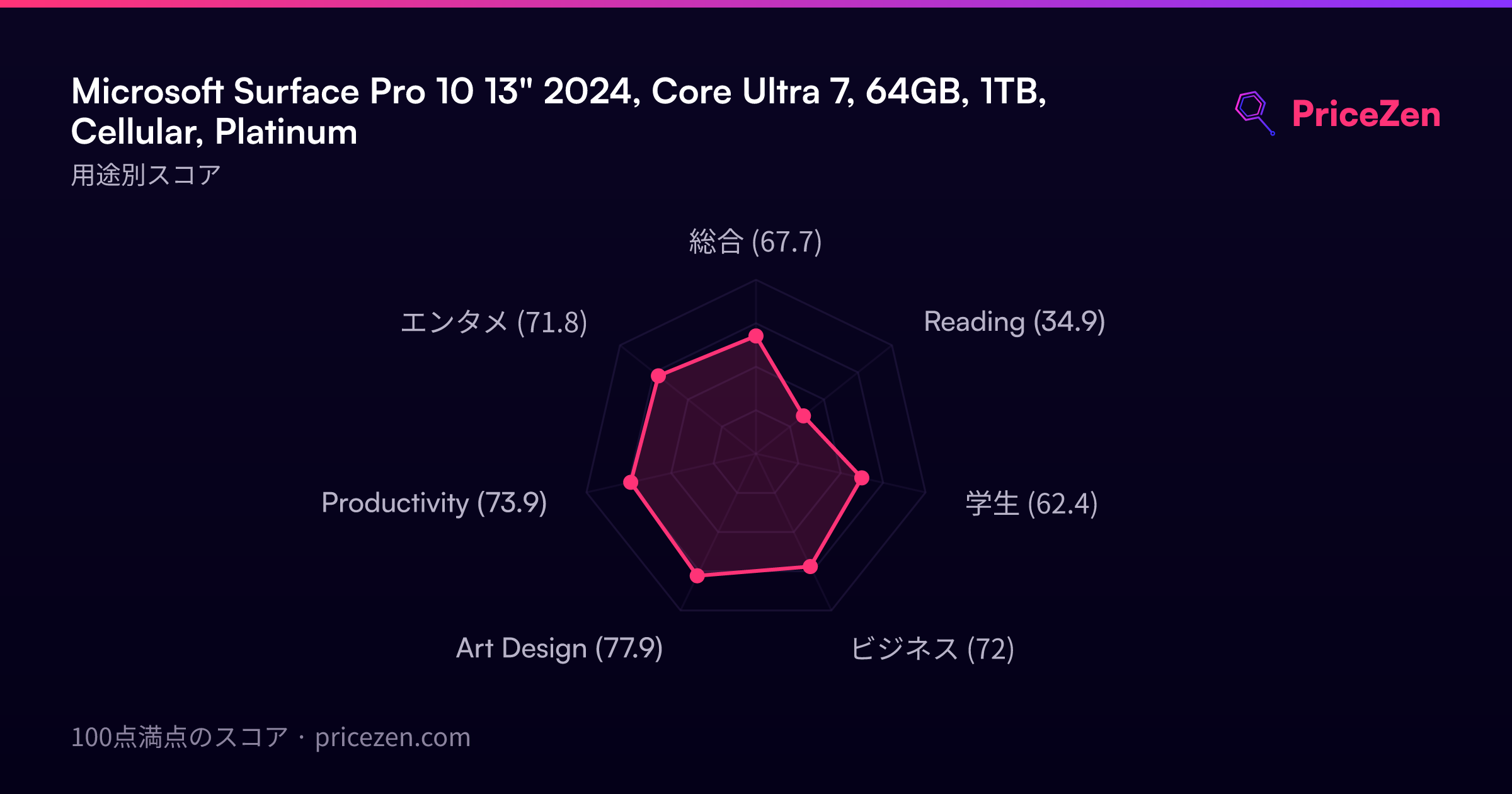
- 総合67.7
- Reading34.9
- 学生62.4
- ビジネス72
- Art Design77.9
- Productivity73.9
- エンタメ71.8