Lenovo ThinkPad X1 Carbon 14" G13 2025, Core Ultra 7 255U, 32GB, 512GB SSD, Black
The Intel Core Ultra 7-255U 12-core processor and 32GB LPDDR5X RAM handle demanding business multitasking, while the 500-nit 14-inch IPS display stays readable in bright offices. The 57Wh battery and Wi-Fi 6E support reliable all-day work, and the 1.92kg chassis keeps it portable for frequent travel. Best for business professionals who need a durable, secure laptop for productivity and video conferencing, not for gaming.


概要
The 30-Second Version
The X1 Carbon Gen 13 is featherlight with a legendary keyboard and all-day battery, but Lenovo skimped on storage and the display. It's the best ultraportable for typists who travel, and a tough sell for everyone else.
Pros & Cons
長所
- Ridiculously light, under 1kg is no joke 92nd
- Keyboard is still the gold standard for laptops 91st
- Battery life is genuinely excellent 82nd
- 32GB RAM means zero multitasking anxiety 81st
- Port selection is actually useful, HDMI and USB-A included
短所
- 512GB SSD is stingy at this price
- 60Hz display feels dated next to 120Hz OLED rivals
- Speakers are mediocre, Dolby Atmos marketing aside
- Touchpad is subpar for a flagship ThinkPad
- Price is brutal, 14th percentile for affordability
オーナーの声
The Word on the Street
購入者の評価が時間とともにどう変化したか
独自顧客が実際にレビューを書いた時期に基づいています。発売当初の高評価が続いたかどうかがわかります。
書かれたレビュー 5件、2025年:星なし 5件
各点は書かれたレビュー1件で、書かれた月に置いています。満足 = 4〜5★、普通 = 3★、不満 = 1〜2★。
実証データ
Performance
The Core Ultra 7-255U with 32GB of LPDDR5X chews through office work, browser tabs, and dev tasks without breaking a sweat. Our database puts the RAM at the 91st percentile, which means this thing multitasks like a champ. The integrated Intel graphics are fine for everything except gaming, which lands at a sad 20.1 out of 100. That's not a surprise for a business ultraportable, but don't expect to do anything more demanding than light photo editing. The 512GB SSD is the real letdown, sitting in the 36th percentile. For this price, 1TB should be the floor.
Specifications
Full Specifications
Processor
| CPU | Intel Core Ultra 7 255U |
| Cores | 12 |
| Frequency | 2.0 GHz |
| L3 Cache | 12 MB |
Graphics
| GPU | Intel Graphics |
| Type | Integrated |
Memory & Storage
| RAM | 32 GB |
| RAM Generation | LPDDR5X |
| Storage | 512 GB |
| Storage Type | NVMe SSD |
Display
| Size | 14" |
| Resolution | 1920x1200 (Full HD) |
| Panel | IPS |
| Refresh Rate | 60 Hz |
| Brightness | 500 nits |
| Color Gamut | 100% sRGB |
Connectivity
| USB-C Ports | 2 |
| USB Ports | 2 |
| Thunderbolt | Thunderbolt 4 |
| HDMI | HDMI 2.1 |
| Wi-Fi | Wi-Fi 6E |
| Bluetooth | Bluetooth 5.3 |
Physical
| Weight | 1.0 kg / 2.2 lbs |
| Battery | 57 Wh |
| OS | Windows 11 Pro |
vs Competition
The obvious rival is the MacBook Pro M4 Max, which destroys this thing on raw performance and display quality but costs even more and weighs more. If you want a Windows machine with actual gaming chops, the ASUS ROG Zephyrus G14 or HP OMEN Transcend 14 will run circles around the X1 Carbon's integrated graphics, though they're heavier and less business-focused. The X1 Carbon wins on portability and keyboard feel, but it's not the performance pick. For pure office work and travel, it's hard to beat. For anything else, look elsewhere.
| Spec | Lenovo ThinkPad X1 Carbon 14" G13 | HP ZBook 14" Ultra G1a | ASUS ROG Strix G16 G615LP-XS97 | MSI Vector VECTOR16HXA2400 | Samsung Galaxy Book5 Pro 14" NP944XHA-KG2US | GEEKOM GeekBook X14 Pro NX14CM |
|---|---|---|---|---|---|---|
| CPU | Intel Core Ultra 7 255U | AMD Ryzen AI Max Pro 390 | Intel Core Ultra 9 275HX | Intel Core Ultra 9 275HX | Intel Core Ultra 7 256V | Intel Core Ultra 9 185H |
| RAM (GB) | 32 | 64 | 32 | 16 | 16 | 32 |
| Storage (GB) | 512 | 4096 | 2048 | 1024 | 512 | 2048 |
| Screen | 14" 1920x1200 | 14" 1920x1200 | 16" 2560x1600 | 16" 2560x1600 | 14" 2880x1800 | 14" 2880x1800 |
| GPU | Intel Graphics | AMD Radeon 8050S | NVIDIA GeForce RTX 5070 | NVIDIA GeForce RTX 5080 | Intel Arc Graphics | Intel Arc Graphics |
| OS | Windows 11 Pro | Windows 11 Pro | Windows 11 Pro | Windows 11 Home | Windows 11 Pro | Windows 11 Pro |
| Weight (kg) | 1 | 2.5 | 2.7 | 2.7 | 1.2 | 1 |
| Battery (Wh) | 57 | 74 | 90 | - | 63 | 72 |
| Compare | Compare | Compare | Compare | Compare |
| 製品 | CPU | GPU | RAM | ポート | 画面 | 携帯性 | ストレージ | User Sentiment | 信頼性 | Affordability |
|---|---|---|---|---|---|---|---|---|---|---|
| Lenovo ThinkPad X1 Carbon 14" G13 | 61.5 | 57.1 | 91.2 | 77.2 | 77.3 | 91.5 | 51 | 81.4 | 81.8 | 15.2 |
| HP ZBook 14" Ultra G1a Compare | 92.8 | 86.2 | 99.2 | 79.9 | 74 | 61.6 | 98.5 | 99 | 33.5 | 2.9 |
| ASUS ROG Strix G16 G615LP-XS97 Compare | 97.2 | 93.6 | 86.4 | 98.5 | 92 | 10.6 | 94 | 0 | 60.4 | 11.6 |
| MSI Vector VECTOR16HXA2400 Compare | 97.2 | 98.4 | 59.8 | 89.3 | 90 | 9.9 | 65.3 | 95.9 | 60.4 | 8.8 |
| Samsung Galaxy Book5 Pro 14" NP944XHA-KG2US Compare | 68.6 | 69.8 | 50 | 83.2 | 91.6 | 89.4 | 51 | 0 | 81.8 | 37.5 |
| GEEKOM GeekBook X14 Pro NX14CM Compare | 85.1 | 69.8 | 90.4 | 63.8 | 96.2 | 91.9 | 89.8 | 0 | 4 | 39.2 |
価格
Value & Pricing
This is where it gets painful. US pricing swings from USD 2,070 to USD 2,699 depending on the vendor, and the cheapest listing is the one to hunt down. In Canada you're looking at CAD 2,374 to CAD 2,900. For that money you're getting a phenomenal ultraportable, but the 512GB SSD and 60Hz screen make it feel like Lenovo is charging MacBook Pro money for a machine that cuts corners on storage and display. If you can find it at the low end of that range, it's defensible. At the high end, you're overpaying.
Amazon 1件の価格 最安 ¥575,785
価格履歴
詳細情報
Overview
The ThinkPad X1 Carbon Gen 13 is the laptop you buy when you're done messing around. It's absurdly light, the keyboard is still the best in the business, and the battery actually lasts. But Lenovo made some weird choices here, like a 512GB SSD in a machine this expensive and a 60Hz panel when competitors are shipping 120Hz OLEDs. The core experience is fantastic. The spec sheet just has a few head-scratchers.
Common Questions
Q: Is the X1 Carbon Gen 13 good for gaming?
No. The integrated Intel graphics score a 20.1 out of 100 for gaming in our database. It'll handle Solitaire and maybe some light indie titles, but anything 3D is going to struggle. Get a Zephyrus G14 if you want to game.
Q: How much storage does it actually have?
512GB, and that's the only option on this config. For a laptop this expensive, that's disappointing. You'll want an external drive or cloud storage if you keep a lot of files locally.
Q: Is the display good enough for photo editing?
It's a 1920x1200 IPS panel with 500 nits and 100% sRGB, so colors are accurate and it gets bright enough for most rooms. But it's 60Hz, so scrolling feels less smooth than on 120Hz panels. Fine for work, not a creator's dream.
Who Should Skip This
If you need serious graphics performance or a high-refresh display, this isn't your laptop. Go get an ASUS ROG Zephyrus G14 or a MacBook Pro instead. And if you're on a budget, the X1 Carbon's pricing will make you wince. This is a premium travel machine for people who type all day, not a do-everything powerhouse.
Verdict
The X1 Carbon Gen 13 is a fantastic ultraportable with a few frustrating compromises. If you live in Excel, Slack, and a browser, and you travel constantly, this is one of the best machines you can buy. The keyboard alone is worth the price of admission for heavy typists. But the 512GB SSD and 60Hz screen are hard to swallow at this price point. Buy it for the weight and the keyboard. Just know you're paying a premium for portability, not for specs.
Usage Scores
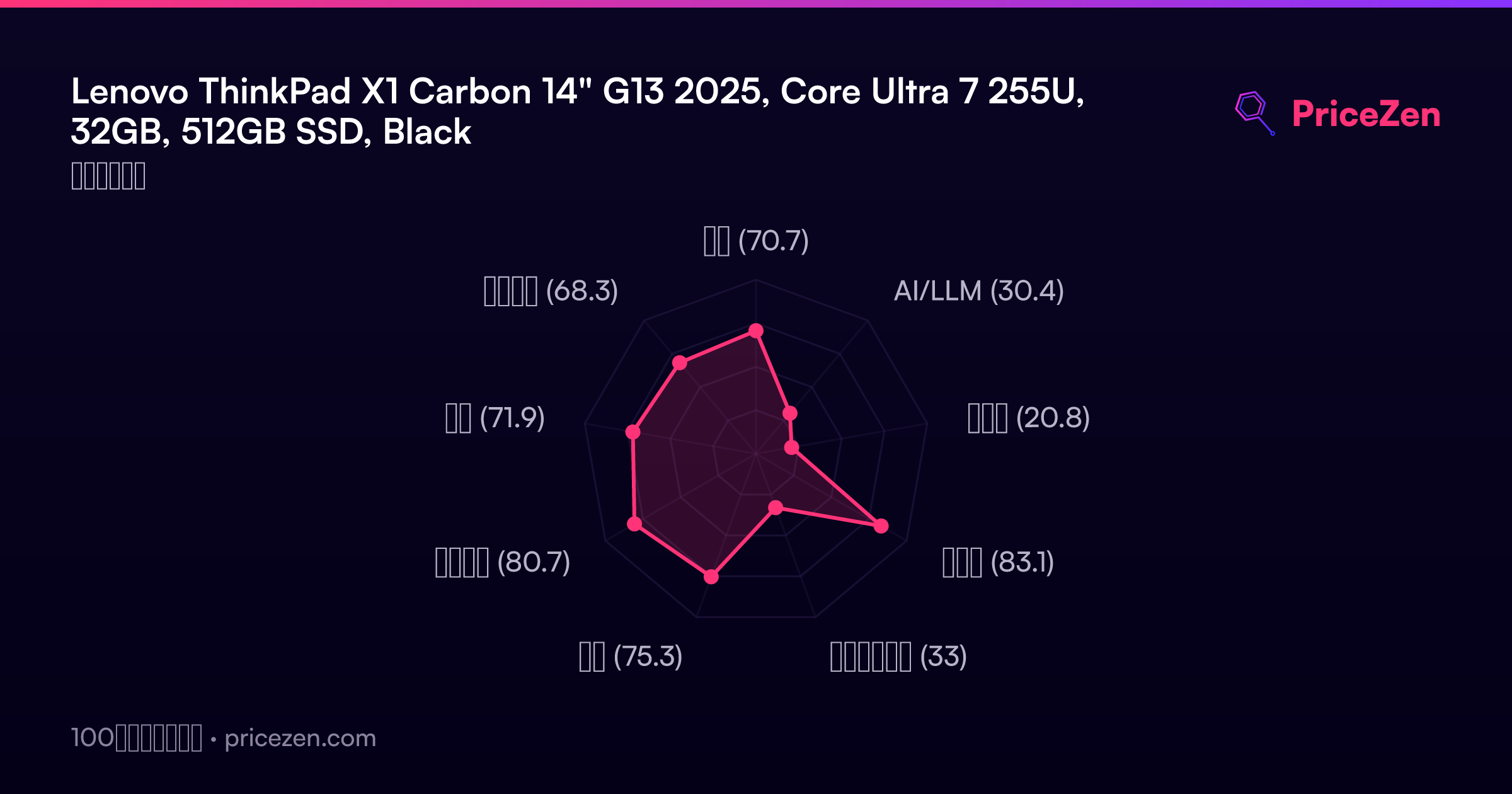
- 総合70.7
- AI/LLM30.4
- ゲーム20.8
- 携帯性83.1
- クリエイター33
- 学生75.3
- ビジネス80.7
- 開発71.9
- エンタメ68.3