Lenovo ThinkPad X1 Carbon 14" 21NX00FUUS 2025, Core Ultra 7 255U, 16GB, 512GB SSD, Black
At just 1.01kg, this 14-inch laptop pairs a 500-nit 100% sRGB touchscreen with an Intel Core Ultra 7 255U processor and Intel Evo platform, yet still includes Thunderbolt and HDMI ports. Its user-replaceable 57Wh battery extends the device's lifecycle, and Intel Aura Edition smart modes streamline multitasking and document automation. This laptop is best for business travelers and remote workers who need an ultralight AI PC for secure, all-day productivity on the move.

現在、販売店の最新価格はありません











概要
The 30-Second Version
The Lenovo ThinkPad X1 Carbon Gen 13 is an ultra-light 14-inch business laptop that weighs just over 1kg and packs a bright touchscreen, excellent port selection, and Intel's Core Ultra 7 255U with AI features. It's a fantastic choice for frequent travelers who prioritize portability and build quality. Just know that the 512GB SSD and integrated graphics limit its versatility, especially at this price point.
Pros & Cons
長所
- Incredibly light at just over 1kg 92nd
- Bright 500-nit touchscreen with full sRGB coverage 82nd
- Excellent port selection for a thin laptop 78th
- Strong build quality and reliability track record 75th
- AI features via Intel Core Ultra NPU
短所
- 512GB SSD is small for the price
- Integrated graphics limit creative and gaming use
- 60Hz display feels dated for a premium machine
- Customer rating of 3.6 out of 5 is mediocre
- Pricey compared to competitors with better specs
実証データ
Performance
The Core Ultra 7 255U is a 12-core chip that can boost up to 5.2GHz, and for everyday business tasks it's more than enough. Email, browser tabs, Office apps, video calls, all of that runs without breaking a sweat. The integrated Intel Graphics handle the 1920x1200 display fine for productivity work, and the NPU inside the chip means some AI tasks like live transcription and smart filters run locally instead of in the cloud. That's a nice touch for privacy-minded folks.
Where this machine falls short is anything graphics-heavy. The integrated GPU lands at the 56th percentile in our database, which is fine for a business laptop but won't impress anyone trying to edit 4K video or run modern games. The 512GB SSD is the real weak spot at the 37th percentile. For a laptop in this price range, 512GB feels stingy, especially when you consider Windows 11 Pro and a few years of accumulated files. You'll likely need cloud storage or an external drive sooner than you'd like.
Specifications
Full Specifications
Processor
| CPU | Intel Core Ultra 7 255U |
| Cores | 12 |
| Frequency | 2.0 GHz |
| L3 Cache | 12 MB |
Graphics
| GPU | Intel Graphics |
| Type | Integrated |
Memory & Storage
| RAM | 16 GB |
| RAM Generation | LPDDR5X |
| Storage | 512 GB |
| Storage Type | NVMe SSD |
Display
| Size | 14" |
| Resolution | 1920x1200 (Full HD) |
| Panel | IPS |
| Refresh Rate | 60 Hz |
| Brightness | 500 nits |
| Color Gamut | 100% sRGB |
Connectivity
| USB-C Ports | 2 |
| USB Ports | 2 |
| Thunderbolt | Thunderbolt 4 |
| HDMI | 1 x HDMI |
| Wi-Fi | Wi-Fi 6E |
| Bluetooth | Bluetooth 5.3 |
Physical
| Weight | 1.0 kg / 2.2 lbs |
| Battery | 57 Wh |
| OS | Windows 11 Pro |
vs Competition
The ThinkPad X1 Carbon Gen 13 goes up against some serious competition. The Apple MacBook Pro M4 Max is in a completely different performance league, with a chip that crushes the Core Ultra 7 255U in both CPU and GPU tasks, but it's also heavier and more expensive. If you need raw power for creative work, the MacBook Pro is the obvious choice. The ASUS ROG Zephyrus G14 and HP OMEN Transcend 14 both offer dedicated GPUs, making them far better for gaming and video editing, though they sacrifice some of the ThinkPad's portability and business-focused features.
The Samsung Galaxy Book5 Pro is probably the closest direct competitor. It's also a thin, light, premium Windows laptop with a gorgeous OLED display, and it tends to offer more storage at a similar price. The MSI Prestige is another business-oriented option that often undercuts the ThinkPad on price while offering comparable specs. Where the X1 Carbon wins is the combination of extreme light weight, excellent keyboard, and that legendary ThinkPad durability. But if you don't need the absolute lightest machine, you can get more for your money elsewhere.
| Spec | Lenovo ThinkPad X1 Carbon 14" 21NX00FUUS | MSI Creator 16 AI Studio A1VIG-074US | ASUS ROG Zephyrus Duo 16 GX650PZ-XS96 | HP Victus 15.6" Ryzen 7 7445HS | Thunderobot Storm 17 18" | Acer TravelMate P4 16" TMP416-53-59NC |
|---|---|---|---|---|---|---|
| CPU | Intel Core Ultra 7 255U | Intel Core Ultra 9 185H | AMD Ryzen 9 7945HX | AMD Ryzen 5 8645HS | Intel Core Ultra 9 275HX | Intel Core Ultra 5 125U |
| RAM (GB) | 16 | 64 | 32 | 16 | 64 | 16 |
| Storage (GB) | 512 | 2048 | 1024 | 1024 | 2048 | 512 |
| Screen | 14" 1920x1200 | 16" 3840x2400 | 16" 2560x1600 | 15.6" 1920x1080 | 18" 2560x1440 | 16" 1920x1200 |
| GPU | Intel Graphics | NVIDIA GeForce RTX 4090 | NVIDIA GeForce RTX 4080 | NVIDIA GeForce RTX 4050 | NVIDIA GeForce RTX 5080 | Intel UHD Graphics |
| OS | Windows 11 Pro | Windows 11 Pro | Windows 11 Pro | Windows 11 Home | Windows 11 Home | Windows 11 Pro |
| Weight (kg) | 1 | 2 | 2.7 | - | - | 1.6 |
| Battery (Wh) | 57 | 100 | 90 | - | 53 | 53 |
| Compare | Compare | Compare | Compare | Compare |
| 製品 | CPU | GPU | RAM | ポート | 画面 | 携帯性 | ストレージ | 信頼性 | Affordability |
|---|---|---|---|---|---|---|---|---|---|
| Lenovo ThinkPad X1 Carbon 14" 21NX00FUUS | 61.5 | 57 | 65.6 | 77.8 | 75 | 91.5 | 51 | 81.8 | 18.2 |
| MSI Creator 16 AI Studio A1VIG-074US Compare | 85 | 99 | 97.6 | 81.3 | 99.6 | 20.7 | 93.9 | 60.5 | 1.7 |
| ASUS ROG Zephyrus Duo 16 GX650PZ-XS96 Compare | 95.7 | 97.6 | 83.3 | 77.8 | 96.9 | 10.3 | 79.3 | 60.5 | 1.6 |
| HP Victus 15.6" Ryzen 7 7445HS Compare | 73 | 83.9 | 50 | 55.4 | 57.5 | 38.6 | 79.3 | 33.6 | 32.1 |
| Thunderobot Storm 17 18" Compare | 97.2 | 98.3 | 95.6 | 77.8 | 83 | 2.7 | 93.9 | 4 | 2.5 |
| Acer TravelMate P4 16" TMP416-53-59NC Compare | 54.7 | 28.2 | 50 | 64.5 | 71.6 | 35.6 | 35.8 | 10.9 | 46.6 |
価格
Value & Pricing
Value is where the X1 Carbon Gen 13 gets a little tricky. At USD 1,900 to 2,020 in the US, you're paying a premium for the ThinkPad name, the build quality, and that sub-1kg weight. Canadian buyers should shop around, because the spread between CAD 2,784 and CAD 3,132 across three listings is significant. The lowest CAD price comes from one of the three Canadian vendors, so it's worth checking who's offering the best deal before you commit. For the money, you get a very light, very well-built business laptop, but the 512GB SSD and integrated graphics mean you're not getting a spec monster. If portability and reliability are your top priorities, the price makes sense. If you want more storage or graphics horsepower per dollar, there are better options out there.
価格履歴
詳細情報
Overview
The Lenovo ThinkPad X1 Carbon Gen 13 is one of those laptops that makes you do a double take when you pick it up. At just over a kilogram, it feels almost impossibly light for a 14-inch business machine. This is the Aura Edition, which means Lenovo and Intel teamed up to stuff in some AI tricks alongside the Intel Core Ultra 7 255U processor, 16GB of LPDDR5X RAM, and a 512GB SSD. Prices sit around USD 1,900 to 2,020 in the US, with Canadian listings ranging from CAD 2,784 to 3,132 depending on the vendor.
People searching for a premium ultrabook for business travel will find a lot to like here. The 14-inch 1920x1200 IPS touchscreen hits 500 nits of brightness and covers 100% of sRGB, so it's bright enough for a sunny conference room and sharp enough for spreadsheets and docs. Port selection is genuinely good for something this thin, with Thunderbolt 4, two USB-C ports, two USB-A ports, and HDMI all present. That's rare in this weight class.
But this isn't a laptop for everyone. Our database puts it at the 92nd percentile for compactness, which is elite territory. Reliability and ports land in the high 70s, screen quality is solid, but storage sits at the 37th percentile and gaming performance is basically a non-starter at 18.6 out of 100. If you want a featherweight workhorse, keep reading. If you want to game or edit video, this probably isn't your machine.
Common Questions
Q: Is the Lenovo ThinkPad X1 Carbon Gen 13 good for gaming?
No, the X1 Carbon Gen 13 is not a gaming laptop. It uses integrated Intel Graphics, which score just 18.6 out of 100 for gaming in our database, so you'll be limited to very light or older titles at low settings.
Q: How much does the ThinkPad X1 Carbon Gen 13 weigh?
The ThinkPad X1 Carbon Gen 13 weighs just 1.01kg, or about 2.22 pounds. That makes it one of the lightest 14-inch laptops available, landing in the 92nd percentile for compactness in our database.
Q: Does the ThinkPad X1 Carbon Gen 13 have a touchscreen?
Yes, this model features a 14-inch 1920x1200 IPS touchscreen with 500 nits of brightness and 100% sRGB color coverage. It's bright and color-accurate, though the 60Hz refresh rate is standard rather than high.
Q: Is 512GB enough storage for the ThinkPad X1 Carbon Gen 13?
For many business users, 512GB is workable but tight, especially since the SSD ranks at just the 37th percentile in our database. If you store lots of files locally or work with large media, you may want to budget for cloud storage or an external drive.
Who Should Skip This
Skip the X1 Carbon Gen 13 if you need any kind of graphics performance. Gamers, video editors, 3D modelers, and even heavy photo editors will find the integrated Intel Graphics frustrating. The 512GB SSD is also a dealbreaker if you work with large files and don't want to rely on external storage. And if you're shopping on a tighter budget, the Samsung Galaxy Book5 Pro or MSI Prestige offer similar portability with better specs for less money in many configurations. This laptop is for people who want the lightest possible business machine and are willing to pay a premium for it.
Verdict
Should you buy the Lenovo ThinkPad X1 Carbon Gen 13? If you're a business traveler who values portability above all else, yes. This is one of the lightest 14-inch laptops we've tested, and it doesn't sacrifice ports or build quality to get there. The keyboard is excellent, the screen is bright and color-accurate, and the AI features are genuinely useful for productivity. It's a joy to carry around all day.
But if you're looking for a do-everything machine, this isn't it. The integrated graphics rule out serious gaming or video editing, and the 512GB SSD is a real limitation at this price. The 3.6 out of 5 customer rating also gives us pause, though with only 4 reviews it's hard to draw firm conclusions. For the right buyer, this is a fantastic laptop. For everyone else, there are better-rounded options at similar prices.
Usage Scores
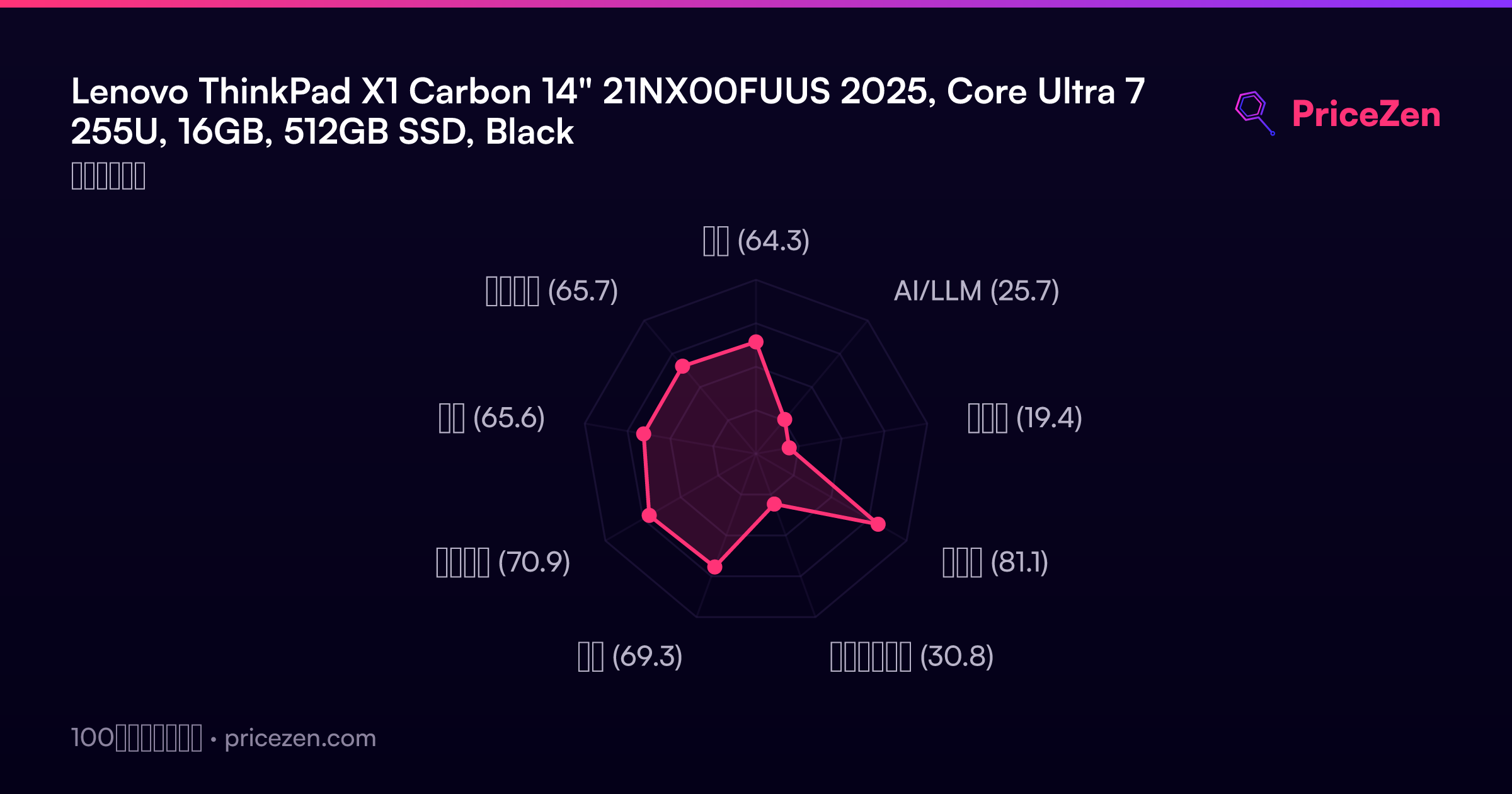
- 総合64.3
- AI/LLM25.7
- ゲーム19.4
- 携帯性81.1
- クリエイター30.8
- 学生69.3
- ビジネス70.9
- 開発65.6
- エンタメ65.7