ASUS ProArt PA279CRV 27" Black 2023

Faithful color for photo and video edits verified Nov 29
79/100 overall score 4.3 average from 715 owner ratings
- Screen
- 27"
- Resolution
- 3840 x 2160
- Panel
- IPS
- Refresh
- 60 Hz
- Response time
- 5 ms
- Adaptive sync
- Adaptive-Sync
- HDR
- HDR10
Compare prices at 1 store
Cheapest first. New, refurbished and bundled offers are kept apart, so you compare like with like.
| Store | Sold by | Colour and condition | Price | vs lowest | Last checked | Link |
|---|---|---|---|---|---|---|
| New1 offerSingle unit | ||||||
| Not checked in the last 7 days, so these prices may have changed | ||||||
| Amazon | Not known | Not listed | ¥83,201 | Nov 1 | Go to store | |
 Source: PriceZen, checked Nov 1, 2026
A price counts as current when we checked it in the last 7 days. “Marketplace seller” means a third-party seller on that store, not the store itself.
Price history
Checked that dayNot checked that day, still on offer
Source: PriceZen, checked Nov 2, 2026











Snapshot
The 30-Second Version
A color-accurate 4K workhorse that won't empty your wallet if you shop smart. Just don't expect it to handle gaming without feeling like molasses.
Pros & Cons
Pros
- Dead-on factory calibration that professionals can trust 96th
- Covers 99% of both Adobe RGB and DCI-P3 gamuts 95th
- USB-C with 65W power delivery makes it a docking station for your laptop 91st
- Excellent ergonomic stand adjusts every which way 87th
Cons
- 60Hz is a yawn for anything but static work
- HDR400 is barely HDR; don't expect impressive highlights
- IPS glow is present, black levels can't touch OLED
- Built-in speakers sound like a tin can
What owners think
The Word on the Street
- Owners can't stop talking about the amazing out-of-the-box color; multiple pros say it requires almost no adjustment.
- The built-in speakers are a running joke in the community; everyone just plugs in headphones or externals.
- Some users grumble about IPS glow in dark scenes, but that's typical for this panel tech.
How owner sentiment changed over time
ExclusiveBased on when customers actually wrote their reviews - so you can see whether early praise held up.
Happy owners: 73% lately, 43% in Apr 2023 – Mar 2025
Too few reviews to call that a change.
Across all 715 store ratings: 4.3★. Most owners rate without writing a review. The chart counts the 38 written reviews with stars and their own date.
26 written reviews without stars are left out of the trend.
Show the numbers
| Period | Reviews | Happy | Mixed | Unhappy | Happy share |
|---|---|---|---|---|---|
| Apr 2023 – Mar 2025 | 14 | 6 | 1 | 7 | 43% |
| Apr 2025 – Jun 2026 | 13 | 7 | 1 | 5 | 54% |
| Jul – Oct 2026 | 11 | 8 | 2 | 1 | 73% |
- Jul – Sep 20268 of 10 happy
Buyers praised color accuracy, sharpness, and ergonomics, but several reported DisplayPort sleep/wake issues and random blackouts, with one noting slow wake-up.
- Excellent color accuracy and resolution, ideal for photo editing and matching Apple displays.
- DisplayPort connection causes sleep/wake failures, requiring HDMI or adapter workarounds.
- Ergonomic stand with rotation, tilt, and height adjustments, but wake-up from sleep is slow.
- Monitor randomly goes dark during use, causing frustration.
- Apr – Jun 20263 of 5 happy · 6 without stars
Buyers praised the display's resolution, color accuracy, and value for photo/video editing, but one reported slow startup from sleep mode.
- High resolution and color accuracy praised for photo editing and color grading.
- Great value for price, with features exceeding expectations.
- Sleek design with narrow bezel and small footprint saves desk space.
- Slow startup from sleep mode, taking 20-30 seconds, compared to Apple display.
- Jan – Mar 20262 of 4 happy · 14 without stars
Buyers praise color accuracy, brightness, and value, but several report connectivity issues with USB-C, firmware update problems, and calibration limitations on macOS.
- Color accuracy, brightness, and image quality are consistently praised, especially for photo editing.
- USB-C connection is inconsistent, causing signal drops or failure to connect, especially on macOS.
- Calibration with external devices like Calibrite is not supported, limiting professional use.
- Firmware updates are problematic for some, causing wake delays or not loading, though updates can resolve issues.
Each column joins calendar quarters until it holds at least 10 reviews with stars and their own date. Happy = 4-5★, mixed = 3★, unhappy = 1-2★. Period summaries are in English.
The proof
Performance
What surprised us is how well the color stacks up against monitors costing twice as much. With 99% Adobe RGB and DCI-P3 coverage and a Delta E under 2, it's a top-tier performer for creative tasks (96th percentile color accuracy in our database). The 60Hz refresh rate and 5ms response time, on the other hand, are a letdown if you ever stray from Photoshop. It's firmly in the bottom third of monitors we've tested for sheer speed, so don't expect fluid motion outside your timeline scrubbing.
Specifications
Full Specifications
Display
| Size | 27" |
| Resolution | 3840x2160 (4K UHD) |
| Panel Type | IPS |
| Aspect Ratio | 16:9 |
| Curved | No |
| Screen Finish | matte |
Performance
| Refresh Rate | 60 Hz |
| Response Time | 5 |
| Adaptive Sync | Adaptive-Sync |
Color & HDR
| Brightness | 400 nits |
| Color Gamut | 100% sRGB, 99% Adobe RGB, 99% DCI-P3 |
| Color Depth | 10-bit |
| HDR | HDR10 |
| HDR Support | HDR10 |
Connectivity
| HDMI Ports | 2 |
| DisplayPort | 1 |
| USB-C | 2 |
| Speakers | Yes |
| Headphone Jack | Yes |
Ergonomics
| Height Adjustable | Yes |
| Tilt | Yes |
| Swivel | Yes |
| Pivot | Yes |
| VESA Mount | 100x100 |
Features
| Webcam | No |
| Touchscreen | No |
| PIP/PBP | Yes |
| Power | 26 |
| Weight | 5.8 kg / 12.7 lbs |
vs Competition
If color-critical work is your world, the ASUS goes toe-to-toe with Dell's UltraSharp U4025QW but in a more standard 27-inch 4K format and at a much friendlier price. For mixed use where you also game or watch movies, the ASUS ROG Strix XG27UCDMG, MSI MAG 271QPX QD-OLED E2, or Samsung Odyssey G60SD will smoke this thing in contrast and refresh rate, though you'll pay more and sacrifice a bit of that Delta E <2 precision. If you want a massive ultrawide, the Samsung Odyssey Neo G9 G95NC is a different beast entirely, and the LG UltraGear 45GX950A-B brings a curved OLED experience that makes this ASUS feel tiny. Pick your poison, but if editing pays the bills, this ASUS is the smarter bet.
| Spec | ASUS ProArt PA279CRV 27" | LG UltraGear 39" | BenQ PD3220U 32" | Samsung Odyssey Ark 2nd Gen 55" | Gigabyte M Series M32U 31.5" | Dell UltraSharp U4320Q 27" |
|---|---|---|---|---|---|---|
| Screen Size | 27 | 39 | 32 | 55 | 31.5 | 27 |
| Resolution | 3840 x 2160 | 3440 x 1440 | 3840 x 2160 | 3840 x 2160 | 3840 x 2160 | 3840 x 2160 |
| Panel Type | IPS | OLED | IPS | Mini-LED | IPS | IPS |
| Refresh Rate | 60 | 240 | 60 | 165 | 144 | 60 |
| Response Time Ms | 5 | 0.03 | 5 | 1 | 1 | 5 |
| Adaptive Sync | Adaptive-Sync | FreeSync Premium Pro | - | FreeSync Premium Pro | FreeSync Premium Pro | - |
| Hdr | HDR10 | DisplayHDR True Black 400 | HDR10 | HDR10+ | HDR400 | HDR400 |
| Compare | Compare | Compare | Compare | Compare |
| Product | Color | Portability | Display | Feature | User Sentiment | Ergonomic | Performance | Connectivity | Social Proof |
|---|---|---|---|---|---|---|---|---|---|
| ASUS ProArt PA279CRV 27" | 96.2 | 76.5 | 87 | 85 | 29.1 | 90.7 | 35.7 | 95.3 | 67.5 |
| LG UltraGear 39" Compare | 63.3 | 49.3 | 84 | 96.3 | 0 | 66.8 | 97.9 | 81 | 0 |
| BenQ PD3220U 32" Compare | 88.6 | 81.4 | 95.1 | 85 | 0 | 90.7 | 22.3 | 96.9 | 0 |
| Samsung Odyssey Ark 2nd Gen 55" Compare | 98.4 | 20.7 | 91.5 | 96.3 | 10.4 | 29.9 | 77 | 81 | 75.1 |
| Gigabyte M Series M32U 31.5" Compare | 89.9 | 62.8 | 87 | 85 | 0 | 73.4 | 72.6 | 87.4 | 0 |
| Dell UltraSharp U4320Q 27" Compare | 91 | 82.7 | 87 | 85 | 0 | 90.7 | 22.3 | 96.9 | 0 |
Price
Value & Pricing
You can find this monitor anywhere from $355 to over $1,200, which is absurd. If you're paying more than $450, you're overpaying, so shop around and snag one from a retailer with the lower price. At the low end, it's a steal for the color accuracy and connectivity you get.
Read more
Overview
The ASUS ProArt PA279CRV is the monitor you buy when color accuracy matters more than flashy specs. This thing is built for photographers, video editors, and designers who need 4K resolution with dead-on factory calibration, and it delivers that without the eye-watering price tag some pro displays carry. It's not fast, it's not great for gaming, and HDR is a bit of a joke here, but for static professional work, it's one of the best values on the market right now.
Common Questions
Q: Is this monitor good for gaming?
Not at all. 60Hz and 5ms response time are fine for desktop work, but any fast-paced game will look choppy. If you game, grab a 120Hz+ display instead.
Q: Does the USB-C port charge my laptop?
Yes, it pushes up to 65W, so it'll keep most ultrabooks and many 13-inch laptops charged while you're working over a single cable.
Q: Is HDR worth using on this monitor?
Barely. VESA DisplayHDR 400 is the minimum. It'll accept an HDR signal but won't give you the brightness or deep blacks that make HDR pop. Treat it as SDR+.
Who Should Skip This
If you're a gamer, the 60Hz refresh rate here is a dealbreaker, go grab an LG UltraGear 27GX790A-B with 240Hz. Or if you're a movie buff craving inky blacks, an OLED like the Alienware AW-Series QD-OLED will blow this away for immersion.
Verdict
For creative pros who need a color-accurate 4K panel and don't want to spend a fortune, the ASUS ProArt PA279CRV is a no-brainer. It's not perfect, and the price spread is wider than ever, but at its best price, the flaws are easy to shrug off. Just make sure you don't need high refresh rates.
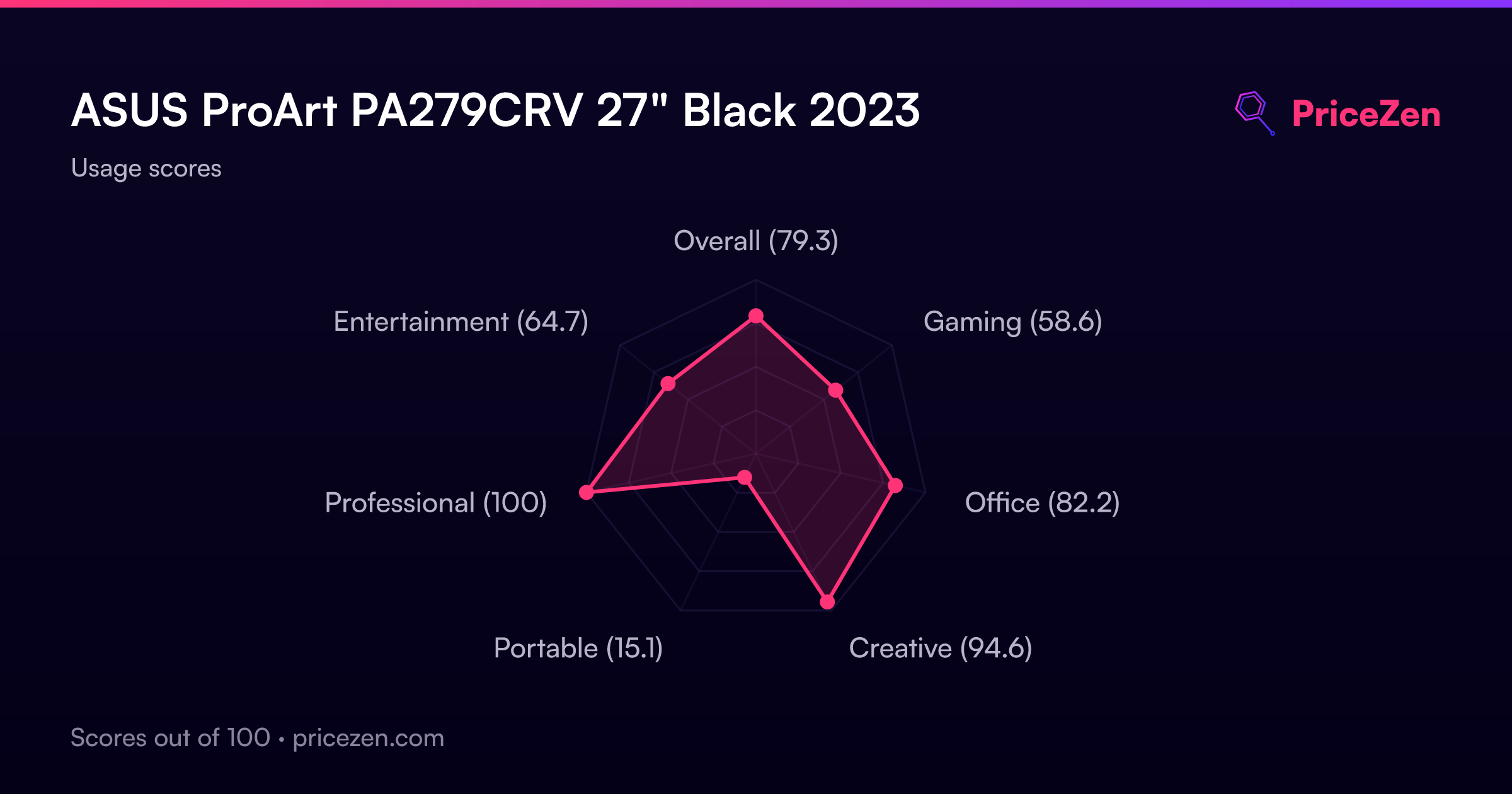
Usage Scores
- Overall79.3
- Gaming58.6
- Office82.2
- Creative94.6
- Portable15.1
- Professional100
- Entertainment64.7