ASUS ProArt PA279CRV 27" Black 2023
Calman認証済みの99% DCI-P3カバー率とDelta E <2の工場出荷時キャリブレーションにより、箱から出してすぐに色精度が重要な作業に対応できます。USB-C 96W給電とデイジーチェーン対応DisplayPortを備え、デュアルモニター環境をすっきりと構築できる接続性の高さが際立ちます。このモニターは、厳密な色再現と4K解像度を求めるフォトグラファーやビデオ編集者に最適です。

現在、販売店の最新価格はありません


概要
The 30-Second Version
A color-accurate 4K workhorse that won't empty your wallet if you shop smart. Just don't expect it to handle gaming without feeling like molasses.
Pros & Cons
長所
- Dead-on factory calibration that professionals can trust 96th
- Covers 99% of both Adobe RGB and DCI-P3 gamuts 95th
- USB-C with 65W power delivery makes it a docking station for your laptop 91st
- Excellent ergonomic stand adjusts every which way 88th
短所
- 60Hz is a yawn for anything but static work
- HDR400 is barely HDR; don't expect impressive highlights
- IPS glow is present, black levels can't touch OLED
- Built-in speakers sound like a tin can
オーナーの声
The Word on the Street
購入者の評価が時間とともにどう変化したか
独自顧客が実際にレビューを書いた時期に基づいています。発売当初の高評価が続いたかどうかがわかります。
満足した購入者:最近73%、2023/04~2025/03は43%
レビューが少なく、変化とは言えません。
ストア評価全1,183件:4.3★。 多くの購入者はレビューを書かずに評価だけを付けています。 グラフは星と投稿日のある書かれたレビュー38件を数えています。
星のない書かれたレビュー26件は推移に含めていません。
数値を表示
| 期間 | レビュー | 満足 | 普通 | 不満 | 満足の割合 |
|---|---|---|---|---|---|
| 2023/04~2025/03 | 14 | 6 | 1 | 7 | 43% |
| 2025/04~2026/06 | 13 | 7 | 1 | 5 | 54% |
| 2026/07~2026/10 | 11 | 8 | 2 | 1 | 73% |
- 2026/07~2026/0910件中8件が満足
Buyers praised color accuracy, sharpness, and ergonomics, but several reported DisplayPort sleep/wake issues and random blackouts, with one noting slow wake-up.
- Excellent color accuracy and resolution, ideal for photo editing and matching Apple displays.
- DisplayPort connection causes sleep/wake failures, requiring HDMI or adapter workarounds.
- Ergonomic stand with rotation, tilt, and height adjustments, but wake-up from sleep is slow.
- Monitor randomly goes dark during use, causing frustration.
- 2026/04~2026/065件中3件が満足 · 星なし 6件
Buyers praised the display's resolution, color accuracy, and value for photo/video editing, but one reported slow startup from sleep mode.
- High resolution and color accuracy praised for photo editing and color grading.
- Great value for price, with features exceeding expectations.
- Sleek design with narrow bezel and small footprint saves desk space.
- Slow startup from sleep mode, taking 20-30 seconds, compared to Apple display.
- 2026/01~2026/034件中2件が満足 · 星なし 14件
Buyers praise color accuracy, brightness, and value, but several report connectivity issues with USB-C, firmware update problems, and calibration limitations on macOS.
- Color accuracy, brightness, and image quality are consistently praised, especially for photo editing.
- USB-C connection is inconsistent, causing signal drops or failure to connect, especially on macOS.
- Calibration with external devices like Calibrite is not supported, limiting professional use.
- Firmware updates are problematic for some, causing wake delays or not loading, though updates can resolve issues.
各列は、星と投稿日のあるレビューが10件以上になるまで四半期をまとめています。満足 = 4〜5★、普通 = 3★、不満 = 1〜2★。 期間ごとの要約は英語です。
実証データ
Performance
What surprised us is how well the color stacks up against monitors costing twice as much. With 99% Adobe RGB and DCI-P3 coverage and a Delta E under 2, it's a top-tier performer for creative tasks (96th percentile color accuracy in our database). The 60Hz refresh rate and 5ms response time, on the other hand, are a letdown if you ever stray from Photoshop. It's firmly in the bottom third of monitors we've tested for sheer speed, so don't expect fluid motion outside your timeline scrubbing.
Specifications
Full Specifications
Display
| Size | 27" |
| Resolution | 3840x2160 (4K UHD) |
| Panel Type | IPS |
| Aspect Ratio | 16:9 |
| Curved | No |
| Screen Finish | matte |
Performance
| Refresh Rate | 60 Hz |
| Response Time | 5 |
| Adaptive Sync | Adaptive-Sync |
Color & HDR
| Brightness | 400 nits |
| Color Gamut | 100% sRGB, 99% Adobe RGB, 99% DCI-P3 |
| Color Depth | 10-bit |
| HDR | HDR10 |
| HDR Support | HDR10 |
Connectivity
| HDMI Ports | 2 |
| DisplayPort | 1 |
| USB-C | 2 |
| Speakers | Yes |
| Headphone Jack | Yes |
Ergonomics
| Height Adjustable | Yes |
| Tilt | Yes |
| Swivel | Yes |
| Pivot | Yes |
| VESA Mount | 100x100 |
Features
| Webcam | No |
| Touchscreen | No |
| PIP/PBP | Yes |
| Power | 26 |
| Weight | 5.8 kg / 12.7 lbs |
vs Competition
If color-critical work is your world, the ASUS goes toe-to-toe with Dell's UltraSharp U4025QW but in a more standard 27-inch 4K format and at a much friendlier price. For mixed use where you also game or watch movies, the ASUS ROG Strix XG27UCDMG, MSI MAG 271QPX QD-OLED E2, or Samsung Odyssey G60SD will smoke this thing in contrast and refresh rate, though you'll pay more and sacrifice a bit of that Delta E <2 precision. If you want a massive ultrawide, the Samsung Odyssey Neo G9 G95NC is a different beast entirely, and the LG UltraGear 45GX950A-B brings a curved OLED experience that makes this ASUS feel tiny. Pick your poison, but if editing pays the bills, this ASUS is the smarter bet.
| Spec | ASUS ProArt PA279CRV 27" | LG UltraGear 45GX950A-B 45" | MSI MAG 271QPX QD-OLED E2 27" | Gigabyte AORUS FO32U2 32" | Samsung Odyssey Neo G95NC 57" | Dell Alienware AW2523HF 24.5" |
|---|---|---|---|---|---|---|
| Screen Size | 27 | 45 | 27 | 32 | 57 | 24.5 |
| Resolution | 3840 x 2160 | 5120 x 2160 | 2560 x 1440 | 3840 x 2160 | 7680 x 2160 | 1920 x 1080 |
| Panel Type | IPS | OLED | QD-OLED | OLED | VA | IPS |
| Refresh Rate | 60 | 330 | 240 | 240 | 240 | 360 |
| Response Time Ms | 5 | 0.029999999329447746 | 0.029999999329447746 | 0.029999999329447746 | 1 | 0.5 |
| Adaptive Sync | Adaptive-Sync | FreeSync Premium Pro | FreeSync Premium Pro | FreeSync Premium Pro | FreeSync Premium Pro | FreeSync Premium |
| Hdr | HDR10 | DisplayHDR True Black 400 | DisplayHDR True Black 400 | DisplayHDR True Black 400 | HDR10+ | HDR10 |
| Compare | Compare | Compare | Compare | Compare |
| 製品 | Color | 携帯性 | Display | Feature | User Sentiment | Ergonomic | Performance | Connectivity | ユーザー評価 |
|---|---|---|---|---|---|---|---|---|---|
| ASUS ProArt PA279CRV 27" | 95.7 | 76.5 | 88.4 | 83.7 | 29.3 | 90.8 | 35.9 | 95.4 | 67.3 |
| LG UltraGear 45GX950A-B 45" Compare | 99.4 | 76.5 | 99.7 | 95.7 | 76.5 | 90.8 | 99.4 | 97 | 92.1 |
| MSI MAG 271QPX QD-OLED E2 27" Compare | 99.1 | 57.5 | 77.3 | 83.7 | 95.7 | 90.8 | 98 | 81.2 | 98.9 |
| Gigabyte AORUS FO32U2 32" Compare | 79.3 | 62.9 | 99.1 | 83.7 | 61.1 | 90.8 | 98 | 87.6 | 92.1 |
| Samsung Odyssey Neo G95NC 57" Compare | 96.9 | 27.9 | 99.7 | 95.7 | 29.3 | 73.7 | 87.3 | 93.2 | 74.9 |
| Dell Alienware AW2523HF 24.5" Compare | 82.9 | 57.5 | 38.4 | 66.8 | 89.2 | 90.8 | 94.9 | 87.6 | 96.9 |
価格
Value & Pricing
You can find this monitor anywhere from $355 to over $1,200, which is absurd. If you're paying more than $450, you're overpaying, so shop around and snag one from a retailer with the lower price. At the low end, it's a steal for the color accuracy and connectivity you get.
価格履歴
詳細情報
Overview
The ASUS ProArt PA279CRV is the monitor you buy when color accuracy matters more than flashy specs. This thing is built for photographers, video editors, and designers who need 4K resolution with dead-on factory calibration, and it delivers that without the eye-watering price tag some pro displays carry. It's not fast, it's not great for gaming, and HDR is a bit of a joke here, but for static professional work, it's one of the best values on the market right now.
Common Questions
Q: Is this monitor good for gaming?
Not at all. 60Hz and 5ms response time are fine for desktop work, but any fast-paced game will look choppy. If you game, grab a 120Hz+ display instead.
Q: Does the USB-C port charge my laptop?
Yes, it pushes up to 65W, so it'll keep most ultrabooks and many 13-inch laptops charged while you're working over a single cable.
Q: Is HDR worth using on this monitor?
Barely. VESA DisplayHDR 400 is the minimum. It'll accept an HDR signal but won't give you the brightness or deep blacks that make HDR pop. Treat it as SDR+.
Who Should Skip This
If you're a gamer, the 60Hz refresh rate here is a dealbreaker, go grab an LG UltraGear 27GX790A-B with 240Hz. Or if you're a movie buff craving inky blacks, an OLED like the Alienware AW-Series QD-OLED will blow this away for immersion.
Verdict
For creative pros who need a color-accurate 4K panel and don't want to spend a fortune, the ASUS ProArt PA279CRV is a no-brainer. It's not perfect, and the price spread is wider than ever, but at its best price, the flaws are easy to shrug off. Just make sure you don't need high refresh rates.
Usage Scores
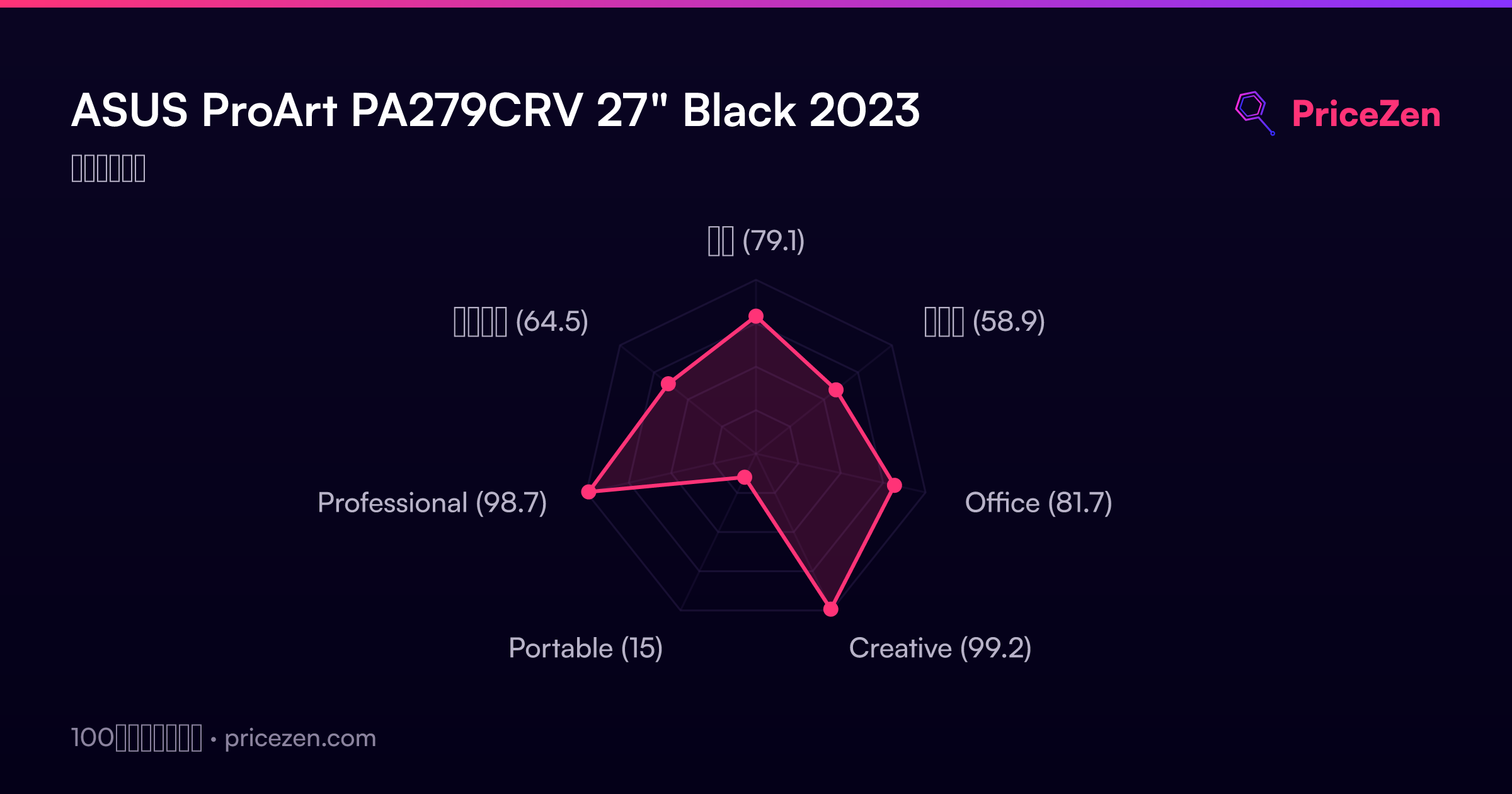
- 総合79.1
- ゲーム58.9
- Office81.7
- Creative99.2
- Portable15
- Professional98.7
- エンタメ64.5