Amazon Kindle 6" Kids 2024, 16GB, Ocean Explorer
The 6-inch E-Paper display with 25% brighter front light and dark mode delivers glare-free reading in any light, backed by a 2-year worry-free guarantee. Its 16GB storage holds thousands of books, and a single USB-C charge lasts up to 6 weeks, while the Parent Dashboard lets you control age filters and bedtime. Best for parents of kids aged 3-12 who want a distraction-free device to build daily reading habits.

Sin precio actual de tiendas
Resumen
The 30-Second Version
A focused, kid-proof reading machine with a killer replacement guarantee. It's slow and basic, but that's kind of the point.
Pros & Cons
Ventajas
- 2-year worry-free guarantee is a genuine lifesaver for kids 100th
- Top-tier eye comfort and a bright, glare-free screen 99th
- Featherweight at 158g, easy for small hands 95th
- Parental controls and Amazon Kids+ actually work well together
Desventajas
- Noticeable lag and occasional Wi-Fi drops
- 16GB storage is fine for books but laughable for anything else
- No water resistance to speak of
- Feature set is bare bones, even for an e-reader
Opinión de los propietarios
The Word on the Street
Cómo cambió la opinión de los propietarios con el tiempo
ExclusivaSegún cuándo escribieron realmente sus opiniones los clientes, para ver si los elogios iniciales se mantuvieron.
5 opiniones escritas, jun 2026: 4 satisfechos, 1 neutral
En las 12 valoraciones de tiendas: 4,5★. La mayoría de los propietarios valora sin escribir una opinión. El gráfico cuenta las 5 opiniones escritas.
Cada punto es una opinión escrita, en el mes en que se escribió. Satisfechos = 4-5★, neutrales = 3★, insatisfechos = 1-2★.
Las pruebas
Performance
The reading experience is where this thing shines. The 6-inch e-paper display sits in the 99th percentile for eye comfort, and the front light is 25% brighter than the previous model, matching the Paperwhite at max. That means bedtime reading in a dark room is genuinely comfortable. Battery life is rated at up to 6 weeks per charge, which lands in the 95th percentile for reading battery. You'll forget where the charger is.
What surprised us is the lag. Owners mention occasional slowness and Wi-Fi connectivity issues that sometimes require a restart. The CPU and RAM sit around the 31st to 35th percentile, so this is not a snappy device. Page turns are fine, but navigating menus or downloading a batch of books can feel sluggish. For a reading device, that's tolerable. For anything else, it would be a dealbreaker.
Specifications
Full Specifications
Memory & Storage
| Storage | 16 GB |
| Expandable | No |
Display
| Size | 6" |
| Panel | E-Paper |
Connectivity
| USB-C | 1 |
| Cellular | No |
Features
| Stylus Support | No |
Physical
| Weight | 0.2 kg / 0.3 lbs |
| OS | Kindle |
vs Competition
The obvious comparison is the Apple iPad mini A17 Pro, but that's a $500+ device aimed at a completely different use case. If your kid needs apps, drawing, or video, the iPad mini is the better tool, but you'll pay double and lose the worry-free guarantee. The Samsung Galaxy Tab S10 FE+ and Lenovo Idea Tab Pro are also full tablets with far more features, but they're heavier, pricier, and come with the same screen-time battles. For pure reading, the Kindle Kids beats all of them on eye comfort and battery life. It's not even close.
| Spec | Amazon Kindle 6" Kids | Apple iPad 11" A16 | Lenovo Idea Tab Pro Gen 2 13" | Xiaomi Pad 7 11.2" 2AFZZCRP4CG | Samsung Galaxy Tab S9 FE 10.9" | URAO 14.1" G140L |
|---|---|---|---|---|---|---|
| CPU | - | Apple A16 | Qualcomm® Snapdragon™ 8s Gen 4 Processor (3.20 GHz ) | Snapdragon 7+ Gen 3 | Samsung s5e8835 | 2.0 GHz octa-core processor |
| RAM (GB) | - | 8 | 8 | 8 | 6 | 6 |
| Storage (GB) | 16 | 128 | 128 | 256 | 128 | 256 |
| Screen | 6" | 11" 2360x1640 | 13" 3504x2190 | 11.2" 3200x2136 | 10.9" 2304x1440 | 14.1" 1920x1200 |
| OS | Kindle | iPadOS | Android 16 | Android 14 | Android 13 | Android 16 |
| Stylus | false | true | true | true | true | true |
| Cellular | false | true | false | false | false | false |
| Battery (Wh) | - | 29 | - | - | 38 | - |
| Compare | Compare | Compare | Compare | Compare |
| Producto | CPU | GPU | RAM | Pantalla | Battery | Feature | Almacenamiento | User Sentiment | Eye Comfort | Portability | Connectivity | Valoración social | Affordability | Reading Battery | Water Resistance |
|---|---|---|---|---|---|---|---|---|---|---|---|---|---|---|---|
| Amazon Kindle 6" Kids | 37.9 | 36.4 | 31 | 41.9 | 32 | 7.4 | 1.9 | 40.7 | 99 | 99.8 | 32.7 | 18.6 | 0 | 95.1 | 46.5 |
| Apple iPad 11" A16 Compare | 81.6 | 92.5 | 65.8 | 77.2 | 94 | 91.5 | 66.4 | 71.1 | 48 | 65.8 | 90.4 | 94.6 | 30.8 | 49.2 | 46.5 |
| Lenovo Idea Tab Pro Gen 2 13" Compare | 84.6 | 82.6 | 77.5 | 98.3 | 88.7 | 98 | 66.4 | 71.1 | 48 | 46.8 | 92.8 | 91 | 34.5 | 44.5 | 46.5 |
| Xiaomi Pad 7 11.2" 2AFZZCRP4CG Compare | 86.3 | 84 | 65.8 | 98 | 85.1 | 60.7 | 83.7 | 90.7 | 48 | 60.1 | 76.9 | 91 | 33 | 71.1 | 46.5 |
| Samsung Galaxy Tab S9 FE 10.9" Compare | 56 | 92.5 | 54.4 | 94.6 | 97 | 99.2 | 70 | 58.6 | 48 | 56.5 | 92.8 | 94.6 | 31.5 | 87.9 | 97.3 |
| URAO 14.1" G140L Compare | 71.7 | 69.9 | 50.9 | 56.7 | 86.7 | 94.7 | 74.9 | 96.3 | 48 | 0.7 | 76.9 | 62.6 | 48.3 | 14.3 | 46.5 |
Precio
Value & Pricing
At $180, this is a fair price for a dedicated kids' e-reader, especially with the 2-year replacement guarantee baked in. You're not paying for specs, you're paying for peace of mind and a device that won't distract your kid with apps and videos. If you can find it on sale, even better. Just don't expect tablet-level performance at this price.
Best Buy 1 oferta Desde 150 US$
Historial de precios
Leer más
Overview
The Kindle Kids is a single-purpose device that nails its one job: getting kids to read more. It's light, the screen is easy on young eyes, and the parental controls are actually useful, not just a checkbox feature. The big story here is the 2-year worry-free guarantee. Kids break things. Amazon replaces it. That alone makes this a smarter buy than handing a kid a $500 tablet.
But this is not a tablet. No apps, no video, no games. If your kid expects YouTube or Minecraft, they'll be disappointed in about four seconds. If you want a focused reading device that won't turn into a fight over screen time, this is the right tool.
Common Questions
Q: Can my kid watch videos or play games on this?
No. This is a pure e-reader. No apps, no video, no games. If that's a problem, get a tablet instead.
Q: How durable is it for young kids?
It's lightweight and feels solid, but the real safety net is the 2-year worry-free guarantee. If it breaks, Amazon replaces it for free.
Q: Do I need an Amazon Kids+ subscription?
You don't need it, but it's a big part of the value. It gives you thousands of age-appropriate books that adjust as your kid grows. Without it, you're just buying books individually.
Who Should Skip This
If you're looking for a device that can handle apps, video, or even light web browsing, this isn't it. Go get an iPad mini or a Samsung Galaxy Tab instead. Also skip this if your kid is a heavy graphic novel reader who wants color, the e-paper screen is black and white only.
Verdict
Buy the Kindle Kids if you want a distraction-free reading device for a child aged 3 to 12. The parental controls, the bright e-paper screen, and the 2-year replacement guarantee make it the best option in its niche. Just know that it's slow, and it's not a tablet. If you need a do-everything device, get an iPad mini and a good case.
Usage Scores
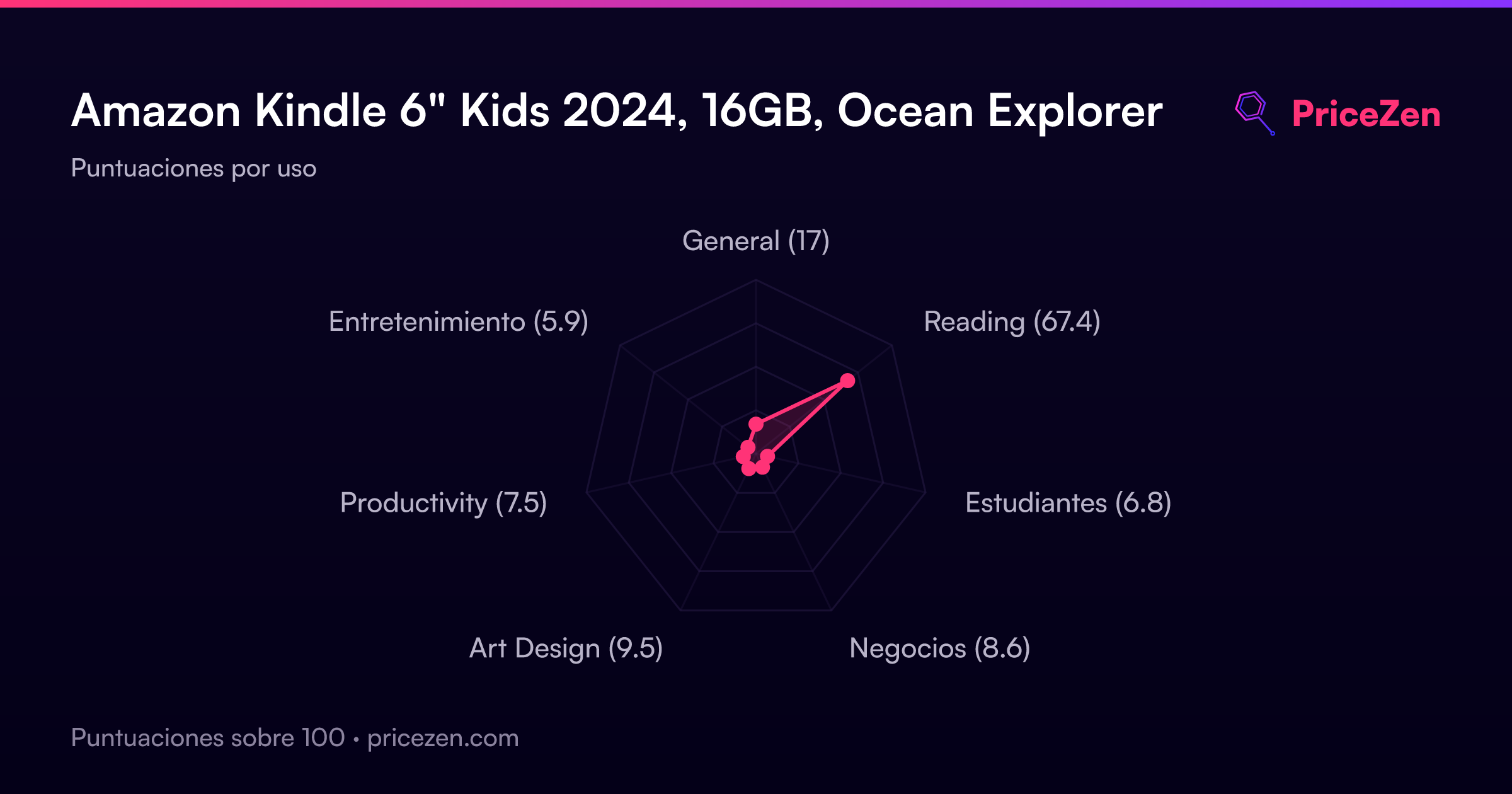
- General17
- Reading67.4
- Estudiantes6.8
- Negocios8.6
- Art Design9.5
- Productivity7.5
- Entretenimiento5.9