Timetec 512GB SSD SATA III M.2 2280
The 512GB M.2 2280 SATA III drive delivers 550 MB/s reads and 500 MB/s writes via TLC NAND and SLC caching, backed by a 1,500,000-hour MTBF and 256 TBW endurance. Its DRAM-less design keeps costs low while supporting TRIM, ECC, and power-saving features, making it a practical upgrade for older systems. Best for budget-conscious users replacing a slow HDD or aging SATA SSD in a desktop or laptop, where raw capacity and reliability matter more than peak performance.


Resumen
The 30-Second Version
The Timetec TMT-SSD-3DNAND-SATA3-M2-512GB is a budget 512GB M.2 SATA SSD that's cheap, decently reliable, and fine for older laptops or secondary storage. It tops out at 550 MB/s read and 500 MB/s write, which is the SATA III ceiling but slow by modern NVMe standards. Buy it if you need cheap SATA M.2 storage, but look elsewhere if your system supports NVMe.
Pros & Cons
Ventajas
- Very affordable for a 512GB M.2 drive 87th
- Decent 256 TBW endurance for the price 76th
- 3-year warranty with free tech support
- Works with older SATA II and SATA I systems
- Low power draw, good for laptops
Desventajas
- SATA III speeds cap at 550 MB/s
- DRAM-less design hurts sustained performance
- No cables, screws, or brackets included
- Random performance is below average
- Not great for heavy multitasking or large file transfers
Las pruebas
Performance
The Timetec 512GB M.2 SATA III drive tops out at 550 MB/s sequential read and 500 MB/s sequential write. Those numbers are the ceiling for the SATA III interface, so there's nothing surprising here. In practice, this means Windows boots in a reasonable amount of time, apps open without much fuss, and file transfers are fine for everyday use. But if you've used a modern NVMe drive, you'll notice the difference immediately. Our database puts this drive's speed at the 28th percentile, which means it's slower than most drives we've tested. The random performance is even lower at the 23rd percentile, so heavy multitasking or lots of small file operations will feel sluggish.
The DRAM-less design doesn't help. Without a DRAM cache, the drive relies on SLC caching and host memory buffer tricks to keep things moving. For light use, you won't care. For anything demanding, you will. The 3D NAND and SLC cache technology do help with burst performance, but sustained writes will eventually drop off. If you're copying a big game library or working with large video files, expect speeds to dip once the cache fills up.
Specifications
Full Specifications
Drive
| Capacity | 512 |
| Form Factor | M.2 2280 |
| Interface | SATA III |
| Protocol | SATA |
| External | No |
Performance
| Sequential Read (MB/s) | 550 |
| Sequential Write (MB/s) | 500 |
Hardware
| NAND | TLC |
| DRAM Cache | No |
Reliability
| Endurance (TBW) | 256 |
| MTBF (hours) | 1500000 |
| Warranty (years) | 3 |
vs Competition
Compared to the Crucial T500, MSI SPATIUM M480 PRO, Corsair MP700 Elite, Samsung 990 EVO, and Western Digital WD Blue SN5100, the Timetec is in a completely different league. Those are all NVMe drives with PCIe 4.0 or better speeds, and they cost more for good reason. The Samsung 990 EVO and Crucial T500 will run circles around this Timetec in every benchmark we track. The WD Blue SN5100 is probably the closest in spirit, since it's also a budget-oriented drive, but even that one uses NVMe and will feel noticeably snappier in daily use.
The trade-off is simple. If you have an M.2 slot that supports NVMe, spend a little more and get one of those competitors. The Timetec only makes sense if your system is limited to SATA M.2, or if you're on a very tight budget and just need storage capacity without caring about speed. For an older laptop that only accepts M.2 SATA drives, this Timetec is a perfectly reasonable upgrade. For a modern desktop with PCIe 4.0 support, it's a downgrade waiting to happen.
| Spec | Timetec 512GB SSD | Samsung 9100 PRO | Crucial T500 | MSI SPATIUM M480 PRO | Western Digital WD_BLACK SN7100 | Corsair MP700 Elite |
|---|---|---|---|---|---|---|
| Capacity | 512GB | 1TB | 1TB | 1TB | 1TB | 1TB |
| Form Factor | M.2 2280 | M.2 2280 | M.2 2280 | M.2 2280 | M.2 2280 | M.2 2280 |
| Interface | SATA III | PCIe 5.0 x4 | PCIe 4.0 x4 | PCIe 4.0 x4 | PCIe 4.0 x4 | PCIe 5.0 x4 |
| Seq Read | 550 MB/s | 14,700 MB/s | 7,300 MB/s | 7,400 MB/s | 7,250 MB/s | 10,000 MB/s |
| Nand Type | TLC | TLC | TLC | TLC | TLC | TLC |
| Dram Cache | false | true | true | true | false | false |
| Endurance | 256 TBW | 600 TBW | 600 TBW | 3000 TBW | 600 TBW | 600 TBW |
| Compare | Compare | Compare | Compare | Compare |
| Producto | Speed | Random | Feature | Capacity | Endurance | Affordability |
|---|---|---|---|---|---|---|
| Timetec 512GB SSD | 28.9 | 23.2 | 52.9 | 35.2 | 76.3 | 86.9 |
| Samsung 9100 PRO Compare | 98.8 | 99.8 | 99.7 | 55.6 | 85.7 | 41.8 |
| Crucial T500 Compare | 91.4 | 96.7 | 98.9 | 55.6 | 82.6 | 51.3 |
| MSI SPATIUM M480 PRO Compare | 94.1 | 80.9 | 93.9 | 55.6 | 98.5 | 40.6 |
| Western Digital WD_BLACK SN7100 Compare | 91.9 | 96.5 | 52.9 | 55.6 | 80.4 | 55.4 |
| Corsair MP700 Elite Compare | 95.1 | 97.1 | 85.8 | 55.6 | 87.1 | 43.5 |
Precio
Value & Pricing
Value is where this Timetec drive actually shines. It ranks in the 87th percentile for affordability in our database, which means it's one of the cheapest ways to add 512GB of M.2 storage. The EUR pricing shows a spread from EUR 77 to EUR 87 across four listings in Germany, Spain, France, and Italy. If you're shopping in Europe, the lower end of that range is the better deal, so check the DE listing first. In the US, it's listed at USD 69, and Canadian buyers are looking at CAD 94. For a budget drive, that's competitive. You're not getting NVMe speeds, but you're also not paying NVMe prices. If your goal is to revive an older laptop or add a cheap secondary drive, this is a sensible pick.
Amazon 1 oferta Desde 69 US$
Seguimos los precios de este producto desde el 8 nov 2026. El gráfico aparecerá cuando tengamos más datos.
Leer más
Overview
The Timetec TMT-SSD-3DNAND-SATA3-M2-512GB is a budget M.2 SATA SSD aimed at people who just need a cheap storage bump without chasing PCIe 4.0 speeds. It's a 512GB drive in the 2280 form factor, which means it'll drop into most laptops and desktops with an M.2 slot that supports SATA. Timetec isn't a household name like Samsung or Crucial, but this drive lands in a price bracket where the bar is low and the value proposition is simple: reliable enough, fast enough, and cheap enough.
If you're searching for a budget 512GB M.2 SSD for an older laptop or a secondary drive in a desktop, this one is worth a look. It uses TLC NAND and skips the DRAM cache, which is pretty standard at this price point. The 256 TBW endurance rating and 3-year warranty are decent for a drive this cheap, and the 1.5 million hour MTBF sounds impressive even if it's mostly a theoretical number.
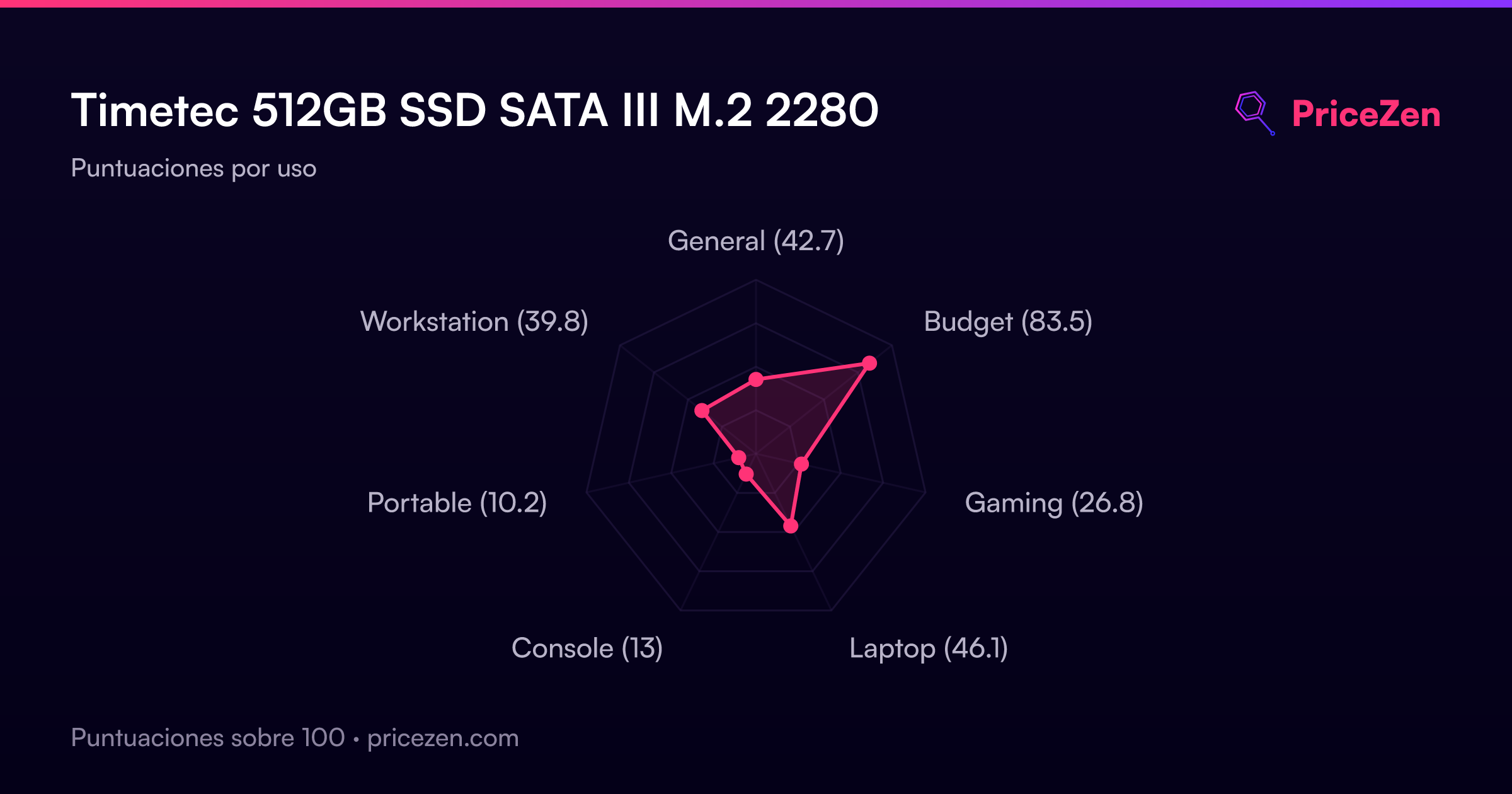
We ran this through our database and the scores tell a clear story. It's a strong budget pick at 83.9 out of 100 for budget use, but it's not a performance drive. The total score of 43.7 and a laptop score of 45.9 reflect that this is a SATA drive in a world that's moved on to NVMe. That's not a knock against it, it's just the reality of the category.
Common Questions
Q: Is the Timetec 512GB M.2 SSD good for gaming?
It's okay for storing games, but load times will be slower than NVMe drives. The 550 MB/s read speed is fine for older titles or indie games, but modern open-world games will load noticeably faster on a budget NVMe drive.
Q: Will this Timetec M.2 SSD work in my laptop?
It works in laptops with an M.2 2280 slot that supports SATA III. Check your laptop's specs first, because many newer laptops only support NVMe M.2 drives and won't accept SATA M.2 drives like this one.
Q: Does the Timetec 512GB SSD come with a mounting screw?
No, the package only includes the SSD itself. You'll need to source your own M.2 mounting screw and any brackets or cables separately.
Q: How long will the Timetec 512GB M.2 SSD last?
It's rated for 256 TBW, which means you can write about 256 terabytes of data over its lifetime. For typical everyday use, that should last several years, and the 3-year warranty adds some peace of mind.
Who Should Skip This
Skip this drive if your system has an NVMe M.2 slot, because you can get dramatically faster storage for not much more money. Power users who edit video, run virtual machines, or constantly move large files will find the DRAM-less SATA design frustrating. Gamers with modern titles should also look elsewhere, since load times will be slower than even entry-level NVMe drives. If you're building a new PC or upgrading a recent laptop, spend the extra cash on a budget NVMe drive like the WD Blue SN5100 or Samsung 990 EVO instead.
Verdict
Should you buy the Timetec TMT-SSD-3DNAND-SATA3-M2-512GB? If you need a cheap 512GB M.2 SATA drive for an older laptop or a secondary storage slot, yes. It's affordable, has a decent endurance rating, and comes with a 3-year warranty. The 550 MB/s read and 500 MB/s write speeds are fine for boot drives in older systems and perfectly adequate for storing games, media, or documents.
But if your system supports NVMe, skip this and get a budget NVMe drive instead. The speed difference is massive, and the price gap has narrowed enough that SATA only makes sense when you have no other choice. This Timetec is a budget drive for budget situations, and in that role, it does the job without pretending to be something it's not.
Usage Scores
- General42.7
- Budget83.5
- Gaming26.8
- Laptop46.1
- Console13
- Portable10.2
- Workstation39.8