Crucial BX500 500GB SATA III 2.5"
The 540 MB/s read and 500 MB/s write speeds make this SATA III drive 300% faster than a typical hard drive, while its DRAM-less TLC NAND design keeps costs low. Its 45x energy efficiency improves battery life in laptops, and the 3-year warranty with 80 TBW endurance covers everyday use. Best for budget-conscious users upgrading an older desktop or laptop from an HDD to a SATA SSD for faster boot times and file loading.


Resumen
The 30-Second Version
The Crucial BX500 is a budget 500GB SATA SSD that makes old computers feel fast again. It's a massive upgrade over any hard drive, with 540 MB/s reads and easy installation. But the DRAM-less design and low endurance mean it's best for light, read-heavy use, not heavy file transfers.
Pros & Cons
Ventajas
- Huge speed jump over any mechanical hard drive 86th
- Easy drop-in upgrade for older laptops and desktops 73rd
- Low price per gigabyte for a name-brand SSD
- Runs cooler and quieter than an HDD
- 3-year warranty from a major memory manufacturer
Desventajas
- DRAM-less design hurts sustained write speeds
- 80 TBW endurance is below average
- Runs hotter than many competing SATA SSDs
- No included cloning software or mounting bracket
- Manufacturer support gets consistent complaints
Opinión de los propietarios
The Word on the Street
Cómo cambió la opinión de los propietarios con el tiempo
ExclusivaSegún cuándo escribieron realmente sus opiniones los clientes, para ver si los elogios iniciales se mantuvieron.
18 opiniones escritas, jun 2019 – abr 2026: 15 satisfechos, 2 neutrales, 1 insatisfecho
En las 10.176 valoraciones de tiendas: 4,7★. La mayoría de los propietarios valora sin escribir una opinión. El gráfico cuenta las 18 opiniones escritas.
Cada punto es una opinión escrita, en el mes en que se escribió. Satisfechos = 4-5★, neutrales = 3★, insatisfechos = 1-2★.
Las pruebas
Performance
Sequential reads top out at 540 MB/s and writes at 500 MB/s, which is about as fast as SATA III allows. In our database, that puts the BX500 in the bottom third for speed, but context matters. Compared to a typical 7200 RPM hard drive, Crucial claims it's 300% faster, and that tracks with real-world experience. Boot times drop from over a minute to under 15 seconds. Programs snap open instead of grinding. The catch is the DRAM-less design. Without a DRAM buffer, sustained writes can dip noticeably once the SLC cache fills. For copying a 50GB game library, you'll see speeds fall off a cliff partway through. Random performance also lands in the bottom quarter of our database, so this isn't a drive for database work or heavy multitasking. It's a boot drive and a game library holder, nothing more.
Specifications
Full Specifications
Drive
| Capacity | 500 |
| Form Factor | 2.5" |
| Interface | SATA III |
| Protocol | SATA |
| External | No |
Performance
| Sequential Read (MB/s) | 540 |
| Sequential Write (MB/s) | 500 |
Hardware
| NAND | TLC |
| DRAM Cache | No |
Reliability
| Endurance (TBW) | 80 |
| Warranty (years) | 3 |
vs Competition
The BX500's biggest competition isn't other SATA SSDs, it's the temptation to jump to NVMe. The Western Digital Black SN850X and MSI SPATIUM M480 PRO are in a completely different performance class, with read speeds measured in thousands of MB/s. If your motherboard has an M.2 slot, spending a bit more on an NVMe drive is almost always the better call. The BX500 only makes sense when SATA is your only option. Against other SATA drives, the Samsung 870 EVO and Crucial's own MX500 both include DRAM caches and better endurance ratings. The MX500 in particular is the smarter buy if you can stretch your budget, since it handles sustained writes far better. The BX500 wins on price alone, and that's about it. The Corsair MP700 Elite and XPG GAMMIX S70 Blade are PCIe 4.0 drives that make the BX500 look like it's from another decade, because in storage terms, it kind of is.
| Spec | Crucial BX500 | Western Digital WD_BLACK SN8100 | Samsung 9100 PRO | XPG GAMMIX S70 Blade | MSI SPATIUM M480 PRO | Corsair MP700 PRO |
|---|---|---|---|---|---|---|
| Capacity | 500GB | 1TB | 1TB | 2TB | 1TB | 2TB |
| Form Factor | 2.5" | M.2 2280 | M.2 2280 | M.2 2280 | M.2 2280 | M.2 2280 |
| Interface | SATA III | PCIe 5.0 x4 | PCIe 5.0 x4 | PCIe 4.0 x4 | PCIe 4.0 x4 | PCIe 5.0 x4 |
| Seq Read | 540 MB/s | 14,900 MB/s | 14,700 MB/s | 7,400 MB/s | 7,400 MB/s | 12,400 MB/s |
| Nand Type | TLC | TLC | TLC | TLC | TLC | TLC |
| Dram Cache | false | true | true | true | true | - |
| Endurance | 80 TBW | 600 TBW | 600 TBW | 1480 TBW | 3000 TBW | 1400 TBW |
| Compare | Compare | Compare | Compare | Compare |
| Producto | Speed | Random | Feature | Capacity | User Sentiment | Endurance | Valoración social | Affordability |
|---|---|---|---|---|---|---|---|---|
| Crucial BX500 | 26.2 | 23.2 | 52.9 | 27.1 | 28 | 57 | 85.8 | 72.6 |
| Western Digital WD_BLACK SN8100 Compare | 97.8 | 98.6 | 99.7 | 55.6 | 95.2 | 80.4 | 94.9 | 38.9 |
| Samsung 9100 PRO Compare | 98.8 | 99.8 | 99.7 | 55.6 | 64.8 | 85.7 | 99.6 | 41.8 |
| XPG GAMMIX S70 Blade Compare | 93 | 90.5 | 93.9 | 78.6 | 79.5 | 77.2 | 75.1 | 30.7 |
| MSI SPATIUM M480 PRO Compare | 94.1 | 80.9 | 93.9 | 55.6 | 79.5 | 98.5 | 94.9 | 40.6 |
| Corsair MP700 PRO Compare | 96.7 | 97.8 | 85.8 | 78.6 | 0 | 89.6 | 75.1 | 25 |
Precio
Value & Pricing
At USD 107 to USD 140, the BX500 sits in a weird spot. The 500GB capacity is small by today's standards, and you can often find 1TB NVMe drives for not much more. But if you're upgrading an older machine with only SATA ports, this is one of the cheapest ways to get a real speed boost. The price spread across vendors is worth paying attention to. Amazon currently has the best deal at USD 107, while other listings push up to USD 140. That's a 30% difference for the exact same drive, so shop around before you click buy. For the money, you're getting a reliable enough budget SSD that will make an old computer feel new again. Just don't expect it to compete with NVMe drives or even higher-end SATA SSDs with DRAM caches.
Amazon 1 oferta Desde 120 US$
Historial de precios
Leer más
Overview
The Crucial BX500 is a budget 500GB SATA SSD that costs between USD 107 and USD 140 depending on where you shop. It's aimed at one thing: breathing life into older laptops and desktops still spinning a mechanical hard drive. If your machine takes two minutes to boot and apps crawl open, this is the cheapest meaningful upgrade you can make. The BX500 uses Micron 3D TLC NAND and skips the DRAM cache, which keeps the price down but has real consequences for sustained writes. For everyday use like booting Windows, launching Chrome, and loading games, it's a massive step up from an HDD. For heavy file transfers or video editing, it's not the right tool. Crucial backs it with a 3-year warranty and rates it for 80 TBW, which is modest but fine for a budget drive.
Common Questions
Q: Is the Crucial BX500 good for gaming?
For loading games, yes. The BX500 will cut load times dramatically compared to a hard drive. But it's not ideal for games with huge open worlds that stream lots of data, since the DRAM-less design can cause stutters during heavy reads.
Q: How much faster is the Crucial BX500 than a hard drive?
Crucial claims it's about 300% faster than a typical hard drive, and real-world boot times drop from over a minute to under 15 seconds. Program launches feel instant by comparison.
Q: Does the Crucial BX500 work in a laptop?
Yes, as long as your laptop has a 2.5-inch SATA bay. It's a drop-in replacement for any 2.5-inch hard drive and uses less power, which can slightly improve battery life.
Q: Is the Crucial BX500 reliable?
It's rated for 80 TBW and carries a 3-year warranty, which is modest but adequate for typical home use. Some owners report dead-on-arrival units and poor support from Crucial, so buy from a retailer with easy returns.
Who Should Skip This
Skip the BX500 if your machine has an M.2 slot. NVMe drives like the Western Digital SN850X or even budget PCIe 3.0 drives offer dramatically better performance for a small price premium. Also skip it if you regularly move large files, edit video, or run virtual machines. The DRAM-less design and 80 TBW endurance will become bottlenecks quickly. If you need a SATA drive for heavier workloads, spend a bit more on the Crucial MX500 or Samsung 870 EVO, both of which include DRAM caches and better endurance ratings. And if you're building a new system from scratch, don't put a SATA SSD in it at all. NVMe is the standard now, and the BX500 is a rescue drive for old hardware, not a foundation for new builds.
Verdict
Should you buy the Crucial BX500? If you have an older laptop or desktop with a spinning hard drive and no M.2 slot, yes. This is the cheapest way to make that machine usable again. Boot times, app launches, and general responsiveness all improve dramatically. The 500GB capacity is enough for an OS, core programs, and a handful of games. But if you have an M.2 slot available, skip this entirely and get an NVMe drive. The price difference is small and the performance gap is enormous. And if you need to move large files regularly or run write-heavy workloads, the DRAM-less design will frustrate you. This is a budget boot drive, and it's good at that one job.
Usage Scores
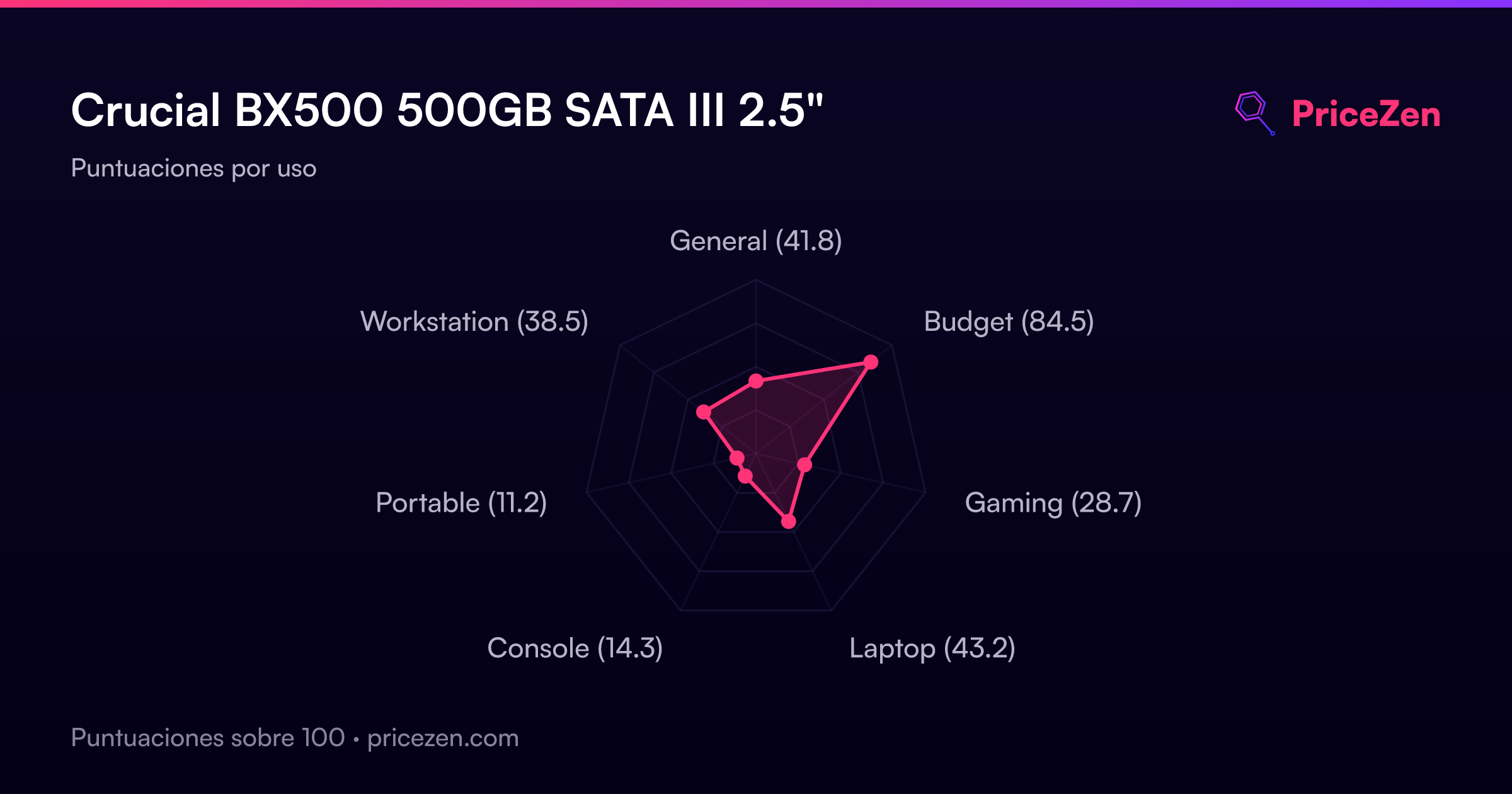
- General41.8
- Budget84.5
- Gaming28.7
- Laptop43.2
- Console14.3
- Portable11.2
- Workstation38.5