Silicon Power P34A60 256GB PCIe 3.0 x4 NVMe M.2 2280
The PCIe Gen3x4 interface delivers read speeds up to 2,200 MB/s and write speeds up to 1,600 MB/s, making this 256GB M.2 2280 NVMe drive a solid budget performer. Its HMB architecture and LDPC error correction enhance efficiency and data integrity, while the compact form factor fits easily in laptops and small form factor PCs. Best for novice builders or budget-conscious upgraders seeking a reliable, affordable SSD for everyday tasks.












Resumen
The 30-Second Version
Cheap, quick enough, and tiny. The P34A60's best score is affordability, one of the best we track, but 256GB and 75 TBW drag the total down to 35.1. Worth it as a budget boot drive, not as your main storage.
Pros & Cons
Ventajas
- One of the cheapest NVMe drives we track, with top-tier affordability. 89th
- Random performance beats its sequential ranking, so it feels responsive. 74th
- M.2 2280 fits laptops and small form factor builds without drama.
- LDPC, end-to-end protection and a RAID engine for data integrity.
Desventajas
- 75 TBW endurance is a weak spot compared to almost everything else.
- 256GB is tight, capacity ranks near the bottom.
- No DRAM cache, it leans on your system RAM via HMB.
- M-key only, so it won't fit older B-key slots.
Opinión de los propietarios
Cómo cambió la opinión de los propietarios con el tiempo
ExclusivaSegún cuándo escribieron realmente sus opiniones los clientes, para ver si los elogios iniciales se mantuvieron.
36 opiniones escritas, abr 2023 – mar 2026: 32 satisfechos, 4 insatisfechos
En las 12.738 valoraciones de tiendas: 4,5★. La mayoría de los propietarios valora sin escribir una opinión. El gráfico cuenta las 36 opiniones escritas.
Cada punto es una opinión escrita, en el mes en que se escribió. Satisfechos = 4-5★, neutrales = 3★, insatisfechos = 1-2★.
Las pruebas
Performance
Sequential speeds are about average, and random performance is a bit better, so day-to-day snappiness should be fine. There's no DRAM here. It uses HMB, borrowing a slice of your system RAM instead, which is the standard budget trick. LDPC error correction, end-to-end data protection and a RAID engine cover data integrity. The lowlight is endurance: 75 TBW puts it in the 15th percentile, one of the weaker ratings we track. And 256GB fills up fast. Windows plus a couple of big games and you're already juggling files.
Specifications
Full Specifications
Drive
| Capacity | 256 |
| Form Factor | M.2 2280 |
| Interface | PCIe 3.0 x4 |
| Protocol | NVMe |
| PCIe Generation | 3 |
| External | No |
Performance
| Sequential Read (MB/s) | 2200 |
| Sequential Write (MB/s) | 1600 |
Hardware
| NAND | TLC |
| DRAM Cache | No |
Reliability
| Endurance (TBW) | 150 |
| MTBF (hours) | 2000000 |
| Warranty (years) | 1 |
vs Competition
Cross-shop the WD_BLACK SN770 and the Crucial T500 first. Both sit in the same shortlist as this thing, and the P34A60's low capacity and endurance ratings make a strong case for spending more if you can. The Kingston KC3000 is worth a look if you write a lot of data, since 75 TBW is the number that'll bite you here. Samsung's 9100 PRO and SK Hynix's Platinum P41 are the premium end of the list, and honestly they're playing a different sport than a Gen3 budget stick. If your board only does PCIe 3.0 anyway, the P34A60's average speed ranking matters less than its price.
| Spec | Silicon Power P34A60 | Crucial T500 | Corsair MP700 Elite | SanDisk WD Blue SN5100 | SK Hynix Platinum P41 | Kingston KC3000 |
|---|---|---|---|---|---|---|
| Capacity | 256GB | 1TB | 1TB | 1TB | 2TB | 512GB |
| Form Factor | M.2 2280 | M.2 2280 | M.2 2280 | M.2 2280 | M.2 2280 | M.2 2280 |
| Interface | PCIe 3.0 x4 | PCIe 4.0 x4 | PCIe 5.0 x4 | PCIe 4.0 x4 | PCIe 4.0 x4 | PCIe 4.0 x4 |
| Seq Read | 2,200 MB/s | 7,300 MB/s | 10,000 MB/s | 7,100 MB/s | 7,000 MB/s | 7,000 MB/s |
| Nand Type | TLC | TLC | TLC | TLC | TLC | TLC |
| Dram Cache | false | true | false | false | true | false |
| Endurance | 150 TBW | 600 TBW | 600 TBW | 600 TBW | 1200 TBW | 400 TBW |
| Compare | Compare | Compare | Compare | Compare |
| Producto | Speed | Random | Feature | Capacity | User Sentiment | Endurance | Valoración social | Affordability |
|---|---|---|---|---|---|---|---|---|
| Silicon Power P34A60 | 51 | 61.8 | 53.2 | 18.6 | 28 | 74 | 64.6 | 88.7 |
| Crucial T500 Compare | 91.4 | 96.7 | 99 | 56 | 95.2 | 82.5 | 94.9 | 51.3 |
| Corsair MP700 Elite Compare | 95.1 | 97.1 | 85.9 | 56 | 79.6 | 87 | 94.9 | 44.7 |
| SanDisk WD Blue SN5100 Compare | 87.1 | 95.8 | 78.7 | 56 | 57.5 | 87.9 | 94.9 | 59.7 |
| SK Hynix Platinum P41 Compare | 84.2 | 97.1 | 94.1 | 78.7 | 0 | 85.6 | 41.2 | 57.7 |
| Kingston KC3000 Compare | 78.5 | 89.3 | 78.7 | 35.6 | 0 | 92.7 | 85.7 | 59.5 |
Precio
Value & Pricing
At USD 59 on Amazon right now, this is a low-risk purchase, and our budget score of 76.3 backs that up. We track its price over time and it stays in bargain territory. But cheap upfront isn't the same as cheap per gigabyte. With 256GB and 75 TBW, you're buying a stopgap, not a drive you'll keep for years. Fine as a boot drive or a revival job for an old laptop. Less fine as your only storage.
Amazon 1 oferta Desde 59 US$
Historial de precios
Leer más
Overview
The SP Silicon Power P34A60 is a cheap NVMe stick with one job: get you off a slow drive without emptying your wallet. This 256GB version runs PCIe 3.0 x4, NVMe 1.3, and claims up to 2,200 MB/s reads and 1,600 MB/s writes. It's M.2 2280, so it drops into most laptops and small desktops.
Our scoring model likes the price and not much else. Affordability is one of the best we track, which is genuinely great. Capacity, endurance and features all land near the bottom of the category. Total score: 35.1 out of 100. Budget buy, not a daily driver for heavy work.
Common Questions
Q: Will this fit my motherboard or laptop?
You need an M.2 slot with an M key and PCIe support. This drive has no B notch, so it physically won't seat in a B-keyed slot.
Q: Is 256GB enough?
For Windows and a handful of apps, yes. For a game library or video projects, no, and capacity ranks near the bottom here.
Q: Does the lack of DRAM matter?
It uses HMB to borrow system RAM instead, which keeps costs down. Random performance is still above average, so basic use should feel fine.
Who Should Skip This
If you edit video, move big files daily, or want one drive to hold everything, look elsewhere. 75 TBW and 256GB will both run out on you, and the feature set ranks near the bottom of the category. Also skip it if your slot is B-key only. It won't go in.
Verdict
Buy it if you're building on a shoestring, resurrecting an older laptop, or need a small boot drive and nothing more. The 39.4 laptop score says it's an okay fit there, not a standout. Skip it as your main drive in a machine you actually work on. Our ranking puts it firmly in the bargain bin, and that's exactly where it earns its keep.
Usage Scores
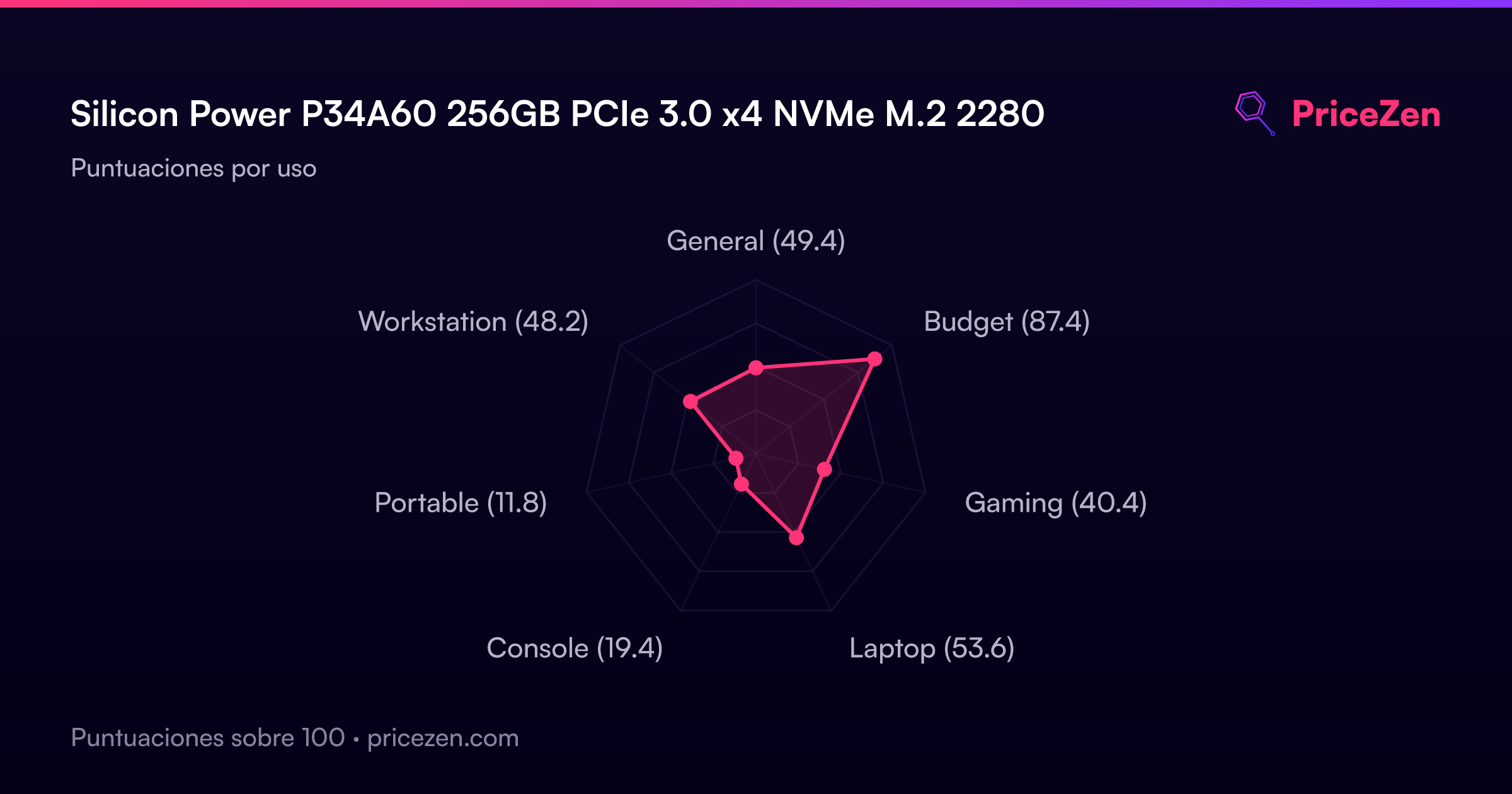
- General49.4
- Budget87.4
- Gaming40.4
- Laptop53.6
- Console19.4
- Portable11.8
- Workstation48.2