Samsung QBC Series QB75C 75" Black 2025
A 4000:1 static contrast ratio from its VA panel delivers deep blacks uncommon for commercial displays, while the 1.1-inch thin chassis and uniform bezel create a seamless, modern look. The embedded Tizen OS with MagicINFO S10 player enables standalone digital signage without external hardware, and IR, LAN, and RS-232 control options simplify large-scale deployment. This display is best for corporate lobbies and retail spaces needing a reliable 16/7 signage solution with integrated content management.

Sin precio actual de tiendas


Resumen
The 30-Second Version
The Samsung QB75C is a 75-inch 4K commercial display with top-tier display and color scores, built for 16/7 signage use. The 60Hz panel and 8ms response time kill any gaming or fast-motion ambitions. Worth considering for retail and corporate installs, especially at the lower end of the CAD 2,146 to CAD 2,512 range.
Pros & Cons
Ventajas
- Big 75-inch 4K panel with excellent display and color scores 92nd
- 16/7 duty cycle means it can run all day in commercial settings 88th
- Tizen OS and MagicINFO make content scheduling straightforward 67th
- Thin 1.1-inch depth with a uniform bezel looks clean on a wall
Desventajas
- 60Hz and 8ms response time rule out gaming or fast motion
- Only 350 nits, so bright rooms or window-facing spots will wash it out
- No price listed, which makes value hard to judge
- Ergonomics are limited to VESA mounting, no stand adjustments
Las pruebas
Performance
The display and color scores are the stars here, landing in the top 10 percent of our database. The 350 nits brightness is fine for indoor signage, and the 72 percent NTSC coverage keeps colors punchy enough for retail content. But the overall performance score sits at the 5th percentile, dragged down hard by the 60Hz refresh rate and 8ms response time. For static signage, that's irrelevant. For anything interactive, it's a weak spot.
Specifications
Full Specifications
Display
| Size | 75" |
| Resolution | 3840x2160 (4K UHD) |
| Panel Type | VA |
| Aspect Ratio | 16:9 |
| Curved | No |
| Screen Finish | semi_glossy |
Performance
| Refresh Rate | 60 Hz |
| Response Time | 8 |
Color & HDR
| Brightness | 350 nits |
| Color Gamut | 72% NTSC |
| Color Depth | 10-bit |
| HDR | HDR10+ |
| HDR Support | HDR10+ |
Connectivity
| HDMI Ports | 3 |
| Speakers | Yes |
Ergonomics
| Height Adjustable | No |
| Tilt | No |
| Swivel | No |
| Pivot | No |
| VESA Mount | 400x400 |
Features
| Touchscreen | No |
| PIP/PBP | No |
| Power | 215 |
| Weight | 15.2 kg / 33.4 lbs |
vs Competition
Stacked against the LG UltraGear 45GX950A-B, ASUS ROG Strix XG27UCDMG, and MSI MAG 271QPX QD-OLED E2, the QB75C is playing a completely different game. Those are high-refresh gaming monitors with OLED panels and response times measured in fractions of a millisecond. The Samsung wins on sheer size and signage features, but it loses badly on speed and motion clarity. The Dell UltraSharp U4025QW and Apple Studio Display are closer in spirit for professional work, but they're desktop monitors with better color accuracy and ergonomics. The QB75C is for walls, not desks.
| Spec | Samsung QBC Series QB75C 75" | LG UltraGear 45GX950A-B 45" | ASUS ROG Strix XG27UCDMG 27" | Dell UltraSharp U4025QW 39.7" | MSI MAG 271QPX QD-OLED E2 27" | Alienware AW-Series AW3425DW 34" |
|---|---|---|---|---|---|---|
| Screen Size | 75 | 45 | 27 | 39.70000076293945 | 27 | 34 |
| Resolution | 3840 x 2160 | 5120 x 2160 | 3840 x 2160 | 5120 x 2160 | 2560 x 1440 | 3440 x 1440 |
| Panel Type | VA | OLED | OLED | IPS | QD-OLED | QD-OLED |
| Refresh Rate | 60 | 330 | 240 | 120 | 240 | 240 |
| Response Time Ms | 8 | 0.029999999329447746 | 0.029999999329447746 | 5 | 0.029999999329447746 | 0.029999999329447746 |
| Adaptive Sync | - | FreeSync Premium Pro | FreeSync Premium Pro | Adaptive-Sync | FreeSync Premium Pro | FreeSync Premium Pro |
| Hdr | HDR10+ | DisplayHDR True Black 400 | DisplayHDR True Black 400 | DisplayHDR 600 | DisplayHDR True Black 400 | DisplayHDR 400 True Black |
| Compare | Compare | Compare | Compare | Compare |
| Producto | Color | Portabilidad | Display | Feature | Ergonomic | Performance | Connectivity |
|---|---|---|---|---|---|---|---|
| Samsung QBC Series QB75C 75" | 88.3 | 20.8 | 92.3 | 66.9 | 30.7 | 6.2 | 58.2 |
| LG UltraGear 45GX950A-B 45" Compare | 99.4 | 76.5 | 99.7 | 95.7 | 90.8 | 99.4 | 97 |
| ASUS ROG Strix XG27UCDMG 27" Compare | 96.1 | 57.5 | 97.9 | 83.7 | 90.8 | 98 | 81.2 |
| Dell UltraSharp U4025QW 39.7" Compare | 98.2 | 76.5 | 98.7 | 95.7 | 90.8 | 56.1 | 99.3 |
| MSI MAG 271QPX QD-OLED E2 27" Compare | 99.1 | 57.5 | 77.3 | 83.7 | 90.8 | 98 | 81.2 |
| Alienware AW-Series AW3425DW 34" Compare | 99 | 73.9 | 85.7 | 89.7 | 90.8 | 98 | 95.4 |
Precio
Value & Pricing
Pricing is all over the place in Canada, ranging from CAD 2,146 to CAD 2,512 across two listings. That's a CAD 366 spread, so shop around before committing. The US listing sits at USD 1,960, but those amounts aren't directly comparable across currencies. For a 75-inch commercial 4K panel with this feature set, the lower end of that Canadian range feels reasonable. The higher end starts to feel steep for a 60Hz signage display.
Historial de precios
Leer más
Overview
The Samsung QBC Series QB75C is a 75-inch 4K commercial display built for signage, not gaming or desktop work. It's thin, bright enough for indoor retail, and designed to run 16 hours a day without complaining. But the 60Hz panel and 8ms response time tell you everything about its priorities.
Samsung packed in HDR10+ support, a VA panel with a 4000:1 contrast ratio, and Tizen OS with MagicINFO for content management. That's a solid toolkit for corporate lobbies and storefronts. Just don't expect it to feel snappy as a monitor.
Common Questions
Q: Can I use this as a regular desktop monitor?
Technically yes, but the 60Hz refresh rate and 8ms response time will feel sluggish for everyday computing. It's really designed for signage and content display, not interactive desktop use.
Q: How bright is the screen for a bright room?
At 350 nits, it's fine for typical indoor environments but will struggle near windows or in direct sunlight. For bright storefronts, you'd want something with higher brightness.
Q: Does it work in portrait mode?
Yes, Samsung lists portrait and landscape support, and the VESA 400x400 mount makes rotation straightforward. The uniform bezel helps it look clean either way.
Who Should Skip This
Skip this if you need a high-refresh display for gaming or fast-moving video content. The 60Hz panel and 8ms response time will frustrate you. Also skip it if you need a color-accurate monitor for professional creative work, since 72 percent NTSC coverage isn't enough for critical color grading. And if you're mounting it in a bright, sunlit space, the 350 nits will leave you squinting.
Verdict
Buy this if you need a large, reliable 4K display for corporate signage, retail, or lobby content. The 16/7 duty cycle, Tizen OS, and MagicINFO player make it easy to deploy and manage. Skip it if you want a monitor for creative work, gaming, or anything involving fast motion. This is a signage panel first, and it doesn't pretend otherwise.
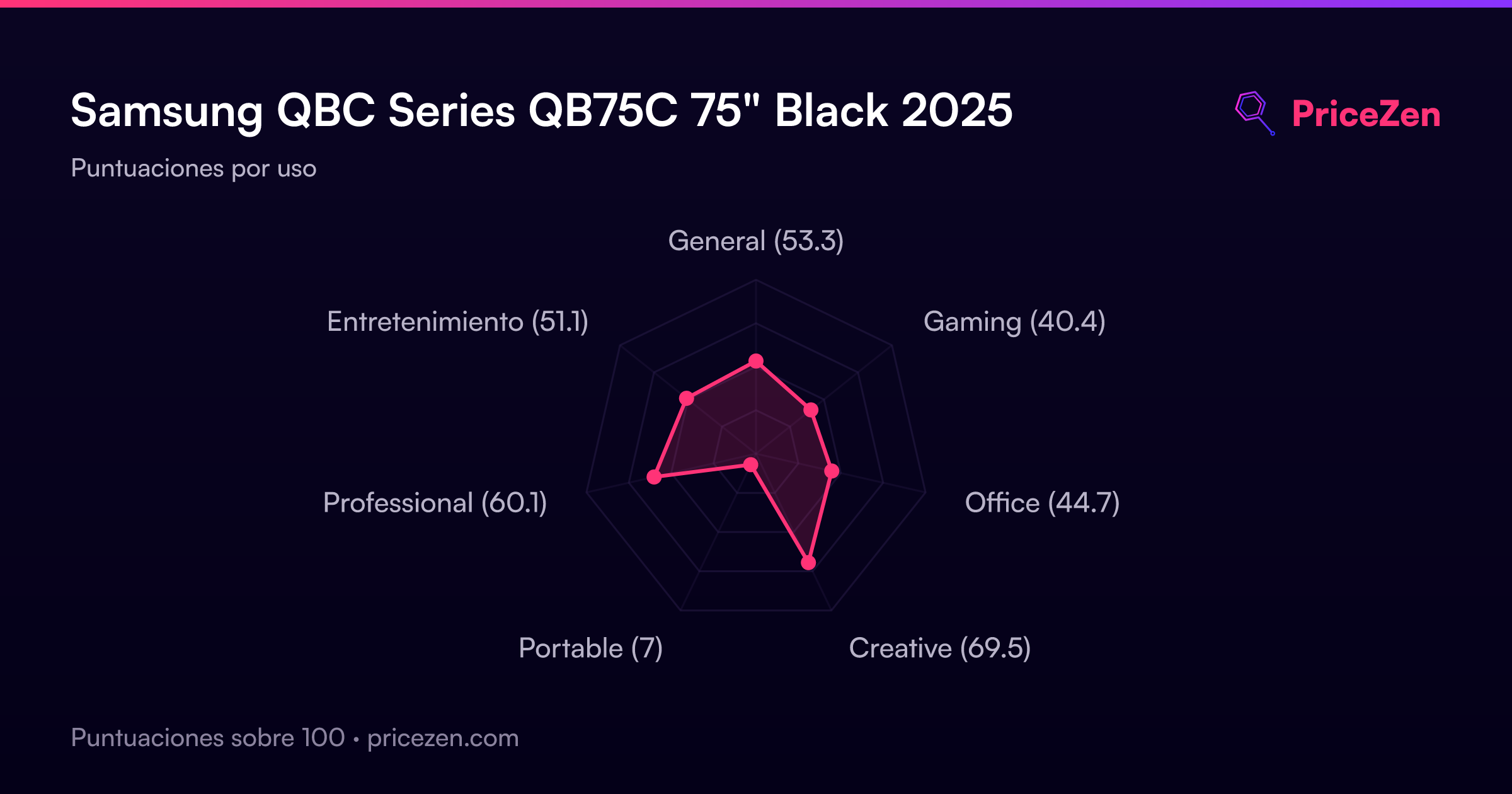
Usage Scores
- General53.3
- Gaming40.4
- Office44.7
- Creative69.5
- Portable7
- Professional60.1
- Entretenimiento51.1