MSI Pro Series PRO MP251 E14L 24.5" Black 2026

Gaming fluido a 144 Hz verificado el 29 nov
46/100 puntuación global 4,9 media de 3 valoraciones de propietarios
La tienda muestra un precio «antes», pero 74,99 US$ no está por debajo del precio habitual de 74,99 US$.
Mínimo de 90 días 72,67 US$Habitual 74,99 US$Máximo 84,99 US$
Mínimo de 90 días 72,67 US$Habitual 74,99 US$Máximo 84,99 US$Precio «antes» de la tienda 109,99 US$
Precio en los últimos 90 días: mínimo 72,67 US$ el 4 sept, máximo 84,99 US$. Precio habitual 74,99 US$. El precio «antes» de la tienda 109,99 US$. Hoy 74,99 US$.
- Screen
- 24.5"
- Resolution
- 1920 x 1080
- Panel
- IPS
- Refresh
- 144 Hz
- Response time
- 1 ms
- Adaptive sync
- FreeSync
- HDR
- HDR
Compara precios en 3 tiendas
De la más barata a la más cara. Las ofertas nuevas, reacondicionadas y en pack se mantienen separadas para que compares lo comparable.
| Tienda | Vendido por | Color y estado | Precio | vs. el más bajo | Última comprobación | Enlace |
|---|---|---|---|---|---|---|
| Nuevo3 ofertasUnidad individual | ||||||
| Amazon | Amazon | Black | 74,99 US$ | Precio más bajo | Hace 4 días | Ir a la tienda |
| Best Buy | Best Buy | Black | 74,99 US$ | Igual | Hoy | Ir a la tienda |
| Newegg | Newegg | Matte Black | 74,99 US$ | Igual | Hace 5 días | Ir a la tienda |
 Fuente: PriceZen, comprobado el 29 nov 2026
4 anuncios; 1 de ellos repiten otra oferta exactamente (misma tienda, vendedor, estado, color y precio), por lo que se muestran una sola vez. Un precio se considera vigente si lo comprobamos en los últimos 7 días. «Vendedor externo» significa un vendedor de terceros en esa tienda, no la propia tienda.
Historial de precios
El precio habitual en tiendas es 74,99 US$ y el más bajo de los últimos 90 días fue 72,67 US$.
Comprobado ese díaNo comprobado ese día, sigue en oferta
Fuente: PriceZen, checked 29 nov 2026


Resumen
The 30-Second Version
The MSI PRO MP251 E14L delivers 144Hz and 1ms response time at a budget price, with performance in the 73rd percentile. Connectivity is sparse with just one HDMI port, and color accuracy is average. At USD 75 from Newegg, it's a solid deal for smooth 1080p gaming on a budget.
Pros & Cons
Ventajas
- 144Hz and 1ms response time feel great for fast-paced games 73rd
- 4-side slim bezels make multi-monitor setups look clean 70th
- TÜV certified with anti-flicker tech helps reduce eye strain
- VESA mount support gives you flexibility beyond the basic stand
Desventajas
- Only one HDMI port, no DisplayPort
- No height adjustment, just tilt
- Color accuracy is middle of the pack at best
- HDR Ready is basically a checkbox, not a real feature
Opinión de los propietarios
Cómo cambió la opinión de los propietarios con el tiempo
ExclusivaSegún cuándo escribieron realmente sus opiniones los clientes, para ver si los elogios iniciales se mantuvieron.
2 opiniones escritas, jun 2026: 2 satisfechos
En las 3 valoraciones de tiendas: 4,9★. El gráfico cuenta las 2 opiniones escritas.
Cada punto es una opinión escrita, en el mes en que se escribió. Satisfechos = 4-5★, neutrales = 3★, insatisfechos = 1-2★.
Las pruebas
Performance
The 144Hz refresh rate and 1ms response time put this panel in the 73rd percentile for performance, which is solid for the price. FreeSync keeps things tear-free on AMD GPUs, and 300 nits of brightness is fine for a typical office or bedroom. The 8-bit color depth covers 16.7 million colors, but color accuracy lands right at the 51st percentile, so don't expect to do serious photo work on this thing. HDR Ready is marketing speak for 'it can accept an HDR signal', not 'this looks great in HDR'. The 18W power draw is efficient, and the built-in speakers are there if you're desperate.
Specifications
Full Specifications
Display
| Size | 24.5" |
| Resolution | 1920x1080 (Full HD) |
| Panel Type | IPS |
| Aspect Ratio | 16:9 |
| Curved | No |
| Screen Finish | matte |
Performance
| Refresh Rate | 144 Hz |
| Response Time | 1 |
| Adaptive Sync | FreeSync |
Color & HDR
| Brightness | 300 nits |
| Color Depth | 8-bit |
| HDR | ✓ |
| HDR Support | HDR |
Connectivity
| HDMI Ports | 1 |
| DisplayPort | 0 |
| USB-C | 0 |
| Speakers | No |
| Headphone Jack | Yes |
Ergonomics
| Height Adjustable | No |
| Tilt | Yes |
| Swivel | No |
| Pivot | No |
| VESA Mount | 100x100 |
Features
| Webcam | No |
| Touchscreen | No |
| PIP/PBP | No |
| Power | 18 |
| Weight | 2.9 kg / 6.4 lbs |
vs Competition
Stacked against the ASUS TUF Gaming VG27AQL5A or the LG UltraGear 27G640A-B, the MSI gives up a lot. Those panels offer 27-inch screens, higher resolutions, and more ports. The Acer Nitro XV272U and Samsung Odyssey LS27BG402ENXGO both bring better color performance and more ergonomic flexibility. But here's the thing: those monitors cost significantly more. The MSI is playing a different game. It's a budget 1080p panel with a high refresh rate, and for that specific niche, it holds its own. The Lenovo Legion R27qc-30 is probably the closest competitor in spirit, but even that steps up to 1440p.
| Spec | MSI Pro Series PRO MP251 E14L 24.5" | HP OMEN 27qs G2 27" | ASUS TUF Gaming VG27AQL5A 27" | LG UltraGear 27GS75Q-B 27" | Alienware AW2724DM 27" | Lenovo L27q-4A 27" |
|---|---|---|---|---|---|---|
| Screen Size | 24.5 | 27 | 27 | 27 | 27 | 27 |
| Resolution | 1920 x 1080 | 2560 x 1440 | 2560 x 1440 | 2560 x 1440 | 2560 x 1440 | 2560 x 1440 |
| Panel Type | IPS | IPS | IPS | IPS | IPS | IPS |
| Refresh Rate | 144 | 280 | 210 | 200 | 180 | 100 |
| Response Time Ms | 1 | 1 | 0.3 | 1 | 1 | 1 |
| Adaptive Sync | FreeSync | G-Sync Compatible | FreeSync Premium | G-Sync Compatible | FreeSync Premium Pro | Adaptive-Sync |
| Hdr | HDR | HDR400 | HDR400 | HDR10 | HDR600 | HDR10 |
| Compare | Compare | Compare | Compare | Compare |
| Producto | Color | Portabilidad | Display | Ergonomic | Performance | Connectivity | Valoración social |
|---|---|---|---|---|---|---|---|
| MSI Pro Series PRO MP251 E14L 24.5" | 49.9 | 57.3 | 37.4 | 47.1 | 72.6 | 20.4 | 24.3 |
| HP OMEN 27qs G2 27" Compare | 71.2 | 81.3 | 66.9 | 90.7 | 89.4 | 96.9 | 98.9 |
| ASUS TUF Gaming VG27AQL5A 27" Compare | 86.3 | 71.2 | 66.9 | 90.7 | 94.8 | 87.4 | 53.9 |
| LG UltraGear 27GS75Q-B 27" Compare | 83.1 | 49.3 | 66.9 | 78.6 | 84.7 | 87.4 | 75.1 |
| Alienware AW2724DM 27" Compare | 97.5 | 49.3 | 66.9 | 90.7 | 81.7 | 87.4 | 84.3 |
| Lenovo L27q-4A 27" Compare | 82.5 | 62.8 | 66.9 | 90.7 | 67.8 | 90.9 | 92.2 |
Precio
Value & Pricing
Pricing is all over the place depending on where you look. We're seeing USD 75 to USD 85 across four listings, with Newegg offering the lowest price in our database. At USD 75, this is a genuinely good deal for a 144Hz IPS panel. At USD 85, it's still reasonable but you're getting closer to territory where competitors start offering more connectivity. If you can snag it at the low end, the value proposition is strong.
Leer más
Overview
The MSI PRO MP251 E14L is a 24.5-inch 1080p IPS panel aimed at people who want smooth motion without spending a fortune. It hits 144Hz with a 1ms response time, which is the headline feature here. The 4-side slim bezel design is genuinely nice if you're planning a multi-monitor setup.
But this is a budget monitor wearing a gaming refresh rate. You get one HDMI port, a headphone jack, and that's about it. No DisplayPort, no USB hub, no height adjustment. It's a simple panel that does one thing well: fast, smooth 1080p.
Common Questions
Q: Does this monitor work with NVIDIA GPUs?
Yes, it will work with NVIDIA GPUs. FreeSync is AMD's adaptive sync tech, but many NVIDIA cards can use it through G-Sync Compatible mode, and even without that, the monitor runs fine at 144Hz.
Q: Can I mount this on a monitor arm?
Yes, it has a standard VESA 100x100 mount pattern. The included stand only tilts, so a monitor arm is a good upgrade if you want height adjustment.
Q: Is the HDR any good on this monitor?
Not really. It's HDR Ready, which means it can accept an HDR signal, but with 300 nits of brightness and 8-bit color, you won't see a meaningful HDR improvement over SDR content.
Who Should Skip This
Skip this if you need more than one input. The single HDMI port is a dealbreaker if you want to switch between a PC and a console without unplugging cables. Also skip it if you do color-sensitive work, since the color accuracy is mediocre. And if you want a monitor that adjusts to your height, the tilt-only stand will annoy you.
Verdict
This monitor is for budget-conscious gamers and office workers who want smooth scrolling and fluid motion without paying for features they won't use. If you're running an AMD GPU and want FreeSync at 144Hz on a 1080p panel, this does the job. It's not flashy, but it's honest about what it is.
Usage Scores
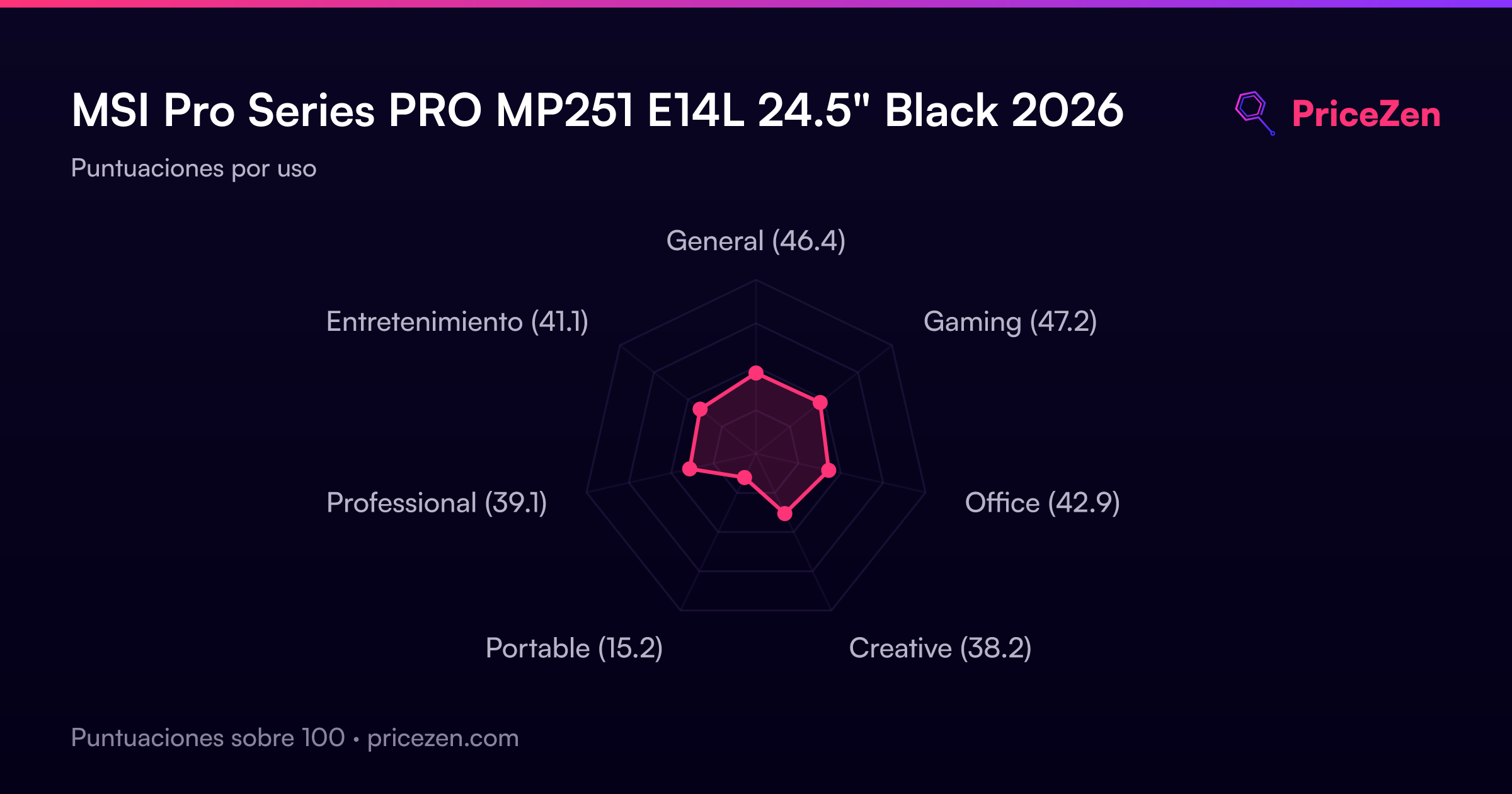
- General46.4
- Gaming47.3
- Office43
- Creative38.3
- Portable15.2
- Professional39.1
- Entretenimiento41.1