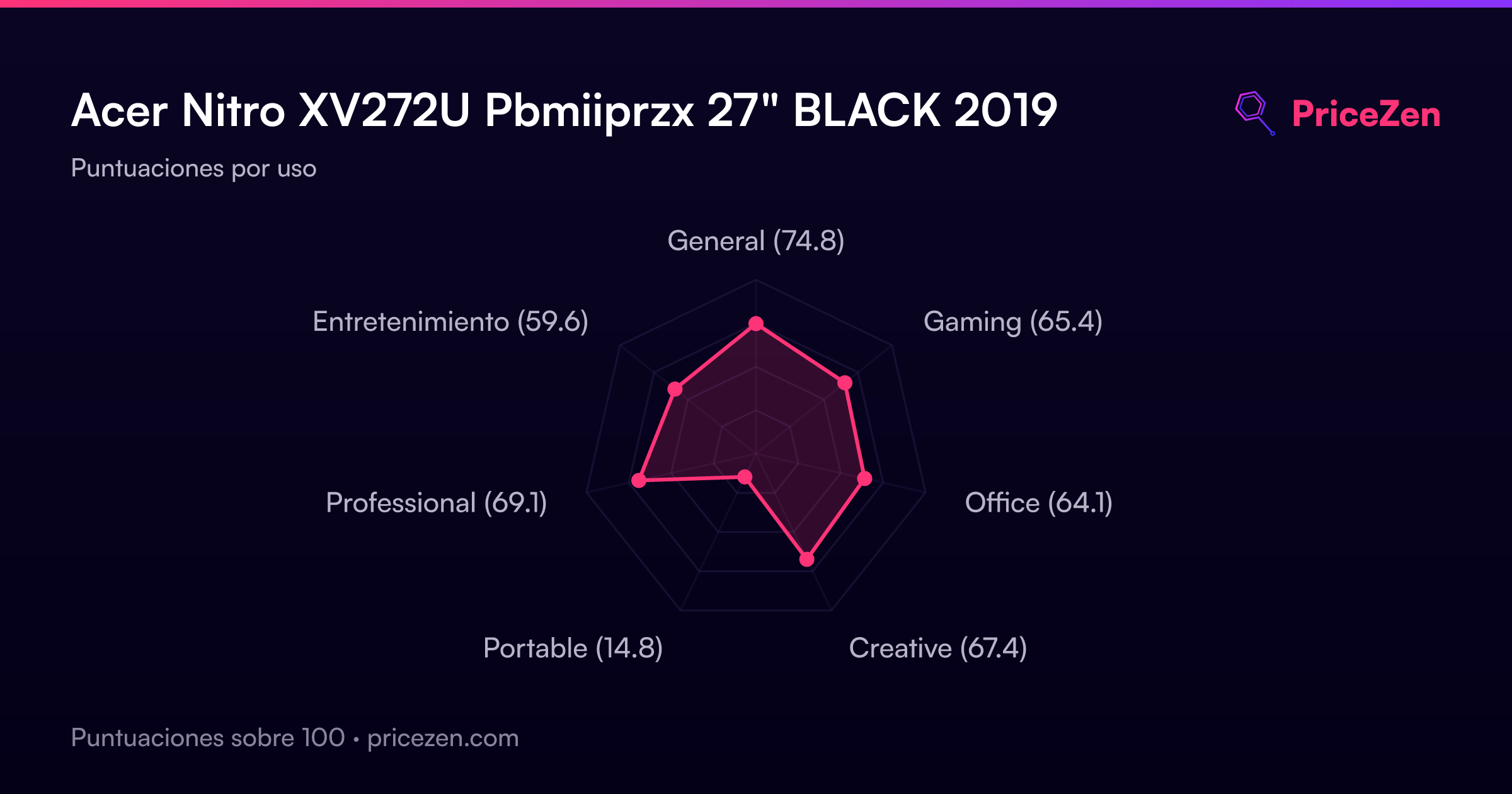
Acer Nitro XV272U Pbmiiprzx 27" BLACK 2019
The 27-inch WQHD IPS panel combines a 144Hz refresh rate and 1ms response time with 95% DCI-P3 coverage and a Delta E under 2 for color-accurate gaming. Its zero-frame design and built-in 2-watt speakers add practical desk utility without inflating the cost. This monitor suits competitive gamers who also need reliable sRGB and DCI-P3 accuracy for entry-level photo or video editing.












Resumen
The 30-Second Version
The Acer Nitro XV272U is a 27-inch 1440p IPS gaming monitor with a 144Hz refresh rate and excellent color accuracy. It's one of the best value picks in its class, with a 4.6-star rating from nearly 3,000 buyers. The stand is wobbly and HDR is finicky, but for the price, it's hard to beat.
Pros & Cons
Ventajas
- Excellent color accuracy with Delta E under 2 93rd
- Sharp 1440p resolution on a 27-inch IPS panel 92nd
- Smooth 144Hz refresh rate with 1ms response time 77th
- FreeSync and G-Sync compatible 73rd
- Great value compared to ASUS and other competitors
Desventajas
- Wobbly stand with limited height adjustment
- Windows HDR implementation is buggy
- No DisplayPort cable included in the box
- DisplayHDR 400 is entry-level HDR at best
- Overclocking yields minimal refresh rate gains
Opinión de los propietarios
The Word on the Street
Cómo cambió la opinión de los propietarios con el tiempo
ExclusivaSegún cuándo escribieron realmente sus opiniones los clientes, para ver si los elogios iniciales se mantuvieron.
12 opiniones escritas, may 2019 – may 2026: 12 satisfechos
En las 2977 valoraciones de tiendas: 4,6★. La mayoría de los propietarios valora sin escribir una opinión. El gráfico cuenta las 12 opiniones escritas.
Cada punto es una opinión escrita, en el mes en que se escribió. Satisfechos = 4-5★, neutrales = 3★, insatisfechos = 1-2★.
Las pruebas
Performance
Let's talk numbers. The XV272U runs at 2560 x 1440 with a 144Hz refresh rate and a 1ms VRB response time. In practice, that means fast-paced shooters feel smooth and responsive, especially if you're coming from a 60Hz or 75Hz panel. The FreeSync support works with AMD cards, and it's G-Sync Compatible too, so NVIDIA owners aren't left out. Our performance percentile sits at 76th, which is well above average but not top of the charts. That's fair, because 144Hz is no longer the ceiling in 2025, but it's still plenty for most people.
The color performance is where this monitor really punches above its weight. It covers DCI-P3 and uses 10-bit color via 8-bit plus FRC, with a peak brightness of 400 nits in HDR mode. The 95th percentile color ranking in our database backs up what owners say: colors look vibrant and accurate right out of the box. The Delta E under 2 spec means you won't need to spend hours calibrating unless you're doing professional color work. HDR is a mixed bag, though. DisplayHDR 400 is the entry-level HDR certification, and several users report that Windows HDR can wash things out unless you toggle it manually. When it works, blacks look deeper and highlights pop, but it's not a true HDR experience like you'd get on a mini-LED or OLED panel.
Specifications
Full Specifications
Display
| Size | 27" |
| Resolution | 2560x1440 (QHD) |
| Panel Type | IPS |
| Aspect Ratio | 16:9 |
| Curved | No |
| Screen Finish | glossy |
Performance
| Refresh Rate | 144 Hz |
| Response Time | 1 |
| Adaptive Sync | FreeSync |
Color & HDR
| Brightness | 400 nits |
| Color Gamut | DCI-P3 |
| Color Depth | 10-bit (8-bit + FRC) |
| HDR | HDR400 |
| HDR Support | HDR400 |
Connectivity
| HDMI Ports | 2 |
| DisplayPort | 1 |
| USB-C | 0 |
| Speakers | Yes |
Ergonomics
| Height Adjustable | Yes |
| Tilt | Yes |
Features
| Webcam | No |
| Touchscreen | No |
| Weight | 4.9 kg / 10.8 lbs |
vs Competition
Stacked against the ASUS ROG Strix XG27UCDMG or the MSI MAG 271QPX QD-OLED E2, the Acer Nitro XV272U looks like a budget pick, and that's exactly what it is. Those OLED panels offer true HDR, faster response times, and higher refresh rates, but they also cost significantly more. The LG UltraGear 27GX790A-B and Samsung Odyssey G60SD sit in a similar premium tier. If you're deciding between the Acer and one of those, the question is simple: do you want the best possible image quality, or do you want to save a few hundred bucks and still get a very good gaming experience?
Against other IPS panels in its class, the XV272U holds its own. The color accuracy beats many competitors at this price, and the G-Sync compatibility is a nice touch that some budget monitors skip. The stand is a weak point compared to the sturdier builds on ASUS and LG models, but that's an easy fix with a VESA mount. For most gamers, the Acer gives you 90% of the experience for a fraction of the cost.
| Spec | Acer Nitro XV272U Pbmiiprzx 27" | ASUS ROG Strix XG27UCDMG 27" | Alienware AW-Series AW3425DW 34" | MSI MAG 271QPX QD-OLED E2 27" | Samsung Odyssey G60SD 27" | LG UltraGear 32GX850A-B 32" |
|---|---|---|---|---|---|---|
| Screen Size | 27 | 27 | 34 | 27 | 27 | 32 |
| Resolution | 2560 x 1440 | 3840 x 2160 | 3440 x 1440 | 2560 x 1440 | 2560 x 1440 | 3840 x 2160 |
| Panel Type | IPS | QD-OLED | QD-OLED | QD-OLED | OLED | OLED |
| Refresh Rate | 144 | 240 | 240 | 240 | 360 | 165 |
| Response Time Ms | 1 | 0.03 | 0.03 | 0.03 | 0.03 | 0.03 |
| Adaptive Sync | FreeSync | FreeSync Premium Pro | FreeSync Premium Pro | FreeSync Premium Pro | FreeSync Premium Pro | FreeSync Premium Pro |
| Hdr | HDR400 | DisplayHDR True Black 400 | HDR400 | DisplayHDR True Black 400 | HDR10+ | DisplayHDR True Black 400 |
| Compare | Compare | Compare | Compare | Compare |
| Producto | Color | Portabilidad | Display | Feature | User Sentiment | Ergonomic | Performance | Connectivity | Valoración social |
|---|---|---|---|---|---|---|---|---|---|
| Acer Nitro XV272U Pbmiiprzx 27" | 93 | 35.1 | 66.9 | 70.1 | 76.6 | 59.9 | 72.6 | 62.1 | 92 |
| ASUS ROG Strix XG27UCDMG 27" Compare | 96.5 | 57.3 | 97.7 | 85 | 99.3 | 90.7 | 97.9 | 81 | 98.9 |
| Alienware AW-Series AW3425DW 34" Compare | 98.9 | 73.9 | 84.1 | 96.3 | 95.7 | 90.7 | 97.9 | 95.3 | 96.8 |
| MSI MAG 271QPX QD-OLED E2 27" Compare | 99.2 | 57.3 | 73.4 | 85 | 95.7 | 90.7 | 97.9 | 81 | 98.9 |
| Samsung Odyssey G60SD 27" Compare | 90.7 | 39.3 | 73.4 | 70.1 | 95.7 | 90.7 | 99.5 | 87.4 | 92 |
| LG UltraGear 32GX850A-B 32" Compare | 79.4 | 49.3 | 99 | 70.1 | 76.6 | 90.7 | 96.2 | 98.2 | 74.8 |
Precio
Value & Pricing
At $310 USD, the Acer Nitro XV272U is one of the better deals in the 1440p 144Hz space. The value proposition gets a little murkier when you look at other currencies. In Europe, prices swing from EUR 606 to EUR 839 depending on the vendor, which is a massive spread. If you're shopping in Spain, France, or Italy, it pays to compare listings carefully. The same goes for Canada, where prices range from CAD 401 to CAD 702. That's a CAD 301 difference for the exact same monitor. For US buyers, the single listing at $310 is straightforward and competitive. When you factor in the color accuracy and the 4.6-star rating from nearly 3,000 reviews, this monitor delivers more than its price tag suggests, as long as you don't overpay in a market with inflated listings.
Amazon 1 oferta Desde 320 US$
Historial de precios
Leer más
Overview
The Acer Nitro XV272U Pbmiiprzx sits in that sweet spot for 1440p gaming monitors, a 27-inch IPS panel with a 144Hz refresh rate and 1ms response time. It's aimed at competitive gamers who want sharper visuals than 1080p without paying the premium for 4K or OLED. The spec sheet reads like a checklist of what most people search for in a mid-range gaming display: WQHD resolution, FreeSync and G-Sync compatibility, DisplayHDR 400, and DCI-P3 color coverage.
In our database, this monitor lands in the 95th percentile for color and social proof, which is a big deal at this price. Buyers consistently rate it around 4.6 out of 5 stars across nearly 3,000 reviews. The color accuracy is genuinely impressive for a gaming panel, with Delta E under 2 out of the box. That means it's not just good for fragging, it's also a solid pick for photo editing or content creation on a budget.
But it's not perfect. The stand gets called wobbly by multiple owners, and the Windows HDR implementation can be finicky. Still, for around $310 USD, this thing delivers a lot of what people ask about when they search "best 1440p 144Hz monitor under $400."
Common Questions
Q: Is the Acer Nitro XV272U good for gaming?
Yes, the 144Hz refresh rate and 1ms response time make it a solid choice for competitive gaming, and it works with both FreeSync and G-Sync.
Q: Does the Acer Nitro XV272U have good color accuracy?
Yes, it covers DCI-P3 and has a Delta E under 2, which puts it in the 95th percentile for color in our database.
Q: Is the Acer Nitro XV272U worth it for photo editing?
For budget photo editing, yes. The color accuracy is excellent out of the box, though the HDR mode can be inconsistent on Windows.
Q: Does the Acer Nitro XV272U come with a DisplayPort cable?
No, the box includes an HDMI cable but not a DisplayPort cable, so you'll need to buy one separately if you want to use that connection.
Who Should Skip This
Skip this monitor if you need true HDR performance or a rock-solid stand. The DisplayHDR 400 certification is entry-level, and Windows HDR can be a headache with washed-out colors unless you toggle settings manually. If you're doing professional color-critical work, you'll want something with better HDR and a more stable chassis. Tall users should also be aware that the stand's height adjustment may not go high enough, and the wobble is real. For those who want the best HDR and don't mind spending more, the MSI MAG 271QPX QD-OLED E2 or LG UltraGear 27GX790A-B are better picks. And if you're a competitive esports player chasing every last frame, a 240Hz or 360Hz panel might serve you better than this 144Hz option.
Verdict
Should you buy the Acer Nitro XV272U? If you're looking for a 1440p 144Hz IPS monitor with great colors and you don't want to spend OLED money, yes. This is one of the best value picks in our database right now. The 95th percentile color ranking is no joke, and the 4.6-star rating from thousands of buyers backs that up. It's a monitor that works well for gaming, streaming, and even light creative work.
But know what you're getting into. The stand is wobbly, the HDR is finicky, and you'll need to buy a DisplayPort cable separately if you want to use that connection. None of those are dealbreakers, but they're the kind of annoyances that show up in reviews. If you can live with them, this monitor is an easy recommendation.
Usage Scores
- General74.7
- Gaming65.4
- Office64.1
- Creative67.3
- Portable14.8
- Professional69.1
- Entretenimiento60.2