MSI PRO MP275QPDG 27" Black 2025

Webcam integrada en la pantalla para videollamadas verificado el 29 nov
68/100 puntuación global
Cerca del precio habitual de 419,36 US$.
Mínimo de 90 días 381,98 US$Habitual y máximo 419,36 US$
Precio en los últimos 90 días: mínimo 381,98 US$ el 3 sept, máximo 419,36 US$. Precio habitual 419,36 US$. Hoy 419,36 US$.
- Screen
- 27"
- Resolution
- 2560 x 1440
- Panel
- IPS
- Refresh
- 100 Hz
- Response time
- 4 ms
- Adaptive sync
- FreeSync
Compara precios en 2 tiendas
De la más barata a la más cara. Las ofertas nuevas, reacondicionadas y en pack se mantienen separadas para que compares lo comparable.
| Tienda | Vendido por | Color y estado | Precio | vs. el más bajo | Última comprobación | Enlace |
|---|---|---|---|---|---|---|
| Nuevo2 ofertasUnidad individual | ||||||
| Amazon | Vendedor externo | No indicado | 419,36 US$ | Precio más bajo | Anteayer | Ir a la tienda |
| Agotado en la última comprobación | ||||||
| Newegg | Vendedor externo | Black | Sin precio | Agotado | Anteayer | Ir a la tienda |
 Fuente: PriceZen, comprobado el 27 nov 2026
Un precio se considera vigente si lo comprobamos en los últimos 7 días. «Vendedor externo» significa un vendedor de terceros en esa tienda, no la propia tienda.
Historial de precios
El precio habitual en tiendas es 419,36 US$ y el más bajo de los últimos 90 días fue 381,98 US$.
Comprobado ese díaNo comprobado ese día, sigue en oferta
Fuente: PriceZen, checked 27 nov 2026











Resumen
The 30-Second Version
A docking station disguised as a monitor, and a pretty good one at that. One cable replaces your charger, Ethernet adapter, webcam, and display cable, just don't expect OLED-level color or gaming chops.
Pros & Cons
Ventajas
- Single USB-C cable handles power, video, data, and Ethernet 94th
- 100Hz refresh rate makes everyday use feel smoother than 60Hz 91st
- Fully adjustable stand with height, tilt, swivel, and pivot 71st
- Built-in webcam and mic mean one less peripheral on your desk 69th
- Daisy chain support via DisplayPort MST for multi-monitor setups
Desventajas
- 250 nits brightness is dim for bright rooms
- Color accuracy is fine for office work, not for creative pros
- 4ms response time won't impress serious gamers
- Only 4 customer reviews, so long-term reliability is a question mark
Opinión de los propietarios
The Word on the Street
- Owners love the single-cable USB-C setup and built-in Ethernet for keeping their desks clean.
- The adjustable stand and eye care features get consistent nods from people who sit in front of this thing all day.
- A few buyers note the color accuracy is fine for spreadsheets but not something you'd want to grade photos on.
Cómo cambió la opinión de los propietarios con el tiempo
ExclusivaSegún cuándo escribieron realmente sus opiniones los clientes, para ver si los elogios iniciales se mantuvieron.
Las pruebas
Performance
The 100Hz refresh rate and 4ms response time are the quiet overachievers here. You won't mistake this for a 240Hz esports panel, but scrolling through documents and spreadsheets feels noticeably smoother than a typical office monitor. The 250-nit brightness is fine for indoor use but won't fight off a sunny window. Color coverage hits 100% sRGB, which is what matters for everyday work, but the 79% DCI-P3 and 84% Adobe RGB numbers tell you this isn't built for serious photo or video editing. The built-in FHD webcam and digital mic are genuinely useful for conference calls, and the 1Gbps Ethernet port means you can leave the Wi-Fi dongle in the drawer.
Specifications
Full Specifications
Display
| Size | 27" |
| Resolution | 2560x1440 (QHD) |
| Panel Type | IPS |
| Aspect Ratio | 16:9 |
| Curved | No |
| Screen Finish | matte |
Performance
| Refresh Rate | 100 Hz |
| Response Time | 4 |
| Adaptive Sync | FreeSync |
Color & HDR
| Brightness | 250 nits |
| Color Gamut | 84% Adobe RGB, 79% DCI-P3, 100% sRGB |
| Color Depth | 10-bit |
Connectivity
| HDMI Ports | 2 |
| DisplayPort | 2 |
| USB-C | 1 |
| Speakers | Yes |
| Headphone Jack | Yes |
Ergonomics
| Height Adjustable | Yes |
| Tilt | Yes |
| Swivel | Yes |
| Pivot | Yes |
| VESA Mount | 100x100 |
Features
| Webcam | Yes |
| PIP/PBP | Yes |
| Weight | 7.5 kg / 16.5 lbs |
vs Competition
If you're cross-shopping, the ASUS ROG Strix XG27UCDMG and Samsung Odyssey G60SD are both OLED panels that will absolutely destroy this MSI in color and contrast, but they cost significantly more and skip the docking features entirely. The LG UltraGear 32GX850A-B gives you a bigger screen and better gaming performance, but again, no USB-C docking or Ethernet. The MSI's real competition isn't gaming monitors, it's other productivity-focused panels with USB-C, and in that niche, the connectivity package here is genuinely hard to beat. The Gigabyte MO27U2 SA is the closest rival in spirit, but it's OLED and priced accordingly.
| Spec | MSI PRO MP275QPDG 27" | ASUS ROG Strix XG27UCDMG 27" | Alienware AW-Series AW3425DW 34" | Samsung Odyssey G60SD 27" | LG UltraGear 32GX850A-B 32" | BenQ MA Series MA270U 27" |
|---|---|---|---|---|---|---|
| Screen Size | 27 | 27 | 34 | 27 | 32 | 27 |
| Resolution | 2560 x 1440 | 3840 x 2160 | 3440 x 1440 | 2560 x 1440 | 3840 x 2160 | 3840 x 2160 |
| Panel Type | IPS | QD-OLED | QD-OLED | OLED | OLED | IPS |
| Refresh Rate | 100 | 240 | 240 | 360 | 165 | 60 |
| Response Time Ms | 4 | 0.03 | 0.03 | 0.03 | 0.03 | 5 |
| Adaptive Sync | FreeSync | FreeSync Premium Pro | FreeSync Premium Pro | FreeSync Premium Pro | FreeSync Premium Pro | - |
| Hdr | - | DisplayHDR True Black 400 | HDR400 | HDR10+ | DisplayHDR True Black 400 | HDR10 |
| Compare | Compare | Compare | Compare | Compare |
| Producto | Color | Portabilidad | Display | Feature | User Sentiment | Performance | Connectivity |
|---|---|---|---|---|---|---|---|
| MSI PRO MP275QPDG 27" | 69.4 | 71.2 | 66.9 | 55.3 | 48.4 | 57.7 | 93.8 |
| ASUS ROG Strix XG27UCDMG 27" Compare | 96.5 | 57.3 | 97.7 | 85 | 99.3 | 97.9 | 81 |
| Alienware AW-Series AW3425DW 34" Compare | 98.9 | 73.9 | 84 | 96.3 | 95.8 | 97.9 | 95.3 |
| Samsung Odyssey G60SD 27" Compare | 90.6 | 39.3 | 73.3 | 70 | 95.8 | 99.5 | 87.4 |
| LG UltraGear 32GX850A-B 32" Compare | 79.3 | 49.3 | 99 | 70 | 77 | 96.2 | 98.2 |
| BenQ MA Series MA270U 27" Compare | 92.2 | 83.9 | 87 | 70 | 95.8 | 22.3 | 97.8 |
Precio
Value & Pricing
Pricing is all over the place right now. In the US, you'll see it anywhere from USD 419 to USD 601 depending on the vendor, and Newegg has the better end of that spread. Canadian buyers face a similar gap, from CAD 480 to CAD 552. At the lower end, this is a solid deal for a docking monitor with this feature set. At the top of the range, you're paying a premium for convenience that starts to feel less justified. Shop around before you click buy.
Leer más
Overview
The MSI PRO MP275QPDG is a 27-inch QHD monitor that's secretly a docking station wearing a display's clothes. The headline feature is that single USB-C cable handling 98W power delivery, video, data, and even a wired Ethernet connection. If your desk currently looks like a spaghetti factory, this thing cleans it up fast. It's not a gaming monitor and it's not a color-critical reference display, but for office work and the occasional after-hours session, the 100Hz refresh rate is a nice step up from the standard 60Hz most productivity panels are stuck with.
Common Questions
Q: Can this monitor charge my laptop while connected?
Yes. The USB-C port delivers up to 98W of power, which is enough for most 13 to 14 inch laptops and even some 15 inch models. You won't need a separate charger on your desk.
Q: Is the 100Hz refresh rate noticeable compared to 60Hz?
Absolutely. Scrolling, window dragging, and even just moving the cursor feel smoother. It's not a night-and-day gaming upgrade, but for everyday use it's a real improvement you'll notice within minutes.
Q: Does the built-in webcam work without installing software?
Yes. The FHD webcam and digital mic are plug-and-play over USB-C or the included connections. Windows and macOS will pick them up as standard video and audio devices, so you can jump straight into Zoom or Teams.
Who Should Skip This
If you're a photographer, video editor, or anyone who needs accurate color beyond sRGB, this isn't your monitor. Go grab something with higher DCI-P3 coverage and better brightness instead. And if you're a competitive gamer chasing high refresh rates and low input lag, the 100Hz panel and 4ms response time will leave you wanting. This is a productivity workhorse, not a creative or esports tool.
Verdict
The MSI PRO MP275QPDG is a purpose-built tool for people who want a clean desk and a single-cable setup. It nails that job. The 100Hz refresh rate, adjustable stand, and built-in webcam are all meaningful quality-of-life upgrades over a basic office monitor. Just don't buy it expecting a color-accurate creative display or a competitive gaming panel. If you can find it near the USD 419 mark, it's an easy recommendation for hybrid workers and desk minimalists.
Usage Scores
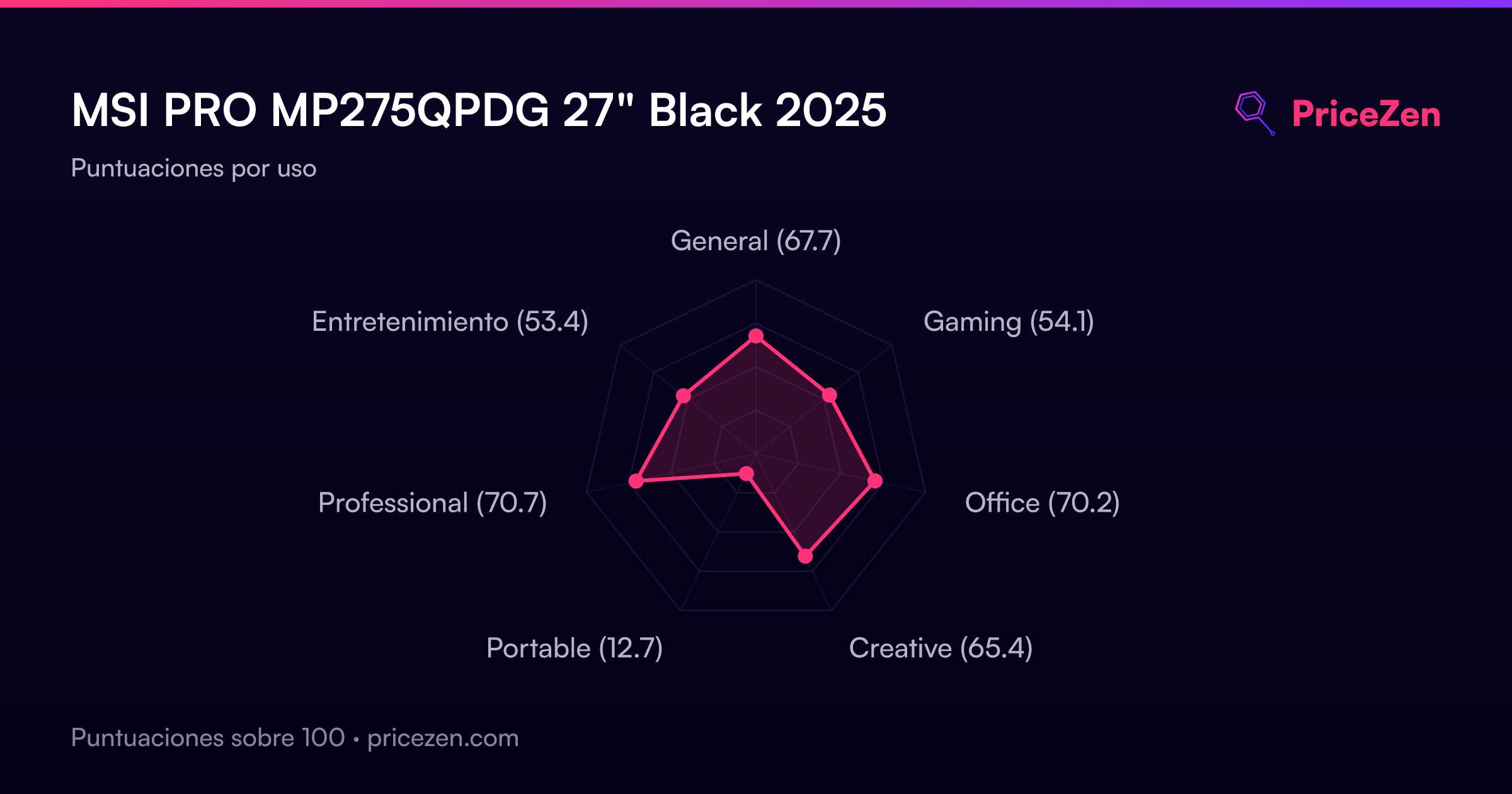
- General67.7
- Gaming54.1
- Office70.2
- Creative65.4
- Portable12.7
- Professional70.7
- Entretenimiento53.4