ASUS ROG Strix XG27ACMS 27"
The 320Hz Fast IPS panel with 0.3ms response time delivers sharp, tear-free visuals at high frame rates, supported by G-Sync compatibility and ELMB Sync. Its USB-C with DP Alt mode simplifies connectivity, while DisplayWidget Center allows mouse-controlled OSD adjustments. Best for competitive gamers who prioritize speed and clarity in fast-paced esports titles.












Resumen
The 30-Second Version
The ROG Strix XG27ACMS packs a 320Hz overclocked 1440p Fast IPS panel with 94% DCI-P3 coverage into a USD 322 package, and our data ranks its performance among the best we've seen, in the 96th percentile. Owners rate it 4.6/5 and repeatedly call out the clarity, colors and value. The trade-offs are no speakers, a right-side OSD joystick and only three video inputs. If you're a competitive gamer who wants maximum refresh per dollar, buy it.
Pros & Cons
Ventajas
- 320Hz overclock and 0.3ms min response put performance among the best we've seen, in the 96th percentile 96th
- 94% DCI-P3 and 130% sRGB make color a standout, not an afterthought 89th
- USD 322 on Amazon for a 320Hz 1440p Fast IPS panel is aggressive pricing 85th
- Full ergonomics: height, tilt, swivel and pivot, plus a tripod socket 79th
- DisplayWidget Center lets you change settings with a mouse, and owners love it
Desventajas
- No built-in speakers, a recurring complaint from buyers
- OSD joystick sits on the right side, awkward in dual-monitor setups
- Only three video inputs: 1x HDMI, 1x DisplayPort, 1x USB-C
- HDR400 with 400 nits means no real HDR impact
- 320Hz requires manual overclocking in the OSD, it isn't on by default
Opinión de los propietarios
The Word on the Street
Cómo cambió la opinión de los propietarios con el tiempo
ExclusivaSegún cuándo escribieron realmente sus opiniones los clientes, para ver si los elogios iniciales se mantuvieron.
8 opiniones escritas, oct 2025 – abr 2026: 8 satisfechos
En las 46 valoraciones de tiendas: 4,6★. La mayoría de los propietarios valora sin escribir una opinión. El gráfico cuenta las 8 opiniones escritas.
- ene–mar 20264 de 4 satisfechos
Buyers praised the monitor's picture quality, smoothness, and value, especially during sales. Some noted the side-mounted controller and lack of speakers as drawbacks.
- Excellent colors, brightness, and picture quality; a major upgrade from older monitors.
- High refresh rate and smooth performance, ideal for competitive gaming.
- Side-mounted controller is awkward, especially in dual-monitor setups; software partially mitigates.
- No built-in speakers, which was a disappointment for one buyer.
- oct–dic 20253 de 3 satisfechos
Buyers in Q4 2025 praised this 1440p 300Hz monitor for gaming, image clarity, and value. Setup was easy, and Amazon's secure packaging was noted. One mentioned color calibration needed out of the box.
- Excellent 1440p gaming performance with 300Hz refresh, minimal ghosting, and sharp, bright visuals.
- Great value for the price, especially as a primary or secondary monitor upgrade from 1080p.
- Secure Amazon packaging with styrofoam and plastic bags ensured safe delivery.
- Color accuracy off out of the box, but easily fixed with tweaking; not a dealbreaker.
Cada punto es una opinión escrita, en el mes en que se escribió. Satisfechos = 4-5★, neutrales = 3★, insatisfechos = 1-2★. Los resúmenes por periodo están en inglés.
Las pruebas
Performance
Let's unpack the headline numbers. 320Hz is an overclock, not the default, and owners confirm you have to enable it in the OSD before Windows will offer it in display settings. Once you do, you're getting a refresh rate near the top of what any monitor currently ships with, which translates to noticeably smoother tracking and less perceived input lag in fast-paced games. The 0.3ms figure is a minimum spec rather than an average, so treat it as a best-case number, but paired with Fast IPS it's clearly aimed at killing ghosting. ELMB Sync running alongside variable refresh is the part enthusiasts should care about most, because normally backlight strobing and adaptive sync are mutually exclusive.
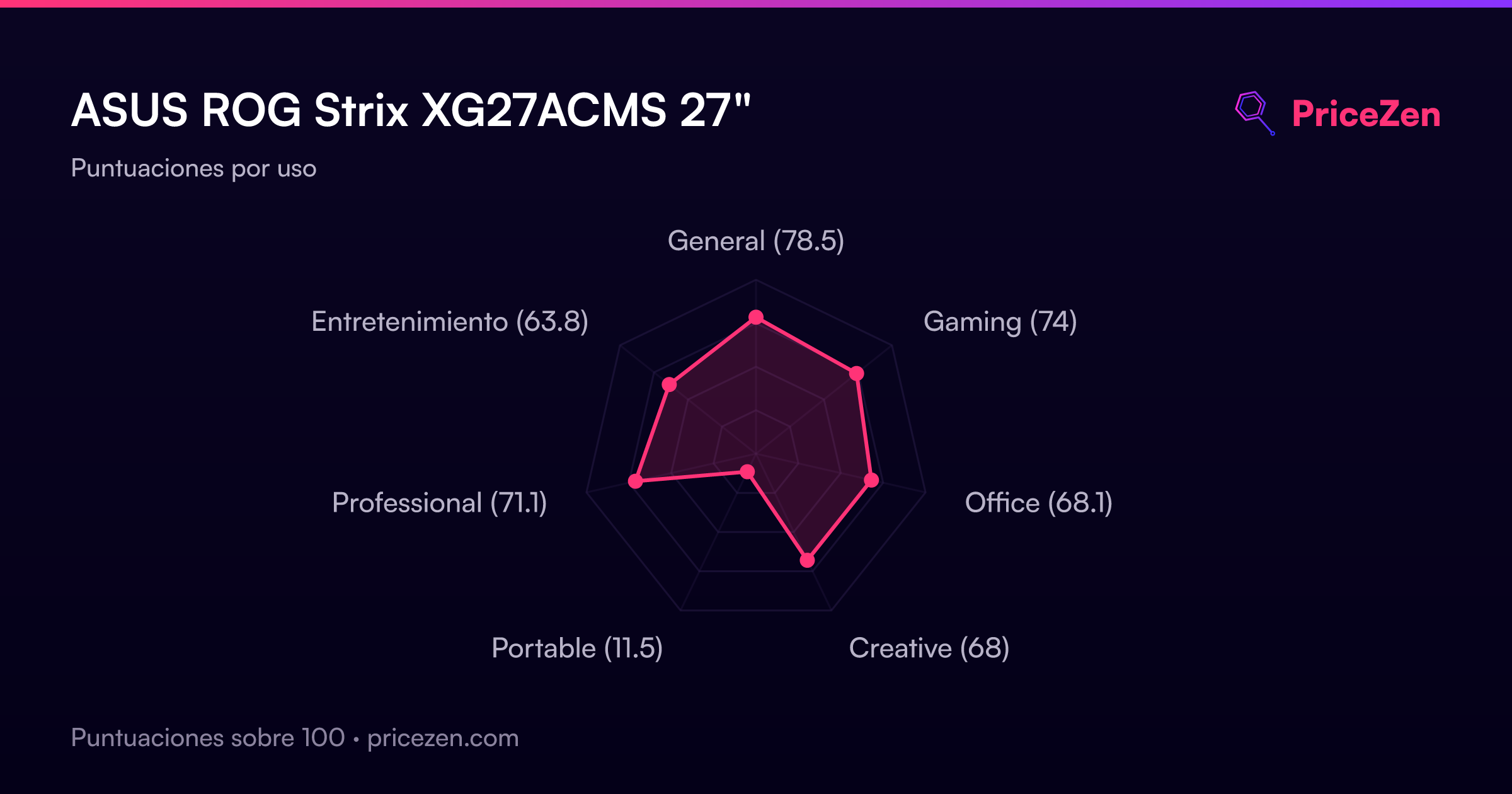
On the image side, 400 nits and HDR400 mean this is a bright SDR monitor with basic HDR support rather than a true HDR display. There's no local dimming here, so don't buy it expecting deep blacks in dark scenes. What you do get is wide gamut coverage at 94% DCI-P3 and 130% sRGB, which puts color accuracy potential well above average for a gaming panel. One owner noted colors needed tweaking out of the box, which is normal for wide-gamut screens running unclamped. Overall our model gives it 74/100 for gaming and 78.5/100 total, held back less by the panel itself and more by the trimmed connectivity: one HDMI, one DisplayPort, one USB-C. That's enough for a PC plus a laptop, but not a console-and-PC-and-switch setup.
Specifications
Full Specifications
Display
| Size | 27" |
| Resolution | 2560x1440 (QHD) |
| Panel Type | IPS |
| Aspect Ratio | 16:9 |
| Curved | No |
| Screen Finish | matte |
Performance
| Refresh Rate | 320 Hz |
| Response Time | 0.3 |
| Adaptive Sync | G-Sync Compatible |
Color & HDR
| Brightness | 400 nits |
| Color Gamut | DCI-P3 94%, sRGB 130% |
| HDR | HDR400 |
| HDR Support | HDR |
Connectivity
| HDMI Ports | 1 |
| DisplayPort | 1 |
| USB-C | 1 |
| Speakers | No |
Ergonomics
| Height Adjustable | Yes |
| Tilt | Yes |
| Swivel | Yes |
| Pivot | Yes |
Features
| Weight | 9.1 kg / 20.0 lbs |
vs Competition
The competitor set here is interesting because it splits into two camps. On the OLED side you've got the MSI MAG 271QPX QD-OLED E2 and the Samsung Odyssey G60SD, both 27-inch panels chasing the same competitive gamer. Against those, the XG27ACMS argues its case with 320Hz, a performance ranking that's among the best we've seen, and that USD 322 price. Where it gives ground is contrast and black levels, since HDR400 at 400 nits on an IPS panel simply isn't playing the same game as OLED. If you mostly play atmospheric single-player titles in a dark room, cross-shop the MSI and Samsung seriously. If you play shooters in a bright room and want zero burn-in anxiety, the ASUS makes a strong counterargument.
The other camp is bigger or more work-oriented. The Alienware AW3425DW is a 34-inch ultrawide and the LG UltraGear 32GX850A-B is a 32-inch panel, both offering more screen real estate than this 27-inch 16:9 display. Our display score for the ASUS sits at 67, solid but about average, and that's partly the resolution and size talking. The BenQ MA270U is the one to look at if your day is spreadsheets and design work rather than ranked matches, though the ASUS holds its own with 94% DCI-P3 and a 71.1 professional score. Our honest take: pick the ASUS when refresh rate per dollar is the metric you're optimizing, and look elsewhere when screen size or contrast is.
| Spec | ASUS ROG Strix XG27ACMS 27" | Alienware AW-Series AW3425DW 34" | MSI MAG 271QPX QD-OLED E2 27" | Samsung Odyssey G60SD 27" | LG UltraGear 32GX850A-B 32" | BenQ MA Series MA270U 27" |
|---|---|---|---|---|---|---|
| Screen Size | 27 | 34 | 27 | 27 | 32 | 27 |
| Resolution | 2560 x 1440 | 3440 x 1440 | 2560 x 1440 | 2560 x 1440 | 3840 x 2160 | 3840 x 2160 |
| Panel Type | IPS | QD-OLED | QD-OLED | QD-OLED | OLED | IPS |
| Refresh Rate | 320 | 240 | 240 | 360 | 165 | 60 |
| Response Time Ms | 0.3 | 0.03 | 0.03 | 0.03 | 0.03 | 5 |
| Adaptive Sync | G-Sync Compatible | FreeSync Premium Pro | FreeSync Premium Pro | FreeSync Premium Pro | FreeSync Premium Pro | - |
| Hdr | HDR400 | HDR400 | DisplayHDR True Black 400 | HDR10+ | DisplayHDR True Black 400 | HDR10 |
| Compare | Compare | Compare | Compare | Compare |
| Producto | Color | Portabilidad | Display | Feature | User Sentiment | Ergonomic | Performance | Connectivity | Valoración social |
|---|---|---|---|---|---|---|---|---|---|
| ASUS ROG Strix XG27ACMS 27" | 84.7 | 57.4 | 66.9 | 70.1 | 89.2 | 78.6 | 95.5 | 62.3 | 51 |
| Alienware AW-Series AW3425DW 34" Compare | 98.9 | 73.9 | 84.1 | 96.3 | 95.7 | 90.7 | 97.9 | 95.4 | 96.8 |
| MSI MAG 271QPX QD-OLED E2 27" Compare | 99.2 | 57.4 | 73.4 | 85 | 95.7 | 90.7 | 97.9 | 81.1 | 98.9 |
| Samsung Odyssey G60SD 27" Compare | 90.7 | 39.4 | 73.4 | 70.1 | 95.7 | 90.7 | 99.5 | 87.5 | 92 |
| LG UltraGear 32GX850A-B 32" Compare | 79.4 | 49.4 | 99 | 70.1 | 76.5 | 90.7 | 96.2 | 98.2 | 74.8 |
| BenQ MA Series MA270U 27" Compare | 92.3 | 83.9 | 87 | 70.1 | 95.7 | 90.7 | 22.4 | 97.8 | 83.9 |
Precio
Value & Pricing
At USD 322 from Amazon, this is the kind of price that makes you double-check the spec sheet. A 320Hz 1440p Fast IPS panel with wide gamut coverage and full ergonomics landing in the low three hundreds is genuinely strong price-to-performance, and value for money is one of the most repeated themes in owner feedback, showing up in roughly five separate mentions. Several buyers describe it as punching above its weight, which matches what our numbers say.
We also track it at CAD 514 in Canada, GBP 553 in the UK and BRL 4,432 in Brazil. Those are separate markets with separate pricing, so don't read them as conversions of each other, but the pattern holds: this is positioned as an attainable high-refresh panel rather than a halo product. The 3-year warranty listed by Amazon adds some peace of mind at this price too.
Amazon 1 oferta Desde 322 US$
Historial de precios
Leer más
Overview
The ASUS ROG Strix XG27ACMS is a 27-inch, 2560 x 1440 Fast IPS panel built for people who care more about frame rate than pixel count. It runs at an overclocked 320Hz with a claimed 0.3ms minimum response time, and it's G-Sync Compatible with ELMB Sync on top, which means you can run motion blur reduction and variable refresh at the same time instead of picking one. That combination is why our scoring model puts its performance among the best we track, ranking in the 96th percentile. This thing is quick.
Who's it for? Competitive shooters first. If you're grinding Valorant, CS or Apex at 1440p and your GPU can actually push high frame rates, this is aimed squarely at you. But it's not a one-trick panel: 94% DCI-P3 coverage, 130% sRGB and 400 nits give it a color score that's one of the best we've seen, ranking in the 85th percentile, so photo work and general desktop use aren't an afterthought. Our professional-use score lands at 71.1/100, which is respectable for something wearing a ROG badge.
What makes it interesting right now is the price. We track it at USD 322 on Amazon, and that's a number that would have sounded like a typo for a 320Hz 1440p panel not long ago. Owners seem to agree: sentiment sits at 88/100 in our data, with a 4.6/5 average across 46 reviews. The catch, as always, is what got left out to hit that price, and we'll get into it.
Common Questions
Q: Do I really get 320Hz out of the box?
Not quite. The 320Hz figure is an overclock, and owners confirm you need to enable it in the monitor's OSD menu first, then select it in your display settings. It's a two-minute process, but worth knowing so you don't think the panel is underperforming on day one.
Q: Is the HDR worth caring about?
Honestly, no, not as a buying reason. HDR400 with 400 nits and no local dimming means you get basic HDR signal support rather than the punchy highlights and deep blacks a proper HDR display delivers. Buy this for its 320Hz refresh and wide gamut SDR image, not for HDR.
Q: Can I connect a console and a PC at the same time?
Yes, but just barely. You get one HDMI, one DisplayPort and one USB-C with DP Alt mode, so a PC plus one console or laptop works fine. Add a third device and you'll be swapping cables, which is why connectivity only ranks in the 62nd percentile in our data.
Q: Is it good for photo or design work, not just gaming?
It's better than most gaming monitors at that. Coverage of 94% DCI-P3 and 130% sRGB puts its color among the best we've seen, ranking in the 85th percentile, and our professional-use score is 71.1/100. You'll want to calibrate or at least tweak the out-of-box settings, and note that gamma adjustment lives in the monitor controls rather than software.
Who Should Skip This
Skip this if your gaming leans cinematic rather than competitive. An IPS panel with HDR400 and 400 nits can't deliver the contrast that makes dark, atmospheric games sing, and the MSI MAG 271QPX QD-OLED E2 or Samsung Odyssey G60SD are the ones to cross-shop for that. Same story if you watch a lot of movies at your desk: no built-in speakers means external audio is mandatory.
Also skip it if you're building a multi-device battlestation or a big-screen setup. Three video inputs total is tight, and at 27 inches with 1440p, anyone wanting more workspace should look at the 34-inch Alienware AW3425DW or the 32-inch LG UltraGear 32GX850A-B instead. And if your daily grind is design work first and gaming never, the BenQ MA270U is the more sensible target.
Verdict
For competitive gamers on a budget, this is an easy recommendation. You're getting a refresh rate and response spec that sit near the top of the market, color coverage that doesn't embarrass itself in creative work, and a stand that adjusts every way you'd want, all at USD 322. Owner sentiment backs that up at 88/100, with picture quality and smoothness dominating the feedback. Just go in knowing you'll need to flip the overclock switch yourself and probably spend a few minutes in the color settings.
For everyone else, it's more conditional. If you want a monitor that doubles as a TV substitute, the missing speakers and basic HDR will annoy you. If you run three source devices, the single HDMI port will frustrate you within a week. And if you're chasing cinematic contrast, the OLED alternatives in our comparison are worth the extra spend. Our total score of 78.5/100 reflects exactly that: excellent at its core job, ordinary at the extras.
Usage Scores
- General78.5
- Gaming74
- Office68.1
- Creative68
- Portable11.5
- Professional71.1
- Entretenimiento63.8