MSI MAG 32CQ6F 31.5" Black 2024

Respuesta de 0.5 ms para un movimiento nítido verificado el 28 nov
59/100 puntuación global 4,5 media de 500 valoraciones de propietarios
30,00 US$ (13 %) por debajo del precio habitual y el más bajo en 90 días.
Habitual 219,99 US$Máximo y precio «antes» de la tienda 249,99 US$
Habitual 219,99 US$Máximo y precio «antes» de la tienda 249,99 US$
Precio en los últimos 90 días: mínimo 189,99 US$ el 19 nov, máximo 249,99 US$. Precio habitual 219,99 US$. El precio «antes» de la tienda 249,99 US$. Hoy 189,99 US$.
- Screen
- 31.5"
- Resolution
- 2560 x 1440
- Panel
- IPS
- Refresh
- 180 Hz
- Response time
- 0.5 ms
- Adaptive sync
- Adaptive-Sync
- HDR
- HDR
Compara precios en 1 tienda
De la más barata a la más cara. Las ofertas nuevas, reacondicionadas y en pack se mantienen separadas para que compares lo comparable.
| Tienda | Vendido por | Color y estado | Precio | vs. el más bajo | Última comprobación | Enlace |
|---|---|---|---|---|---|---|
| Nuevo1 ofertaUnidad individual | ||||||
| Amazon | Amazon | Black | 189,99 US$ | Precio más bajo | Anteayer | Ir a la tienda |
 Fuente: PriceZen, comprobado el 26 nov 2026
Un precio se considera vigente si lo comprobamos en los últimos 7 días. «Vendedor externo» significa un vendedor de terceros en esa tienda, no la propia tienda.
Historial de precios
189,99 US$ está 30,00 US$ por debajo del precio habitual en tiendas y es el más bajo en 90 días.
Comprobado ese díaNo comprobado ese día, sigue en oferta
Fuente: PriceZen, checked 26 nov 2026
Resumen
The 30-Second Version
A 31.5-inch curved QHD panel with 180Hz for USD 190 is a steal, and its performance rank is among the best we've seen. Color accuracy is the weak spot. If you want size and speed on a budget, buy it.
Pros & Cons
Ventajas
- 180Hz and a 0.5ms claim make it one of the faster monitors in our data. 92nd
- 31.5 inches of QHD curve for USD 190 is genuinely hard to argue with. 91st
- Height adjust, tilt and VESA 100x100 cover most setup needs. 84th
- 4.5/5 across 500 reviews is strong owner approval. 67th
Desventajas
- Color performance falls behind most of the category.
- One HDMI and one DisplayPort is thin if you run multiple machines.
- The stand eats a lot of desk space, according to owners.
- At 8165g it's not going anywhere once it's set up.
Opinión de los propietarios
The Word on the Street
- Several owners say the size and curve make a huge difference for spreadsheet, mapping and CAD work, and one buyer who ordered five units reported no dead pixels or power problems.
- A recurring theme is that the picture quality and responsiveness feel well above what the price suggests.
- The bundled stand gets called out for hogging desk space, and at least one owner noticed dark areas of photos looking washed out compared to their other screens.
Cómo cambió la opinión de los propietarios con el tiempo
ExclusivaSegún cuándo escribieron realmente sus opiniones los clientes, para ver si los elogios iniciales se mantuvieron.
11 opiniones escritas, dic 2023 – dic 2025: 10 satisfechos, 1 neutral
En las 500 valoraciones de tiendas: 4,5★. La mayoría de los propietarios valora sin escribir una opinión. El gráfico cuenta las 11 opiniones escritas.
Cada punto es una opinión escrita, en el mes en que se escribió. Satisfechos = 4-5★, neutrales = 3★, insatisfechos = 1-2★.
Las pruebas
Performance
The headline numbers do the heavy lifting here. 180Hz with Adaptive-Sync and a 0.5ms claim puts this thing among the faster panels we track, and the performance rank backs that up. The curve plus narrow bezels make the 31.5-inch span feel immersive without eating your whole desk view. Height adjust, tilt and VESA 100x100 mean you can actually get it positioned right. The lowlights are real, though: color ranks in the 31st percentile, connectivity is only about average with a single HDMI and a single DisplayPort, and HDR support is listed but this isn't a panel to buy for HDR. At 8165g it's also firmly a stay-at-home monitor, which is why portability scores a dismal 6.7/100. Not that anyone was planning to commute with a 32-inch curve.
Specifications
Full Specifications
Display
| Size | 31.5" |
| Resolution | 2560x1440 (QHD) |
| Panel Type | IPS |
| Aspect Ratio | 16:9 |
| Curved | Yes |
| Curvature | 1500 |
| Screen Finish | matte |
Performance
| Refresh Rate | 180 Hz |
| Response Time | 0.5 |
| Adaptive Sync | Adaptive-Sync |
Color & HDR
| HDR | ✓ |
Connectivity
| HDMI Ports | 1 |
| DisplayPort | 1 |
| Speakers | Yes |
Ergonomics
| Height Adjustable | Yes |
| Tilt | Yes |
| VESA Mount | VESA Mountable |
Features
| Weight | 8.2 kg / 18.0 lbs |
vs Competition
This is a crowded shelf. The Samsung Odyssey G60SD 27", ASUS ROG Strix XG27AQDMG 26.5" and LG UltraGear 27G810A-B 27" are all worth cross-shopping if you want a smaller, sharper-feeling gaming screen, since 1440p on 31.5 inches spreads those pixels thinner than it does on 27. If your day is spreadsheets, CAD prints and documents rather than shooters, the BenQ MA Series MA270U 27" and Dell S2725QC 27" deserve a look given how weak this MSI's color ranking is. Where the MAG 32CQ6F wins is sheer scale plus a leading refresh rate at a price the others don't have to answer to.
| Spec | MSI MAG 32CQ6F 31.5" | Samsung Odyssey G60SD 27" | ASUS ROG Strix XG27AQDMG 26.5" | LG UltraGear 27G810A-B 27" | BenQ MA Series MA270U 27" | Dell S2725QC 27" |
|---|---|---|---|---|---|---|
| Screen Size | 31.5 | 27 | 26.5 | 27 | 27 | 27 |
| Resolution | 2560 x 1440 | 2560 x 1440 | 2560 x 1440 | 3840 x 2160 | 3840 x 2160 | 3840 x 2160 |
| Panel Type | IPS | OLED | OLED | IPS | IPS | IPS |
| Refresh Rate | 180 | 360 | 240 | 180 | 60 | 120 |
| Response Time Ms | 0.5 | 0.03 | 0.03 | 1 | 5 | 8 |
| Adaptive Sync | Adaptive-Sync | FreeSync Premium Pro | FreeSync Premium Pro | FreeSync Premium | - | FreeSync Premium |
| Hdr | HDR | HDR10+ | HDR10 | HDR400 | HDR10 | HDR |
| Compare | Compare | Compare | Compare | Compare |
| Producto | Color | Portabilidad | Display | Feature | Ergonomic | Performance | Connectivity | Valoración social |
|---|---|---|---|---|---|---|---|---|
| MSI MAG 32CQ6F 31.5" | 31.1 | 20.7 | 66.9 | 90.8 | 66.9 | 91.8 | 43 | 83.9 |
| Samsung Odyssey G60SD 27" Compare | 90.7 | 39.3 | 73.4 | 70 | 90.8 | 99.5 | 87.4 | 91.9 |
| ASUS ROG Strix XG27AQDMG 26.5" Compare | 97.1 | 67.9 | 72.5 | 70 | 90.8 | 97.9 | 93 | 67.1 |
| LG UltraGear 27G810A-B 27" Compare | 93.7 | 67.9 | 87 | 70 | 90.8 | 81.7 | 98.2 | 67.1 |
| BenQ MA Series MA270U 27" Compare | 92.2 | 83.9 | 87 | 70 | 90.8 | 22.3 | 97.8 | 83.9 |
| Dell S2725QC 27" Compare | 71.7 | 76.5 | 87 | 70 | 90.8 | 44.2 | 87.4 | 96.8 |
Precio
Value & Pricing
USD 190 for a 31.5-inch 180Hz QHD curved panel is the whole argument. We track its price and there's currently one US listing at Amazon at that number, so no shopping around needed. Our total score of 58.5/100 looks middling until you remember what it costs. You're paying for size and speed, and you're getting both. Just don't expect the color accuracy or port selection you'd get further up the price ladder.
Leer más
Overview
The MSI MAG 32CQ6F is a big, fast curved monitor that doesn't ask much of your wallet. You get 31.5 inches of 2560 x 1440 IPS panel, a 180Hz refresh rate and a claimed 0.5ms response time for USD 190 at Amazon. That's a lot of screen per dollar.
Our scoring model likes the speed and the feature set far more than it likes the picture quality. Performance is among the best we've seen, and features are close behind, but color sits near the bottom third of the category. So: great gaming and workhorse value, not a color-critical display.
Common Questions
Q: Is 1440p sharp enough on a 31.5-inch screen?
It's usable and fine for gaming and general work, but pixel density is lower than on a 27-inch QHD panel. Our display score of 67/100 reflects a solid, middle-of-the-pack panel rather than a standout.
Q: Can I mount it on an arm instead of using the stand?
Yes, it's VESA 100x100 compatible, which is handy since owners complain the stock stand takes up a lot of desk. Just account for the 8165g weight when picking an arm.
Q: Is this good for photo or video editing?
Not really. Color ranks in the 31st percentile in our data and one owner spotted lifted shadows in photos, so leave color-critical work to something better calibrated.
Who Should Skip This
If you edit photos, grade video or do anything where color has to be trustworthy, look elsewhere. The color ranking is a weak spot and owners have already noticed brightened shadows. Same story if you juggle a console, a desktop and a laptop, because one HDMI and one DisplayPort will have you swapping cables like it's 2009.
Verdict
Buy this if you want maximum screen and maximum frames for minimum money. Budget gamers, sim racers, and anyone doing spreadsheet-and-maps work who wants a big curved canvas will be happy. Owners clearly are, with 4.5/5 over 500 reviews. Skip it if your work depends on colors being right, or if you need to plug in three devices at once.
Usage Scores
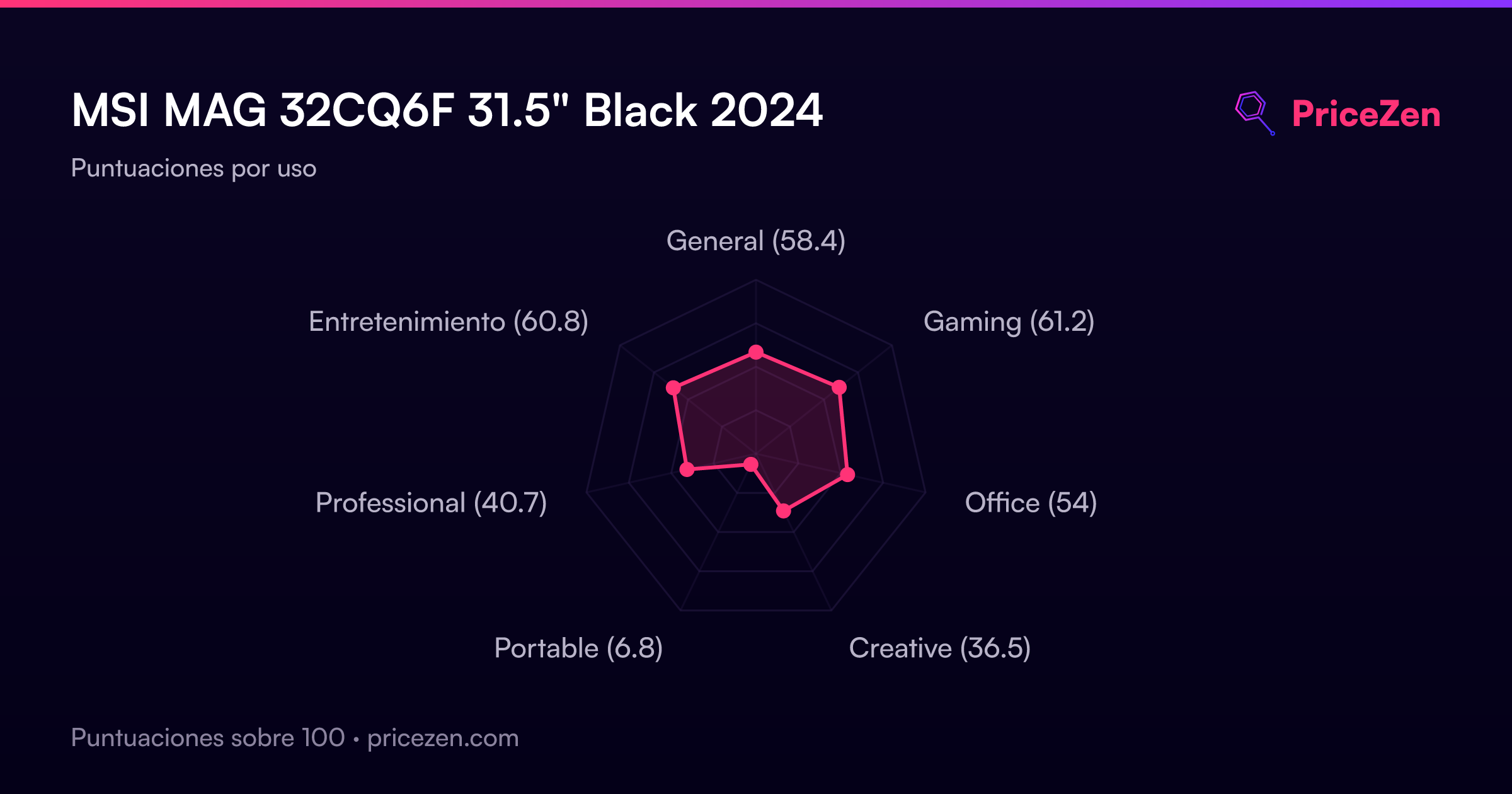
- General58.5
- Gaming61.2
- Office53.9
- Creative36.5
- Portable6.7
- Professional40.7
- Entretenimiento61.3