ASUS ProArt PA32UCDMR-K 31.5" BLACK 2026
El panel OLED de 31.5 pulgadas ofrece resolución 4K a 240 Hz con 0.1 ms de respuesta y un brillo máximo de 1000 nits, además de estar calibrado de fábrica con ΔE<1 e incluir el colorímetro ProArt CaliContrO. Su cobertura del 99% DCI-P3 y compatibilidad con Dolby Vision, junto con un contraste estático de 1.5 millones:1, garantizan negros puros y colores precisos para contenido HDR. Es ideal para coloristas y editores de vídeo que trabajan con flujos 4K HDR y exigen calibración de hardware y respuesta instantánea de 0.1 ms.

Sin precio actual de tiendas
Dónde lo vimos antes. Consulta el precio de hoy en la tienda.





Resumen
The 30-Second Version
The ASUS ProArt PA32UCDMR-K is a 31.5" 4K OLED monitor built for color professionals, with best-in-class accuracy, a 240Hz refresh rate, and Thunderbolt 4 connectivity. It's painfully expensive and the stand is limited, but if you're serious about photo or video editing, it's one of the finest displays you can buy right now.
Pros & Cons
Ventajas
- Stunning OLED panel with 1.5M:1 contrast and deep blacks 100th
- Factory calibrated to Delta E <1, plus includes colorimeter 99th
- 240Hz refresh rate at 4K is incredibly smooth 98th
- Thunderbolt 4 and USB-C make it a killer hub 98th
- HDR support for Dolby Vision, HDR10, HLG is top-notch
Desventajas
- Price varies from $1,633 to $2,597—ouch
- No swivel on the stand, ergonomics are just okay
- Heavy at 9.2 kg and bulky on a desk
- Only a handful of user reviews so far
- QD-OLED subpixel structure may cause text fringing for some
Opinión de los propietarios
The Word on the Street
Cómo cambió la opinión de los propietarios con el tiempo
ExclusivaSegún cuándo escribieron realmente sus opiniones los clientes, para ver si los elogios iniciales se mantuvieron.
1 opinión escrita, mar 2026: 1 sin estrellas
En las 1 valoraciones de tiendas: 5,0★. El gráfico cuenta 1 opinión escrita.
Cada punto es una opinión escrita, en el mes en que se escribió. Satisfechos = 4-5★, neutrales = 3★, insatisfechos = 1-2★.
Las pruebas
Performance
This monitor lands in the absolute top tier of our display database for performance and color, meaning it's essentially best-in-class right now. The 240Hz refresh rate and 0.1ms response time are wild for a 4K panel—smooth enough for competitive gaming, though we know that's not the main draw. In practice, scrolling is buttery and even fast video pans stay crystal clear. The 1000-nit peak brightness means HDR content pops with real impact, not just a washed-out approximation.
Color accuracy is where this thing truly shines. With a 99th percentile ranking, it's about as good as it gets before you step into reference monitors costing far more. The included ProArt CaliContrO colorimeter helps maintain that accuracy over time, which is a big deal for photographers and video editors who can't afford color drift. Black levels are near-perfect OLED, so dark scenes in movies or shadow detail in photos look exactly right.
Specifications
Full Specifications
Display
| Size | 31.5" |
| Resolution | 3840x2160 (4K UHD) |
| Panel Type | QD-OLED |
| Aspect Ratio | 16:9 |
| Curved | No |
| Screen Finish | matte |
Performance
| Refresh Rate | 240 Hz |
| Response Time | 0.1 |
| Adaptive Sync | G-Sync Compatible |
Color & HDR
| Brightness | 1000 nits |
| Color Gamut | 99% DCI-P3, 100% sRGB |
| Color Depth | 10-bit |
| HDR | Dolby Vision |
| HDR Support | Dolby Vision |
Connectivity
| HDMI Ports | 1 |
| DisplayPort | 1 |
| USB-C | 3 |
| Thunderbolt | Thunderbolt 4 |
| Speakers | Yes |
| Headphone Jack | Yes |
Ergonomics
| Height Adjustable | Yes |
| Tilt | Yes |
| Swivel | No |
| Pivot | Yes |
| VESA Mount | 100x100 |
Features
| Webcam | No |
| Touchscreen | No |
| PIP/PBP | Yes |
| Power | 32 |
| Weight | 9.2 kg / 20.3 lbs |
vs Competition
Stacked against rivals, the ASUS stands out as the specialist's choice. The MSI MAG 271QPX QD-OLED E2 is a 27" 1440p option that's faster and cheaper, but it's smaller and can't touch the ASUS for resolution or color-critical precision. The Gigabyte M Series OLED MO27U2 SA offers a similar 27" 4K OLED experience with a 240Hz refresh rate, making it a compelling alternative for those who don't need the larger 31.5" canvas or the bundled colorimeter.
Then there's the LG UltraGear 45GX950A-B, a massive 45" ultrawide OLED that delivers an immersive gaming and multitasking experience, yet its lower pixel density and less rigorous calibration make it a step down for photographers. The Samsung Odyssey G60SD is a 27" 1440p OLED gaming monitor with incredible speed, but it lacks the 4K resolution and pro-grade color accuracy the ASUS provides. The ASUS ROG Strix XG27AQDMG is another 27" 1440p OLED, built purely for gaming with a glossy panel and extreme brightness, but it's not in the same conversation for color-critical work. If your workflow demands reference-level accuracy in a flat 16:9 4K panel, none of these alternatives quite nail the ProArt's blend of speed and precision.
| Spec | ASUS ProArt PA32UCDMR-K 31.5" | LG UltraGear 45GX950A-B 45" | Dell UltraSharp U4025QW 39.7" | Alienware AW-Series AW3425DW 34" | Samsung Odyssey G80SH 32" | MSI MPG 271QR QD-OLED X50 27" |
|---|---|---|---|---|---|---|
| Screen Size | 31.5 | 45 | 39.7 | 34 | 32 | 27 |
| Resolution | 3840 x 2160 | 5120 x 2160 | 5120 x 2160 | 3440 x 1440 | 3840 x 2160 | 2560 x 1440 |
| Panel Type | QD-OLED | OLED | IPS | QD-OLED | QD-OLED | QD-OLED |
| Refresh Rate | 240 | 330 | 120 | 240 | 240 | 500 |
| Response Time Ms | 0.1 | 0.03 | 5 | 0.03 | 0.03 | 0.03 |
| Adaptive Sync | G-Sync Compatible | FreeSync Premium Pro | Adaptive-Sync | FreeSync Premium Pro | FreeSync Premium Pro | G-Sync Compatible |
| Hdr | Dolby Vision | DisplayHDR True Black 400 | HDR600 | HDR400 | HDR10+ | DisplayHDR True Black 500 |
| Compare | Compare | Compare | Compare | Compare |
| Producto | Color | Portabilidad | Display | Feature | Ergonomic | Performance | Connectivity | Valoración social |
|---|---|---|---|---|---|---|---|---|
| ASUS ProArt PA32UCDMR-K 31.5" | 99.6 | 81.3 | 97.7 | 85 | 78.6 | 97.9 | 99.3 | 26.8 |
| LG UltraGear 45GX950A-B 45" Compare | 99.4 | 76.5 | 99.7 | 96.3 | 90.7 | 99.4 | 96.9 | 92 |
| Dell UltraSharp U4025QW 39.7" Compare | 97.9 | 76.5 | 98.6 | 96.3 | 90.7 | 56.1 | 99.3 | 96.8 |
| Alienware AW-Series AW3425DW 34" Compare | 98.9 | 73.9 | 84.1 | 96.3 | 90.7 | 97.9 | 95.4 | 96.8 |
| Samsung Odyssey G80SH 32" Compare | 94.4 | 49.3 | 99 | 70.1 | 90.7 | 97.9 | 81 | 96.8 |
| MSI MPG 271QR QD-OLED X50 27" Compare | 99.2 | 57.3 | 73.4 | 85 | 90.7 | 99.9 | 62.1 | 98.9 |
Precio
Value & Pricing
Let's talk money. Prices are all over the place, from about $1,633 at some retailers up to $2,597 at others, so you absolutely should shop around. Even at the low end, this is a serious investment. For a professional creative who bills by the hour and needs absolute color confidence, the included calibrator and outstanding panel justify the cost. But if you're a gamer or a casual user who just wants a nice 4K screen, the Dell UltraSharp U4025QW or Samsung Odyssey Neo G9 deliver more real estate for less, albeit without the same pixel-perfect accuracy.
Historial de precios
Leer más
Overview
If you're hunting for a top-tier 4K monitor for photo editing, video grading, or any color-critical work, the ASUS ProArt PA32UCDMR-K is probably on your radar. And it should be. This 31.5" OLED display packs a gorgeous 3840 x 2160 resolution, a blazing 240Hz refresh rate, and factory calibration so precise that Delta E is less than 1 out of the box. You also get a dedicated colorimeter in the box, so you can recalibrate whenever you want without buying extra gear.
What really sets it apart is the OLED panel's sheer contrast and color volume. With a 1.5 million:1 static contrast ratio and peak brightness hitting 1000 nits in HDR, it handles Dolby Vision, HDR10, and HLG like a champ. The 10-bit panel covers 99% of DCI-P3 and 100% sRGB, making it a no-brainer for anyone delivering content across multiple color spaces.
Around the back, connectivity is generous: one HDMI, one DisplayPort, two USB-C ports with Thunderbolt 4, plus a headphone jack and built-in speakers. It's not just a display, it's practically a dock. The stands does tilt and height adjust, though you won't find swivel. At 9.2 kg, it's a hefty piece of kit, so VESA mounting is a smart move if your desk isn't huge.
Common Questions
Q: Is the ASUS ProArt PA32UCDMR-K good for gaming?
It's not designed as a gaming monitor, but the 240Hz OLED panel and 0.1ms response time make it shockingly capable for gaming, especially if you play fast-paced shooters at 4K.
Q: Does this monitor use the same panel as the older PA32UCDM?
It's an updated model, and while ASUS doesn't specify the exact panel, early signs point to improvements over the PA32UCDM, with black crush issues reportedly addressed.
Q: How accurate is the color out of the box?
Factory calibration achieves Delta E less than 1, covering 99% DCI-P3 and 100% sRGB, so you can start color-critical work immediately without tweaking.
Q: Does the QD-OLED panel use a standard RGB subpixel layout?
No, the QD-OLED tech uses a different subpixel structure that's not classic RGB stripe, which can cause slight text fringing on fine details but doesn't impact image or video work.
Who Should Skip This
Skip this one if you're a gamer looking for an ultrawide or a high-refresh 1440p panel at a saner price—something like the Alienware AW3423DW or Samsung Odyssey G9 will serve you better. Also, if you just need a big, sharp screen for office work and spreadsheets, the Dell UltraSharp U4025QW gives you a wider 5K canvas for less cash without features you'll never touch. And if price makes you sweat, this monitor will feel like overkill; there are excellent 4K IPS panels under $800 that handle SDR workflows perfectly well.
Verdict
If you need a 4K OLED monitor that's factory calibrated for pro-level work and also handles 240Hz motion like a dream, the ASUS ProArt PA32UCDMR-K is basically in a class of its own. It's not for everyone, but it's an amazing tool for photo editors, colorists, and video producers who want HDR grading without a $5,000 reference monitor.
Should you buy it? If your income depends on accurate color and your eyes appreciate buttery-smooth motion, yes. Just budget for a VESA arm and maybe a second monitor for toolbars, and you'll have a setup that's hard to beat. For pure entertainment or office use, save your cash and look elsewhere.
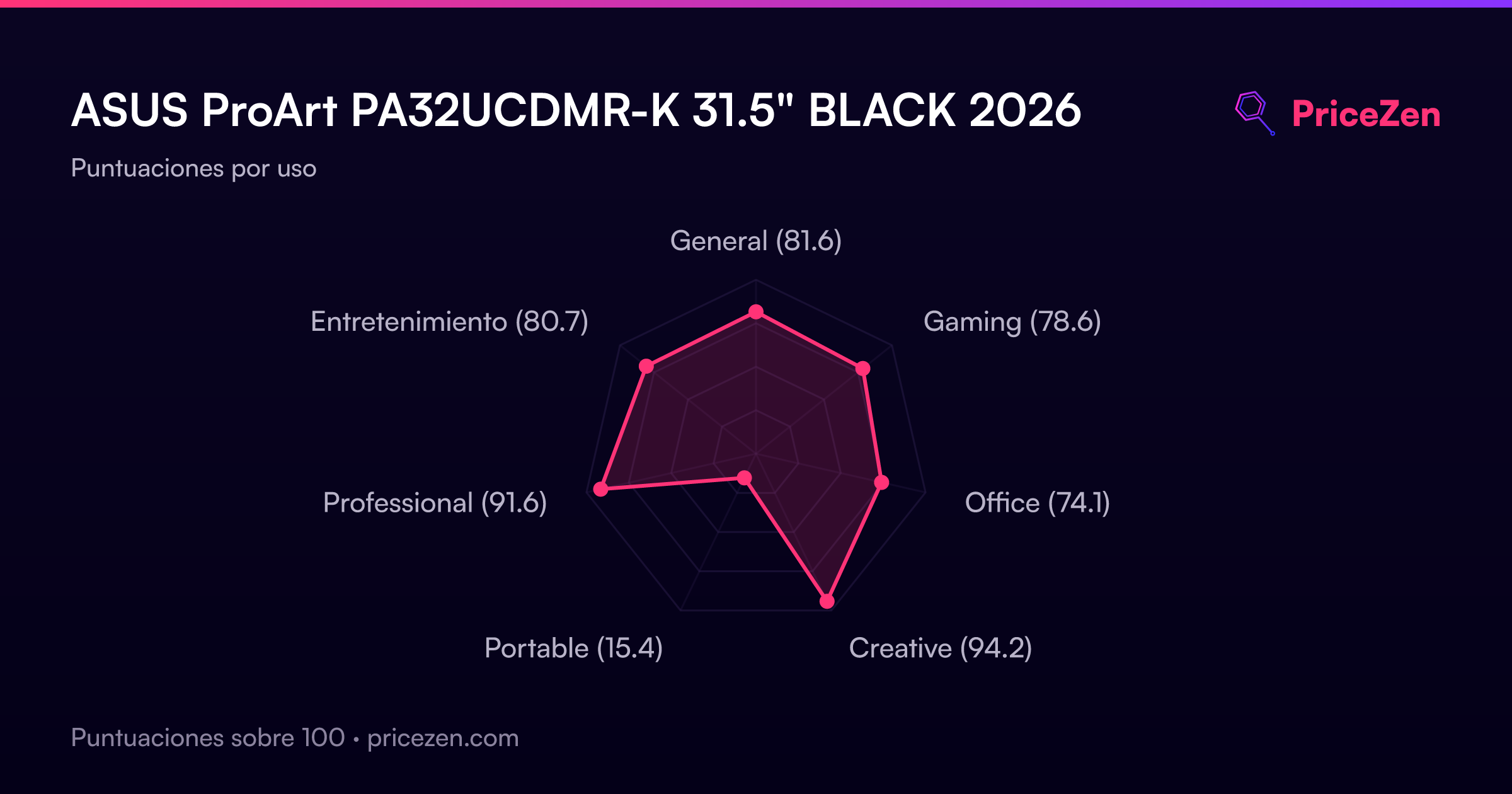
Usage Scores
- General81.6
- Gaming78.6
- Office74.1
- Creative94.2
- Portable15.4
- Professional91.6
- Entretenimiento80.7