LG UltraGear 34GP950G-B 34" Black 2021
Su panel Nano IPS curvo de 34 pulgadas con resolución 3440x1440 alcanza 180Hz en overclock y un tiempo de respuesta de 1ms GtG, combinado con G-Sync Ultimate y retroiluminación local de 56 zonas. Ofrece una cobertura cromática DCI-P3 del 98% y certificación DisplayHDR 600, con un diseño prácticamente sin bordes en tres lados que maximiza la inmersión. Ideal para jugadores de simuladores y mundos abiertos que priorizan la fluidez visual y la precisión del color en un formato ultra panorámico.












Resumen
The 30-Second Version
The LG UltraGear 34GP950G-B is a 34-inch curved ultrawide gaming monitor with a 3440 x 1440 Nano IPS panel, 180Hz overclock and G-Sync Ultimate. Color and speed are excellent, HDR and build quality are the weak spots. It's a great buy at Amazon's USD 560 and a bad one at Newegg's USD 1,627.
Pros & Cons
Ventajas
- 180Hz overclock with 1ms GtG Nano IPS response 93rd
- G-Sync Ultimate module, not just basic adaptive sync 91st
- 98% DCI-P3 and 10-bit color, near top of its class 89th
- DisplayHDR 600 with 56-zone local dimming 82nd
- Owners report minimal backlight bleed and easy stand assembly
Desventajas
- Only one HDMI and one DisplayPort, connectivity lags behind most
- Stand tilts and adjusts height but doesn't swivel
- Cheap-feeling plastic and a wobbly stand, per multiple owners
- External power brick plus short included cables
- Wild price swings between stores
Opinión de los propietarios
The Word on the Street
Cómo cambió la opinión de los propietarios con el tiempo
ExclusivaSegún cuándo escribieron realmente sus opiniones los clientes, para ver si los elogios iniciales se mantuvieron.
7 opiniones escritas, may 2020 – feb 2026: 7 satisfechos
En las 1060 valoraciones de tiendas: 4,3★. La mayoría de los propietarios valora sin escribir una opinión. El gráfico cuenta las 7 opiniones escritas.
Cada punto es una opinión escrita, en el mes en que se escribió. Satisfechos = 4-5★, neutrales = 3★, insatisfechos = 1-2★.
Las pruebas
Performance
On paper this thing is quick. The Nano IPS panel runs 144Hz out of the box and overclocks to 180Hz, with a 1ms GtG rating that puts motion clarity well above average for an IPS ultrawide. G-Sync Ultimate is the real headline here, since the dedicated module handles variable refresh without the flicker and brightness quirks cheaper adaptive-sync implementations can show. Our performance ranking puts it at the 82nd percentile, so strong rather than class-leading, and the display score sits at 79.
Color is the standout: 98% DCI-P3 (CIE1976), 10-bit, 400 nits typical, and a 93rd percentile color ranking that puts it among the best on the market. That means it's genuinely usable for photo and video work, not just fragging. HDR is the asterisk. DisplayHDR 600 with 56 dimming zones is a real step up from edge-lit HDR400 sets, but 56 zones across a 34-inch panel still means blooming around bright objects on dark backgrounds. Owners are split on it, and honestly, so are we.
Specifications
Full Specifications
Display
| Size | 34" |
| Resolution | 3440x1440 |
| Panel Type | IPS |
| Aspect Ratio | 21:9 |
| Curved | Yes |
| Curvature | 1900 |
| Screen Finish | glossy |
Performance
| Refresh Rate | 180 Hz |
| Response Time | 1 |
| Adaptive Sync | G-Sync Ultimate |
Color & HDR
| Brightness | 400 nits |
| Color Gamut | DCI-P3 98% (CIE1976) |
| Color Depth | 10-bit |
| HDR | HDR600 |
| HDR Support | HDR10 |
Connectivity
| HDMI Ports | 1 |
| DisplayPort | 1 |
| USB-C | 0 |
| Speakers | No |
| Headphone Jack | Yes |
Ergonomics
| Height Adjustable | Yes |
| Tilt | Yes |
| Swivel | No |
| Pivot | No |
| VESA Mount | 100x100 |
Features
| Webcam | No |
| Touchscreen | No |
| Power | 65 |
| Weight | 9.1 kg / 20.1 lbs |
vs Competition
The closest rival is the Alienware AW-Series AW3425DW, another 34-inch ultrawide, and that's the one to put side by side if you're set on this shape. The LG counters with G-Sync Ultimate hardware and a color ranking in the 93rd percentile, so if you're on an NVIDIA card and care about accurate color for editing between gaming sessions, it makes a strong case. If you'd rather have a smaller desk footprint, the MSI MAG 271QPX QD-OLED E2 27", Samsung Odyssey G60SD 27" and ASUS ROG Strix XG27UCDMG 27" are all worth a look, though none of them give you the 21:9 width this LG does.
The Dell UltraSharp U4025QW 39.7" is the odd one out: it's aimed at productivity first, so if your day is spreadsheets and your evening is games, weigh that against the LG's 79/100 gaming score and 180Hz ceiling. Our feature ranking for the LG sits at the 91st percentile, which tells you it's loaded for gaming specifically, not for docking a laptop.
| Spec | LG UltraGear 34GP950G-B 34" | ASUS ROG Strix XG27UCDMG 27" | Dell UltraSharp U4025QW 39.7" | Alienware AW-Series AW3425DW 34" | MSI MAG 271QPX QD-OLED E2 27" | Samsung Odyssey G60SD 27" |
|---|---|---|---|---|---|---|
| Screen Size | 34 | 27 | 39.7 | 34 | 27 | 27 |
| Resolution | 3440 x 1440 | 3840 x 2160 | 5120 x 2160 | 3440 x 1440 | 2560 x 1440 | 2560 x 1440 |
| Panel Type | IPS | QD-OLED | IPS | QD-OLED | QD-OLED | OLED |
| Refresh Rate | 180 | 240 | 120 | 240 | 240 | 360 |
| Response Time Ms | 1 | 0.03 | 5 | 0.03 | 0.03 | 0.03 |
| Adaptive Sync | G-Sync Ultimate | FreeSync Premium Pro | Adaptive-Sync | FreeSync Premium Pro | FreeSync Premium Pro | FreeSync Premium Pro |
| Hdr | HDR600 | DisplayHDR True Black 400 | HDR600 | HDR400 | DisplayHDR True Black 400 | HDR10+ |
| Compare | Compare | Compare | Compare | Compare |
| Producto | Color | Portabilidad | Display | Feature | User Sentiment | Ergonomic | Performance | Connectivity | Valoración social |
|---|---|---|---|---|---|---|---|---|---|
| LG UltraGear 34GP950G-B 34" | 93 | 3.7 | 78.8 | 90.8 | 89 | 66.8 | 81.7 | 33.8 | 67.1 |
| ASUS ROG Strix XG27UCDMG 27" Compare | 96.5 | 57.3 | 97.7 | 85 | 99.3 | 90.8 | 97.9 | 81 | 98.9 |
| Dell UltraSharp U4025QW 39.7" Compare | 97.9 | 76.5 | 98.6 | 96.3 | 85.4 | 90.8 | 56.1 | 99.3 | 96.8 |
| Alienware AW-Series AW3425DW 34" Compare | 98.9 | 73.9 | 84.1 | 96.3 | 95.7 | 90.8 | 97.9 | 95.3 | 96.8 |
| MSI MAG 271QPX QD-OLED E2 27" Compare | 99.2 | 57.3 | 73.4 | 85 | 95.7 | 90.8 | 97.9 | 81 | 98.9 |
| Samsung Odyssey G60SD 27" Compare | 90.7 | 39.3 | 73.4 | 70.1 | 95.7 | 90.8 | 99.5 | 87.4 | 92 |
Precio
Value & Pricing
At Amazon's USD 560 this is a lot of monitor for the money, and it's the cheapest US listing in our data by a mile. Newegg's USD 1,627 ask is more than double for the same panel, and the full tracked range runs USD 326 to USD 1,627 across three US listings. We track this price over time, partly through our community browser extension, and the lesson is simple: do not buy this model without checking at least two stores. Against alternatives like the Alienware AW3425DW or the ASUS ROG Strix XG27UCDMG, the value argument only holds at the low end of that range. At USD 1,627 you should be cross-shopping hard.
Amazon 1 oferta Desde 560 US$
Historial de precios
Leer más
Overview
The LG UltraGear 34GP950G-B is a 34-inch curved ultrawide gaming monitor, and it sits in the premium end of that category: 3440 x 1440 Nano IPS at 21:9, 144Hz native with a 180Hz overclock, 1ms GtG, and NVIDIA G-Sync Ultimate. Add DisplayHDR 600 with 56-block local dimming, 98% DCI-P3 coverage and 10-bit color, and you've got a spec sheet that still reads like a wish list for anyone shopping for an ultrawide gaming monitor right now.
Pricing is where this gets weird. Our price tracking shows US listings anywhere from USD 326 to USD 1,627, which is a spread wide enough to drive a truck through. Amazon currently has it at USD 560, Newegg at USD 1,627. Same model number, wildly different asks. Some listings are Geek Squad Certified Refurbished stock, so read the condition line before you click buy.
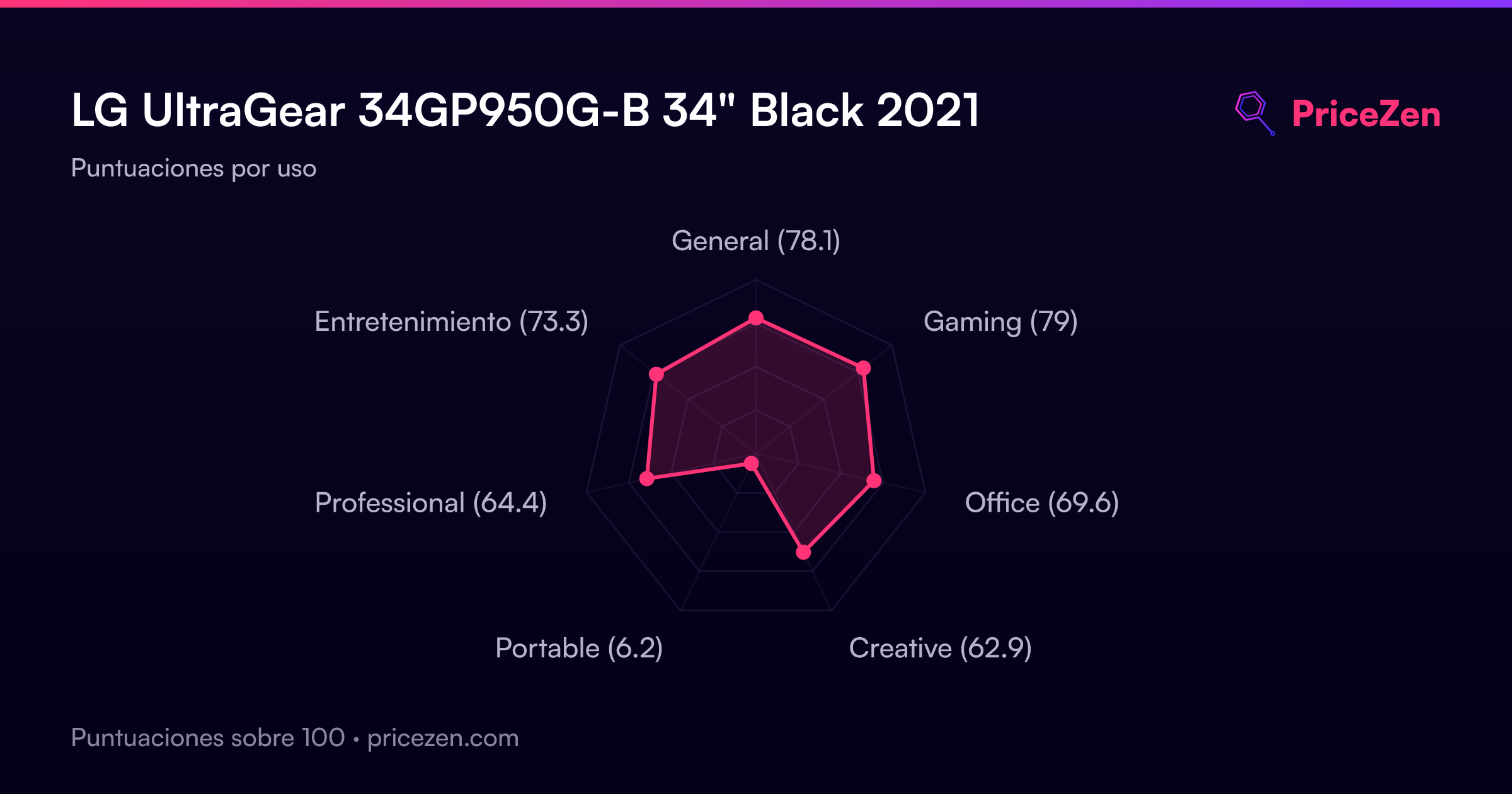
We collect specs, prices and owner reviews across stores with our own automated system and score every monitor against the rest of its category. This one lands at 78.1/100 overall and 79/100 for gaming, with color and features among the strongest things about it. Owners agree: 4.3/5 across 1,060 ratings.
Common Questions
Q: Is the LG 34GP950G-B good for gaming?
Yes, it scores 79/100 for gaming in our ranking, thanks to a 144Hz Nano IPS panel that overclocks to 180Hz, 1ms GtG response and a G-Sync Ultimate module. It's one of the stronger ultrawide gaming monitors in its class.
Q: Does the LG 34GP950G-B work with AMD graphics cards?
It'll display fine over DisplayPort or HDMI, but the G-Sync Ultimate hardware is built for NVIDIA GPUs, so AMD owners won't get the full variable refresh benefit they'd get from a FreeSync monitor.
Q: Is the HDR on the 34GP950G-B actually good?
It's VESA DisplayHDR 600 with 56-block local dimming and 400 nits typical brightness, which beats basic HDR400 panels but still shows blooming. Owner feedback on the HDR experience is genuinely split.
Q: Can you mount the LG 34GP950G-B on a monitor arm?
Yes, it uses a standard VESA 100x100 pattern, so any arm rated for its 9117g weight will work. Given the complaints about the stock stand, an arm is a reasonable upgrade.
Who Should Skip This
Skip this if you need ports. One HDMI and one DisplayPort is thin for a monitor at this price, and our connectivity ranking puts it in the bottom third, so console-plus-PC-plus-laptop setups will want something else. It's also a poor fit if you want true HDR punch, since 56 dimming zones can't compete with the per-pixel contrast of the MSI MAG 271QPX QD-OLED E2 or Samsung Odyssey G60SD. Productivity-first buyers chasing screen area should look at the Dell UltraSharp U4025QW instead. And it's obviously not portable, scoring 6.2/100 there, which is a bit like rating a fridge on its sprint speed.
Verdict
Should you buy the LG UltraGear 34GP950G-B? At USD 560, yes, especially if you're on NVIDIA and coming from a 1080p ultrawide. Owners rate it 88/100 in our sentiment analysis, and the recurring praise lines up with the specs: fast panel, smooth gaming, accurate color, surprisingly little backlight bleed. The gripes are real but mostly cosmetic and cable-related, not dealbreakers.
At anything close to USD 1,627, no. That's a different conversation, and the competition gets a lot more interesting. Check the store, check whether you're buying refurbished, and don't let the HDR600 badge sell you on a monitor you're buying for SDR gaming anyway.
Usage Scores
- General78.1
- Gaming79
- Office69.6
- Creative62.9
- Portable6.2
- Professional64.4
- Entretenimiento73.3