LG UltraWide 34BQ60QC-B 34" Black 2024

Ultrapanorámico 21:9: ves más del juego verificado el 29 nov
64/100 puntuación global
La tienda muestra un precio «antes», pero 369,99 US$ no está por debajo del precio habitual de 369,99 US$.
Mínimo de 90 días 312,45 US$Habitual y máximo 369,99 US$Precio «antes» de la tienda 399,00 US$
Mínimo de 90 días 312,45 US$Habitual y máximo 369,99 US$Precio «antes» de la tienda 399,00 US$
Precio en los últimos 90 días: mínimo 312,45 US$ el 19 sept, máximo 369,99 US$. Precio habitual 369,99 US$. El precio «antes» de la tienda 399,00 US$. Hoy 369,99 US$.
- Screen
- 34"
- Resolution
- 3440 x 1440
- Panel
- IPS
- Refresh
- 60 Hz
- Response time
- 5 ms
- HDR
- HDR10
Compara precios en 3 tiendas
De la más barata a la más cara. Las ofertas nuevas, reacondicionadas y en pack se mantienen separadas para que compares lo comparable.
| Tienda | Vendido por | Color y estado | Precio | vs. el más bajo | Última comprobación | Enlace |
|---|---|---|---|---|---|---|
| Nuevo3 ofertasUnidad individual | ||||||
| Amazon | Vendedor externo | Black | 369,99 US$ | Precio más bajo | Hace 3 días | Ir a la tienda |
| No comprobados en los últimos 7 días, por lo que estos precios pueden haber cambiado | ||||||
| B&H Photo | B&H Photo | No indicado | Precio sin confirmar | Desconocido | Ir a la tienda | |
| Newegg | Vendedor externo | No indicado | Precio sin confirmar | Desconocido | Ir a la tienda | |
 Fuente: PriceZen, comprobado el 26 nov 2026
Un precio se considera vigente si lo comprobamos en los últimos 7 días. «Vendedor externo» significa un vendedor de terceros en esa tienda, no la propia tienda.
Historial de precios
El precio habitual en tiendas es 369,99 US$ y el más bajo de los últimos 90 días fue 312,45 US$.
Comprobado ese díaNo comprobado ese día, sigue en oferta
Fuente: PriceZen, checked 26 nov 2026


Resumen
The 30-Second Version
The LG 34BQ60QC-B is a 34-inch ultrawide built for productivity, not speed. Its 96th percentile feature set and 3440 x 1440 resolution are great for multitasking, but the 60Hz panel and dim 300-nit screen hold it back. Worth it for office work, skip it for gaming.
Pros & Cons
Ventajas
- Huge 34-inch ultrawide screen with 3440 x 1440 resolution gives you serious multitasking room. 96th
- 99% sRGB and 10-bit color support make it a decent budget option for color-conscious work. 82nd
- Picture-by-Picture and OnScreen controls are genuinely useful for splitting inputs. 79th
- Height adjust, tilt, and VESA mount support cover the ergonomic basics. 67th
Desventajas
- 60Hz refresh rate and 5ms response time feel sluggish for gaming or fast video.
- 300 nits brightness is dim, and HDR10 is basically decorative at this level.
- No USB hub or USB-C, so connectivity is limited to HDMI and DisplayPort.
- At 6.9 kg, it's heavy and the stand takes up real desk space.
Las pruebas
Performance
The 60Hz refresh rate is the headline limitation here. For office work, email, and web browsing, it's completely fine. But the 5ms GtG response time and 60Hz cap mean fast motion gets a little smeary. The 300 nits brightness is workable in a normal room but won't wow anyone, and HDR10 support on a panel this dim is more of a checkbox than a feature. The 1000:1 static contrast ratio is typical for IPS, so blacks look gray in a dark room. On the plus side, the 3440 x 1440 resolution gives you a ton of horizontal space, and the 3800R curve is subtle enough that it doesn't distort spreadsheets or documents.
Specifications
Full Specifications
Display
| Size | 34" |
| Resolution | 3440x1440 |
| Panel Type | IPS |
| Aspect Ratio | 21:9 |
| Curved | Yes |
| Curvature | 3800 |
| Screen Finish | matte |
Performance
| Refresh Rate | 60 Hz |
| Response Time | 5 |
Color & HDR
| Brightness | 300 nits |
| Color Gamut | 99% sRGB |
| Color Depth | 10-bit |
| HDR | HDR10 |
| HDR Support | HDR10 |
Connectivity
| HDMI Ports | 2 |
| DisplayPort | 1 |
| Speakers | No |
| Headphone Jack | Yes |
Ergonomics
| Height Adjustable | Yes |
| Tilt | Yes |
| Swivel | No |
| Pivot | No |
| VESA Mount | 100x100 |
Features
| Touchscreen | No |
| PIP/PBP | Yes |
| Power | 42 |
| Weight | 6.9 kg / 15.2 lbs |
vs Competition
Stacked against the ASUS ROG Strix XG27UCDMG, MSI MAG 271QPX QD-OLED E2, Samsung Odyssey G60SD, Gigabyte MO27U2 SA, and Alienware AW2725D, the LG is playing a different game. Those competitors are mostly 27-inch high-refresh OLED or QD-OLED panels built for speed and contrast. The LG counters with size and aspect ratio. You get a 34-inch 21:9 workspace that none of those 27-inch 16:9 panels can match for side-by-side windows. But every one of those competitors will crush the LG in response time, refresh rate, and HDR impact. The Samsung and Alienware especially are in another league for gaming. The LG wins on raw horizontal space and price per inch, not on motion clarity or contrast.
| Spec | LG UltraWide 34BQ60QC-B 34" | ASUS ROG Strix XG27UCDMG 27" | Alienware AW-Series AW3425DW 34" | MSI MAG 271QPX QD-OLED E2 27" | Samsung Odyssey G60SD 27" | BenQ MA Series MA270U 27" |
|---|---|---|---|---|---|---|
| Screen Size | 34 | 27 | 34 | 27 | 27 | 27 |
| Resolution | 3440 x 1440 | 3840 x 2160 | 3440 x 1440 | 2560 x 1440 | 2560 x 1440 | 3840 x 2160 |
| Panel Type | IPS | QD-OLED | QD-OLED | QD-OLED | OLED | IPS |
| Refresh Rate | 60 | 240 | 240 | 240 | 360 | 60 |
| Response Time Ms | 5 | 0.03 | 0.03 | 0.03 | 0.03 | 5 |
| Adaptive Sync | - | FreeSync Premium Pro | FreeSync Premium Pro | FreeSync Premium Pro | FreeSync Premium Pro | - |
| Hdr | HDR10 | DisplayHDR True Black 400 | HDR400 | DisplayHDR True Black 400 | HDR10+ | HDR10 |
| Compare | Compare | Compare | Compare | Compare |
| Producto | Color | Portabilidad | Display | Feature | Ergonomic | Performance | Connectivity |
|---|---|---|---|---|---|---|---|
| LG UltraWide 34BQ60QC-B 34" | 81.7 | 3.7 | 78.7 | 96.3 | 66.8 | 22.3 | 53 |
| ASUS ROG Strix XG27UCDMG 27" Compare | 96.5 | 57.3 | 97.7 | 85 | 90.7 | 97.9 | 81 |
| Alienware AW-Series AW3425DW 34" Compare | 98.9 | 73.9 | 84.1 | 96.3 | 90.7 | 97.9 | 95.3 |
| MSI MAG 271QPX QD-OLED E2 27" Compare | 99.2 | 57.3 | 73.3 | 85 | 90.7 | 97.9 | 81 |
| Samsung Odyssey G60SD 27" Compare | 90.6 | 39.3 | 73.3 | 70.1 | 90.7 | 99.5 | 87.4 |
| BenQ MA Series MA270U 27" Compare | 92.2 | 83.9 | 87 | 70.1 | 90.7 | 22.3 | 97.8 |
Precio
Value & Pricing
Pricing sits around $349 to $380 USD, with a single Canadian listing at $489 CAD. For a 34-inch ultrawide IPS with this resolution, that's reasonable but not a steal. You're paying for screen real estate and color coverage, not speed or brightness. If your job is documents, code, or light photo editing, the value is there. If you want a do-everything display that also handles gaming, you'll probably end up spending more elsewhere anyway.
Leer más
Overview
The LG 34BQ60QC-B is a 34-inch ultrawide that nails the basics for office work and casual media. You get a 3440 x 1440 IPS panel with a gentle 3800R curve, 99% sRGB coverage, and a claimed 1.07 billion colors. It's not flashy, but it's practical. The feature set lands in the 96th percentile for this category, which mostly means LG packed in useful stuff like Picture-by-Picture, height adjustment, and VESA mounting.
But the performance story is a different one. A 60Hz refresh rate and 5ms response time put it in the 21st percentile for performance. That's fine for spreadsheets and Netflix, less fine for fast-paced gaming. If you want an ultrawide for productivity and don't care about high refresh rates, this is a solid pick. If you want smooth motion, keep scrolling.
Common Questions
Q: Is this monitor good for gaming?
Not really. The 60Hz refresh rate and 5ms response time are fine for casual or turn-based games, but fast-paced shooters and racers will show noticeable motion blur. If gaming is a priority, look for a 120Hz or higher panel.
Q: Can I connect two computers and use them side by side?
Yes. The Picture-by-Picture mode lets you display two inputs at once, so you can run a work laptop and a desktop on the same screen. You'll need to use the HDMI and DisplayPort inputs for the two sources.
Q: Does the 3800R curve make text look distorted?
No, the 3800R curve is very gentle compared to aggressive gaming curves. Text and spreadsheets stay readable, and the curve mostly helps with immersion and reducing edge glare on such a wide panel.
Who Should Skip This
Skip this if you need a high refresh rate for competitive gaming, a bright screen for a sunlit room, or real HDR performance. The 60Hz cap and 300 nits brightness will frustrate you. Also skip it if you want USB-C connectivity or a built-in hub, since this only has HDMI and DisplayPort. And if desk space is tight, the 6.9 kg weight and wide stand make it a poor fit for small setups.
Verdict
This is a monitor for people who live in spreadsheets, code editors, and document windows. The 21:9 aspect ratio is a genuine productivity upgrade, and the color coverage is good enough for casual creative work. It's not for gamers, and it's not for anyone who wants punchy HDR or a bright room experience. If you want an affordable ultrawide for work and don't care about refresh rate, the LG 34BQ60QC-B is a sensible buy.
Usage Scores
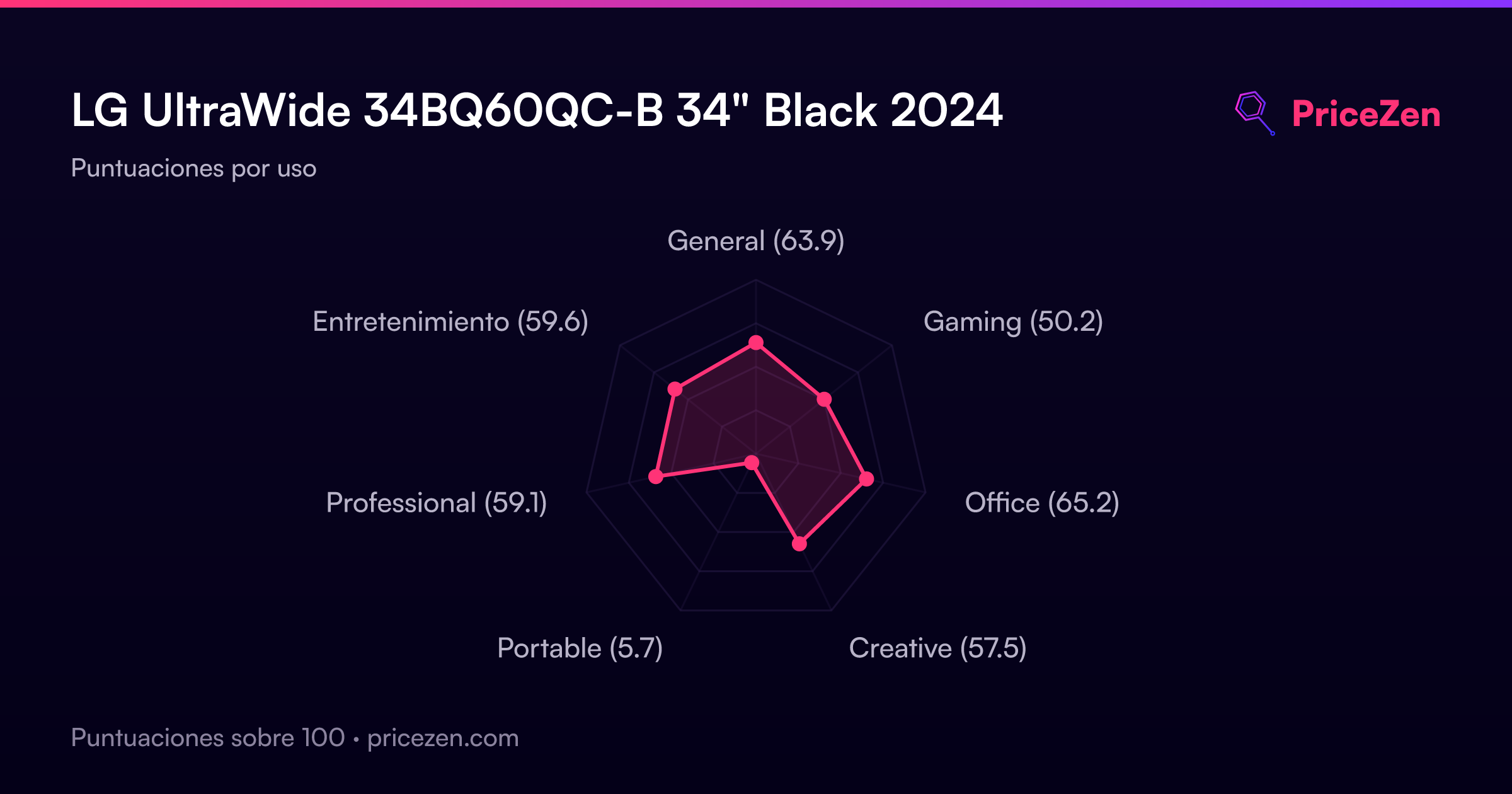
- General63.9
- Gaming50.2
- Office65.2
- Creative57.5
- Portable5.7
- Professional59.1
- Entretenimiento59.6