ViewSonic VX2276-SMHD 22" Black 2016

Pantalla mate que reduce los reflejos verificado el 29 nov
39/100 puntuación global 4,6 media de 2321 valoraciones de propietarios
Cerca del precio habitual de 99,99 US$.
Precio en los últimos 90 días: mínimo 99,99 US$ el 1 sept, máximo 99,99 US$. Precio habitual 99,99 US$. Hoy 99,99 US$.
- Screen
- 22"
- Resolution
- 1920 x 1080
- Panel
- IPS
- Refresh
- 60 Hz
- Response time
- 7 ms
Compara precios en 3 tiendas
De la más barata a la más cara. Las ofertas nuevas, reacondicionadas y en pack se mantienen separadas para que compares lo comparable.
| Tienda | Vendido por | Color y estado | Precio | vs. el más bajo | Última comprobación | Enlace |
|---|---|---|---|---|---|---|
| Nuevo3 ofertasUnidad individual | ||||||
| Amazon | Amazon | Black/Silver | 99,99 US$ | Precio más bajo | Ayer | Ir a la tienda |
| No comprobados en los últimos 7 días, por lo que estos precios pueden haber cambiado | ||||||
| B&H Photo | B&H Photo | No indicado | Precio sin confirmar | Desconocido | Ir a la tienda | |
| Newegg | Vendedor externo | Black | Precio sin confirmar | Desconocido | Ir a la tienda | |
 Fuente: PriceZen, comprobado el 28 nov 2026
Un precio se considera vigente si lo comprobamos en los últimos 7 días. «Vendedor externo» significa un vendedor de terceros en esa tienda, no la propia tienda.
Historial de precios
El precio habitual en tiendas es 99,99 US$ y el más bajo de los últimos 90 días fue 99,99 US$.
Comprobado ese díaNo comprobado ese día, sigue en oferta
Fuente: PriceZen, checked 28 nov 2026




Resumen
The 30-Second Version
The ViewSonic VX2276-SMHD is a slim, affordable 22 inch IPS monitor that nails the basics for office and secondary screen use. The 60Hz refresh rate and 250 nits brightness are weak spots, but the frameless design and strong user reviews make it a solid budget pick. At $100 USD it's a great deal, though Canadian buyers should watch for the CAD 140 to CAD 273 price spread. Skip it if you need gaming performance or color accuracy.
Pros & Cons
Ventajas
- Ultra-slim 6.6mm panel with 2mm bezels looks sharp and saves desk space 92nd
- IPS panel delivers wide 178 degree viewing angles 81st
- Strong user sentiment score of 85/100 with 4.6 stars across 2,329 reviews 77th
- HDMI, DisplayPort, and VGA inputs cover older and newer devices
- Low heat output and easy stand removal make it great for multi-monitor setups
Desventajas
- 60Hz refresh rate and 7ms response time are weak for gaming
- 250 nits brightness is dim for bright rooms
- 72% CIE1931 color coverage falls short for photo or video work
- No VESA mount despite the slim design begging for a clean wall setup
- Some units develop dead pixels or cracking noises after a few months
Opinión de los propietarios
The Word on the Street
- A recurring theme is that the display quality exceeds expectations for the price, with multiple owners praising the clear, bright screen and sharp 1080p resolution for everyday tasks.
- The slim, frameless design gets consistent compliments, and several buyers mention using it as a secondary monitor where the thin bezels make side-by-side setups look seamless.
- Some owners report using this monitor for surveillance systems and retro computing, noting the low heat output and flexible inputs make it a surprisingly good fit for niche applications.
- A smaller group of buyers express frustration over the lack of VESA mount support and the absence of included cables in some packages, which complicates wall mounting and initial setup.
Cómo cambió la opinión de los propietarios con el tiempo
ExclusivaSegún cuándo escribieron realmente sus opiniones los clientes, para ver si los elogios iniciales se mantuvieron.
49 opiniones escritas, sept 2016 – may 2026: 38 satisfechos, 2 insatisfechos, 9 sin estrellas
En las 2321 valoraciones de tiendas: 4,6★. La mayoría de los propietarios valora sin escribir una opinión. El gráfico cuenta las 49 opiniones escritas.
- ene–mar 202621 de 22 satisfechos · 2 sin estrellas
Buyers praised the slim design, crisp display, and easy setup. Built-in speakers were a common disappointment, and one user reported dissatisfaction.
- Slim design with thin bezel, praised for aesthetics and space-saving.
- Crisp, clear display with good colors and viewing angles.
- Built-in speakers: some found them adequate, others weak or disappointing.
- One user reported dissatisfaction, though details were not provided.
- abr–jun 20202 de 2 satisfechos · 1 sin estrellas
Buyers praised the monitor's picture quality and brightness, with one noting it works well as a confidence monitor. One review was contradictory, giving 0 stars despite positive comments.
- Great picture quality and brightness
- Works well as additional screen for video systems
- One review gave 0 stars despite praising clarity and brightness
- Speakers need upgrade to 5 watts and better orientation
- abr–jun 20172 de 3 satisfechos
Mixed reviews: one user praises flicker-free tech for migraines, but others report dead pixels, loud noises, and misleading VESA mount info.
- Flicker-free display reduces migraines and eyestrain effectively.
- Dead pixel appears after 5 months; warranty requires 3+ defective pixels.
- Loud cracking noises persist for an hour after power-off.
- VESA mount not present despite description; not in manual.
Cada punto es una opinión escrita, en el mes en que se escribió. Satisfechos = 4-5★, neutrales = 3★, insatisfechos = 1-2★. Los resúmenes por periodo están en inglés.
Las pruebas
Performance
Let's be honest about the numbers. A 60Hz refresh rate and 7ms response time put this monitor in the 8th percentile for performance in our database. That's not a typo. If you're buying this for fast-paced gaming, you're going to feel it. Motion won't be as smooth as a 144Hz panel, and fast-moving content will show more blur. The 250 nits brightness is also on the dimmer side, which means it's best in a room where you control the lighting. Next to a bright window, you'll be cranking it to max and wishing for more.
But here's the thing. For static content, documents, spreadsheets, and web browsing, none of that matters much. The IPS panel gives you wide 178 degree viewing angles, so text stays readable even if you're not sitting dead center. The 1000:1 static contrast ratio is standard for IPS, and the 16.7 million colors are fine for everyday use. Color accuracy sits at 72% CIE1931, which lands in the 17th percentile. That's not great if you're editing photos, but for reading email or watching a YouTube video, it's perfectly serviceable. The real-world takeaway is that this monitor does the boring stuff well and the demanding stuff poorly.
Specifications
Full Specifications
Display
| Size | 22" |
| Resolution | 1920x1080 (Full HD) |
| Panel Type | IPS |
| Aspect Ratio | 16:9 |
| Curved | No |
| Screen Finish | matte |
Performance
| Refresh Rate | 60 Hz |
| Response Time | 7 |
Color & HDR
| Brightness | 250 nits |
| Color Gamut | 72% CIE1931 |
| Color Depth | 6-bit + FRC |
Connectivity
| HDMI Ports | 1 |
| DisplayPort | 1 |
| USB-C | 0 |
| Speakers | Yes |
| Headphone Jack | Yes |
Ergonomics
| Height Adjustable | No |
| Tilt | Yes |
| Swivel | No |
| Pivot | No |
| VESA Mount | 75x75 |
Features
| Webcam | No |
| Touchscreen | No |
| PIP/PBP | No |
| Power | 21 |
| Weight | 2.4 kg / 5.4 lbs |
vs Competition
Stacked against the competition in our database, the VX2276-SMHD is playing a different game than most of its rivals. The ASUS TUF Gaming VG34VQL1B and HP OMEN 27qs G2 are gaming-focused ultrawides and high-refresh panels with far better performance numbers. The Acer Nitro XV272U and Gigabyte M27UP SA are 1440p or 4K options with better color and brightness. If you're comparing spec sheets, the ViewSonic loses almost every category.
But that's not really the point. Those competitors cost significantly more and are built for different use cases. The ViewSonic's real competition is other budget 22 inch office monitors, and in that space, it holds its own. The slim bezels and IPS panel are the standout features here. The KOORUI 34E6UC is an ultrawide that costs more and takes up way more desk space. If you need a compact second monitor or something for a small workspace, the ViewSonic's 82nd percentile compact score matters more than raw performance. The trade-off is clear: you're giving up speed, brightness, and color depth for a clean, affordable, space-efficient display.
| Spec | ViewSonic VX2276-SMHD 22" | ASUS ROG Strix XG27JCG 27" | Dell S2725QC 27" | HP OMEN 27qs G2 27" | LG UltraGear 27GS75Q-B 27" | KOORUI 34E6UC 34" |
|---|---|---|---|---|---|---|
| Screen Size | 22 | 27 | 27 | 27 | 27 | 34 |
| Resolution | 1920 x 1080 | 5120 x 2880 | 3840 x 2160 | 2560 x 1440 | 2560 x 1440 | 3440 x 1440 |
| Panel Type | IPS | IPS | IPS | IPS | IPS | VA |
| Refresh Rate | 60 | 330 | 120 | 280 | 200 | 180 |
| Response Time Ms | 7 | 0.3 | 8 | 1 | 1 | 1 |
| Adaptive Sync | - | FreeSync Premium Pro | FreeSync Premium | G-Sync Compatible | G-Sync Compatible | FreeSync Premium |
| Hdr | - | HDR600 | HDR | HDR400 | HDR10 | HDR400 |
| Compare | Compare | Compare | Compare | Compare |
| Producto | Color | Portabilidad | Display | Feature | User Sentiment | Ergonomic | Performance | Connectivity | Valoración social |
|---|---|---|---|---|---|---|---|---|---|
| ViewSonic VX2276-SMHD 22" | 0.9 | 81.3 | 21.3 | 21.1 | 76.9 | 47.1 | 8.9 | 42.9 | 92.2 |
| ASUS ROG Strix XG27JCG 27" Compare | 89.9 | 67.9 | 99.5 | 70.1 | 0 | 90.7 | 95.6 | 81 | 84.3 |
| Dell S2725QC 27" Compare | 71.6 | 76.5 | 87 | 70.1 | 95.8 | 90.7 | 44.2 | 87.4 | 92.2 |
| HP OMEN 27qs G2 27" Compare | 71.2 | 81.3 | 66.9 | 70.1 | 95.8 | 90.7 | 89.4 | 96.9 | 98.9 |
| LG UltraGear 27GS75Q-B 27" Compare | 83.1 | 49.3 | 66.9 | 70.1 | 76.9 | 78.6 | 84.7 | 87.4 | 75.1 |
| KOORUI 34E6UC 34" Compare | 84.6 | 3.8 | 76 | 96.3 | 95.8 | 90.7 | 81.7 | 53 | 75.1 |
Precio
Value & Pricing
Pricing on this monitor is all over the place depending on where you shop. In the US, it's going for around $100, which is a solid deal for a 22 inch IPS panel with this build quality. But in Canada, the spread is wild. We're seeing CAD 140 to CAD 273 across three listings. That's a CAD 133 gap for the exact same monitor. If you're buying in Canada, shop around. The lower end of that range is fair. The upper end is not.
At $100 USD, this is a budget monitor that punches above its weight for office and secondary screen use. The build feels more premium than the price suggests, and the frameless design makes it look like something that cost twice as much. But once you get into the CAD 200+ range, you're competing with monitors that offer better brightness, better color, and higher refresh rates. The value proposition really depends on getting it at the lower end of the price spread.
Leer más
Overview
The ViewSonic VX2276-SMHD is one of those monitors that doesn't try to be everything. It's a 22 inch, 1080p IPS panel aimed squarely at people who need a clean, dependable screen for work, secondary display duty, or light home use. No 144Hz refresh rates, no HDR claims, no RGB lighting. Just a thin bezel, decent color, and a price that won't make you wince.
What's interesting here is the mismatch between specs and reputation. On paper, the display numbers are modest. 250 nits brightness, 72% CIE1931 color coverage, 60Hz refresh, and a 7ms response time (though some retailer listings say 14ms GtG, which is a bit confusing). Those specs put it near the bottom of our performance rankings. But the user sentiment score is 85/100, and the social proof is at the 95th percentile. People genuinely like this thing.
So who is it for? Office workers who want a second screen that doesn't take over the desk. Home users who need something for email, documents, and the occasional YouTube video. Retro computing enthusiasts, apparently, since one reviewer was thrilled it handles 15kHz signals for old hardware. It's not a gaming monitor, and it's not a color-critical display. But as a no-fuss daily driver, it's earned a loyal following.
Common Questions
Q: Is this monitor good for gaming?
Not really. The 60Hz refresh rate and 7ms response time put it in the 8th percentile for performance in our database. Casual or slower-paced games will be playable, but fast-paced shooters or competitive titles will feel sluggish and blurry compared to a 144Hz panel. If gaming is a priority, look at options like the ASUS TUF Gaming VG34VQL1B or HP OMEN 27qs G2 instead.
Q: Can I mount this monitor on a wall or monitor arm?
This is a bit confusing. The product highlights mention VESA 75x75 compatibility, but the description and several user reviews say it's not VESA compatible. The stand is easy to remove, which helps for custom setups, but if wall mounting is a must-have, verify the exact model you're buying before you commit. Some users have reported the lack of VESA support as a dealbreaker.
Q: How does the brightness hold up in a bright room?
The 250 nits brightness rating is on the lower end, landing in the 17th percentile for display performance. In a typical office with controlled lighting, it's fine. But next to a large window or in direct sunlight, you'll likely find yourself wishing for more. If your workspace is very bright, consider a monitor with 300 nits or higher.
Q: Is this a good choice for photo or video editing?
No. The 72% CIE1931 color coverage is below what you'd want for color-critical work. It covers the basics for everyday use, but skin tones and gradients won't be as accurate as on a monitor with 90% or higher sRGB coverage. For editing, look at something like the Acer Nitro XV272U or Gigabyte M27UP SA, which offer better color performance.
Who Should Skip This
If you're a gamer, move along. The 60Hz refresh rate and 7ms response time will leave you wanting more the first time you play anything fast. You'll notice ghosting and motion blur, and once you've seen a 144Hz panel, there's no going back. Look at the ASUS TUF Gaming VG34VQL1B or HP OMEN 27qs G2 for a proper gaming experience.
Photo and video editors should also pass. The 72% CIE1931 color coverage and 250 nits brightness aren't enough for accurate color grading or working in bright environments. And if you need to wall mount your monitor, the VESA situation is murky at best. Some listings say it's compatible, others say it's not, and users have complained about the lack of mounting options. For a wall-mountable budget monitor, check out alternatives that explicitly list VESA support in the specs.
Verdict
For office work and general productivity, this monitor is an easy recommendation at the right price. The IPS panel keeps text crisp, the slim bezels make it look modern, and the low heat output means it won't turn your desk into a sauna. If you're setting up a dual-monitor workstation on a budget, grabbing two of these at $100 each is a smart move. The easy stand removal also makes it a favorite for people building custom setups or mounting multiple screens side by side.
For gamers, content creators, or anyone working in a bright room, look elsewhere. The 60Hz refresh rate and 7ms response time will frustrate anyone used to smoother motion. The 250 nits brightness struggles in sunlight. And the 72% color coverage isn't enough for serious photo or video editing. This is a monitor that knows what it is. If your needs match its strengths, you'll be happy. If not, you'll be shopping again in six months.
Usage Scores
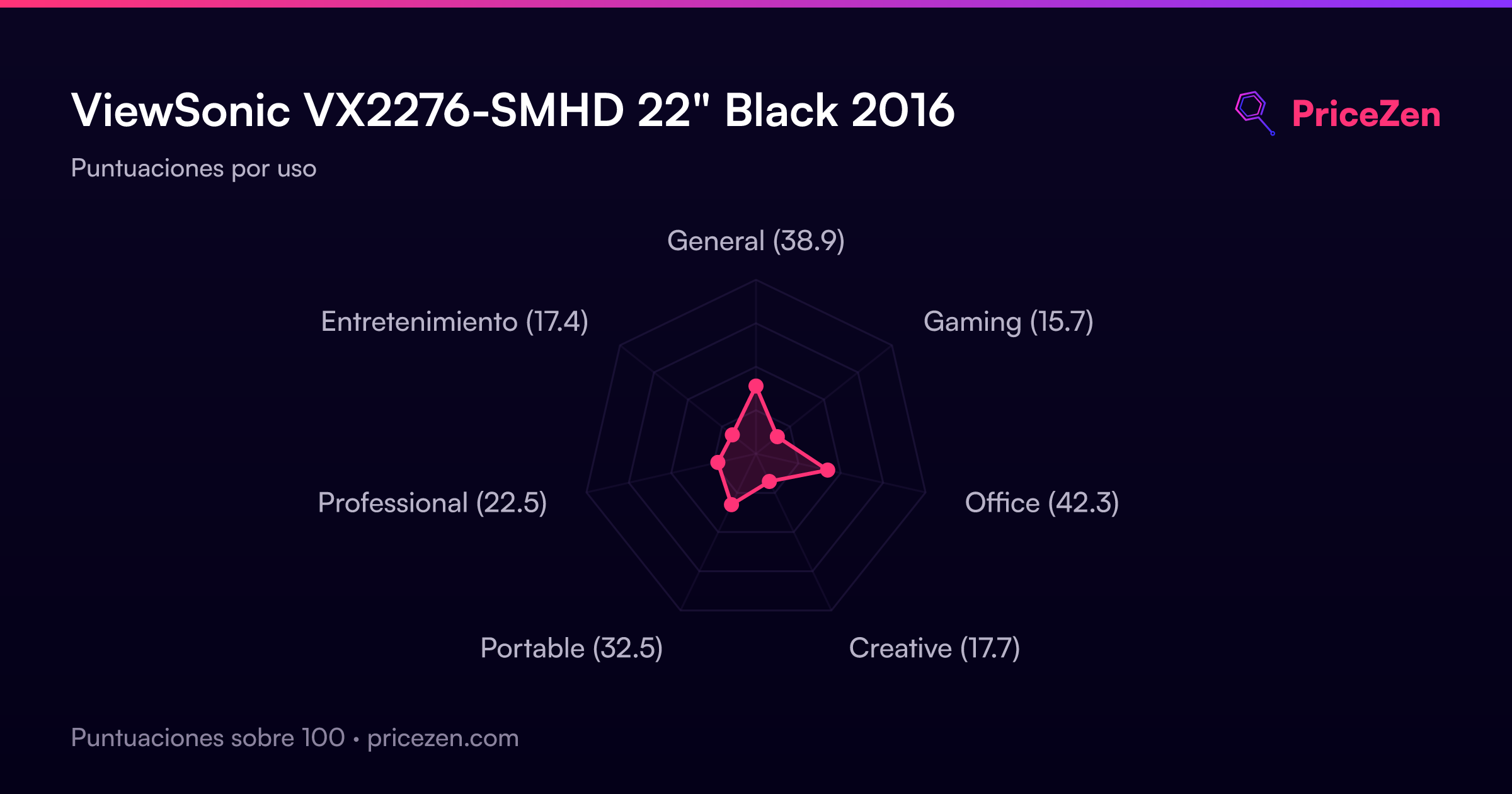
- General38.9
- Gaming15.7
- Office42.3
- Creative17.7
- Portable32.5
- Professional22.5
- Entretenimiento17.4