Acer KB272HL Hbi 27" Black 2020
The 27-inch VA panel delivers Full HD resolution with a 75Hz refresh rate and 1ms VRB response time, supported by AMD FreeSync for smoother visuals. Its zero-frame design and VESA compatibility make it a practical choice for multi-monitor setups, while the low blue light filter reduces eye strain during long sessions. Best for office workers and home users who need a reliable, budget-friendly monitor for productivity and light gaming.












Resumen
The 30-Second Version
The Acer KB272HL Hbi is a budget 27-inch 1080p monitor that delivers good contrast and a smooth 75Hz refresh rate for casual gaming and office work. It's light on ports and color accuracy, but at around $240 USD, it's a solid value for anyone who just needs a big, reliable screen. Buy it for the price, not the features.
Pros & Cons
Ventajas
- Excellent value for a 27-inch monitor 92nd
- VA panel delivers good contrast and deep blacks 66th
- 75Hz refresh rate with FreeSync support
- Lightweight and easy to set up
- VESA mount compatible out of the box
Desventajas
- Only one HDMI port and one VGA, no DisplayPort
- No HDMI cable included in the box
- Buttons on the back are awkward to reach
- Color accuracy is below average
- Some light bleed along the edges
Opinión de los propietarios
The Word on the Street
Cómo cambió la opinión de los propietarios con el tiempo
ExclusivaSegún cuándo escribieron realmente sus opiniones los clientes, para ver si los elogios iniciales se mantuvieron.
11 opiniones escritas, dic 2020 – mar 2025: 11 satisfechos
En las 1850 valoraciones de tiendas: 4,6★. La mayoría de los propietarios valora sin escribir una opinión. El gráfico cuenta las 11 opiniones escritas.
Cada punto es una opinión escrita, en el mes en que se escribió. Satisfechos = 4-5★, neutrales = 3★, insatisfechos = 1-2★.
Las pruebas
Performance
Let's talk numbers. The KB272HL runs at 75Hz, which is a modest but real upgrade over the 60Hz panels most people are used to. You'll notice smoother scrolling and slightly better motion in games, though it's not going to feel like a 144Hz gaming monitor. The 1ms VRB response time is a bit of marketing magic, that's the backlight strobing mode, not the native panel response. In practice, the VA panel is fine for casual gaming but you'll see some ghosting in fast-paced titles. Our database puts its overall performance at the 66th percentile, which translates to solid but unspectacular.
For office work and general use, this thing is more than capable. Text is crisp at 1080p on a 27-inch screen, though pixel density isn't amazing if you sit really close. The 100 million:1 contrast ratio is a dynamic contrast number, so take it with a grain of salt, but the VA panel does deliver deeper blacks than a typical IPS at this price. Color accuracy lands in the 16th percentile, which is a weak spot. If you're doing photo or video editing, this isn't the monitor for you. Out of the box, colors lean a bit washed out, and several owners mention needing to tweak brightness and black levels to get things looking right.
Specifications
Full Specifications
Display
| Size | 27" |
| Resolution | 1920x1080 (Full HD) |
| Panel Type | VA |
| Aspect Ratio | 16:9 |
| Curved | No |
| Screen Finish | glossy |
Performance
| Refresh Rate | 75 Hz |
| Response Time | 1 |
| Adaptive Sync | FreeSync |
Connectivity
| HDMI Ports | 1 |
| Speakers | No |
Ergonomics
| Tilt | Yes |
| VESA Mount | VESA Compatible |
Features
| Webcam | No |
| Touchscreen | No |
| Weight | 5.4 kg / 11.8 lbs |
vs Competition
Stacked against the competition, the KB272HL Hbi is clearly the budget pick. The MSI MAG 271QPX QD-OLED E2 and LG UltraGear 27GX790A-B are in a completely different league, those are high-refresh OLED gaming monitors that cost several times more. The Samsung Odyssey G60SD and Gigabyte M Series OLED MO27U2 SA are similarly premium. If you're comparing this Acer to those, you're comparing a Honda Civic to a Porsche. Different buyers, different budgets.
Where the Acer makes sense is against other budget 27-inch monitors. It holds its own on contrast and general usability, but it falls short on connectivity. Most competitors at this size include at least two HDMI ports or a DisplayPort. The ASUS ROG Strix XG27AQDMG, while pricier, offers a much better overall package if you can stretch your budget. For pure office use, though, the Acer's simplicity is almost a feature. One cable in, picture on, done.
| Spec | Acer KB272HL Hbi 27" | ASUS ROG Strix XG27AQDPG 27" | Alienware AW-Series AW3425DW 34" | MSI MAG 271QPX QD-OLED E2 27" | Samsung Odyssey G60SD 27" | LG UltraGear 32GX850A-B 32" |
|---|---|---|---|---|---|---|
| Screen Size | 27 | 27 | 34 | 27 | 27 | 32 |
| Resolution | 1920 x 1080 | 2560 x 1440 | 3440 x 1440 | 2560 x 1440 | 2560 x 1440 | 3840 x 2160 |
| Panel Type | VA | QD-OLED | QD-OLED | QD-OLED | OLED | OLED |
| Refresh Rate | 75 | 500 | 240 | 240 | 360 | 165 |
| Response Time Ms | 1 | 0.03 | 0.03 | 0.03 | 0.03 | 0.03 |
| Adaptive Sync | FreeSync | G-Sync | FreeSync Premium Pro | FreeSync Premium Pro | FreeSync Premium Pro | FreeSync Premium Pro |
| Hdr | - | HDR500 | HDR400 | DisplayHDR True Black 400 | HDR10+ | DisplayHDR True Black 400 |
| Compare | Compare | Compare | Compare | Compare |
| Producto | Color | Portabilidad | Display | Feature | User Sentiment | Ergonomic | Performance | Connectivity | Valoración social |
|---|---|---|---|---|---|---|---|---|---|
| Acer KB272HL Hbi 27" | 15.4 | 12.7 | 43.5 | 21.1 | 61.6 | 47.2 | 65.7 | 20.4 | 92 |
| ASUS ROG Strix XG27AQDPG 27" Compare | 99.2 | 57.3 | 73.4 | 70.1 | 95.7 | 90.8 | 99.9 | 93.1 | 99.8 |
| Alienware AW-Series AW3425DW 34" Compare | 98.9 | 73.9 | 84.1 | 96.3 | 95.7 | 90.8 | 97.9 | 95.4 | 96.8 |
| MSI MAG 271QPX QD-OLED E2 27" Compare | 99.2 | 57.3 | 73.4 | 85 | 95.7 | 90.8 | 97.9 | 81.1 | 98.9 |
| Samsung Odyssey G60SD 27" Compare | 90.7 | 39.3 | 73.4 | 70.1 | 95.7 | 90.8 | 99.5 | 87.5 | 92 |
| LG UltraGear 32GX850A-B 32" Compare | 79.4 | 49.3 | 99 | 70.1 | 76.7 | 90.8 | 96.2 | 98.2 | 74.8 |
Precio
Value & Pricing
At around $240 USD, the Acer KB272HL Hbi is a solid deal if you just need a big, decent-looking screen. You're not paying for extras like high refresh rates, wide color gamuts, or a fancy stand. You're paying for 27 inches of usable real estate with a VA panel that handles everyday tasks well. The catch is that prices vary wildly by region. The CAD 653 listing in Canada is rough, that's a lot more money for the same monitor. If you can find it near the $200-250 USD mark, it's a good buy. If it's creeping toward $300 or beyond, you should look at alternatives like the ASUS ROG Strix XG27AQDMG or even a cheaper IPS option from LG.
Amazon 1 oferta Desde 240 US$
Historial de precios
Leer más
Overview
The Acer KB272HL Hbi is a 27-inch 1080p VA monitor aimed squarely at budget-conscious buyers who want a big screen without spending big money. It's the kind of display you grab for a home office setup, a first gaming rig, or just to stop squinting at a 15-inch laptop screen. At around $240 USD, it sits in the entry-level tier, and honestly, it does a decent job of punching above its weight in a few areas.
People searching for a cheap 27-inch monitor usually want to know two things: is the picture decent, and will it hold up for casual gaming? The short answer is yes on both counts. The VA panel gives you solid contrast, the 75Hz refresh rate is a nice step up from the standard 60Hz, and FreeSync support means games won't tear if you've got an AMD card. It's not going to blow anyone away, but it's not trying to.
One thing to note right away: this monitor is light on ports. You get one HDMI and one VGA, and that's it. No DisplayPort, no USB hub, no speakers worth mentioning. If you need to plug in multiple devices, you'll be reaching for a switcher or swapping cables. But for a single PC or console setup, it gets the job done.
Common Questions
Q: Is the Acer KB272HL Hbi good for gaming?
It's decent for casual gaming. The 75Hz refresh rate and FreeSync support help reduce screen tearing, and the 1ms VRB mode improves motion clarity, but serious competitive gamers will want something faster like a 144Hz panel.
Q: Does the Acer KB272HL Hbi come with an HDMI cable?
No, it only includes a VGA cable in the box. You'll need to buy an HDMI cable separately if you want to use the HDMI port.
Q: Can I mount the Acer KB272HL Hbi on a monitor arm?
Yes, it's VESA compatible, so you can attach it to most standard monitor arms or wall mounts. Just keep in mind the control buttons are on the back, which can be tricky to reach once mounted.
Q: Is the Acer KB272HL Hbi good for office work?
Yes, it's well-suited for office use. The 27-inch screen gives you plenty of room for documents and spreadsheets, and the VA panel's contrast makes text easy to read. Just adjust the brightness and black levels to your liking.
Who Should Skip This
Skip this monitor if you're a competitive gamer who needs high refresh rates, a content creator who cares about color accuracy, or anyone who needs to connect multiple devices. The single HDMI port is a real limitation, and the color performance won't cut it for photo or video editing. If you're in those camps, look at something like the LG UltraGear 27GX790A-B for gaming or an IPS panel from ASUS for color work. Also skip it if you're buying in Canada, the CAD 653 price is hard to justify for what you get.
Verdict
Should you buy the Acer KB272HL Hbi? If you need a 27-inch monitor for under $250 USD and you're not picky about color accuracy or port selection, yes. It's a straightforward, no-frills display that does the basics well. The VA panel gives you nice contrast for movies and games, the 75Hz refresh rate is a small but welcome bonus, and setup takes about five minutes.
But if you're a serious gamer, a content creator, or someone who needs to connect multiple devices, this isn't the one. The single HDMI port is limiting, the color performance is mediocre, and the lack of height adjustment means you might be stacking books under it. For the right person, it's a great value. For everyone else, there are better options if you're willing to spend a bit more.
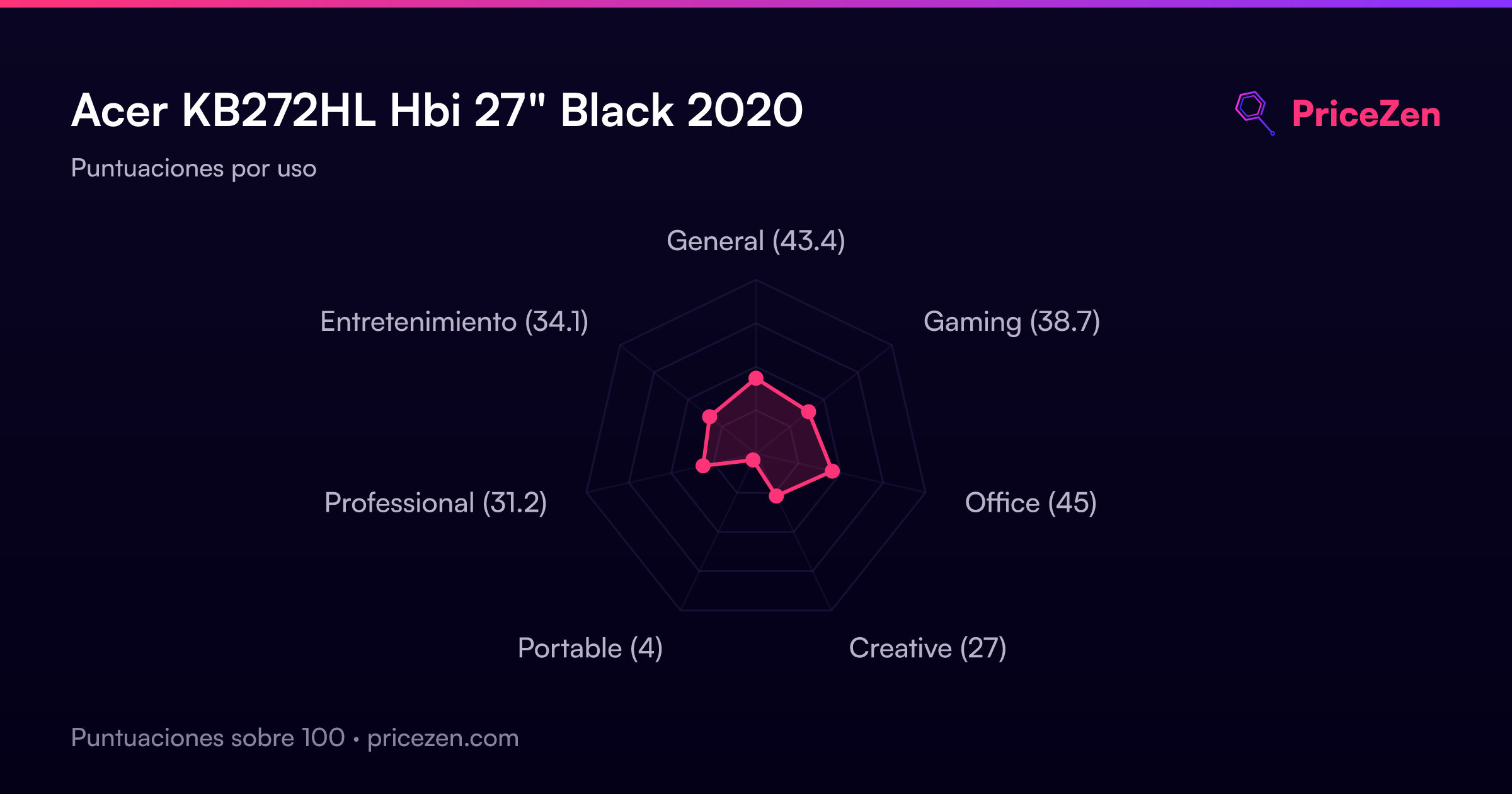
Usage Scores
- General43.4
- Gaming38.7
- Office45
- Creative27
- Portable4
- Professional31.2
- Entretenimiento34.1