Acer Swift Air 14 2026, Core 5 320, 8GB, 512GB SSD, Sage
The Intel Core 5 320 processor with a 16 TOPS NPU powers this 1.19kg aluminum laptop, offering up to 21 hours of battery life and a 120Hz 350-nit IPS display. Its dual Thunderbolt 4 ports and Wi-Fi 6E provide fast connectivity, while the backlit keyboard and facial recognition add convenience. Best for students who need a lightweight, all-day laptop for classes, streaming, and everyday tasks, not for gaming.

Resumen
The 30-Second Version
The Acer Swift Air 14 is a super light 14-inch laptop with a great 120Hz display and solid everyday performance. The 8GB of RAM and weak integrated graphics hold it back, and reliability scores are concerning. At the low end of its price range, it's a good buy for students who prioritize portability.
Pros & Cons
Ventajas
- Incredibly light at 1.19kg, you'll forget it's in your bag 90th
- 120Hz IPS display with 100% sRGB is a standout for the price 76th
- Thunderbolt 4 ports give you real expansion options 70th
- Backlit keyboard and facial recognition are nice quality-of-life touches
Desventajas
- 8GB of RAM is a real limitation for multitasking
- Integrated graphics can't handle anything beyond casual games
- Reliability scores in our database are a red flag
- Only 512GB of storage, and it's not upgradeable
Las pruebas
Performance
The Core 5 320 is a six-core chip that sits right around the middle of the pack in our database. It'll chew through web browsing, document editing, and video streaming without breaking a sweat. The 512GB SSD is snappy enough for boot times and app launches. But the 8GB of LPDDR5 is the bottleneck here. Open 20 Chrome tabs plus Spotify plus a Zoom call and you'll feel it start to wheeze. The integrated Intel graphics are fine for basic tasks but gaming is basically off the table, our data puts it near the bottom for GPU performance. The 120Hz display makes scrolling feel smooth, which is a nice touch at this price.
Specifications
Full Specifications
Processor
| CPU | Intel Core 5 320 |
| Cores | 6 |
| Frequency | 1.5 GHz |
| L3 Cache | 6 MB |
Graphics
| GPU | Intel Graphics |
| Type | Integrated |
Memory & Storage
| RAM | 8 GB |
| RAM Generation | LPDDR5 |
| Storage | 512 GB |
| Storage Type | SSD |
Display
| Size | 14" |
| Resolution | 1900x1200 |
| Panel | IPS |
| Refresh Rate | 120 Hz |
| Brightness | 350 nits |
| Color Gamut | 100% sRGB |
Connectivity
| USB-C Ports | 2 |
| USB Ports | 1 |
| Thunderbolt | Thunderbolt 4 |
| Wi-Fi | Wi-Fi 6E |
Physical
| Weight | 1.2 kg / 2.6 lbs |
| OS | Windows 11 Home |
vs Competition
The MacBook Air M4 absolutely demolishes this thing on performance and battery life, but it costs significantly more. The Lenovo ThinkPad T14 Gen 6 is the reliability pick, with a keyboard that's in a different league, though it's heavier and pricier. The ASUS Vivobook Pro 15 gives you way more GPU muscle if you need creative work done, but it's a much bigger machine. The HP OmniBook X Flip and Samsung Galaxy Book5 Pro both offer better displays and build quality, but again, you're paying for it. The Swift Air 14's lane is clear: it's the budget ultraportable that gets the basics right.
| Spec | Acer Swift Air 14 | Apple MacBook Air 13.6" M2 | HP OmniBook X Flip | Lenovo Yoga 14" 83JR0001US | Samsung Galaxy Book6 Pro 14" NP940XJG-KG2US | ASUS ExpertBook 14" P5405CSA-DH54 |
|---|---|---|---|---|---|---|
| CPU | Intel Core 5 320 | Apple M2 | AMD Ryzen AI 7 350 | AMD Ryzen AI 7 350 | Intel Core Ultra 7 356H | Intel Core Ultra 5 226V |
| RAM (GB) | 8 | 8 | 24 | 16 | 16 | 16 |
| Storage (GB) | 512 | 256 | 1024 | 1024 | 512 | 512 |
| Screen | 14" 1900x1200 | 13.6" 2560x1664 | 14" 1920x1200 | 14" 1920x1200 | 14" 2880x1800 | 14" 2560x1600 |
| GPU | Intel Graphics | Apple M2 8-core | AMD Radeon 860M | AMD Radeon 860M | Intel Graphics | Intel Arc 130V GPU |
| OS | Windows 11 Home | macOS | Windows 11 Home | Windows 11 Home | Windows 11 Home | Windows 11 Home |
| Weight (kg) | 1.2 | 1.2 | 1.4 | 1.4 | 1.2 | 1.3 |
| Battery (Wh) | - | 53 | 59 | 70 | 65 | 63 |
| Compare | Compare | Compare | Compare | Compare |
| Producto | CPU | GPU | RAM | Puertos | Pantalla | Portabilidad | Almacenamiento | Fiabilidad | Valoración social | Affordability |
|---|---|---|---|---|---|---|---|---|---|---|
| Acer Swift Air 14 | 51.1 | 6.5 | 20.5 | 44.4 | 75.9 | 89.8 | 35.6 | 10.8 | 34.5 | 69.6 |
| Apple MacBook Air 13.6" M2 Compare | 51.6 | 66.5 | 13.2 | 77.1 | 89 | 91.8 | 15.7 | 98.3 | 99.1 | 62.1 |
| HP OmniBook X Flip Compare | 80 | 64.5 | 82.2 | 77.1 | 74 | 79.4 | 65.1 | 33.6 | 94.2 | 43.5 |
| Lenovo Yoga 14" 83JR0001US Compare | 80 | 64.5 | 64.2 | 63.6 | 83.2 | 81.5 | 65.1 | 82.1 | 94.2 | 39 |
| Samsung Galaxy Book6 Pro 14" NP940XJG-KG2US Compare | 90.7 | 56.9 | 49.8 | 50.9 | 97.4 | 87.7 | 35.6 | 82.1 | 79.2 | 20.1 |
| ASUS ExpertBook 14" P5405CSA-DH54 Compare | 62.6 | 62.6 | 65.7 | 89.2 | 89.2 | 87.3 | 50.8 | 60.7 | 0 | 44.4 |
Precio
Value & Pricing
Pricing is all over the place right now. We're seeing this laptop listed anywhere from USD 446 to USD 580 across three US listings. At the low end, it's a solid deal for a sub-1.2kg laptop with a 120Hz display and Thunderbolt 4. At the high end, you're getting into territory where better-equipped machines start to look tempting. If you can snag it near USD 446, the value proposition is genuinely strong for students and commuters. At USD 580, you should think twice.
Best Buy 3 ofertas Desde 450 US$
Historial de precios
Leer más
Overview
The Acer Swift Air 14 is a featherweight laptop that nails the basics for students and commuters. At 1.19kg with a 14-inch 120Hz display, it's built for people who live out of a backpack. The Intel Core 5 320 and 8GB of RAM handle everyday tasks fine, but this is not a machine for heavy lifting.
Acer claims up to 21 hours of battery life, which would be impressive if true. The display is genuinely nice for the price, with 100% sRGB coverage and 350 nits of brightness. But the 8GB of RAM and integrated graphics put a hard ceiling on what this thing can do.
Common Questions
Q: Can the Acer Swift Air 14 handle gaming?
Not really. The integrated Intel graphics score near the bottom of our database for GPU performance, so you're limited to very light or older titles at low settings. This is not a gaming laptop.
Q: Is 8GB of RAM enough for this laptop?
For basic tasks like browsing, streaming, and document editing, yes. But if you keep lots of tabs open or run heavier apps, you'll hit the ceiling fast. The RAM is soldered, so you can't upgrade it later.
Q: How good is the battery life on the Swift Air 14?
Acer claims up to 21 hours of video playback, which would be excellent if accurate. We don't have independent battery test data for this model, so treat that number with some skepticism until real-world results confirm it.
Who Should Skip This
Skip this if you need to run demanding software, edit video, or play modern games. The integrated graphics and 8GB of RAM will frustrate you quickly. Also skip it if reliability is your top priority, our database shows this model scoring near the bottom for dependability. If you need a machine that'll last five years without hiccups, look at the ThinkPad T14 Gen 6 or spend more on the MacBook Air M4.
Verdict
This is a student laptop through and through. If you're writing papers, streaming lectures, and occasionally editing photos, the Swift Air 14 handles it all while weighing less than a hardcover textbook. The display is genuinely good, the port selection is thoughtful, and the price is right at the low end. Just don't expect it to grow with you. 8GB of RAM in 2025 is like buying shoes that already fit a little tight.
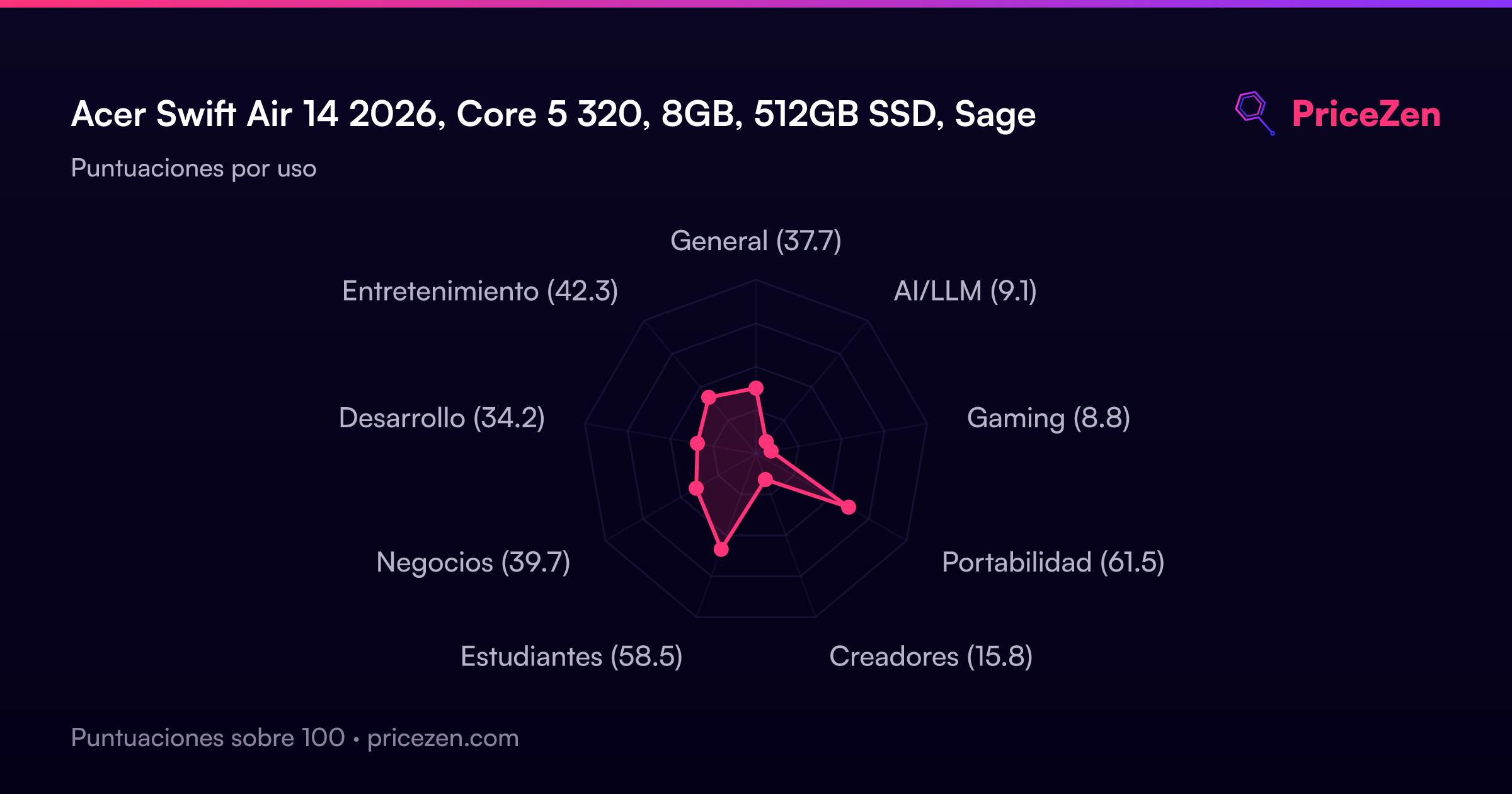
Usage Scores
- General37.7
- AI/LLM9.1
- Gaming8.8
- Portabilidad61.5
- Creadores15.8
- Estudiantes58.5
- Negocios39.7
- Desarrollo34.2
- Entretenimiento42.3