Dell 15 LD15260-7140BLK-PUS 2026, Core Ultra 7 255U, 16GB, 1TB SSD, Black
The Intel Core Ultra 7 255U with 12 cores and dedicated NPU powers AI-assisted multitasking, paired with 16GB DDR5 and a 1TB NVMe SSD for smooth everyday performance. The 15.6-inch FHD touchscreen with 220 nits brightness and a 41Wh battery keeps the 1.94kg chassis portable, while the backlit keyboard and Wi-Fi 6 add convenience. Best for students who need a reliable, touch-enabled Windows laptop for note-taking, research, and light productivity, though gaming is a weak point.

Resumen
The 30-Second Version
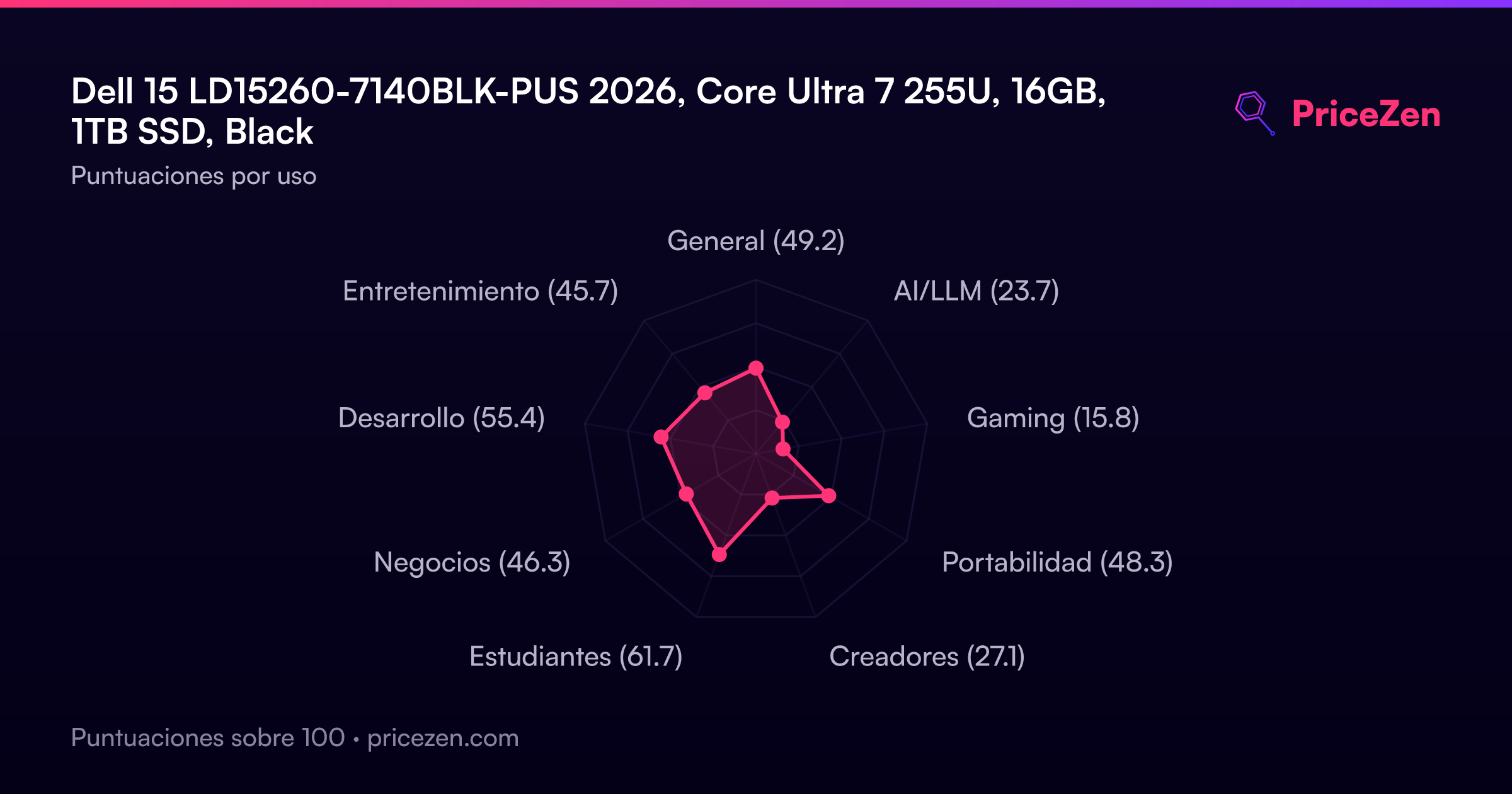
A big touchscreen and a 1TB SSD for USD 800, dragged down by a dim 220-nit 60Hz panel and a 41Wh battery. Storage is the standout at the 79th percentile; overall it scores 49.2/100. Worth it as a stay-at-home student or office machine, not as a travel or gaming laptop.
Pros & Cons
Ventajas
- 1TB NVMe SSD is well above average for the money. 83rd
- Core Ultra 7 255U handles everyday work without drama. 79th
- Touchscreen and backlit keyboard at USD 800.
- Owners rate it 4.2/5 across 736 reviews.
Desventajas
- 220-nit 60Hz panel is one of the dimmer screens we track.
- Gaming score of 15.8/100 means integrated graphics only.
- Single 16GB stick runs single-channel.
- HDMI 1.4 and just one USB-C port feel dated.
Las pruebas
Performance
The 12-core Ultra 7 255U sits around the 61st percentile for CPU, so it's solidly average for this class: fine for browser tabs, Office, video calls and light coding. The 1TB drive is a genuine bright spot at the 79th percentile, though it's a QLC part, so don't expect workstation-grade sustained writes. RAM is 16GB of DDR5-5600 in a single stick, which means single-channel memory and no easy dual-channel boost. Integrated Intel Graphics plus a gaming score of 15.8 out of 100 tells you everything: this is not a gaming laptop. Ports are a weak spot too, with one USB-C, two USB-A and HDMI 1.4 only.
Specifications
Full Specifications
Processor
| CPU | Intel Core Ultra 7 255U |
| Cores | 12 |
| L3 Cache | 12 MB |
Graphics
| GPU | Intel Graphics |
| Type | Integrated |
Memory & Storage
| RAM | 16 GB |
| RAM Generation | DDR5 |
| Storage | 1 TB |
| Storage Type | NVMe SSD |
Display
| Size | 15.6" |
| Resolution | 1920x1080 (Full HD) |
| Panel | IPS |
| Refresh Rate | 60 Hz |
| Brightness | 220 nits |
Connectivity
| USB-C Ports | 1 |
| USB Ports | 2 |
| HDMI | HDMI 1.4 |
| Wi-Fi | Wi-Fi 6 |
| Bluetooth | ✓ |
Physical
| Weight | 1.9 kg / 4.3 lbs |
| Battery | 41 Wh |
| OS | Windows 11 Home |
vs Competition
Against the Apple MacBook Air 13.6" M4, this Dell wins on screen size, touch input and storage capacity, but the Air is the one to cross-shop if display quality and battery matter more than inches. The Samsung Galaxy Book5 Pro 14" and ASUS Zenbook 14" UX3405CA-U9321TB are the picks for anyone who cares about portability and panels, since this Dell's screen ranks 29th percentile and its compactness only 42nd. Want to actually play games? The Lenovo Legion 5i 15.1" exists for exactly that reason, because a 15.8 gaming score isn't going to get you there. And if you want touch plus flexibility, look at the HP OmniBook X Flip 14-fk0033dx instead.
| Spec | Dell 15 LD15260-7140BLK-PUS | Apple MacBook Air 13.6" M4 | Lenovo Legion 5i 15.1" 83F00008US | Samsung Galaxy Book5 Pro 14" NP944XHA-KG3US | ASUS Zenbook 14" UX3405CA-U9321TB | HP OmniBook X Flip |
|---|---|---|---|---|---|---|
| CPU | Intel Core Ultra 7 255U | Apple M4 | Intel Core Ultra 7 255HX | Intel Core Ultra 7 258V | Intel Core Ultra 9 285H | AMD Ryzen AI 7 350 |
| RAM (GB) | 16 | 24 | 32 | 32 | 32 | 24 |
| Storage (GB) | 1024 | 1024 | 1024 | 1024 | 1024 | 1024 |
| Screen | 15.6" 1920x1080 | 13.6" 2560x1664 | 15.1" 2560x1600 | 14" 2880x1800 | 14" 1920x1200 | 14" 1920x1200 |
| GPU | Intel Graphics | Apple (10-Core) | NVIDIA GeForce RTX 5060 | Intel Arc Graphics 140V | Intel Arc Graphics | AMD Radeon 860M |
| OS | Windows 11 Home | macOS | Windows 11 Home | Windows 11 Pro | Windows 11 Home | Windows 11 Home |
| Weight (kg) | 1.9 | 1.2 | 2 | 1.2 | 1.3 | 1.4 |
| Battery (Wh) | 41 | 54 | 80 | 63 | 75 | 59 |
| Compare | Compare | Compare | Compare | Compare |
| Producto | CPU | GPU | RAM | Puertos | Pantalla | Portabilidad | Almacenamiento | Fiabilidad | Valoración social | Affordability |
|---|---|---|---|---|---|---|---|---|---|---|
| Dell 15 LD15260-7140BLK-PUS | 61.3 | 56.9 | 59.7 | 35.5 | 29.1 | 41.9 | 79.2 | 33.6 | 83 | 55.4 |
| Apple MacBook Air 13.6" M4 Compare | 75.8 | 75.6 | 64.9 | 50.9 | 87.1 | 91.4 | 79.2 | 98.3 | 98.7 | 24.6 |
| Lenovo Legion 5i 15.1" 83F00008US Compare | 94.4 | 88.3 | 86.3 | 97.2 | 94.3 | 56.5 | 79.2 | 82.1 | 76.7 | 26.8 |
| Samsung Galaxy Book5 Pro 14" NP944XHA-KG3US Compare | 65.7 | 69.6 | 79.4 | 83 | 91.6 | 89.5 | 79.2 | 82.1 | 96.5 | 20.6 |
| ASUS Zenbook 14" UX3405CA-U9321TB Compare | 90.1 | 69.6 | 89.7 | 57.5 | 82.4 | 87.1 | 65.1 | 60.7 | 96.5 | 16.1 |
| HP OmniBook X Flip Compare | 80 | 64.5 | 82.2 | 77.1 | 74 | 79.4 | 65.1 | 33.6 | 94.2 | 43.5 |
Precio
Value & Pricing
USD 800 at Costco for a Core Ultra 7, 16GB and 1TB is decent, not thrilling. Affordability ranks about average in our data, so you're paying market rate rather than getting a steal. The storage and the touch display are where the money goes. The screen quality and battery are where it was saved. If you want a big-screen workhorse for a desk near an outlet, it's fair value. If you want something you'll enjoy looking at for eight hours a day, spend more.
Costco 1 oferta Desde 800 US$
Historial de precios
Leer más
Overview
This is a Costco-flavored Dell 15 with a Core Ultra 7 255U, 16GB of DDR5 and a 1TB NVMe SSD for USD 800. On paper that's a sensible everyday machine: big touchscreen, backlit keyboard, Windows 11 Home, plenty of storage.
The catch is the screen. A 15.6" 1080p IPS panel at 60Hz and 220 nits lands in the bottom third of our rankings, and the 41Wh battery isn't doing it any favors. Our scoring model gives it 49.2 overall, which is middle-of-the-road territory.
Common Questions
Q: Can I upgrade the RAM later?
It ships as a single 16GB DDR5-5600 stick, so there's a free slot in principle, but check Dell's service docs for your exact unit before buying a second module.
Q: Is the screen good enough for outdoor use?
Not really. At 220 nits with an anti-glare coating it's fine indoors, but it ranks in the bottom third of screens we track and will wash out in direct sun.
Q: Will it run modern games?
Only the lightest stuff. Integrated Intel Graphics and a gaming score of 15.8/100 put it near the bottom of the category.
Who Should Skip This
If you game, edit video or work outside, skip it. The integrated GPU and 220-nit panel aren't built for any of that, and HDMI 1.4 limits what you can push to an external monitor. Frequent flyers should also pass: 1.94kg and a 41Wh battery is a lot of weight for not much unplugged time.
Verdict
Buy this if you want a large touchscreen for schoolwork, spreadsheets and streaming, you mostly work indoors near a plug, and 1TB of local storage matters to you. Students get the best fit here (61.7/100 in our model), developers a passable one (55.5/100). Anyone chasing display quality, battery endurance or frame rates should keep scrolling.
Usage Scores
- General49.2
- AI/LLM23.7
- Gaming15.8
- Portabilidad48.3
- Creadores27.1
- Estudiantes61.7
- Negocios46.3
- Desarrollo55.4
- Entretenimiento45.7