KurieTim 15.6" T152A, Intel N95, 16GB, 512GB SSD, Rose Gold
The Intel N95 quad-core processor, paired with 16GB DDR4 RAM and a 512GB SSD, handles multitasking and storage for daily workloads. The 15.6-inch 1920x1080 IPS display and backlit keyboard add comfort for extended use, while the 1.55kg weight keeps it portable. This laptop suits students and business users needing a reliable, budget-friendly Windows 11 Pro machine for documents, streaming, and video calls.

Sin precio actual de tiendas
Resumen
The 30-Second Version
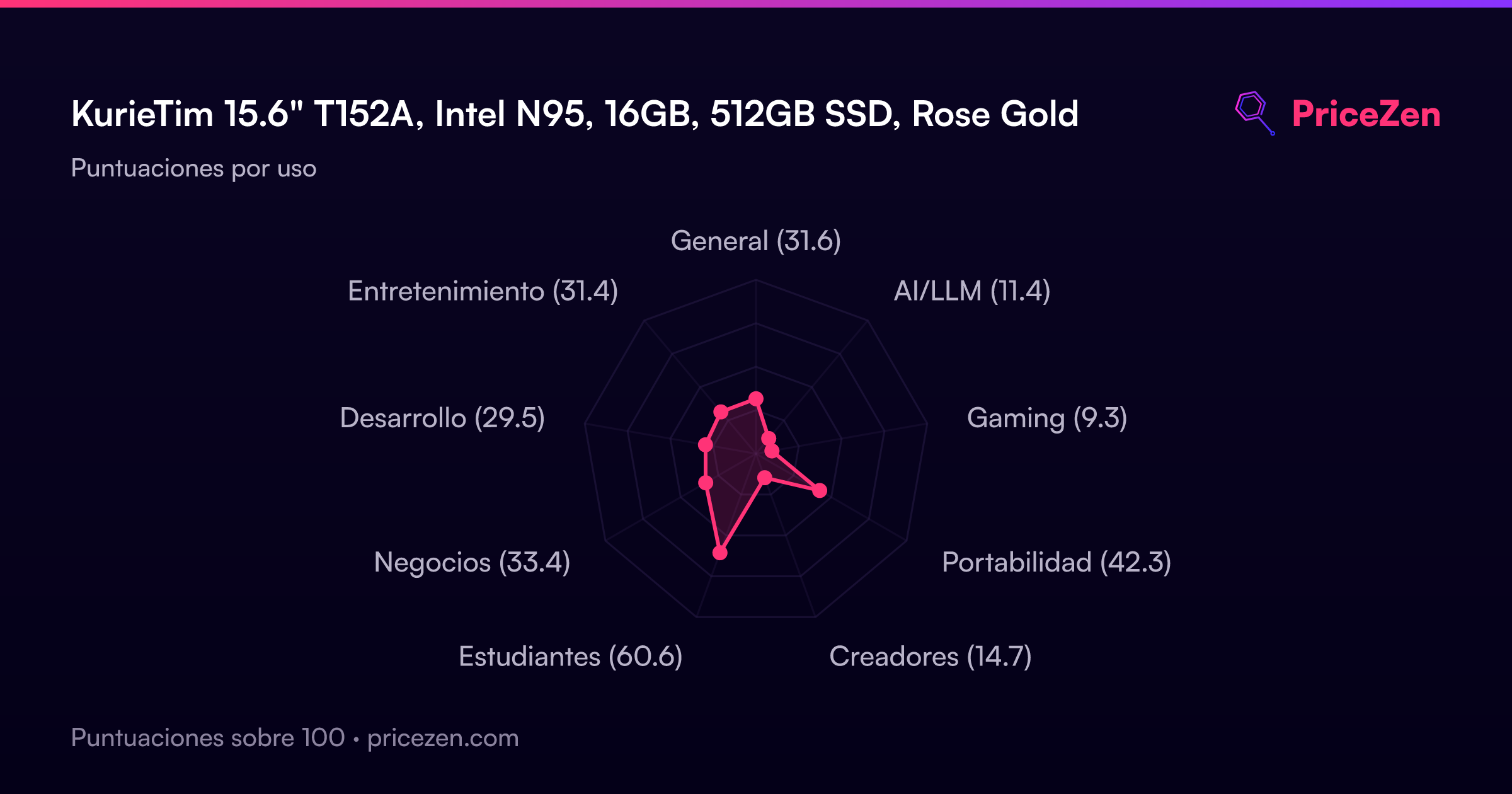
The KurieTim T152A packs 16GB of RAM, a 512GB SSD and Windows 11 Pro into a USD 290 laptop at Newegg, which is why it lands in the top tenth of our affordability rankings. The Intel N95 is the weak link, sitting near the bottom of our CPU rankings with a gaming score of just 9.3. Buy it as a light-duty student or spare home machine, skip it if this will be your main work computer.
Pros & Cons
Ventajas
- USD 290 at Newegg, top-tenth affordability in our rankings 91st
- 16GB DDR4 keeps lots of tabs and apps open at once
- 512GB SSD, mid-pack capacity with fast load times
- Windows 11 Pro, backlit keyboard and fingerprint reader included
- 15.6-inch 1920x1080 IPS panel and a light 1.55kg chassis
Desventajas
- N95 CPU ranks in the bottom tenth of laptops we track
- Gaming score of 9.3 out of 100, integrated UHD graphics only
- Reliability ranking is one of the worst in our data
- Screen ranks below average despite the FHD IPS spec
- Only two owner reviews behind that 5/5 rating
Opinión de los propietarios
The Word on the Street
Cómo cambió la opinión de los propietarios con el tiempo
ExclusivaSegún cuándo escribieron realmente sus opiniones los clientes, para ver si los elogios iniciales se mantuvieron.
8 opiniones escritas, may 2025 – ene 2026: 5 satisfechos, 1 neutral, 2 insatisfechos
En las 2 valoraciones de tiendas: 5,0★. El gráfico cuenta las 8 opiniones escritas.
Cada punto es una opinión escrita, en el mes en que se escribió. Satisfechos = 4-5★, neutrales = 3★, insatisfechos = 1-2★.
Las pruebas
Performance
Let's translate the numbers. Four cores and four threads means no hyperthreading headroom, so the N95 handles a handful of light tasks at once but chokes when you stack real workloads. Its 10th percentile CPU placement tells you most laptops we track will out-compute it, and the integrated UHD graphics land in the bottom third, which is why gaming scores 9.3. Owners describe pages loading quickly and app switching feeling smooth on Windows 11 Pro, and that lines up with what this hardware is good at: short bursts of light work, not sustained crunching. Video encoding, big spreadsheet models, photo edits in bulk, modern games, all off the table.
Where it claws back ground is memory and storage. 16GB is the number that keeps a dozen tabs, a document and a chat app open without constant swapping, and both RAM and storage sit around the middle of our rankings rather than the basement where the CPU lives. The 512GB SSD means fast boots and enough room for a school year of files before you start deleting things. The screen is the other soft spot: 1920x1080 on 15.6 inches is perfectly readable, but our display ranking puts it below average against the wider field, so don't expect it to compete with the panels on pricier machines. And the port situation deserves a warning, because the listings disagree with each other. Some describe two USB-C ports plus two USB-A and HDMI, others list mini HDMI and two USB 3.0 ports with a microSD slot. Check the exact listing before you buy an adapter.
Specifications
Full Specifications
Processor
| CPU | Intel N95 |
| Cores | 4 |
| Frequency | 1.7 GHz |
| L3 Cache | 6 MB |
Graphics
| GPU | Intel UHD Graphics |
| Type | Integrated |
| VRAM Type | Shared |
Memory & Storage
| RAM | 16 GB |
| RAM Generation | DDR4 |
| Storage | 512 GB |
| Storage Type | SSD |
Display
| Size | 15.6" |
| Resolution | 1920x1080 (Full HD) |
| Panel | IPS |
Connectivity
| USB-C Ports | 2 |
| USB Ports | 2 |
| HDMI | 1 x HDMI |
| Wi-Fi | 802.11ac |
| Bluetooth | Bluetooth 4.0 |
Physical
| Weight | 1.6 kg / 3.4 lbs |
| OS | Windows 11 Pro |
vs Competition
Cross-shop this against the Apple MacBook Air 13.3" M1, the HP OmniBook X Flip 14-fm0013dx and the Lenovo Yoga 14" 83TD0047US and the picture gets clearer. All three sit well above the T152A in our overall rankings, and the gap is mostly silicon: this machine's CPU placement in the bottom tenth and its 9.3 gaming score mean anything compute-heavy belongs on one of those instead. If you're editing photos, compiling code or gaming at all, stop reading and go look at them.
The Samsung Galaxy Book4 Edge 14" NP940XMA-KB1US and ASUS Vivobook 14" TP3407SA-DS74T are the other names worth a look, particularly if a smaller footprint matters to you. The KurieTim's counterargument is simple: it's cheaper than everything on that list, it gives you a bigger 15.6-inch panel, and its 16GB of RAM and 512GB SSD hold up respectably against the field even when the processor doesn't. If your entire computing life is documents, browsing, email and Netflix, the extra spend on those machines buys headroom you may never touch. If there's any chance you'll want that headroom, buy it now rather than replacing this in a year.
| Spec | KurieTim 15.6" T152A | Apple MacBook Air 13.3" M1 | HP OmniBook X Flip | Lenovo Yoga 14" 83TD0047US | Samsung Galaxy Book4 Edge 14" NP940XMA-KB1US | ASUS Vivobook 14" TP3407SA-DS74T |
|---|---|---|---|---|---|---|
| CPU | Intel N95 | Apple M1 | Intel Core Ultra 5 226V | AMD Ryzen AI 7 445 | Qualcomm Snapdragon X Elite X1E-84-100 | Intel Core Ultra 7 256V |
| RAM (GB) | 16 | 8 | 16 | 24 | 16 | 16 |
| Storage (GB) | 512 | 512 | 512 | 512 | 512 | 1024 |
| Screen | 15.6" 1920x1080 | 13.3" 2560x1600 | 14" 1920x1200 | 14" 1920x1200 | 14" 2880x1800 | 14" 1920x1200 |
| GPU | Intel UHD Graphics | Apple Intel Iris Plus Graphics 645 | Intel Arc 130V | AMD Radeon 840M | Qualcomm Adreno | Intel Arc Graphics |
| OS | Windows 11 Pro | macOS | Windows 11 Home | Windows 11 Home | Windows 11 Home | Windows 11 Home |
| Weight (kg) | 1.6 | 1.3 | 1.4 | 1.4 | 1.2 | 1.6 |
| Battery (Wh) | - | - | 65 | 65 | 35 | 70 |
| Compare | Compare | Compare | Compare | Compare |
| Producto | CPU | GPU | RAM | Puertos | Pantalla | Portabilidad | Almacenamiento | Fiabilidad | Valoración social | Affordability |
|---|---|---|---|---|---|---|---|---|---|---|
| KurieTim 15.6" T152A | 9.9 | 28.1 | 36.2 | 57.6 | 38.8 | 55.5 | 35.7 | 4 | 51.3 | 90.8 |
| Apple MacBook Air 13.3" M1 Compare | 47.4 | 61.6 | 13.2 | 57.6 | 85 | 94.4 | 35.7 | 98.3 | 82.9 | 66.2 |
| HP OmniBook X Flip Compare | 62.7 | 62.6 | 66.5 | 89.2 | 74 | 82.1 | 50.9 | 33.6 | 96.5 | 62.4 |
| Lenovo Yoga 14" 83TD0047US Compare | 63.3 | 60.8 | 82.7 | 77.1 | 81.5 | 82.7 | 35.7 | 82 | 81.6 | 53.4 |
| Samsung Galaxy Book4 Edge 14" NP940XMA-KB1US Compare | 79.3 | 13.3 | 53.7 | 57.6 | 94.6 | 89.8 | 35.7 | 82 | 91.3 | 39.2 |
| ASUS Vivobook 14" TP3407SA-DS74T Compare | 68.4 | 69.6 | 49.8 | 71 | 82.4 | 73.5 | 79.2 | 60.6 | 51.3 | 58.4 |
Precio
Value & Pricing
At USD 290 from Newegg, with the US listings we track spanning USD 290 to 300, there's barely any shopping-around to do here. The spread is small enough that chasing a lower price isn't worth your afternoon. What you're buying is the memory and storage combo: 16GB and 512GB at this price is genuinely unusual, and our affordability score reflects that. The catch is that the savings come straight out of the processor. You're paying for capacity, not speed, and that's a fair deal only if your workload is light enough that you'll never notice the difference.
Historial de precios
Leer más
Overview
The KurieTim T152A is a budget laptop that shows up with a spec sheet you don't usually see at this price: 16GB of DDR4, a 512GB SSD, Windows 11 Pro, a backlit keyboard and a fingerprint reader. We track it at USD 290 at Newegg, inside a US range of USD 290 to 300 across three listings. Our affordability ranking puts it in the top tenth of every laptop we track, which is the whole pitch here.
Under the hood it's an Intel N95, four cores and four threads with 6MB of cache, running at 1.7GHz and boosting up to 3.4GHz, paired with integrated Intel UHD graphics. That's an entry-level chip, and our CPU ranking backs that up: it sits near the bottom of the field. So the honest framing is a lot of memory and storage bolted onto modest horsepower. For someone writing essays, living in browser tabs and streaming video, that trade can work out fine. For anything heavier, it won't.
Our scoring model likes it most as a student machine, at 62 out of 100, with compact use at 42.4 and business at 33.5. Gaming is its weakest area by a mile, at 9.3. The 15.6-inch 1920x1080 IPS panel gives you real workspace rather than a cramped small-screen compromise, and at 1.55kg it's carryable in a backpack without thinking about it. Rose gold finish, 180-degree hinge, done.
Common Questions
Q: Can it handle gaming or video editing?
No, and we'd rather say it plainly. Our gaming score for this machine is 9.3 out of 100, its weakest category, and the integrated Intel UHD graphics rank in the bottom third of laptops we track. Light photo touch-ups are fine, but sustained rendering or modern games need a different machine entirely.
Q: Is 16GB of RAM wasted on a processor this slow?
Not really, and it's the smartest part of the spec sheet. The N95 is the bottleneck, but 16GB means your browser tabs, documents and chat apps stay resident in memory instead of constantly reloading, which is exactly what makes light multitasking feel smooth. Both RAM and storage land around the middle of our rankings, well ahead of where the CPU sits.
Q: What ports does it actually have?
This is genuinely confusing, because the listings we collect don't agree. Some describe two USB-C and two USB-A ports plus HDMI, while others list mini HDMI, two USB 3.0 ports, a headphone jack and a microSD slot. Confirm the port layout on the specific listing you're buying from before you order any adapters or docks.
Q: Should I trust the 5-star rating?
Treat it as a nice signal, not evidence. It comes from just two reviews, and our social proof ranking puts this right around the middle of the pack, so there's no large owner base backing it up. Our reliability ranking, meanwhile, sits near the very bottom of the field, which is the number we'd weigh more heavily for a machine you plan to depend on.
Who Should Skip This
Skip this if the laptop is how you earn money. A 33.5 business score and a CPU in the bottom tenth mean heavy spreadsheets, virtual machines, code builds and creative apps will drag, and the reliability ranking near the floor of our data makes it a poor bet for something you can't afford to have fail. The Apple MacBook Air 13.3" M1 or the Lenovo Yoga 14" 83TD0047US are the direction to look instead.
Gamers should walk away immediately, since a 9.3 gaming score isn't a limitation you tweak your way around. And if you want a small, toss-in-any-bag machine, our compact score of 42.4 says this 15.6-inch chassis isn't the answer either. Look at the HP OmniBook X Flip 14-fm0013dx or the ASUS Vivobook 14" TP3407SA-DS74T for something built around a smaller footprint.
Verdict
For a student who needs a cheap second brain, this makes sense. Our student score of 62 out of 100 is its strongest showing, and the combination of a full-size FHD screen, 16GB of RAM, a backlit keyboard for late-night library sessions and 1.55kg of weight covers the actual job. Same story for a kitchen-table family laptop or a spare machine for travel. At USD 290 the downside risk is small, and the one detailed owner review we have describes exactly this kind of light use going smoothly.
For anyone whose laptop is their primary work tool, we'd pass. The business score of 33.5 and the CPU ranking tell you it'll feel slow the moment your workload grows, and the reliability placement near the very bottom of our data is not something we'd gamble a paycheck on. Spend more on one of the competitors above and keep it longer. Cheap is only cheap if it lasts.
Usage Scores
- General31.6
- AI/LLM11.4
- Gaming9.3
- Portabilidad42.3
- Creadores14.7
- Estudiantes60.6
- Negocios33.4
- Desarrollo29.5
- Entretenimiento31.4