Microsoft Surface Pro 13" 11th Edition 2024, Snapdragon X Elite, 16GB, 1TB SSD, Sapphire
The Snapdragon X Elite chip delivers multi-threaded performance that outpaces the MacBook Air M3, paired with a vivid 13-inch 2880x1920 OLED 120Hz display and 14-hour battery life. Its 0.89kg tablet form factor with an integrated kickstand offers genuine 2-in-1 flexibility, now enhanced by Wi-Fi 7 and AI-driven features like Recall. This device is best for students and mobile professionals who need a lightweight, always-connected PC for productivity and media consumption, not gaming.






Resumen
The 30-Second Version
The Surface Pro 11 packs a stunning OLED display and best-in-class CPU performance into an impossibly light 0.89kg body. The Snapdragon X Elite is a multi-threaded monster, but the weak GPU and Windows on ARM app compatibility issues hold it back, and our score has slipped to 54/100. User feedback is mixed, with some reporting blue screens and keyboard glitches that are hard to ignore at this price. If you find it near the $1,250 mark and live in native ARM apps, it's a compelling ultraportable. Otherwise, the Samsung Galaxy Book5 Pro 14" is the safer Windows bet.
Pros & Cons
Ventajas
- Best-in-class CPU performance for a thin-and-light 97th
- Gorgeous 13" OLED display with a smooth 120Hz refresh rate 95th
- Incredibly light and portable at just 0.89kg 82nd
- Excellent build quality with the classic flexible kickstand 79th
- Wi-Fi 7 support for future-proof connectivity
Desventajas
- GPU performance is weak, landing in the bottom quarter of our database
- Multiple user reports of blue screen errors during initial setup
- Windows on ARM still has significant app compatibility gaps
- On-screen keyboard glitches in tablet mode are a common gripe
- Pricey for the reliability concerns, with a wide $1,200 spread across vendors
Opinión de los propietarios
The Word on the Street
Cómo cambió la opinión de los propietarios con el tiempo
ExclusivaSegún cuándo escribieron realmente sus opiniones los clientes, para ver si los elogios iniciales se mantuvieron.
16 opiniones escritas, ene 2025 – may 2026: 9 satisfechos, 2 insatisfechos, 5 sin estrellas
En las 68 valoraciones de tiendas: 4,2★. La mayoría de los propietarios valora sin escribir una opinión. El gráfico cuenta las 16 opiniones escritas.
Cada punto es una opinión escrita, en el mes en que se escribió. Satisfechos = 4-5★, neutrales = 3★, insatisfechos = 1-2★.
Las pruebas
Performance
That Snapdragon X Elite is the real deal for raw CPU grunt. In our database, it lands in the absolute top tier for processor performance, outpacing nearly every other thin-and-light laptop on the market. For multi-threaded productivity tasks like video encoding or compiling code, this thing punches way above its weight class. The integrated Adreno GPU is a different story though. It sits in the 23rd percentile, which is frankly disappointing. You can forget about any serious gaming or GPU-accelerated creative work. This is a productivity machine through and through.
In real-world use, app launch times are instant and multitasking with a dozen browser tabs and Office apps feels effortless. The 16GB of LPDDR5X RAM is snappy, though it's worth noting that's just average for this price bracket. The 1TB SSD is also middle of the pack in terms of speed, but it's capacious enough for most. The real performance wildcard is emulation. Any app not compiled natively for ARM runs through Microsoft's Prism emulator, and that's where some users are reporting sluggishness compared to older Intel Surface models. For native ARM apps, it flies. For everything else, your mileage will vary.
Specifications
Full Specifications
Processor
| CPU | Qualcomm Snapdragon X Elite X1E-84-100 |
| Cores | 12 |
| Frequency | 3.4 GHz |
| L3 Cache | 6 MB |
Graphics
| GPU | Qualcomm Adreno |
| Type | Integrated |
| VRAM Type | Shared |
Memory & Storage
| RAM | 16 GB |
| RAM Generation | LPDDR5X |
| Storage | 1 TB |
| Storage Type | SSD |
Display
| Size | 13" |
| Resolution | 2880x1920 |
| Panel | OLED |
| Refresh Rate | 120 Hz |
| Color Gamut | sRGB and Vivid |
Connectivity
| USB-C Ports | 2 |
| USB Ports | 0 |
| Thunderbolt | USB4 |
| Wi-Fi | Wi-Fi 7 |
| Bluetooth | Bluetooth 5.4 |
Physical
| Weight | 0.9 kg / 2.0 lbs |
| Battery | 53 Wh |
| OS | Windows 11 Home |
vs Competition
The closest rival in our top five is the Samsung Galaxy Book5 Pro 14" NP944XHA-KG3US, and it's the one we'd put in front of anyone who wants Windows without the ARM question marks. It's a conventional clamshell rather than a tablet, so you give up the kickstand, the detachable keyboard and the pen-first workflow that make the Surface what it is. What you get back is a machine where your existing software simply runs. The Surface counters with that 13-inch OLED panel at 2880x1920 and 120Hz, a 0.89kg body you can hold in one hand, and a CPU that sits in the 99th percentile in our data. If portability and the 2-in-1 shape are the whole point of your purchase, the Surface still wins that argument. If you just want a dependable Windows laptop, the Galaxy Book5 Pro is the easier recommendation.
The Apple MacBook Pro 14.2" M4 Pro is the other name worth weighing, and it's a very different animal. This is the machine to look at if graphics work is on your list, because the Adreno GPU here lands in the 23rd percentile in our ranking and that's the Surface's biggest hole. The MacBook Pro also sidesteps the emulation layer entirely, which matters if your daily apps aren't compiled for ARM. The trade-off is obvious: it's a laptop, not a tablet, and it doesn't fold down into something you can read on a plane tray table. Buy the Surface for the form factor and the CPU, buy the MacBook Pro if you need the graphics headroom.
The Lenovo Legion Pro 7i Gen 10 16" rounds out the group, and it's barely a comparison at all. That's a full-size gaming machine built around raw power, and it lives in a completely different weight class from a sub-1kg tablet. We include it because it shows up alongside the Surface in our rankings, not because we think you're cross-shopping them. If you're seriously considering both, decide first whether you want a desktop replacement or something you forget is in your bag, because nothing about these two overlaps.
| Spec | Microsoft Surface Pro 13" 11th Edition | Apple MacBook Pro 14.2" M4 Pro | ASUS ROG Zephyrus 14" GA403WW-G14.R95080 | Lenovo Legion Pro 7i Gen 10 16" | HP OMEN Transcend | Samsung Galaxy Book5 Pro 14" NP944XHA-KG3US |
|---|---|---|---|---|---|---|
| CPU | Qualcomm Snapdragon X Elite X1E-84-100 | Apple M4 Pro | AMD Ryzen AI 9 HX 370 | Intel Core Ultra 9 275HX | Intel Core Ultra 9 285H | Intel Core Ultra 7 258V |
| RAM (GB) | 16 | 48 | 32 | 32 | 32 | 32 |
| Storage (GB) | 1024 | 4096 | 2048 | 1024 | 1024 | 1024 |
| Screen | 13" 2880x1920 | 14.2" 3024x1964 | 14" 2880x1800 | 16" 2560x1600 | 14" 2880x1800 | 14" 2880x1800 |
| GPU | Qualcomm Adreno | Apple (16-Core) | NVIDIA GeForce RTX 5080 | NVIDIA GeForce RTX 5070 Ti | NVIDIA GeForce RTX 5070 | Intel Arc Graphics 140V |
| OS | Windows 11 Home | macOS | Windows 11 Home | Windows 11 Home | Windows 11 Home | Windows 11 Pro |
| Weight (kg) | 0.9 | 1.6 | 1.6 | 2.7 | 1.6 | 1.2 |
| Battery (Wh) | 53 | 72 | - | 99 | 71 | 63 |
| Compare | Compare | Compare | Compare | Compare |
| Producto | CPU | GPU | RAM | Puertos | Pantalla | Portabilidad | Almacenamiento | User Sentiment | Fiabilidad | Valoración social | Affordability |
|---|---|---|---|---|---|---|---|---|---|---|---|
| Microsoft Surface Pro 13" 11th Edition | 79.3 | 6.5 | 50 | 39.6 | 95.2 | 97.3 | 65.4 | 3.7 | 82 | 74.6 | 20.7 |
| Apple MacBook Pro 14.2" M4 Pro Compare | 92.4 | 78.9 | 90.6 | 73.9 | 99.1 | 68.9 | 98.4 | 90.8 | 98.2 | 99.7 | 4.5 |
| ASUS ROG Zephyrus 14" GA403WW-G14.R95080 Compare | 91.2 | 98.3 | 90.8 | 89.5 | 96 | 73.6 | 89.7 | 99.1 | 60.6 | 95.6 | 6 |
| Lenovo Legion Pro 7i Gen 10 16" Compare | 97.2 | 96.7 | 89 | 97.3 | 95 | 9.5 | 79.3 | 90.8 | 82 | 99.7 | 5.8 |
| HP OMEN Transcend Compare | 90.1 | 93.5 | 89.7 | 89.5 | 96 | 72.2 | 65.4 | 81.4 | 33.7 | 93.1 | 8.9 |
| Samsung Galaxy Book5 Pro 14" NP944XHA-KG3US Compare | 65.9 | 69.7 | 79.5 | 83.5 | 90.4 | 89.4 | 79.3 | 0 | 82 | 95.6 | 21 |
Precio
Value & Pricing
Pricing on this thing is all over the map. We're seeing it listed anywhere from $1,250 to $2,450 depending on the vendor and color. That's a wild $1,200 spread for the same core specs. If you're hunting for a deal, Newegg currently has the Sapphire model at the lower end of that range with fast shipping, which is where we'd point most people. Paying anywhere near the top of that range feels hard to justify, especially when you factor in that the keyboard and pen are still sold separately.
For what you're getting in terms of raw CPU power and that stunning OLED panel, the low end of the price spectrum actually represents solid value. But the user sentiment score is a low 45/100, and a recurring theme is that this feels expensive for a device with reliability question marks. When you can get a MacBook Air M3 for less and avoid the ARM compatibility roulette, the Surface Pro becomes a tougher sell unless you specifically need that 2-in-1 form factor.
Amazon 3 ofertas Desde 1599 US$
Historial de precios
Leer más
Overview
The new Surface Pro is Microsoft making a big bet on ARM, and honestly, it's about time. This 11th edition model ditches Intel entirely for the Qualcomm Snapdragon X Elite, a 12-core chip that promises MacBook Air-beating performance and all-day battery life. It's still the same iconic 2-in-1 design with a kickstand and detachable keyboard, but now it's wrapped in a 'Copilot+ PC' badge with a dedicated NPU for on-device AI tasks. For the road warrior who wants a tablet that can actually replace a laptop, this thing looks incredible on paper.
At just 0.89kg, it's one of the lightest full-power PCs we've ever tracked. The 13-inch OLED display is a stunner, running at 2880x1920 with a buttery 120Hz refresh rate. You're getting 16GB of RAM and a full terabyte of storage in this config, which is plenty for most productivity workflows. The real story here is the chip. Microsoft claims it smokes the M3 MacBook Air in multi-threaded Cinebench, and our data puts this CPU in the 99th percentile for its class. That's not just marketing fluff, that's a genuine leap for Windows on ARM.
But here's the thing. This is still a first-gen product in a lot of ways, and the user feedback we're seeing tells a messier story. While some owners love the speed and portability, others are running into blue screens during setup and app compatibility headaches. The Snapdragon X Elite is powerful, but Windows on ARM still has some growing pains. If you live in a web browser and Microsoft 365, you'll probably be fine. If you rely on niche software or older peripherals, you might be in for a rough time.
Common Questions
Q: Can this Surface Pro run all my existing Windows apps?
Not necessarily, and that's the biggest caveat here. Native ARM64 apps run beautifully, but older x86 and x64 apps run through Microsoft's Prism emulator. Most mainstream productivity software like Office and browsers have native versions, but specialized business software, older games, and some creative tools may run slowly or not at all. Check with your critical app vendors for ARM compatibility before buying.
Q: How is the battery life in the real world?
Microsoft claims 14 hours, but that's under ideal conditions. With the 53Wh battery and that power-hungry OLED display, expect closer to 8-10 hours of mixed productivity use. It supports fast charging via the Surface Connect port or USB-C with a minimum 65W adapter, so topping up is quick. Just don't expect to leave the charger at home on a long workday.
Q: Is the keyboard and pen included?
No, and this is a classic Surface move. The Type Cover keyboard and Slim Pen are sold separately, which can add a few hundred dollars to the total cost. Factor that into your budget when comparing prices, because a laptop without a keyboard isn't much of a laptop.
Q: Can this replace a tablet for drawing and note-taking?
It can, but with some trade-offs. The 120Hz OLED display is fantastic for inking, and owners say the Slim Pen is responsive. The weak spot is the software side: buyers report the tablet mode experience in Windows 11 is still clunky, with on-screen keyboard glitches coming up again and again. If your day is mostly drawing and handwritten notes, that friction adds up fast. The Surface pulls ahead only if you also need a full desktop OS in the same device.
Who Should Skip This
Gamers and creative pros should look elsewhere, full stop. The integrated Adreno GPU is one of the weakest in our database for this class, sitting in the 23rd percentile, so any kind of 3D rendering, video editing with effects, or modern gaming is off the table. The Apple MacBook Pro 14.2" M4 Pro is the better creative pick, and the Lenovo Legion Pro 7i Gen 10 16" is where to look if gaming is the priority and weight isn't a concern. You should also skip this if you rely on niche Windows software for work. The ARM compatibility headaches are real, and the last thing you need is a mission-critical app that won't launch. A traditional x86 machine like the Samsung Galaxy Book5 Pro 14" NP944XHA-KG3US will save you that gamble until Windows on ARM matures.
Verdict
If you're a frequent traveler who lives in Microsoft Office, Edge, and other native ARM apps, the Surface Pro is a joy to use. That CPU performance in a sub-1kg body is genuinely impressive, and the OLED screen makes everything look fantastic. Just budget for the keyboard and maybe cross your fingers during the initial setup. For this use case, snag it at the lower end of that price range and you'll be happy.
For everyone else, we'd pump the brakes, and our scoring model agrees: it now sits at 54/100, down from 64 when we last looked at it. The GPU is weak, the app compatibility situation is still a work in progress, and the user reports of blue screens and keyboard glitches are concerning for a device at this price. If you need a reliable workhorse that just works without tinkering, the Samsung Galaxy Book5 Pro 14" is the straightforward Windows pick, and the Apple MacBook Pro 14.2" M4 Pro is the one to grab if graphics work matters to you. The Surface Pro is a glimpse of a promising ARM-powered future for Windows, but it's not quite a no-brainer yet.
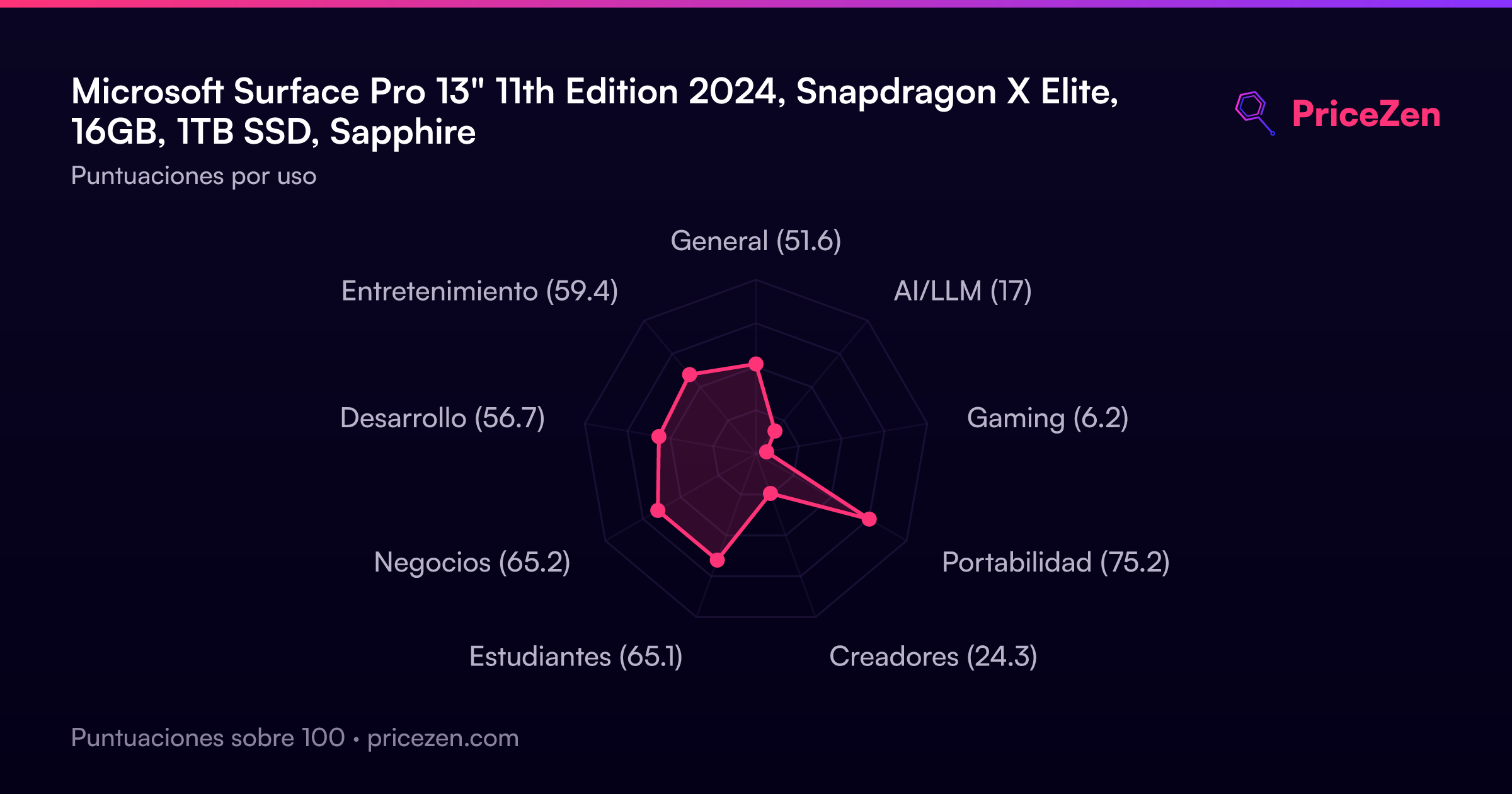
Usage Scores
- General51.6
- AI/LLM17
- Gaming6.2
- Portabilidad75.2
- Creadores24.3
- Estudiantes65.1
- Negocios65.2
- Desarrollo56.7
- Entretenimiento59.4