ASUS Vivobook 14" X1404VA-I38128 2025, Core i3-1315U, 8GB, 128GB SSD, Quiet Blue
Su procesador Intel Core i3-1315U de 6 núcleos con Turbo Boost hasta 4.5 GHz y su peso ligero de 1.36 kg lo distinguen para la productividad diaria en movimiento. Su pantalla FHD de 14 pulgadas con acabado antirreflejo y la bisagra plana de 180° ofrecen una visualización cómoda y flexible para compartir contenido. Este equipo es ideal para estudiantes y oficinistas que priorizan la portabilidad y un precio accesible para tareas de navegación web, ofimática y streaming.












Resumen
The 30-Second Version
The ASUS Vivobook 14 is a lightweight, no-frills laptop that nails the basics for a low price. Its best trick is how easy it is to upgrade the cramped 128GB SSD and 8GB of RAM yourself. Our overall score has slipped to 48, so keep expectations modest, find it on sale, and don't expect any gaming or heavy multitasking.
Pros & Cons
Ventajas
- Super easy to upgrade the RAM and SSD yourself. 90th
- Lightweight and portable at just over 3 pounds. 85th
- Comfortable keyboard for long typing sessions. 81st
- Excellent value, especially when found on sale. 80th
Desventajas
- 128GB of storage is painfully small out of the box.
- Battery life is just average at around 6 hours.
- Charges with an old-style barrel pin, not USB-C.
- No backlit keyboard, which is a bummer in low light.
Opinión de los propietarios
The Word on the Street
Cómo cambió la opinión de los propietarios con el tiempo
ExclusivaSegún cuándo escribieron realmente sus opiniones los clientes, para ver si los elogios iniciales se mantuvieron.
5 opiniones escritas, abr 2026: 5 satisfechos
En las 482 valoraciones de tiendas: 4,5★. La mayoría de los propietarios valora sin escribir una opinión. El gráfico cuenta las 5 opiniones escritas.
Cada punto es una opinión escrita, en el mes en que se escribió. Satisfechos = 4-5★, neutrales = 3★, insatisfechos = 1-2★.
Las pruebas
Performance
The Intel Core i3-1315U is a mixed bag. For everyday stuff like web browsing, email, and Office apps, it feels surprisingly snappy thanks to those newer performance cores. But push it even a little, and you'll feel the limits of 8GB of RAM and integrated graphics. The 128GB SSD is the real bottleneck here. It's tiny by modern standards, landing in the 11th percentile of our database. You'll be leaning on cloud storage or an external drive almost immediately. The good news is that owners consistently report the RAM and SSD are dead simple to upgrade yourself, which is a huge plus for a budget machine.
Specifications
Full Specifications
Processor
| CPU | Intel Core i3 1315U |
| Cores | 6 |
| Frequency | 1.2 GHz |
| L3 Cache | 10 MB |
Graphics
| GPU | Intel UHD Graphics |
| Type | Integrated |
| VRAM Type | Shared |
Memory & Storage
| RAM | 8 GB |
| RAM Generation | DDR4 |
| Storage | 128 GB |
| Storage Type | SSD |
Display
| Size | 14" |
| Resolution | 1920x1080 (Full HD) |
| Panel | IPS |
| Refresh Rate | 60 Hz |
| Brightness | 250 nits |
| Color Gamut | 45% NTSC |
Connectivity
| USB-C Ports | 1 |
| USB Ports | 3 |
| HDMI | HDMI 1.4 |
| Wi-Fi | Wi-Fi 5 |
| Bluetooth | Bluetooth 5.1 |
Physical
| Weight | 1.4 kg / 3.1 lbs |
| Battery | 42 Wh |
| OS | Windows 11 Home |
vs Competition
The current top five in our ranking is a rough room for this Vivobook. The Lenovo Slim 7 14" 83MC0001US, Apple MacBook Air 13.3" M1, Samsung Galaxy Book6 Pro 14" NP940XJG-KG2US and MSI Stealth 14 AI A1VEG-090US all sit well above it on performance, screen quality and battery life. Our scoring model puts the Vivobook at 48 overall, and that gap shows. Its case rests on being light, cheap to get into and easy to open up yourself, not on keeping pace with these machines. If you're cross-shopping any of them, you're shopping in a different class.
| Spec | ASUS Vivobook 14" X1404VA-I38128 | Apple MacBook Air 13.6" M4 | Lenovo Slim 7 14" 83MC0001US | HP OmniBook X Flip | Samsung Galaxy Book5 Pro 16" NP964XHA-KG1US | MSI Stealth 14 AI A1VEG-090US |
|---|---|---|---|---|---|---|
| CPU | Intel Core i3 1315U | Apple M4 | Intel Core Ultra 7 256V | AMD Ryzen AI 7 350 | Intel Core Ultra 7 256V | Intel Core Ultra 7 155H |
| RAM (GB) | 8 | 16 | 16 | 24 | 16 | 16 |
| Storage (GB) | 128 | 256 | 1024 | 1024 | 512 | 1024 |
| Screen | 14" 1920x1080 | 13.6" 2560x1664 | 14" 1920x1200 | 14" 1920x1200 | 16" 2880x1800 | 14" 1920x1200 |
| GPU | Intel UHD Graphics | Apple M4 8-core | Intel Arc 140V | AMD Radeon 860M | Intel Arc Graphics 140V | NVIDIA GeForce RTX 4050 |
| OS | Windows 11 Home | macOS | Windows 11 Home | Windows 11 Home | Windows 11 Pro | Windows 11 Pro |
| Weight (kg) | 1.4 | 1.2 | 1.3 | 1.4 | 1.7 | 1.7 |
| Battery (Wh) | 42 | 54 | 70 | 59 | 76 | 72 |
| Compare | Compare | Compare | Compare | Compare |
| Producto | CPU | GPU | RAM | Puertos | Pantalla | Portabilidad | Almacenamiento | User Sentiment | Fiabilidad | Valoración social | Affordability |
|---|---|---|---|---|---|---|---|---|---|---|---|
| ASUS Vivobook 14" X1404VA-I38128 | 37.4 | 28.2 | 13.4 | 37.1 | 48.3 | 80 | 7.4 | 81.4 | 60.5 | 90.3 | 84.8 |
| Apple MacBook Air 13.6" M4 Compare | 75.9 | 75.7 | 50 | 64.5 | 87.3 | 91.3 | 23.9 | 61 | 98.1 | 98.9 | 51.5 |
| Lenovo Slim 7 14" 83MC0001US Compare | 68.5 | 65.9 | 66.6 | 83.5 | 80.6 | 86.8 | 79.3 | 0 | 81.8 | 97.5 | 40 |
| HP OmniBook X Flip Compare | 80 | 64.5 | 82.3 | 77.8 | 71.6 | 79.2 | 65.3 | 99 | 33.6 | 93 | 43.9 |
| Samsung Galaxy Book5 Pro 16" NP964XHA-KG1US Compare | 68.5 | 69.6 | 50 | 83.5 | 90.4 | 33.3 | 51 | 0 | 81.8 | 95.5 | 37.1 |
| MSI Stealth 14 AI A1VEG-090US Compare | 78.1 | 83.9 | 59.8 | 89.4 | 76.2 | 71.5 | 65.3 | 37.6 | 60.5 | 31.7 | 42 |
Precio
Value & Pricing
Value is where this Vivobook makes its strongest case. The price swings wildly from $250 to $619 across vendors, so you absolutely need to shop around. If you can snag it at the lower end of that range, it's a steal for a basic school or office laptop. The easy upgradability means you can throw in a bigger SSD and more RAM down the line and still come out ahead. At full price, though, the value proposition gets shaky when you look at what a little more money can buy.
Amazon 1 oferta Desde 385 US$
Best Buy 1 oferta Desde 398 US$
Historial de precios
Leer más
Overview
The ASUS Vivobook 14 is what we'd call a no-nonsense budget laptop. It's not trying to be flashy or powerful. It's just a lightweight machine that handles the basics, and it does that job without making a fuss. The 14-inch 1080p screen is fine for documents and spreadsheets, and the whole thing weighs just over three pounds, so tossing it in a bag is no big deal.
Common Questions
Q: Can I upgrade the RAM and storage myself?
Yes, and it's one of the best things about this laptop. The bottom cover comes off easily, giving you direct access to the RAM and NVMe SSD slots for a quick swap.
Q: Does the keyboard have a backlight?
No, the keyboard is not backlit. If you often work in dimly lit rooms or on planes, that's something to keep in mind.
Q: What kind of storage does it use?
It comes with a 128GB NVMe M.2 SSD. It's fast enough for booting Windows, but the capacity is very limited, so you'll likely want to upgrade it.
Who Should Skip This
Skip this if you need to store a lot of files locally or run demanding software. The 128GB drive fills up in a heartbeat, and the integrated graphics will choke on anything beyond casual games. If you need a machine for photo editing, programming with heavy IDEs, or modern gaming, you need to spend more.
Verdict
This is a purpose-built machine for students or anyone who needs a cheap, portable word processor and web surfer. It's not for creatives, gamers, or anyone who keeps a million Chrome tabs open. Our score for it sits at 48 now, down from 58, so go in knowing this is a basics-only buy. The tiny SSD is a hassle, but the fact that you can fix it yourself with a screwdriver is a rare and welcome bit of user-friendliness. Buy it on sale, plan a quick storage upgrade, and you'll have a solid daily driver.
Usage Scores
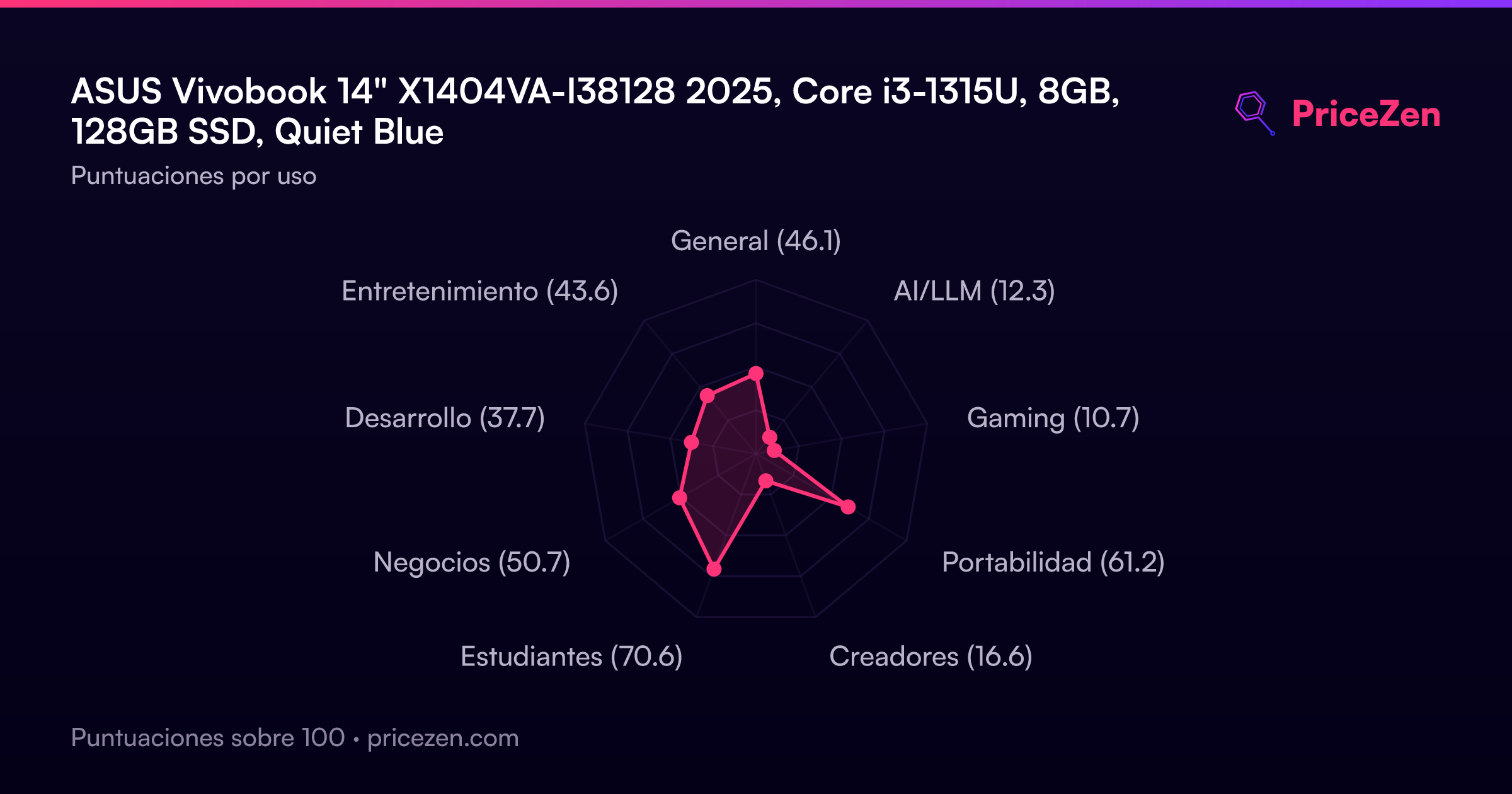
- General46.1
- AI/LLM12.3
- Gaming10.7
- Portabilidad61.2
- Creadores16.6
- Estudiantes70.6
- Negocios50.7
- Desarrollo37.7
- Entretenimiento43.6