Lenovo ThinkCentre Neo 50a 12SA 2024, Core i7-13620H, 32GB, 1TB SSD, Eclipse Black

Un cable, una pantalla y el PC integrado verificado el 28 nov
64/100 puntuación global 4,0 media de 77 valoraciones de propietarios
Cerca del precio habitual de 1599,00 US$.
Precio en los últimos 90 días: mínimo 1599,00 US$ el 31 ago, máximo 1599,00 US$. Precio habitual 1599,00 US$. Hoy 1599,00 US$.
- CPU
- Intel Core i7 13620H
- RAM
- 32 GB
- Storage
- 1 TB
- GPU
- Intel UHD Graphics
- Form factor
- aio
- OS
- Windows 11 Pro
Compara precios en 1 tienda
De la más barata a la más cara. Las ofertas nuevas, reacondicionadas y en pack se mantienen separadas para que compares lo comparable.
| Tienda | Vendido por | Color y estado | Precio | vs. el más bajo | Última comprobación | Enlace |
|---|---|---|---|---|---|---|
| Nuevo1 ofertaUnidad individual | ||||||
| Amazon | Vendedor externo | Eclipse Black | 1599,00 US$ | Precio más bajo | Ayer | Ir a la tienda |
 Fuente: PriceZen, comprobado el 27 nov 2026
Un precio se considera vigente si lo comprobamos en los últimos 7 días. «Vendedor externo» significa un vendedor de terceros en esa tienda, no la propia tienda.
Historial de precios
El precio habitual en tiendas es 1599,00 US$ y el más bajo de los últimos 90 días fue 1599,00 US$.
Comprobado ese díaNo comprobado ese día, sigue en oferta
Fuente: PriceZen, checked 27 nov 2026











Resumen
The 30-Second Version
The ThinkCentre Neo 50a looks like a steal with 32GB RAM and a 100Hz 27-inch display, but user feedback tells a grim story of freezing and invalid warranties. Even at its lowest price around $1,017, the reliability risk is too high for most people. If you see this on sale, think twice and check the seller's authorization. For serious work, a Dell XPS AIO or a Mac mini M4 setup will treat you far better.
Pros & Cons
Ventajas
- Spacious 27" 100Hz IPS display with anti-glare makes all-day work comfortable 81st
- 32GB DDR5 RAM is generous and keeps heavy multitasking fluid 76th
- 1TB PCIe NVMe SSD offers fast boots and plenty of local storage 70th
- HDMI-in port is a rare and useful addition for connecting a laptop or console 69th
- Build quality feels solid when you take it out of the box, with a clean Eclipse Black design
Desventajas
- User reports of frequent freezing and black screens make reliability a major gamble
- Integrated UHD Graphics lag behind most competitors for any visual work
- Purchases from unauthorized sellers often come with invalid warranties and poor support
- Only FHD resolution on a 27" panel feels behind the curve next to QHD competitors
- Heavy at 15.65 lbs and bulky, which limits where you can realistically place it
Opinión de los propietarios
The Word on the Street
- A recurring theme is that the Neo 50a feels snappy and well-built when it's operating normally, with several owners praising the quiet operation and the ease of setting up a dual-monitor workspace.
- Multiple owners report daily freezing and black screen issues that render the computer unusable, often forcing hard reboots that risk data corruption.
- A significant pain point is that many units sold through Amazon turn out to be used or from unauthorized resellers, leaving buyers with a warranty that Lenovo won't honor.
- Some users found the AIO perfect for remote work and basic business tasks, but the looming threat of random crashes makes it hard to rely on for anything time-sensitive.
Cómo cambió la opinión de los propietarios con el tiempo
ExclusivaSegún cuándo escribieron realmente sus opiniones los clientes, para ver si los elogios iniciales se mantuvieron.
7 opiniones escritas, jun–nov 2025: 5 satisfechos, 2 insatisfechos
En las 77 valoraciones de tiendas: 4,0★. La mayoría de los propietarios valora sin escribir una opinión. El gráfico cuenta las 7 opiniones escritas.
Cada punto es una opinión escrita, en el mes en que se escribió. Satisfechos = 4-5★, neutrales = 3★, insatisfechos = 1-2★.
Las pruebas
Performance
With the i7-13620H, you're getting a chip that lands around the middle of the pack for AIOs in our benchmarks. It turbos to 4.9 GHz and has 16 threads, so it chews through Office apps, browser tabs, and lightweight multitasking without breaking a sweat. The 32GB of DDR5 RAM is the real star here, it puts the Neo 50a above average for memory capacity, which means you can keep dozens of Chrome tabs open alongside Slack, Zoom, and a few spreadsheets without feeling the pinch. The 1TB NVMe SSD is quick and spacious, falling into the solid upper-mid tier.
But the graphics side is where the wheels come off if you try to push it. The integrated Intel UHD Graphics sit near the bottom third of our GPU rankings, so this is absolutely not a machine for 3D rendering, gaming, or heavy photo editing. The 27-inch FHD display is bright enough at 300 nits and the 100Hz refresh rate makes scrolling feel smooth, but the 14ms response time betrays any hope of snappy gaming. It's fine for static productivity work, and the anti-glare coating helps in bright offices. Just don't expect this AIO to do double duty as an entertainment hub beyond streaming video.
Specifications
Full Specifications
Processor
| CPU | Intel Core i7 13620H |
| Cores | 10 |
| Frequency | 2.4 GHz |
| L3 Cache | 24 MB |
Graphics
| GPU | Intel UHD Graphics |
| Type | Integrated |
| VRAM Type | Shared |
Memory & Storage
| RAM | 32 GB |
| RAM Generation | DDR5 |
| Storage | 1 TB |
| Storage Type | NVMe SSD |
Build
| Form Factor | aio |
| Weight | 7.1 kg / 15.7 lbs |
Connectivity
| USB-C Ports | 1 |
| USB Ports | 4 |
| HDMI | 1x HDMI-out 2.1, 1x HDMI-in 1.4 |
| Wi-Fi | Wi-Fi 6 |
| Bluetooth | Bluetooth 5.2 |
| Ethernet | Gigabit Ethernet |
System
| OS | Windows 11 Pro |
vs Competition
Stacked against other AIOs, the Neo 50a falls into a weird gap. The HP OMEN GT22-3080 and Dell Aurora Aurora Gaming are built for gaming first, with dedicated GPUs that obliterate the Intel UHD graphics here. They also tend to have higher refresh rate displays and better cooling, but they cost more and are overkill for basic office tasks. The Lenovo Legion Tower 7i Gen 10 is another strong performer in the top tier, though it's a tower rather than an all-in-one, so you'd need to bring your own display. The Apple Mac Studio M5 Max is a totally different animal. It's not an AIO either, so you need to bring your own monitor, keyboard, and mouse, but for a home office setup, the sheer performance per watt and the rock-solid macOS experience make it a compelling alternative.
The Neo 50a's advantage is its simplicity, one power cord and you're done, and the 27-inch screen is built in. But the Mac Studio's user satisfaction scores are stellar, while the ThinkCentre's are in the basement. If you can handle a tiny box and a separate display, the Mac Studio is the smarter long-term bet. For an all-in-one that just works, we'd point most office users toward the Dell XPS line, though the Horizon Pcs Autherium Dragon PITPJ7JXJ has also been turning heads in the top 5 for buyers who want a prebuilt with serious gaming chops.
| Spec | Lenovo ThinkCentre Neo 50a 12SA | Apple Mac Studio M5 Max | HP OMEN GT16-0364 | Dell Desktop ECT1250 | ASUS ROG GM700 | MSI Aegis ZS2 A9NVP-1407US |
|---|---|---|---|---|---|---|
| CPU | Intel Core i7 13620H | Apple M5 Max | AMD Ryzen 7 8700F | Intel Core Ultra 7 265 | AMD Ryzen 7 9800X3D | AMD Ryzen 9 9900X |
| RAM (GB) | 32 | 48 | 32 | 32 | 32 | 32 |
| Storage (GB) | 1024 | 1024 | 1024 | 2048 | 2048 | 2048 |
| GPU | Intel UHD Graphics | Apple (40-Core) | NVIDIA GeForce RTX 5070 | Intel UHD Graphics | NVIDIA GeForce RTX 5070 Ti | NVIDIA GeForce RTX 5070 |
| Form Factor | aio | mini | mid-tower | sff | mid-tower | mid-tower |
| Psu W | - | 480 | 850 | 180 | 850 | 750 |
| OS | Windows 11 Pro | macOS | Windows 11 Home | Windows 11 Home | Windows 11 Home | Windows 11 Home |
| Compare | Compare | Compare | Compare | Compare |
| Producto | CPU | GPU | RAM | Puertos | Almacenamiento | User Sentiment | Fiabilidad | Valoración social |
|---|---|---|---|---|---|---|---|---|
| Lenovo ThinkCentre Neo 50a 12SA | 55.7 | 36.4 | 76.3 | 40.7 | 68.6 | 5 | 70.2 | 80.5 |
| Apple Mac Studio M5 Max Compare | 95.7 | 84.9 | 95 | 89.1 | 68.6 | 95 | 99.3 | 70.9 |
| HP OMEN GT16-0364 Compare | 69.3 | 90.7 | 87 | 97.9 | 53.2 | 98.6 | 70.2 | 98.1 |
| Dell Desktop ECT1250 Compare | 88 | 60 | 81.6 | 75 | 82.5 | 98.6 | 70.2 | 98.1 |
| ASUS ROG GM700 Compare | 80.3 | 94.6 | 81.6 | 96.1 | 90 | 98.6 | 37.7 | 99.2 |
| MSI Aegis ZS2 A9NVP-1407US Compare | 92.3 | 90.7 | 87 | 90.4 | 82.5 | 88.6 | 37.7 | 99.2 |
Precio
Value & Pricing
The price spread on this thing is wild. We're seeing listings from around $1,017 on Amazon all the way up to nearly $2,500. At the low end, you're getting a lot of RAM and a big screen for the money, and it's easy to see why a budget-conscious buyer might bite. But the low price often comes from third-party sellers that aren't Lenovo authorized, and that's where the warranty nightmare begins. Multiple owners reported that Lenovo refused to honor the warranty because the unit was sold as used or altered, leaving them with a dead machine and no recourse.
When you compare that to a Dell XPS AIO that might cost a few hundred more but comes with reliable on-site service, the Neo 50a's value proposition crumbles. The MSI Aegis RS2 and HP Omen GT22 are pricier but include dedicated graphics and better build consistency. The real competitor here might be the Apple Mac mini M4, which costs around $600 without a display, but you can pair it with any monitor and get a dead-reliable system with far better resale value and support. If you're okay gambling on a used or open-box unit and you absolutely need an AIO at the lowest price, the Neo 50a can look tempting, but we wouldn't call it a safe purchase.
Leer más
Overview
The Lenovo ThinkCentre Neo 50a is one of those all-in-ones that looks like a business dream on the datasheet. You get a 10-core 13th-gen Core i7, a generous 32GB of DDR5 RAM, and a 27-inch IPS display that runs at 100Hz. On paper, it's a clean, cable-minimizing package for the home office or cubicle. But if you spend more than a few minutes reading real owner experiences, the picture gets murky fast. This machine has a reputation for freezing, black screens, and warranties that vanish into thin air when you buy from the wrong seller.
The Neo 50a sits in that middle ground: it's not a performance monster like the gaming AIOs from ASUS or HP Omen, and it's not the ultra-reliable appliance that a Dell XPS or an Apple Mac mini M4 setup can be. It's aimed at workers who juggle spreadsheets, video calls, and browser tabs all day, and the spec sheet suggests it can handle that with ease. The integrated UHD graphics are enough for output to a second monitor, and the port selection is actually pretty thoughtful, with an HDMI-in that lets you use the big screen for a console or another PC.
We have to level with you, though. In our database, user sentiment for this model sits in the bottom 5 percent of all products we track. That's not a typo. While the hardware itself can feel fast and well-built when it works, the number of verified buyers reporting daily crashes and shady seller practices is impossible to ignore. If you're considering this AIO, it's not about whether the specs match your needs, it's about whether you're willing to roll the dice on a machine that might just lock up in the middle of your workday.
Common Questions
Q: Can this run modern games like Call of Duty or Apex Legends?
Realistically, no. The integrated Intel UHD Graphics sit in the lowest third of our GPU rankings, so even older games will struggle at native 1080p resolution. The 14ms response time and lack of adaptive sync mean you'll get smeary motion and choppy framerates. This is strictly an office and media streaming machine.
Q: Does it support two external monitors?
Yes, and it's actually a strong point. You have one HDMI-out 2.1 port and a USB-C port that supports DisplayPort Alt Mode, so you can drive up to two additional displays alongside the built-in 27-inch screen. Plus the HDMI-in lets you connect a laptop or console and use the AIO as a monitor.
Q: Why are so many owners complaining about freezing and warranty issues?
Based on user reports and our analysis, the freezing seems to be a hardware or driver fault on certain units, possibly exacerbated by improper power settings or shipping damage. The warranty problem is a seller issue: many Amazon resellers are not Lenovo authorized, so the machines they sell are often used, modified, or region-mismatched, which voids Lenovo's standard warranty. Always verify the seller before buying.
Q: Is the RAM upgradeable?
Lenovo's specs suggest the Neo 50a supports up to 64GB of DDR5, and AIOs in this class often have accessible SODIMM slots behind a rear panel. You'd need to open the chassis to confirm, but in theory, you could double the memory later if 32GB ever feels tight. Given the freezing complaints, we'd not count on easy aftermarket upgrades being a smooth process.
Who Should Skip This
Skip this AIO if you do any kind of GPU-heavy work, like 3D modeling, video editing, or casual gaming. The integrated graphics just aren't cut out for it, and competitors like the ASUS ROG GM700TZ-BS978 or HP Omen GT22 blow it away with dedicated GPUs. Also avoid this if you're buying for a business where downtime means lost money. The reliability reports are too dire to trust it as a daily driver. Instead, look at the Dell XPS EBT2250 or even a business-grade laptop with a docking station for a more stable experience. And please, don't buy this from a sketchy third-party seller hoping to save a few bucks. The invalid warranty and lack of support will cost you more in the long run than the upfront savings.
Verdict
If you absolutely need a big-screen AIO on a tight budget and you're willing to buy from a source with a solid return policy, the Neo 50a might work for light, non-gaming tasks. The spec sheet suggests a fast, capable machine, and when it's running smoothly, it handles business and remote work just fine. But that "when" is doing a lot of heavy lifting. The user reviews are littered with stories of machines that freeze solid multiple times a day, and sorting out warranty coverage through Amazon resellers can be a bureaucratic headache.
For anyone who relies on their computer to make a living, or who can't tolerate random downtime, we'd steer clear of this model. The 5th percentile user sentiment score is a flashing red light that no amount of RAM or storage can cover up. Spend a little more on a Dell XPS AIO or build a Mac mini setup, and you'll sleep better. This is a machine for risk-takers who know exactly what they're getting into and have a backup plan, and for no one else.
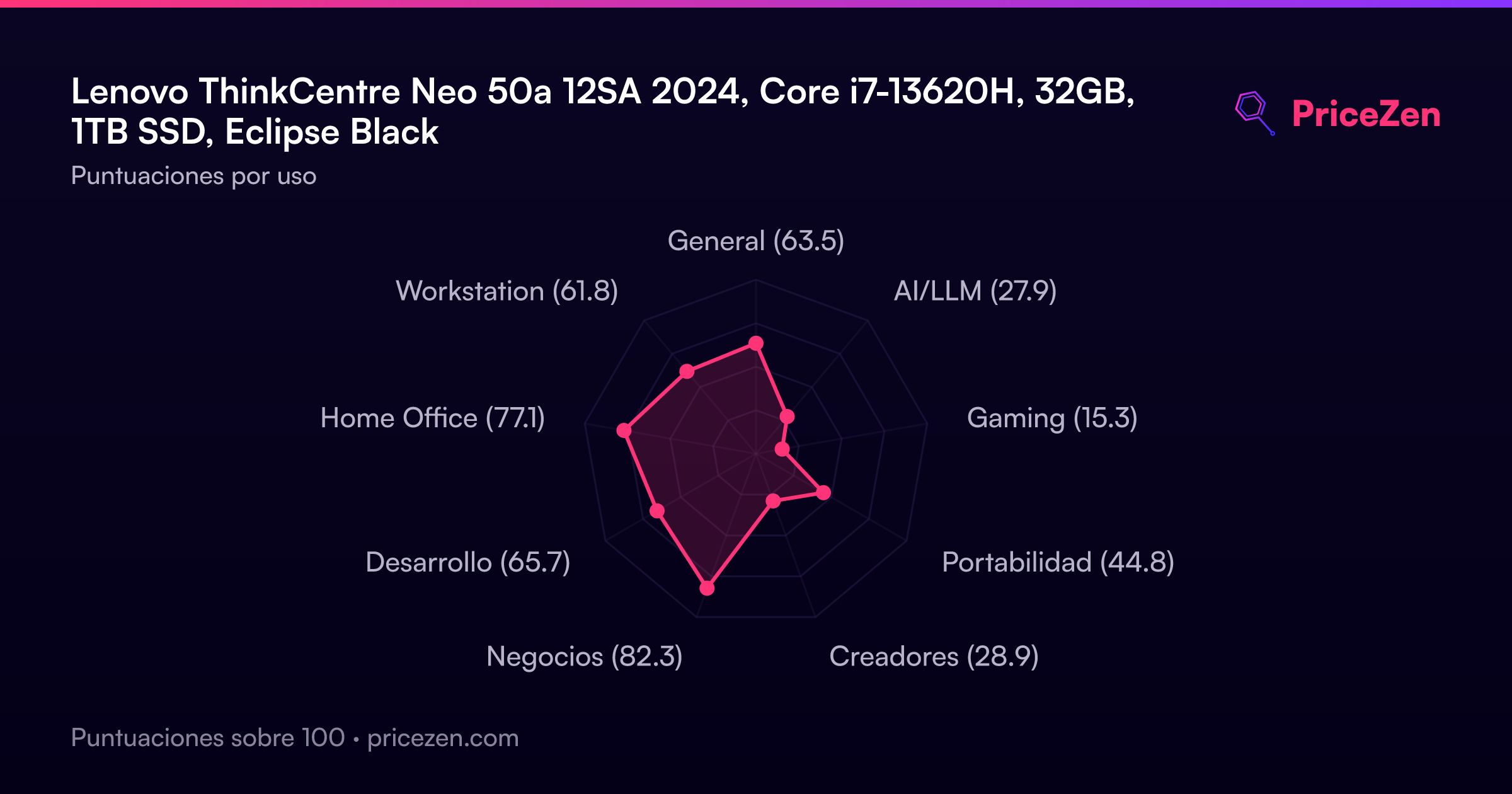
Usage Scores
- General63.5
- AI/LLM27.9
- Gaming15.3
- Portabilidad44.8
- Creadores28.9
- Negocios82.3
- Desarrollo65.7
- Home Office77.1
- Workstation61.8