ASUS Chromebox CHROMEBOX5a-SC081UN 2024, Celeron 7305, 8GB, 128GB SSD, Eco Black
The Intel Celeron 7305 processor with 8GB DDR4 RAM and 128GB SSD delivers smooth ChromeOS performance for everyday tasks. Its dual HDMI, DisplayPort, and USB-C ports support up to four 4K displays, while Wi-Fi 6E ensures fast connectivity. Best for small businesses or home offices needing a compact, low-maintenance desktop for web-based work and light multitasking.


Resumen
The 30-Second Version
The ASUS Chromebox 5a is a compact ChromeOS desktop built for basic productivity and easy IT management. It drives four 4K displays, which is its best trick, but the Celeron CPU and 8GB RAM are near the bottom of our charts. Worth it for fleets and browser-only users, skip it if you need real performance.
Pros & Cons
Ventajas
- Tiny footprint with a lockable VESA mount for clean desk setups
- Supports up to four 4K displays via HDMI, DisplayPort, and USB-C
- Wi-Fi 6E and Ethernet give you fast, flexible networking
- Fanless-style quiet operation and recycled plastic build
Desventajas
- Celeron 7305 CPU sits near the bottom of our performance charts
- 8GB RAM and 128GB SSD are tight even for ChromeOS
- Gaming performance is basically nonexistent
- ChromeOS limits you to web and Android apps, no Windows or macOS software
Opinión de los propietarios
Cómo cambió la opinión de los propietarios con el tiempo
ExclusivaSegún cuándo escribieron realmente sus opiniones los clientes, para ver si los elogios iniciales se mantuvieron.
2 opiniones escritas, abr–oct 2026: 2 satisfechos
En las 9 valoraciones de tiendas: 4,4★. La mayoría de los propietarios valora sin escribir una opinión. El gráfico cuenta las 2 opiniones escritas.
Cada punto es una opinión escrita, en el mes en que se escribió. Satisfechos = 4-5★, neutrales = 3★, insatisfechos = 1-2★.
Las pruebas
Performance
The Celeron 7305 is a 5-core chip that handles ChromeOS smoothly for everyday tasks. Opening a dozen tabs, streaming video, and running Android apps from Google Play all work without much drama. The 8GB of DDR4 is enough for ChromeOS, but it's a tight ceiling. The 128GB SSD is small, though ChromeOS leans on cloud storage anyway. The real standout is connectivity: Thunderbolt, dual HDMI, DisplayPort, and USB-C mean you can run four 4K monitors off this thing. That's wild for a Celeron box. But the GPU is integrated and weak, and our scores put CPU, RAM, and storage in the bottom 15% or worse. It's fine for what it's built for, and nothing else.
Specifications
Full Specifications
Processor
| CPU | Intel Celeron 7305 |
| Cores | 5 |
| Frequency | 1.1 GHz |
| L3 Cache | 8 MB |
Graphics
| GPU | Intel UHD Graphics 710 |
| Type | Integrated |
| VRAM Type | Shared |
Memory & Storage
| RAM | 8 GB |
| RAM Generation | DDR4 |
| Storage | 128 GB |
| Storage Type | SSD |
Build
| Form Factor | mini |
| Weight | 0.7 kg / 1.6 lbs |
Connectivity
| USB-C Ports | 1 |
| USB Ports | 0 |
| Thunderbolt | Thunderbolt 4 |
| HDMI | 2x HDMI |
| DisplayPort | 1x DisplayPort 1.4 |
| Wi-Fi | Wi-Fi 6E |
| Bluetooth | ✓ |
| Ethernet | 1 Gbps Ethernet |
System
| OS | ChromeOS |
vs Competition
Stacked against the Apple Mac mini M4, this thing gets absolutely smoked on performance. The Mac mini costs more but runs circles around the Celeron in every benchmark we track. The Minisforum UM760 Slim is a closer price match and brings a much stronger Ryzen CPU, though it runs Windows instead of ChromeOS. The HP OmniDesk and Dell Tower are traditional desktops with more upgrade room but way bigger footprints. If you need ChromeOS specifically for zero-touch enrollment and easy IT management, the Chromebox 5a makes sense. If you just want a small cheap PC, the Minisforum is the better raw value.
| Spec | ASUS Chromebox CHROMEBOX5a-SC081UN | HP OmniDesk M02-0234 | Dell ECT1250 | Lenovo Yoga AIO F0J20012US | Minisforum DeskMini UM880 Plus | GMKtec Nucbox K8 Plus |
|---|---|---|---|---|---|---|
| CPU | Intel Celeron 7305 | AMD Ryzen 7 8700G | Intel Core Ultra 7 265 | Intel Core Ultra 7 255H | AMD Ryzen 7 255 | AMD Ryzen 7 8845HS |
| RAM (GB) | 8 | 16 | 64 | 16 | 32 | 32 |
| Storage (GB) | 128 | 1536 | 2048 | 2048 | 1024 | 2048 |
| GPU | Intel UHD Graphics 710 | AMD Radeon 780M | Intel UHD Graphics | Intel Arc Graphics | AMD Radeon 780M | AMD Radeon 780M |
| Form Factor | mini | mini-tower | mid-tower | aio | mini | mini |
| Psu W | - | 280 | 180 | 170 | 120 | 120 |
| OS | ChromeOS | Windows 11 Home | Windows 11 Pro | Windows 11 Home | Windows | Windows 11 Pro |
| Compare | Compare | Compare | Compare | Compare |
| Producto | CPU | GPU | RAM | Puertos | Almacenamiento | Fiabilidad | Valoración social |
|---|---|---|---|---|---|---|---|
| ASUS Chromebox CHROMEBOX5a-SC081UN | 1.2 | 36.7 | 9.1 | 31.1 | 5.8 | 37.1 | 51.8 |
| HP OmniDesk M02-0234 Compare | 71.8 | 64.9 | 51.3 | 94.5 | 79.7 | 69.9 | 98.1 |
| Dell ECT1250 Compare | 88.2 | 60.3 | 96.5 | 87 | 90.1 | 69.9 | 87 |
| Lenovo Yoga AIO F0J20012US Compare | 70.3 | 60.3 | 57.6 | 60.6 | 82.7 | 69.9 | 98.1 |
| Minisforum DeskMini UM880 Plus Compare | 65 | 64.9 | 81.6 | 65.2 | 53.5 | 11.5 | 94.3 |
| GMKtec Nucbox K8 Plus Compare | 64.4 | 64.9 | 81.6 | 85.3 | 90.1 | 11.5 | 95.6 |
Precio
Value & Pricing
Pricing is all over the map depending on where you shop. In the US you're looking at USD 410 to USD 449, which is reasonable for a managed ChromeOS fleet device. But in Europe the spread is wider, EUR 688 to EUR 760 across vendors, and in Canada it swings from CAD 620 to CAD 862. That's a huge gap. If you're buying in EUR, shop around because the cheapest listing saves you EUR 72. In CAD, the gap is CAD 242, so the low end is the only one worth considering. At the low end of those ranges, it's a fair deal for a business or school. At the high end, you're paying too much for a Celeron.
Amazon 1 oferta Desde 416 US$
Historial de precios
Leer más
Overview
The ASUS Chromebox 5a is a tiny ChromeOS desktop aimed at offices, schools, and anyone who lives in a browser. This config pairs a Celeron 7305 with 8GB of RAM and a 128GB SSD, which is fine for Google Workspace, video calls, and light multitasking. Just don't expect it to flex much beyond that.
It's compact, quiet, and can drive up to four 4K displays, which is honestly impressive for a box this small. But the internals are entry-level, and our database puts the CPU, RAM, and storage near the bottom of the pack. This is a purpose-built machine, and that purpose is basic productivity.
Common Questions
Q: Can this run Windows or regular desktop apps?
No. It runs ChromeOS, so you're limited to web apps, Android apps from Google Play, and Linux apps if you enable the container. If you need Windows software, look at a mini PC like the Minisforum UM760 Slim instead.
Q: How many monitors can I connect?
Up to four 4K displays using the dual HDMI, DisplayPort, and USB-C ports. That's a lot of screen real estate for a Celeron-powered box, though heavy multitasking across all four will push the CPU hard.
Q: Is 128GB of storage enough?
For ChromeOS, mostly yes. The OS is lightweight and Google pushes you toward cloud storage. But if you plan to install a lot of Android apps or keep files locally, you'll fill 128GB faster than you'd expect.
Who Should Skip This
Skip this if you need to run Windows or macOS software, do any kind of gaming, edit video, or push heavy multitasking. The Celeron 7305 and 8GB of RAM will frustrate you quickly. Also skip it if you're a tinkerer who wants to upgrade RAM or storage later, this box is not built for that.
Verdict
This is a fleet machine. IT departments rolling out ChromeOS to a bunch of desks will love the zero-touch enrollment, automatic updates, and VESA mount. Individual buyers should think hard. If all you do is browse, stream, and use Google Docs, it's fine. But the weak CPU and limited storage mean it'll feel dated sooner than you'd like. Buy it for the OS and the management features, not the horsepower.
Usage Scores
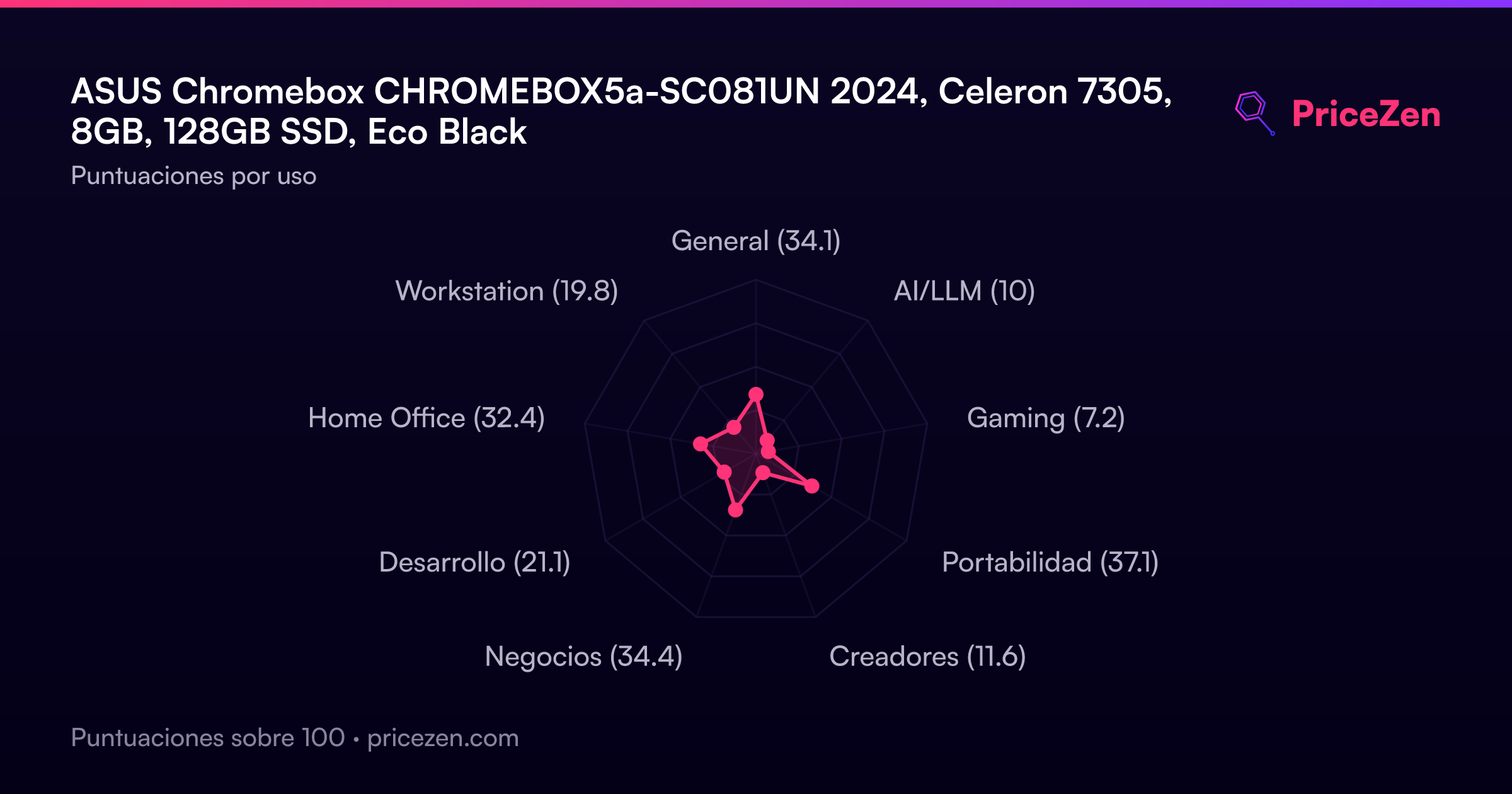
- General33.9
- AI/LLM10.6
- Gaming7.3
- Portabilidad36.8
- Creadores11.9
- Negocios34.1
- Desarrollo21.3
- Home Office32.2
- Workstation20.5