CLX HORUS TGMHORRTZ3A04WM 2023, Core i9-14900KF, 64GB, 2TB SSD + 6TB HDD, RTX 4090, White
Combining a 14th Gen Intel Core i9-14900KF with boost speeds up to 6.0GHz and liquid cooling alongside an RTX 4090 with 24GB VRAM delivers raw 4K gaming performance. Its 2TB NVMe SSD and 6TB HDD storage array, backed by 64GB DDR5 RAM and 2.5Gb Ethernet, handles massive game libraries and heavy creative workloads with ease. This mid-tower is best for 4K gamers and 3D rendering artists who need a pre-built system with lifetime technical support and a zero-compromises component list.

Sin precio actual de tiendas











Resumen
The 30-Second Version
The CLX HORUS packs an i9-14900KF and RTX 4090 for elite 4K performance, with 64GB RAM and a huge 8TB drive combo. But reliability is rock-bottom and the company leaves too many questions unanswered. Worth a look only if you're chasing the highest frame rates and don't need hand-holding.
Pros & Cons
Ventajas
- Monstrous i9-14900KF and RTX 4090 combo for top-tier 4K gaming. 99th
- Massive 2TB NVMe SSD plus 6TB HDD gives you best-in-class storage. 99th
- 64GB DDR5 RAM at 5600MHz handles any multitasking or creator load. 97th
- 360mm AIO keeps temperatures in check and looks sharp in the white case. 95th
Desventajas
- Reliability score is just 12th percentile, a huge warning sign.
- Wi-Fi 5 is outdated and throttles wireless speeds for a $5K machine.
- Questions about PSU details and case color go unanswered by support.
- Port selection is middling and won't satisfy users with lots of accessories.
Opinión de los propietarios
The Word on the Street
Cómo cambió la opinión de los propietarios con el tiempo
ExclusivaSegún cuándo escribieron realmente sus opiniones los clientes, para ver si los elogios iniciales se mantuvieron.
7 opiniones escritas, oct 2025 – feb 2026: 6 satisfechos, 1 insatisfecho
En las 1 valoraciones de tiendas: 4,7★. El gráfico cuenta las 7 opiniones escritas.
Cada punto es una opinión escrita, en el mes en que se escribió. Satisfechos = 4-5★, neutrales = 3★, insatisfechos = 1-2★.
Las pruebas
Performance
In action, the HORUS devours games at 4K with ray tracing maxed out, and the 64GB of DDR5 makes multitasking feel effortless. The i9-14900KF can hit 6.0GHz and sits in the 94th percentile of all CPUs we've tested, so rendering and compiling fly. Storage is a highlight, too, with the 2TB NVMe SSD and 6TB HDD combo landing at the very top of our charts. Where it stumbles is connectivity: the Wi-Fi is stuck on 802.11ac (Wi-Fi 5), which is two generations behind what you'd expect in a flagship build. Port selection is only average, and the port score lands at the 42nd percentile, meaning you might need a hub if you've got a lot of peripherals. Still, for pure gaming framerates, it's hard to beat.
Specifications
Full Specifications
Processor
| CPU | Intel Core i9 14900KF |
| Cores | 24 |
| Frequency | 3.2 GHz |
| L3 Cache | 36 MB |
Graphics
| GPU | NVIDIA GeForce RTX 4090 |
| Type | Discrete |
| VRAM | 24 GB |
| VRAM Type | GDDR6X |
Memory & Storage
| RAM | 64 GB |
| RAM Generation | DDR5 |
| Storage 1 | 2 TB |
| Storage 1 Type | NVMe SSD |
| Storage 2 | 6 TB |
| Storage 2 Type | HDD |
Build
| Form Factor | mid-tower |
| PSU | 1000 |
| Weight | 22.2 kg / 49.0 lbs |
Connectivity
| Thunderbolt | Thunderbolt 4 |
| HDMI | 1 HDMI |
| DisplayPort | 3 Display Ports |
| Wi-Fi | Wi-Fi 6 |
| Bluetooth | Bluetooth 5.x |
| Ethernet | Gigabit Ethernet |
System
| OS | Windows 11 Home |
vs Competition
Stacked against pre-builts like the Lenovo Legion 34IAS10, HP Omen 45L, Apple Mac Studio M4 Max, or MSI MEG Vision X AI, the CLX HORUS brings more RAM and total storage right out of the box. But those rivals typically ship with newer Wi-Fi, more transparent component choices, and reliability scores that don't fall off a cliff. The Omen 45L has a reputation for excellent cooling and cable management, while the Mac Studio M4 Max is a creator's dream with Apple's tight integration. The MSI MEG Vision X AI throws in a front-panel touchscreen and AI features. You're trading peace of mind and modern niceties for a spec sheet that goes further, so decide what matters more to you.
| Spec | CLX HORUS TGMHORRTZ3A04WM | Apple Mac Studio M5 Max | Lenovo T Series Towers Legion Tower 5a Gen 10 | Dell Desktop ECT1250 | HP OMEN GT16-0364 | ASUS ROG GM700 |
|---|---|---|---|---|---|---|
| CPU | Intel Core i9 14900KF | Apple M5 Max | AMD Ryzen 7 7800X3D | Intel Core Ultra 7 265 | AMD Ryzen 7 8700F | AMD Ryzen 7 9800X3D |
| RAM (GB) | 64 | 36 | 32 | 32 | 32 | 32 |
| Storage (GB) | 8192 | 1024 | 4096 | 2048 | 1024 | 2048 |
| GPU | NVIDIA GeForce RTX 4090 | Apple (32-Core) | NVIDIA GeForce RTX 5070 Ti | Intel UHD Graphics | NVIDIA GeForce RTX 5070 | NVIDIA GeForce RTX 5070 Ti |
| Form Factor | mid-tower | mini | mid-tower | sff | mid-tower | mid-tower |
| Psu W | 1000 | 480 | 850 | 180 | 850 | 850 |
| OS | Windows 11 Home | macOS | Windows 11 Home | Windows 11 Home | Windows 11 Home | Windows 11 Home |
| Compare | Compare | Compare | Compare | Compare |
| Producto | CPU | GPU | RAM | Puertos | Almacenamiento | User Sentiment | Fiabilidad | Valoración social |
|---|---|---|---|---|---|---|---|---|
| CLX HORUS TGMHORRTZ3A04WM | 94.8 | 98.7 | 96.5 | 30.1 | 99.1 | 19.7 | 11.7 | 34.9 |
| Apple Mac Studio M5 Max Compare | 95.7 | 84.9 | 92.4 | 89.1 | 68.6 | 94.9 | 99.3 | 66.7 |
| Lenovo T Series Towers Legion Tower 5a Gen 10 Compare | 73.2 | 94.6 | 77.9 | 88.6 | 98.1 | 94.9 | 70.2 | 99.9 |
| Dell Desktop ECT1250 Compare | 88.1 | 60 | 81.6 | 75 | 82.5 | 98.5 | 70.2 | 98.2 |
| HP OMEN GT16-0364 Compare | 69.4 | 90.7 | 87 | 97.9 | 53.3 | 98.5 | 70.2 | 98.2 |
| ASUS ROG GM700 Compare | 80.4 | 94.6 | 81.6 | 96.1 | 90 | 98.5 | 37.7 | 99.2 |
Precio
Value & Pricing
Prices are all over the board, mentioned from $5,050 up to a frankly absurd $1.27 million. The sweet spot seems to be around the $5,050 mark at retailers like Amazon, which is in line with what a maxed-out i9/4090 rig costs. For that you get class-leading specs and a 360mm AIO, but you're also rolling the dice on reliability. If you catch it near $5K and you're comfortable troubleshooting on your own, it's a decent deal for the raw horsepower. Paying a cent more is hard to justify when competitors offer better support and more polished user experiences.
Newegg 1 oferta Desde 5800 US$
Historial de precios
Leer más
Overview
The CLX HORUS is a fire-breathing pre-built that throws the kitchen sink at specs. You get an Intel Core i9-14900KF with 24 cores, a GeForce RTX 4090 packing 24GB of VRAM, 64GB of DDR5 RAM, and a combined 8TB of storage. It's dressed in a clean white mid-tower with tempered glass and RGB, plus a 360mm AIO to keep the CPU chill. On paper, it's a monster for 4K gaming, streaming, and heavy creator work. But raw power isn't the whole story. While the specs are best-in-class, our data shows the HORUS stumbles where it counts. User sentiment sits in the bottom quarter of all desktops we track, and reliability scrapes the 12th percentile. Buyers report getting a stunning machine that runs quietly, but also struggle to get clear answers on basics like the power supply model or case color options before checkout. For a rig that can cost over $5,000, that lack of transparency is a red flag.
Common Questions
Q: What's the RAM speed and can I overclock it?
The DDR5 runs at a base of 5600MHz, but you can push it close to 6000MHz through BIOS settings if you're up for it.
Q: Does the USB-C port support Thunderbolt 4?
Yes, that oval USB-C connector is a Thunderbolt 4 port, so you'll get fast data transfers and charging for compatible devices.
Q: What are the exact dimensions of the desktop?
It measures 13.75 inches tall, 26 inches wide, and 26.25 inches deep, so you'll want a pretty roomy desk or floor space.
Who Should Skip This
If you need a pre-built with dependable warranty support and crystal-clear component transparency, look at HP OMEN, Lenovo Legion, or ASUS ROG towers instead. The HORUS's 12th percentile reliability score and pattern of unanswered buyer questions make it a risky bet for anyone who just wants a PC that works without drama.
Verdict
This is for the enthusiast who absolutely must have an i9-14900KF and RTX 4090 in a single click, and doesn't mind digging through forums if something goes wrong. It delivers breathtaking gaming performance and has the storage to swallow entire game libraries. But if you value knowing every component inside your PC before you buy, or you just want a warranty experience that doesn't feel like a gamble, the HORUS will frustrate you. Know what you're signing up for.
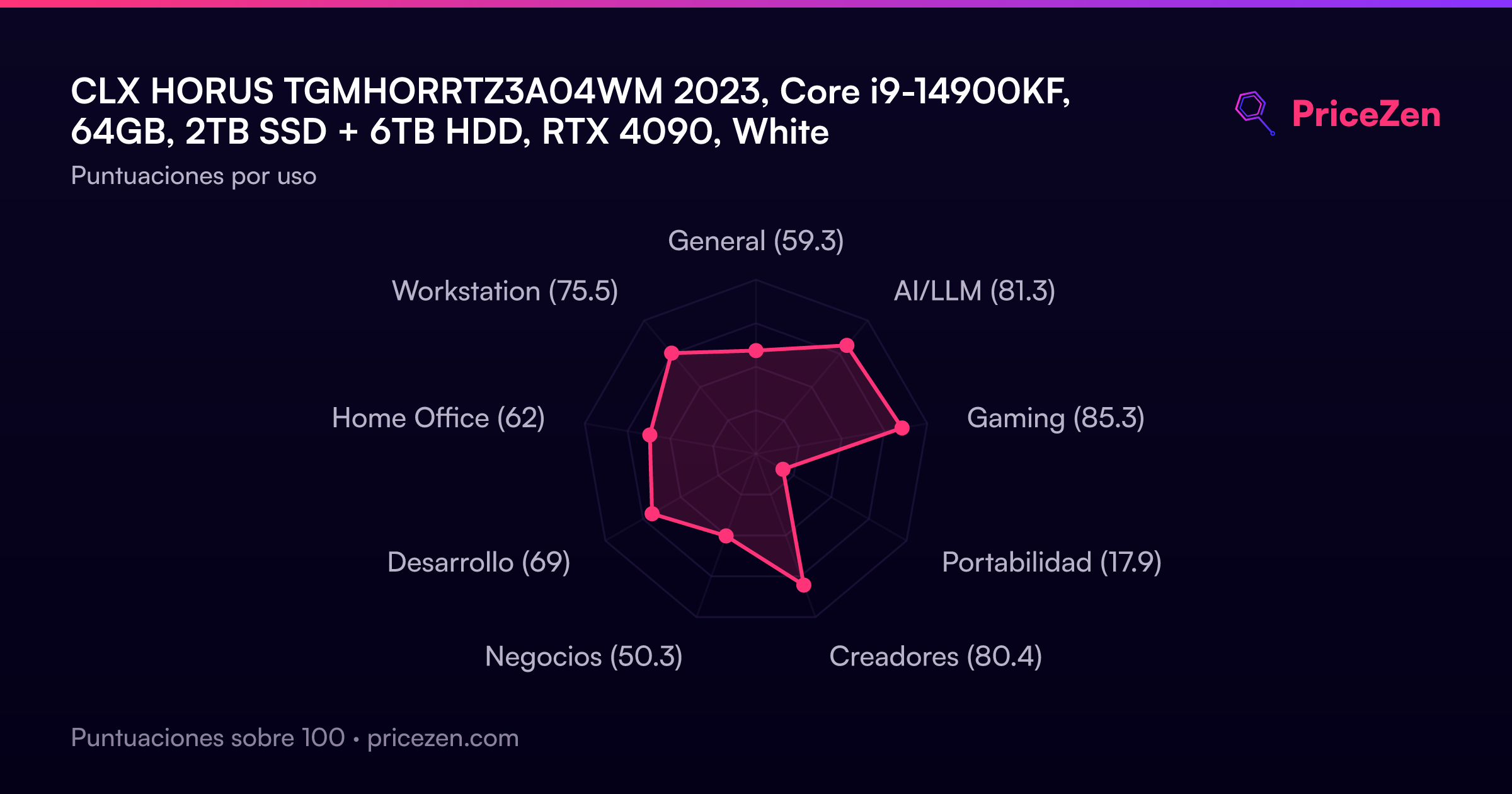
Usage Scores
- General59.3
- AI/LLM81.3
- Gaming85.3
- Portabilidad17.9
- Creadores80.4
- Negocios50.3
- Desarrollo69
- Home Office62
- Workstation75.5