ASUS NUC 13 Pro NUC13L3HV7 2023, Core i7-1370P

Puertos Thunderbolt para periféricos externos rápidos verificado el 28 nov
36/100 puntuación global
- CPU
- Intel Core i7 1370P
- GPU
- Intel Iris Xe
- Form factor
- mini
- Psu
- 120 W
- OS
- No OS
Compara precios en 2 tiendas
De la más barata a la más cara. Las ofertas nuevas, reacondicionadas y en pack se mantienen separadas para que compares lo comparable.
| Tienda | Vendido por | Color y estado | Precio | vs. el más bajo | Última comprobación | Enlace |
|---|---|---|---|---|---|---|
| Nuevo2 ofertasUnidad individual | ||||||
| Agotado en la última comprobación | ||||||
| B&H Photo | B&H Photo | No indicado | Sin precio | Agotado | Desconocido | Ir a la tienda |
| Amazon | Desconocido | No indicado | Sin precio | Agotado | Hoy | Ir a la tienda |
 Fuente: PriceZen, comprobado el 28 nov 2026
Un precio se considera vigente si lo comprobamos en los últimos 7 días. «Vendedor externo» significa un vendedor de terceros en esa tienda, no la propia tienda.
Historial de precios
No hay ofertas de este tipo en este periodo.
Comprobado ese díaNo comprobado ese día, sigue en oferta
Fuente: PriceZen, checked 23 feb 2026











Resumen
The 30-Second Version
The ASUS NUC 13 Pro Tall is a compact barebone kit with a solid 13th Gen i7 and great connectivity, but you'll need to add your own RAM and storage. Gaming is a non-starter at 8.7 out of 100. Worth it for business users who don't mind a little DIY.
Pros & Cons
Ventajas
- Tiny footprint at 0.51kg, easy to hide behind a monitor
- Thunderbolt 4 and dual HDMI 2.1 give you real display flexibility
- 13th Gen i7 with vPro support is a nice pick for IT-managed fleets
- Three storage options: M.2 2280, M.2 2242, and a 2.5-inch bay
Desventajas
- No RAM or storage included, so the base price isn't the real price
- Gaming score of 8.7 out of 100, this is not a gaming machine
- Reliability sits at the 37th percentile, below average for the category
- DDR4 instead of DDR5 feels a generation behind
Las pruebas
Performance
The i7-1370P is a solid mid-pack performer in our database, landing around the 51st percentile for CPU. That's fine for spreadsheets, browser tabs, and light creative work. The Iris Xe integrated graphics sit right around average too, at the 49th percentile. But here's the catch: the RAM and storage scores are rough. RAM comes in at the 9th percentile and storage at the 2nd. That's because this is a barebone kit with zero RAM and zero storage out of the box. You're starting from scratch, and that drags the overall score down hard. Once you add your own DDR4 and an M.2 drive, it'll feel much better, but out of the box it's a paperweight.
Specifications
Full Specifications
Processor
| CPU | Intel Core i7 1370P |
| Cores | 14 |
| Frequency | 1.9 GHz |
| L3 Cache | 24 MB |
Graphics
| GPU | Intel Iris Xe |
| Type | Integrated |
| VRAM Type | Shared |
Memory & Storage
| RAM Generation | DDR4 |
Build
| Form Factor | mini |
| PSU | 120 |
| Weight | 0.5 kg / 1.1 lbs |
Connectivity
| USB-C Ports | 2 |
| USB Ports | 3 |
| Thunderbolt | Thunderbolt 4 x 2 |
| HDMI | 2x HDMI 2.1 Output |
| Wi-Fi | Wi-Fi 6E |
| Bluetooth | Bluetooth 5.3 |
| Ethernet | 2.5 GbE |
System
| OS | No OS |
vs Competition
Stacked against something like the Apple Mac Studio M3 Ultra, this NUC gets absolutely demolished on raw performance, but that's a $4,000 workstation and this is a $747 barebone. Different universe. Against the Lenovo Legion or HP OMEN towers, the NUC loses on gaming and upgrade headroom but wins on desk space. The Dell Desktop ECT1250 is probably the closest real-world competitor for office use, and the NUC's Thunderbolt 4 and dual HDMI 2.1 give it a connectivity edge. The MSI Aegis is a gaming rig, so no real overlap there.
| Spec | ASUS NUC 13 Pro NUC13L3HV7 | Apple Mac Studio M3 Ultra | HP OMEN GT16-0364 | Dell Desktop ECT1250 | Lenovo Legion Tower 5i Gaming | MSI Aegis Z2 C7NVP-1449US |
|---|---|---|---|---|---|---|
| CPU | Intel Core i7 1370P | Apple M3 Ultra | AMD Ryzen 7 8700F | Intel Core Ultra 7 265 | Intel Core Ultra 7 265F | AMD Ryzen 7 7700 |
| RAM (GB) | - | 96 | 32 | 32 | 64 | 32 |
| Storage (GB) | - | 1024 | 1024 | 2048 | 3072 | 1024 |
| GPU | Intel Iris Xe | Apple M3 Ultra 60-core | NVIDIA GeForce RTX 5070 | Intel UHD Graphics | NVIDIA GeForce RTX 5070 | NVIDIA GeForce RTX 5070 |
| Form Factor | mini | sff | mid-tower | sff | mid-tower | mid-tower |
| Psu W | 120 | - | 850 | 180 | - | 750 |
| OS | No OS | macOS | Windows 11 Home | Windows 11 Home | Windows 11 Home | Windows 11 Home |
| Compare | Compare | Compare | Compare | Compare |
| Producto | CPU | GPU | RAM | Puertos | Almacenamiento | Fiabilidad |
|---|---|---|---|---|---|---|
| ASUS NUC 13 Pro NUC13L3HV7 | 50.7 | 49.9 | 9.1 | 55.1 | 1.8 | 37.7 |
| Apple Mac Studio M3 Ultra Compare | 99.7 | 77.2 | 95.8 | 93.6 | 53.2 | 99.3 |
| HP OMEN GT16-0364 Compare | 69.3 | 90.7 | 87 | 97.9 | 53.2 | 70.2 |
| Dell Desktop ECT1250 Compare | 88 | 60 | 81.6 | 75 | 82.5 | 70.2 |
| Lenovo Legion Tower 5i Gaming Compare | 90.4 | 90.7 | 98 | 96.1 | 95.9 | 70.2 |
| MSI Aegis Z2 C7NVP-1449US Compare | 74.4 | 90.7 | 87 | 93.6 | 68.6 | 37.7 |
Precio
Value & Pricing
At $747 USD for the barebone kit, you're paying for the CPU, chassis, and connectivity. Add a decent 16GB DDR4 kit and a 512GB NVMe drive and you're probably looking at another $100 to $150. That puts the real cost closer to $850 to $900 for a usable machine. For a compact business desktop with Thunderbolt 4 and vPro, that's not outrageous. But it's also not a screaming deal. You're paying a premium for the small form factor and the Intel NUC pedigree.
Leer más
Overview
The ASUS NUC 13 Pro Tall is a barebone kit, so you're getting the brains and the chassis but not the RAM, storage, or OS. That's the deal here. You supply the parts, it supplies a 13th Gen Core i7-1370P with 14 cores and Iris Xe graphics in a box that weighs about as much as a burrito. It's aimed squarely at productivity and business use, not gaming. Our database puts its compact score at 41.9 out of 100, which tells you it's decent at being small but not exactly a category leader.
Common Questions
Q: Does this come with RAM and storage?
No, this is a barebone kit. You'll need to add your own DDR4 SO-DIMMs and an M.2 or 2.5-inch drive before it'll boot.
Q: Can this run modern games?
Not really. The integrated Iris Xe graphics score 8.7 out of 100 for gaming in our database, so stick to older titles or cloud gaming.
Q: Is it good for a home office setup?
Yes, especially if you want dual monitors. The dual HDMI 2.1 ports and Thunderbolt 4 give you plenty of display options, and the small size keeps your desk clean.
Who Should Skip This
Skip this if you want a gaming PC or any kind of GPU-heavy workload. The integrated graphics are a dead end for that. Also skip it if you're not comfortable installing RAM and storage yourself, because you'll be doing that before you can even install an OS. And if reliability is your top concern, the 37th percentile score should give you pause.
Verdict
This is for IT departments and home office users who want a small, quiet, vPro-capable machine and don't mind sourcing their own RAM and storage. If you're comfortable opening a case and installing parts, you'll end up with a tidy little workhorse. If you want something that works the second you plug it in, buy a prebuilt instead.
Usage Scores
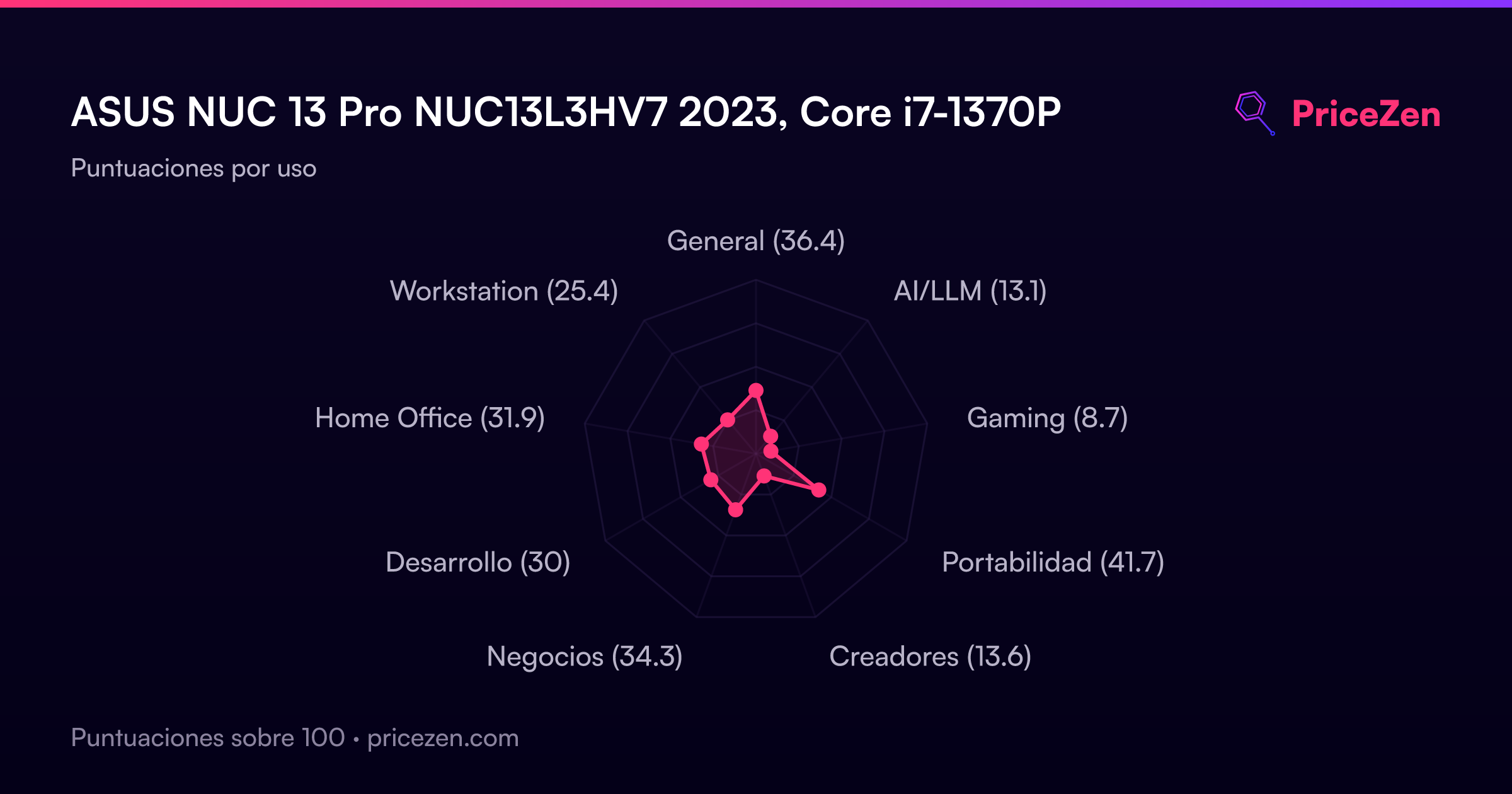
- General36.4
- AI/LLM13.1
- Gaming8.7
- Portabilidad41.7
- Creadores13.6
- Negocios34.3
- Desarrollo30
- Home Office31.9
- Workstation25.4