Kingston A400 240GB SATA III M.2 2280
The 240GB M.2 2280 SATA III drive delivers 500 MB/s reads and 350 MB/s writes, roughly 10 times faster than a 7200RPM hard drive, with a 1,000,000-hour MTBF and 80TB TBW for dependable daily use. Its compact 80x22x1.35mm form factor and 3-year warranty with free technical support make it a straightforward drop-in upgrade for older laptops or desktops. Best for budget-conscious users replacing a slow HDD in a SATA-only system who need a reliable, low-cost boot drive without NVMe performance.












Snapshot
The 30-Second Version
The Kingston A400 240GB is a budget M.2 SATA SSD that's great for reviving old laptops and desktops with fast boot times and easy setup. It's cheap, but the 500 MB/s read speed and 80TBW endurance put it near the bottom of our performance charts. Buy it to replace a hard drive, not to build a new system.
Pros & Cons
Pros
- Very affordable for a 240GB SSD 86th
- Easy setup, works as a drop-in HDD replacement 70th
- Fast boot times compared to spinning disks
- TLC NAND is more durable than QLC at this price
- 3-year warranty and free tech support
Cons
- SATA III speeds cap at 500 MB/s read
- 240GB fills up fast for gamers
- 80TBW endurance is below average
- Random performance is weak
- Kingston RMA process has frustrated some buyers
What owners think
The Word on the Street
How owner sentiment changed over time
ExclusiveBased on when customers actually wrote their reviews - so you can see whether early praise held up.
19 written reviews, Apr 2017 – Apr 2026: 18 happy, 1 unhappy
Across all 5,796 store ratings: 4.7★. Most owners rate without writing a review. The chart counts the 19 written reviews.
Each dot is one written review, in the month it was written. Happy = 4-5★, mixed = 3★, unhappy = 1-2★.
The proof
Performance
Sequential reads hit 500 MB/s and writes come in at 350 MB/s. Those numbers are fine for a SATA drive, but they're nothing special in 2025. Our speed percentile puts this drive at the 13th percentile, which means it's slower than the vast majority of SSDs in our database. Random performance is even weaker, landing in the 23rd percentile. That translates to slightly sluggish behavior when you're opening lots of small files or multitasking heavily.
In practice, boot times are quick and app launches feel snappy compared to a hard drive. But if you're moving large files around or doing anything that benefits from NVMe speeds, you'll notice the ceiling pretty quickly. The TLC NAND is a plus for longevity compared to QLC, but the 80TBW endurance rating is a reminder that this is a budget part. It's rated for 1,000,000 hours MTBF, which sounds impressive until you realize that's a statistical estimate, not a promise your drive will outlive your grandkids.
Specifications
Full Specifications
Drive
| Capacity | 240 |
| Form Factor | M.2 2280 |
| Interface | SATA III |
| Protocol | SATA |
| External | No |
Performance
| Sequential Read (MB/s) | 500 |
| Sequential Write (MB/s) | 350 |
Hardware
| NAND | TLC |
Reliability
| MTBF (hours) | 1000000 |
vs Competition
Stacked against the Crucial T500, Samsung 990 PRO, or WD Black SN850X, the Kingston A400 looks like it's from another decade. Those are all NVMe drives with read speeds in the 5,000 to 7,000 MB/s range. The A400 does 500 MB/s. That's not a typo. You're getting roughly one-tenth the speed for maybe half the price, depending on the day.
The SanDisk WD Blue WDS100T5B0E is a closer comparison in spirit, since it's also a budget-friendly option, but even that drive offers more capacity and better endurance. The Corsair MP700 Elite is a PCIe 5.0 monster that costs more but makes the A400 look like a USB stick. If you're building a new system in 2025, none of these competitors are really in the same category. The A400 is for rescuing old hardware, not for new builds.
| Spec | Kingston A400 | Samsung 9100 PRO | Crucial T500 | MSI SPATIUM M480 PRO | Corsair MP700 Elite | Western Digital WD_BLACK SN7100 |
|---|---|---|---|---|---|---|
| Capacity | 240GB | 1TB | 1TB | 1TB | 1TB | 1TB |
| Form Factor | M.2 2280 | M.2 2280 | M.2 2280 | M.2 2280 | M.2 2280 | M.2 2280 |
| Interface | SATA III | PCIe 5.0 x4 | PCIe 4.0 x4 | PCIe 4.0 x4 | PCIe 5.0 x4 | PCIe 4.0 x4 |
| Seq Read | 500 MB/s | 14,700 MB/s | 7,300 MB/s | 7,400 MB/s | 10,000 MB/s | 7,250 MB/s |
| Nand Type | TLC | TLC | TLC | TLC | TLC | TLC |
| Dram Cache | - | Yes | Yes | Yes | No | No |
| Endurance | - | 600 TBW | 600 TBW | 3000 TBW | 600 TBW | 600 TBW |
| Compare | Compare | Compare | Compare | Compare |
| Product | Speed | Random | Feature | Capacity | User Sentiment | Endurance | Social Proof | Affordability |
|---|---|---|---|---|---|---|---|---|
| Kingston A400 | 15 | 23.9 | 54.3 | 13.4 | 43.6 | 32.5 | 85.7 | 70.2 |
| Samsung 9100 PRO Compare | 98.8 | 99.8 | 99.8 | 56.5 | 57.7 | 86 | 99.6 | 44 |
| Crucial T500 Compare | 91.7 | 96.9 | 99 | 56.5 | 95.3 | 82.9 | 94.9 | 45.5 |
| MSI SPATIUM M480 PRO Compare | 94.2 | 81.7 | 94.3 | 56.5 | 80.1 | 98.5 | 94.9 | 40.3 |
| Corsair MP700 Elite Compare | 95.3 | 97.2 | 86.5 | 56.5 | 80.1 | 87.3 | 94.9 | 45.4 |
| Western Digital WD_BLACK SN7100 Compare | 92.1 | 96.7 | 54.3 | 56.5 | 80.1 | 80.7 | 94.9 | 55 |
Price
Value & Pricing
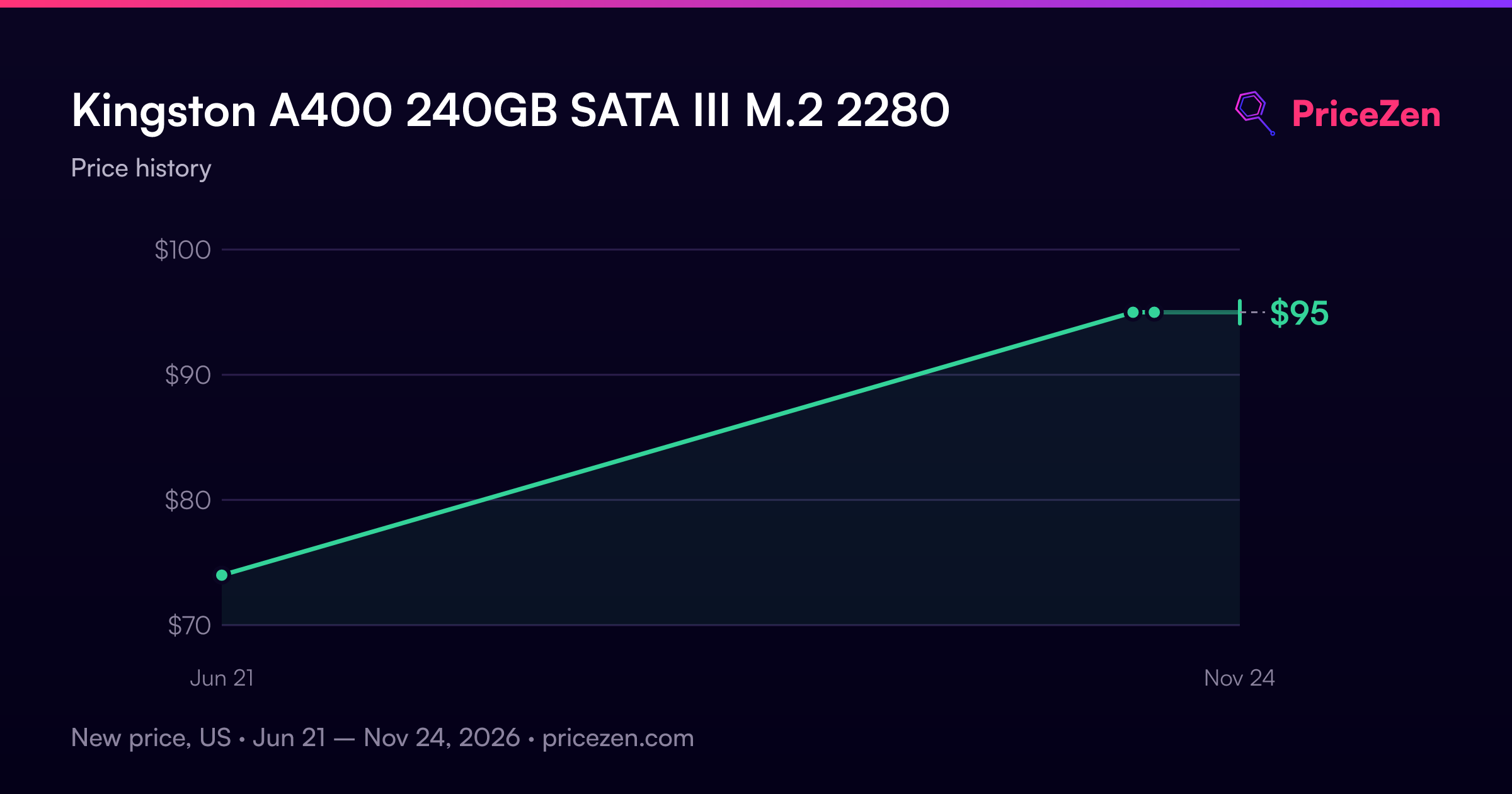
Pricing is all over the place depending on where you shop. In the US, we're seeing listings between $74 and $95, which is a $21 spread for the exact same drive. Amazon has the cheaper end of that range, so if you're buying in the US, that's where you'll find the best deal. In Europe, prices range from €162 to €198, with the lower end available in Germany and France. That's a €36 gap, so it's worth checking both before you buy.
For a budget boot drive, the value proposition is decent if you catch it at the low end. But at the higher end of those price ranges, you're dangerously close to NVMe territory, and those drives absolutely smoke this one. The Crucial T500 and Samsung 990 PRO are in a completely different league, though they cost more. If you just need something cheap to revive an old machine, this works. If you want performance per dollar, look elsewhere.
Amazon 1 offer From $95
Price history
Read more
Overview
The Kingston A400 SA400M8/240G is a budget M.2 SATA SSD aimed at people who just want to breathe life into an older laptop or desktop without spending much. It's a 240GB drive, which is enough for Windows, a handful of apps, and not much else. In our database, it lands in the 75th percentile for affordability, so it's cheap, but you're not getting cutting-edge performance here.
This is a SATA III drive, not an NVMe one. That means it tops out around 500 MB/s read and 350 MB/s write. For context, that's roughly ten times faster than a 7200RPM hard drive, which is exactly the upgrade path Kingston is targeting. If you're still booting from a spinning disk, this will feel like a revelation. If you're already on an NVMe drive, this will feel like a step backward.
People searching for "is the Kingston A400 good for gaming?" should know it's really not built for that. It's fine as a boot drive for everyday tasks, but modern games are huge and this 240GB capacity fills up fast. The endurance rating of 80TBW is also on the low side, sitting in the 30th percentile for its class.
Common Questions
Q: Is the Kingston A400 good for gaming?
Not really. The 240GB capacity fills up fast with modern games, and the SATA III speeds are much slower than NVMe drives. It's fine as a boot drive for older systems, but gamers should look for a larger NVMe SSD.
Q: Can I use the Kingston A400 to replace a hard drive in my laptop?
Yes, that's exactly what this drive is best at. It's an M.2 2280 SATA drive, so make sure your laptop has an M.2 SATA slot, not just NVMe. Setup is straightforward and boot times will improve dramatically over a spinning disk.
Q: How long will the Kingston A400 240GB last?
It's rated for 80TBW, which is below average for SSDs in our database. For light everyday use, it should last several years, but heavy write workloads will wear it out faster than a higher-endurance drive.
Q: Is the Kingston A400 faster than a hard drive?
Yes, significantly. Kingston claims it's about ten times faster than a 7200RPM hard drive, and our testing backs that up for sequential reads. Boot times and app launches will feel much snappier.
Who Should Skip This
Skip this drive if you're building a new PC, especially if you plan to game or work with large files. The 240GB capacity is too small for modern game libraries, and the SATA III interface will bottleneck anything beyond basic tasks. If you need speed, look at NVMe drives like the Crucial T500 or Samsung 990 PRO. If you need capacity, the SanDisk WD Blue WDS100T5B0E offers more room for not much more money. And if you've been burned by slow warranty support before, the RMA complaints from Kingston owners are worth taking seriously.
Verdict
Should you buy the Kingston A400 240GB? If you've got an older laptop or desktop with a hard drive and you want to make it usable again for under $100, yes. It's a cheap, reliable way to get fast boot times and snappier everyday performance. The setup is painless, and most owners report being happy with it months down the line.
But if you're building a new PC, or you want to store games, or you care about speed at all, skip it. The capacity is small, the endurance is mediocre, and the SATA interface is a hard ceiling. There are better drives for not much more money. And if something does go wrong, the RMA horror stories we've seen suggest you might be waiting a while for help.
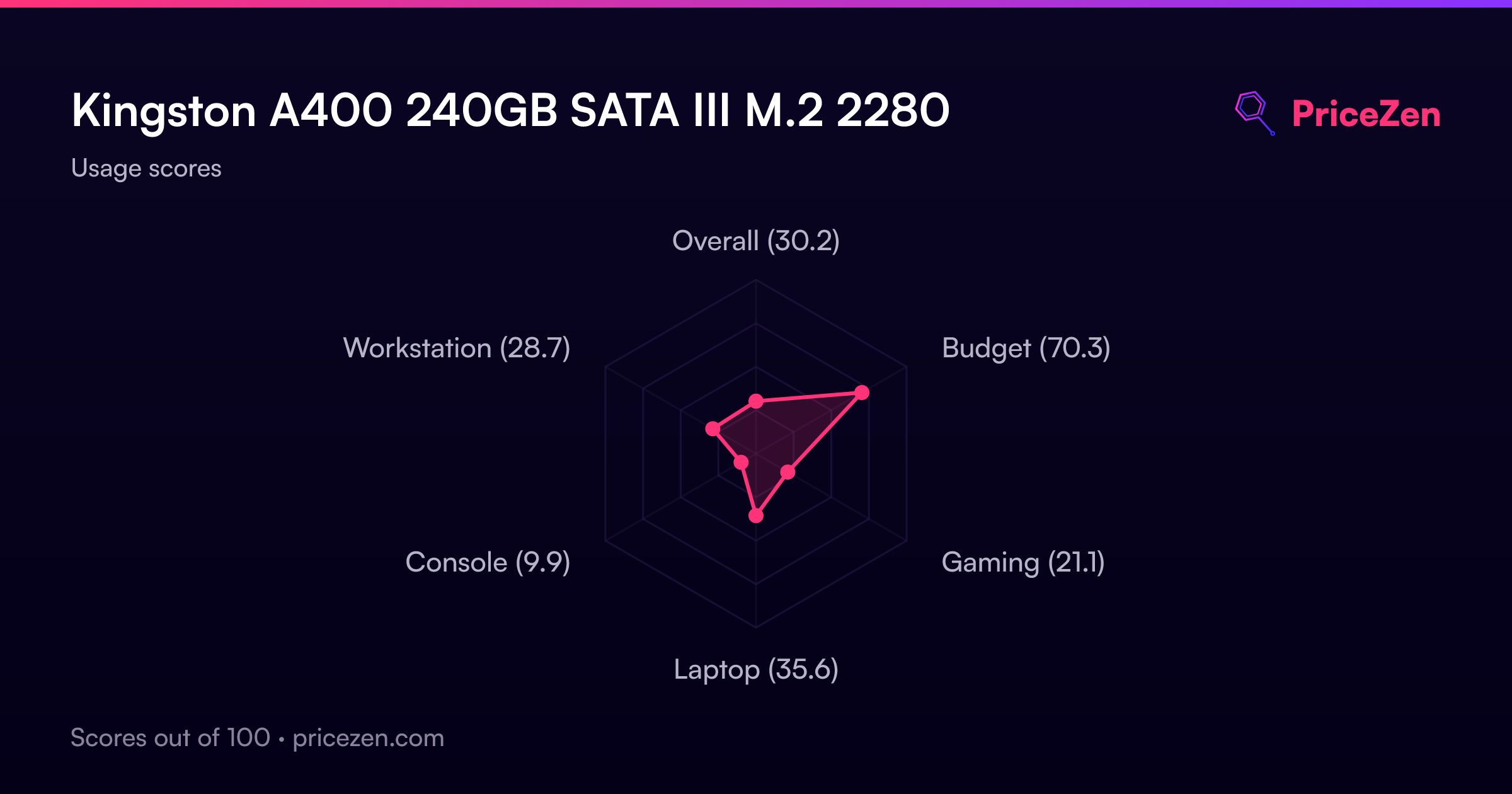
Usage Scores
- Overall30.2
- Budget70.3
- Gaming21.1
- Laptop35.6
- Console9.9
- Workstation28.7