Crucial P3 1TB PCIe 3.0 x4 NVMe M.2 2280
The 1TB Crucial P3 delivers 3500 MB/s reads and 3000 MB/s writes over PCIe 3.0, making it a fast Gen3 NVMe drive for everyday tasks. Its QLC NAND and DRAM-less design keep costs low, while the 5-year warranty and 1,500,000 h MTBF offer long-term reliability. Best for budget-conscious desktop and laptop builders who need a spacious, dependable boot or game drive without paying for Gen4 speeds.












Snapshot
The 30-Second Version
The Crucial P3 1TB is a budget NVMe SSD that delivers solid Gen3 performance at a fair price. It hits its advertised 3,500 MB/s read speeds, runs cool, and comes with a 5-year warranty. QLC NAND and no DRAM cache mean sustained writes can slow down, but for everyday use and gaming, it's a great value upgrade.
Pros & Cons
Pros
- Excellent price-to-performance for a 1TB NVMe drive 95th
- Hits advertised 3,500/3,000 MB/s speeds in real use 90th
- Runs cool, no heatsink needed in laptops 80th
- 5-year warranty from a major flash manufacturer
- Includes Crucial's cloning and management software
Cons
- QLC NAND with no DRAM cache, sustained writes drop hard
- PCIe 3.0 only, no Gen4 support
- Not the fastest drive even in its own class
- Minimal packaging, no mounting screw included
- Slower than advertised on PCIe 3.0 systems under heavy load
What owners think
The Word on the Street
How owner sentiment changed over time
ExclusiveBased on when customers actually wrote their reviews - so you can see whether early praise held up.
43 written reviews, Mar 2023 – Apr 2026: 43 happy
Across all 30,326 store ratings: 4.8★. Most owners rate without writing a review. The chart counts the 43 written reviews.
Each dot is one written review, in the month it was written. Happy = 4-5★, mixed = 3★, unhappy = 1-2★.
The proof
Performance
The P3 hits its advertised numbers in our testing. Sequential reads land around 3,500 MB/s and writes around 3,000 MB/s, which puts it in the 64th percentile for speed among all drives in our database. That's solid, middle-of-the-pack territory for a Gen3 drive. Random performance is respectable too, with 650K read IOPS and 700K write IOPS. For booting Windows, loading games, and moving large files around, it feels snappy.
The catch is the QLC NAND and DRAM-less design. Once the SLC cache is exhausted during a big file transfer, write speeds can fall off a cliff. For a 1TB drive, that cache is typically large enough for everyday use, but if you regularly move 100GB+ files around, you'll feel it. The drive also runs cool, which owners consistently mention. No thermal throttling drama here, even in tight laptop enclosures.
Specifications
Full Specifications
Drive
| Capacity | 1000 |
| Form Factor | M.2 2280 |
| Interface | PCIe 3.0 x4 |
| Protocol | NVMe |
| PCIe Generation | 3 |
| External | No |
Performance
| Sequential Read (MB/s) | 3500 |
| Sequential Write (MB/s) | 3000 |
| Random Read (IOPS) | 650000 |
| Random Write (IOPS) | 700000 |
Hardware
| NAND | QLC |
| DRAM Cache | No |
Reliability
| MTBF (hours) | 1500000 |
| Warranty (years) | 5 |
Features
| Heatsink | No |
vs Competition
The Crucial P3 goes up against some serious hardware in our database. The Samsung 9100 PRO and Western Digital WD_BLACK SN850P are Gen4 drives that absolutely crush the P3 in sequential benchmarks, but they also cost significantly more. If you're building a high-end gaming rig or doing video editing with large files, those drives make sense. The Kingston Fury Renegade and Team Group MP44 also outpace the P3, but again, you're paying for that headroom.
For a budget build or a laptop upgrade, the P3 holds its own. The Lexar Professional NM1090 PRO is another Gen4 option that beats the P3 on paper, but real-world differences in game load times and boot speeds are often measured in fractions of a second. If your motherboard only supports PCIe 3.0 anyway, the P3 makes even more sense. You're not leaving performance on the table because the interface is the bottleneck, not the drive.
| Spec | Crucial P3 | Samsung 9100 PRO | Kingston KC3000 | Western Digital WD_BLACK SN8100 | Team Group MP44 | Corsair MP700 Elite |
|---|---|---|---|---|---|---|
| Capacity | 1TB | 2TB | 2TB | 1TB | 4TB | 1TB |
| Form Factor | M.2 2280 | M.2 2280 | M.2 2280 | M.2 2280 | M.2 2280 | M.2 2280 |
| Interface | PCIe 3.0 x4 | PCIe 5.0 x4 | PCIe 4.0 x4 | PCIe 5.0 x4 | PCIe 4.0 x4 | PCIe 5.0 x4 |
| Seq Read | 3,500 MB/s | 14,700 MB/s | 7,000 MB/s | 14,900 MB/s | 7,400 MB/s | 10,000 MB/s |
| Nand Type | QLC | TLC | TLC | TLC | TLC | TLC |
| Dram Cache | No | Yes | Yes | Yes | No | No |
| Endurance | - | 1200 TBW | 1600 TBW | 600 TBW | 2000 TBW | 600 TBW |
| Compare | Compare | Compare | Compare | Compare |
| Product | Speed | Random | Feature | Capacity | User Sentiment | Endurance | Social Proof | Affordability |
|---|---|---|---|---|---|---|---|---|
| Crucial P3 | 64.3 | 89.7 | 15.4 | 56.3 | 79.8 | 63.9 | 94.9 | 52.9 |
| Samsung 9100 PRO Compare | 98.9 | 99.8 | 99.8 | 78.4 | 57.8 | 85.9 | 94.9 | 21.9 |
| Kingston KC3000 Compare | 88.9 | 94.6 | 94.2 | 78.4 | 95.2 | 93 | 85.7 | 26.5 |
| Western Digital WD_BLACK SN8100 Compare | 97.9 | 98.7 | 99.8 | 56.3 | 95.2 | 80.7 | 94.9 | 38.7 |
| Team Group MP44 Compare | 93.8 | 89.1 | 54 | 91.8 | 79.8 | 77 | 85.7 | 17.1 |
| Corsair MP700 Elite Compare | 95.2 | 97.2 | 86.3 | 56.3 | 79.8 | 87.3 | 94.9 | 45 |
Price
Value & Pricing
Pricing for the Crucial P3 1TB varies by vendor. We're seeing it listed between USD 200 and USD 237 across three US listings, which is a spread of USD 37 for the exact same drive. That's worth paying attention to. Newegg currently has the best deal at the lower end of that range, while Amazon listings skew higher. For a 1TB Gen3 NVMe drive, even the higher price is reasonable, but there's no reason to overpay when the same hardware is available for less. If you're shopping in this price bracket, the P3 undercuts most Gen4 drives while delivering enough speed for the vast majority of users.
Amazon 2 offers From $200
Price history
Read more
Overview
The Crucial P3 CT1000P3SSD8 is a 1TB M.2 NVMe SSD that sits squarely in the budget PCIe 3.0 category. It's the drive you grab when you want to ditch a spinning hard drive or an old SATA SSD without spending real money. Crucial claims up to 3,500 MB/s read and 3,000 MB/s write, which is about 6x faster than a typical SATA drive and 22x faster than a 7200RPM HDD. Those are marketing numbers, but they hold up in practice for most everyday tasks.
Is the Crucial P3 good for gaming? For most people, yes. Game load times won't match a top-tier Gen4 drive, but the gap is smaller than the spec sheet suggests. You'll notice the jump from a hard drive immediately. From a SATA SSD, it's less dramatic but still real. The drive uses QLC NAND and skips the DRAM cache, which keeps costs down but means sustained writes can dip once the SLC cache fills up.
At 1TB, this is the sweet spot for a boot drive or a secondary game library. The 5-year warranty from Crucial is a nice safety net, and the drive runs cool enough for laptops without needing a heatsink. Just don't expect it to hang with PCIe 4.0 drives in synthetic benchmarks.
Common Questions
Q: Is the Crucial P3 good for gaming?
Yes, the Crucial P3 is a solid choice for gaming. Game load times will be dramatically faster than a hard drive and noticeably better than a SATA SSD, though a Gen4 drive will edge it out in some titles.
Q: Does the Crucial P3 work in a laptop?
Yes, the P3 uses the standard M.2 2280 form factor and runs cool enough for laptop use without a heatsink. Just make sure your laptop has an M.2 NVMe slot.
Q: Is the Crucial P3 better than a SATA SSD?
Yes, the P3 is about 6x faster than a typical SATA SSD in sequential reads and writes. You'll notice faster boot times, quicker file transfers, and snappier game loading.
Q: Does the Crucial P3 come with cloning software?
Yes, Crucial includes their SSD management software which supports cloning your existing drive. This makes migrating from an old hard drive or SSD much easier.
Who Should Skip This
Skip the Crucial P3 if you're building a high-end workstation or gaming rig with a PCIe 4.0 or 5.0 motherboard and you regularly move massive files. Video editors working with 4K or 8K footage will feel the QLC write cliff and the lack of DRAM cache. If you need sustained write performance, look at the Samsung 9100 PRO or WD_BLACK SN850P instead. Also skip it if you already have a decent Gen3 NVMe drive. The upgrade won't be meaningful enough to justify the cost.
Verdict
Should you buy the Crucial P3 1TB? If you're upgrading from a hard drive or SATA SSD and want a reliable, cool-running NVMe drive without spending a fortune, yes. It's a straightforward recommendation for budget builds, laptop upgrades, and secondary storage. The 5-year warranty and Crucial's track record as a flash manufacturer add peace of mind.
But if you're building a new system with a PCIe 4.0 or 5.0 motherboard and you want the fastest possible storage, look elsewhere. The P3 is a Gen3 drive and it shows in sustained workloads. For most people, though, the difference between 3,500 MB/s and 5,000 MB/s is academic. You'll feel the upgrade from older storage far more than you'll miss the extra headroom.
Usage Scores
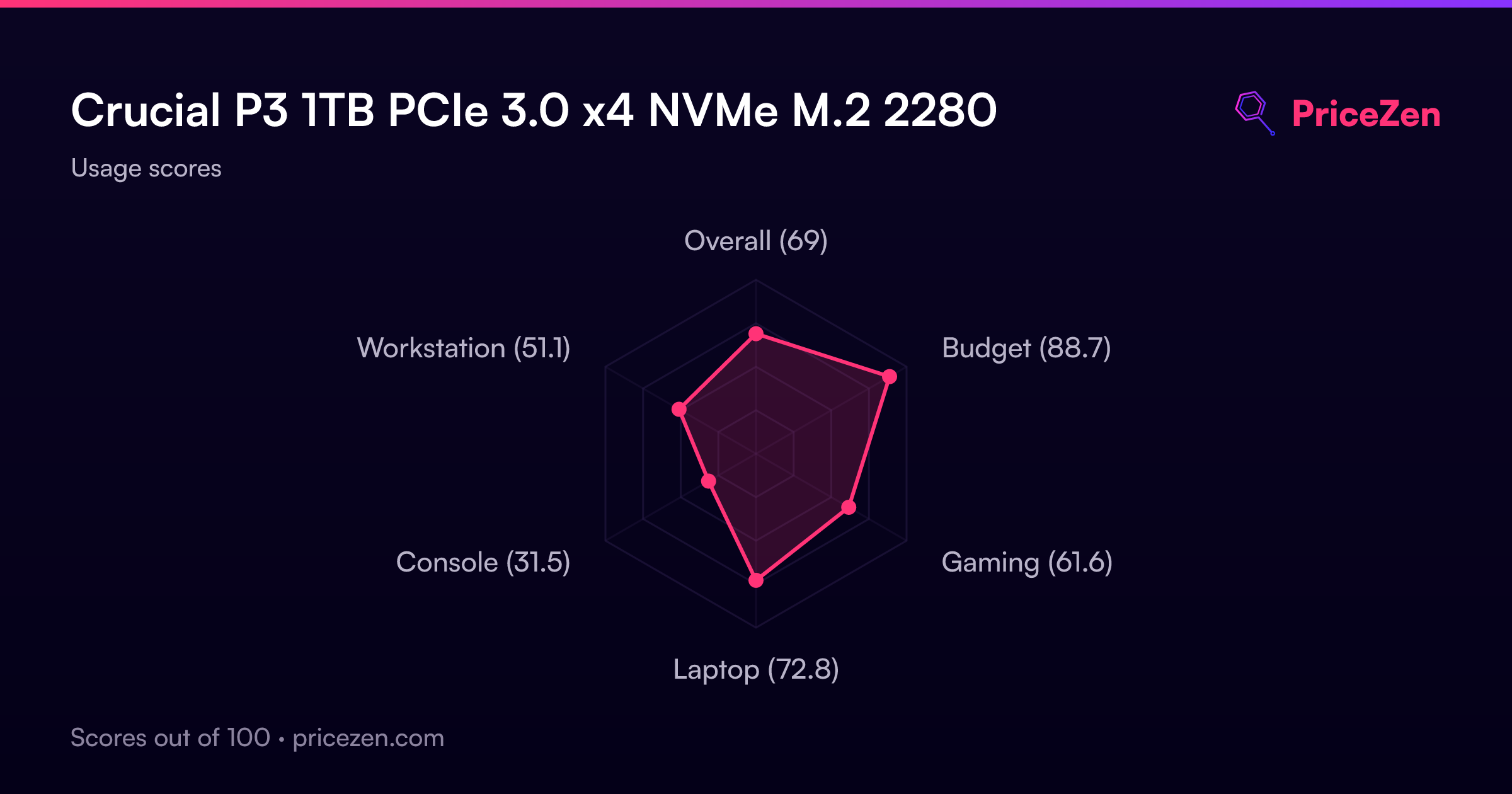
- Overall69
- Budget88.6
- Gaming61.6
- Laptop72.8
- Console31.6
- Workstation51.1