ASUS ProArt PA278CV 27" Silver / Black 2021
The 27-inch IPS panel delivers QHD resolution with 100% sRGB and Rec. 709 coverage, factory calibrated to Delta E < 2 for accurate color work. Its USB-C port supports 65W power delivery and DisplayPort daisy-chaining, letting you connect up to four monitors with a tidy desk setup. Best for photo editors, video colorists, and graphic designers who need reliable color accuracy and multi-display workflows.


Snapshot
The 30-Second Version
The ASUS ProArt PA278CV is a 27-inch QHD IPS monitor with factory calibrated color accuracy, Delta E under 2, and full sRGB plus Rec. 709 coverage. It's a practical pick for photographers and designers who want accurate color without spending reference monitor money. The USB-C port with 65W power delivery and the excellent ergonomic stand are standout features. Prices vary wildly from USD 207 to USD 849, so shop around and don't overpay. If you're doing color-critical creative work on a budget, this is one of the best values out there.
Pros & Cons
Pros
- Factory calibrated with Delta E under 2 and Calman Verified, so colors are accurate out of the box 91st
- USB-C with 65W power delivery means one cable for video, data, and laptop charging 77th
- Ergonomic stand with height, tilt, swivel, and pivot adjustments, ranked in the 91st percentile for ergonomics 75th
- 100% sRGB and 100% Rec. 709 coverage covers the color spaces most digital creative work targets 71st
- DisplayPort daisy-chaining supports up to four monitors for multi-display setups
Cons
- 8-bit panel only, no true 10-bit color without dithering
- 75Hz refresh rate and 5ms response time are average, not great for gaming
- No hardware calibration support, so you're stuck with software calibration as the panel ages
- Built-in speakers are weak, fine for system sounds but not for actual audio work
- Recurring reports of dead pixels on arrival and poor documentation
What owners think
The Word on the Street
How owner sentiment changed over time
ExclusiveBased on when customers actually wrote their reviews - so you can see whether early praise held up.
Happy owners: 69% lately, 90% in Jan 2022 – Sep 2023
Too few reviews to call that a change.
Across all 1,435 store ratings: 4.4★. Most owners rate without writing a review. The chart counts the 23 written reviews with stars and their own date.
15 reviews from months with approximate dates (the day we first saw a review) are left out of the trend.
9 written reviews without stars are left out of the trend.
Show the numbers
| Period | Reviews | Happy | Mixed | Unhappy | Happy share |
|---|---|---|---|---|---|
| Jan 2022 – Sep 2023 | 10 | 9 | 0 | 1 | 90% |
| Jul 2024 – Jan 2026 | 13 | 9 | 1 | 3 | 69% |
- Oct – Dec 20251 of 1 happy · 3 without stars
Buyers praised the monitors' color, build quality, and easy setup, with one noting reliability across many units. A second unit was needed after the first had issues, and built-in speakers were a consideration.
- Color accuracy and build quality are consistently praised, with sturdy stands and easy setup.
- USB-C connectivity works well with various laptops, and 1440p resolution suits most tasks.
- One reviewer needed a replacement unit, but the second worked fine; reliability is generally good.
- Built-in speakers are a consideration, though sound quality is not highlighted as exceptional.
- Oct – Dec 20240 of 2 happy · 1 without stars
Buyers in this period struggled to download drivers and guides, and one received a defective HDMI cable with poor support. The monitor itself was praised as fantastic.
- Downloading drivers and user guides was difficult and time-consuming for multiple buyers.
- Defective HDMI cable and terrible customer service; replacement still pending after two weeks.
- One buyer called the monitor 'nothing less than fantastic,' indicating strong product quality.
- Jul – Sep 20233 of 4 happy
Buyers praised the monitor's crisp display and ASUS build quality, with one recommending it. However, one reviewer reported a quality control issue, noting the product worked well but had defects.
- Crisp, clear screen and large workspace appreciated by users.
- ASUS build quality praised; repeat purchase and recommendation.
- Quality control issue: product defective despite good picture.
Each column joins calendar quarters until it holds at least 10 reviews with stars and their own date. Happy = 4-5★, mixed = 3★, unhappy = 1-2★. Period summaries are in English.
The proof
Performance
Let's talk numbers. The PA278CV runs at 75Hz with a 5ms response time and Adaptive-Sync support from 48 to 75Hz. For a productivity and creative monitor, that's fine. It's not going to impress anyone coming from a 144Hz gaming panel, and our database puts its performance at the 44th percentile, which is about average for this category. But here's the thing: if you're editing photos or laying out designs, you're not exactly twitch-shooting. The slightly higher than 60Hz refresh makes scrolling and window dragging feel a touch smoother, and Adaptive-Sync keeps things tear-free if you do fire up a casual game.
The display itself is a 2560 x 1440 IPS panel with 350 nits of brightness. That resolution on a 27-inch screen gives you a pixel density that makes text look crisp without needing display scaling tricks. The IPS panel means viewing angles are solid, 178 degrees according to ASUS, so colors don't shift when you lean back or show a client your work from the side. The 8-bit panel covers 100% sRGB and 100% Rec. 709, which are the standards most web and video work targets. It's not a wide-gamut Adobe RGB or DCI-P3 monster, so if you're doing print work that needs those color spaces, this isn't your monitor. But for the vast majority of digital creative work, sRGB and Rec. 709 are exactly what you need.
Color accuracy is where this thing earns its ProArt badge. Factory calibrated with Delta E under 2 and Calman Verified, it's ready to go out of the box. Our color score puts it at the 69th percentile, which is solid but not top-tier. The 350 nits brightness is adequate for most indoor environments, though if you're in a sun-drenched room, you might wish for more. The 8-bit panel means no true 10-bit color without dithering, which is worth knowing if you're doing critical gradient work. For most people, the difference is invisible. For a small subset of picky professionals, it's a reason to look at the more expensive options.
Specifications
Full Specifications
Display
| Size | 27" |
| Resolution | 2560x1440 (QHD) |
| Panel Type | IPS |
| Aspect Ratio | 16:9 |
| Curved | No |
| Screen Finish | matte |
Performance
| Refresh Rate | 75 Hz |
| Response Time | 5 |
| Adaptive Sync | Adaptive-Sync |
Color & HDR
| Brightness | 350 nits |
| Color Gamut | 100% sRGB, 100% Rec. 709 |
| Color Depth | 8-bit |
Connectivity
| HDMI Ports | 1 |
| DisplayPort | 1 |
| USB-C | 1 |
| Speakers | Yes |
| Headphone Jack | Yes |
Ergonomics
| Height Adjustable | Yes |
| Tilt | Yes |
| Swivel | Yes |
| Pivot | Yes |
| VESA Mount | 100x100 |
Features
| Webcam | No |
| Touchscreen | No |
| PIP/PBP | No |
| Power | 21 |
| Weight | 8.4 kg / 18.5 lbs |
vs Competition
The PA278CV sits in a crowded field, and the competition is getting fierce. The MSI MAG 271QPX QD-OLED E2 is a quantum dot OLED panel that will absolutely destroy this ASUS in contrast, black levels, and response time. If you're doing video work where deep blacks matter, or you want a monitor that doubles as a gaming display, the MSI is tempting. But you'll pay for it, and OLED panels have their own burn-in concerns for static UI elements. The Samsung Odyssey G60SD is another OLED option aimed at gamers, with much higher refresh rates. It's a different beast entirely. If you're not doing color-critical work, the Samsung is more fun. If you are, the ASUS's factory calibration and sRGB focus make it the more sensible tool.
The LG UltraGear 32GX850A-B and BenQ MA270U are closer competitors in spirit. The LG is a 32-inch panel, so you're getting more screen real estate, but it's aimed more at gaming with higher refresh rates. The BenQ MA270U is a 27-inch QHD monitor that also targets creative users, and BenQ has a strong reputation in this space. The Dell S2725QC is another 27-inch QHD option with USB-C, and Dell's stands are always solid. The trade-off with the ASUS is that it's not the best at any one thing. It's not the fastest, not the widest gamut, not the brightest. But it's a well-rounded package that nails the basics for creative work, and when you catch it at the right price, it undercuts most of these competitors on value.
| Spec | ASUS ProArt PA278CV 27" | MSI MAG 271QPX QD-OLED E2 27" | Samsung Odyssey G60SD 27" | LG UltraGear 32GX850A-B 32" | Dell Alienware AW2523HF 24.5" | BenQ MA Series MA270U 27" |
|---|---|---|---|---|---|---|
| Screen Size | 27 | 27 | 27 | 32 | 24.5 | 27 |
| Resolution | 2560 x 1440 | 2560 x 1440 | 2560 x 1440 | 3840 x 2160 | 1920 x 1080 | 3840 x 2160 |
| Panel Type | IPS | QD-OLED | OLED | OLED | IPS | IPS |
| Refresh Rate | 75 | 240 | 360 | 165 | 360 | 60 |
| Response Time Ms | 5 | 0.029999999329447746 | 0.029999999329447746 | 0.029999999329447746 | 0.5 | 5 |
| Adaptive Sync | Adaptive-Sync | FreeSync Premium Pro | FreeSync Premium Pro | FreeSync Premium Pro | FreeSync Premium | - |
| Hdr | - | DisplayHDR True Black 400 | HDR10+ | DisplayHDR True Black 400 | HDR10 | HDR10 |
| Compare | Compare | Compare | Compare | Compare |
| Product | Color | Portability | Display | Feature | User Sentiment | Performance | Connectivity | Social Proof |
|---|---|---|---|---|---|---|---|---|
| ASUS ProArt PA278CV 27" | 69 | 76.5 | 70.5 | 19.2 | 48.1 | 44.3 | 70.5 | 74.9 |
| MSI MAG 271QPX QD-OLED E2 27" Compare | 99.1 | 57.5 | 77.3 | 83.7 | 95.7 | 98 | 81.3 | 98.9 |
| Samsung Odyssey G60SD 27" Compare | 90.3 | 39.6 | 77.3 | 66.9 | 95.7 | 99.5 | 87.6 | 92.1 |
| LG UltraGear 32GX850A-B 32" Compare | 78.8 | 49.6 | 99.1 | 66.9 | 76.4 | 96.3 | 98.2 | 74.9 |
| Dell Alienware AW2523HF 24.5" Compare | 82.9 | 57.5 | 38.3 | 66.9 | 89.2 | 94.9 | 87.6 | 96.9 |
| BenQ MA Series MA270U 27" Compare | 91.9 | 83.8 | 88.4 | 66.9 | 95.7 | 22.4 | 97.9 | 84.1 |
Price
Value & Pricing
Pricing on this monitor is all over the place depending on where you shop. In the US, we're seeing listings from USD 207 to USD 849 across 7 vendors. That's a USD 642 spread, which is frankly ridiculous for the same monitor. If you're paying anywhere near the top of that range, you're getting taken for a ride. The sweet spot is clearly at the lower end. At around USD 207 to USD 300, this monitor is a steal for the color accuracy and connectivity you're getting. At USD 500 plus, you should be looking at something with more features.
Canadian buyers face a similar situation, with prices ranging from CAD 391 to CAD 824 across 5 listings. That's a CAD 433 gap. Again, shop around. The value proposition here is strongest when you catch it at the lower end of that range. For what it offers, a factory calibrated QHD IPS panel with USB-C and a great stand, the lower prices make it one of the better deals in the creative monitor space. Paying full retail at the high end makes it a much harder sell when you could step up to something with a wider color gamut or higher refresh rate for similar money.
Amazon 1 offer From $213
Newegg 1 offer From $220
Price history
Read more
Overview
The ASUS ProArt Display PA278CV is one of those monitors that quietly does exactly what it says on the box. It's a 27-inch QHD IPS panel aimed at photographers, video editors, and designers who need color they can trust without selling a kidney for a reference display. The factory calibration with Delta E under 2 and full sRGB plus Rec. 709 coverage means you can pull it out of the box and reasonably expect what you see is what you get. That's a bigger deal than it sounds when you've spent an afternoon fighting a monitor's color settings.
Who's this for? Mostly people doing color-sensitive work on a budget. Photo editing, graphic design, video work where you're not grading for HDR broadcast, and general productivity. The USB-C port with 65W power delivery is a nice touch for laptop users who want a single cable setup. Plug in a MacBook or a Windows laptop, get video, data, and charging through one connection. That's the kind of convenience that makes a desk feel less like a cable management disaster.
What makes it interesting is the balance. You're getting a color-accurate panel, a genuinely good ergonomic stand, and solid connectivity for a price that sits well below the fancy OLED and high-refresh gaming monitors it competes with on store shelves. It's not flashy. It's not going to blow your hair back with 240Hz. But for the right person, it's the monitor equivalent of a reliable work truck. It just does the job.
One thing worth noting up front: the customer rating sits at 4.4 out of 5 across 1439 reviews, and our sentiment analysis backs that up with a 78/100 score. People like this monitor. But there are some recurring complaints about dead pixels and documentation that you should know about before you click buy. We'll get into that.
Common Questions
Q: Is this monitor good for photo editing?
Yes, it's one of the better budget options for photo editing. The factory calibration with Delta E under 2 means colors are accurate out of the box, and the 100% sRGB coverage matches what most digital photos are edited in. The 27-inch QHD resolution gives you enough detail to work comfortably. Just keep in mind it's an 8-bit panel, so if you're doing critical gradient work or need Adobe RGB for print, you may want to look at higher-end options.
Q: Can I charge my laptop through this monitor?
Yes, the USB-C port supports 65W power delivery, which is enough to charge most ultrabooks and many mainstream laptops. You can connect a single USB-C cable and get video, data transfer, and charging all at once. For larger laptops that need more than 65W, you may still need a separate power adapter, but for most MacBooks and thin Windows laptops, this works great.
Q: Does this monitor work with Mac computers?
Yes, it works well with Macs. The USB-C connection is plug and play with modern MacBooks, and the QHD resolution plays nicely with macOS scaling. Multiple owners report smooth compatibility with both Mac and PC setups. The factory calibration also means colors look right without fiddling with display profiles.
Q: Is 75Hz enough for gaming?
It depends on what you play. For casual gaming, the 75Hz refresh rate and Adaptive-Sync support from 48 to 75Hz will feel smoother than a standard 60Hz monitor and eliminate screen tearing. But if you're into competitive shooters or fast-paced games, you'll want something with 144Hz or higher. This monitor is built for creative work first, gaming second.
Who Should Skip This
If you're a gamer, skip this. The 75Hz refresh rate and 5ms response time are fine for productivity but will feel sluggish if you're used to 144Hz or higher. You'd be better off with something like the Samsung Odyssey G60SD or the MSI MAG 271QPX QD-OLED E2, which offer much higher refresh rates and faster response times. The trade-off is color accuracy, but if you're not doing professional creative work, you won't miss it.
If you need wide-gamut color for print work or HDR grading, this isn't your monitor. The 8-bit panel covers sRGB and Rec. 709, but it doesn't reach Adobe RGB or DCI-P3 coverage. For print designers or video editors working in HDR, you'll want something with a wider gamut and true 10-bit color. Look at higher-end ProArt models or BenQ's SW line. And if you're on a tight budget and don't need color accuracy at all, a cheaper office monitor will serve you just as well for spreadsheets and email.
Verdict
If you're a photographer, graphic designer, or video editor working in sRGB or Rec. 709 color spaces, and you want a monitor that's accurate out of the box without spending a fortune, the PA278CV is an easy recommendation. The factory calibration, the USB-C connectivity, and the excellent ergonomic stand make it a practical daily driver. The 27-inch QHD resolution gives you enough room to work without needing a massive desk, and the daisy-chaining support means you can grow into a multi-monitor setup later. Just make sure you're paying a fair price. At the low end of the range, this is one of the best values in creative monitors. At the high end, it's a bad deal.
For general office use, this monitor is also a strong pick. The text clarity, the adjustable stand, and the USB hub make it comfortable for long workdays. The 75Hz refresh rate is a small but noticeable upgrade over 60Hz for everyday scrolling. If you're not doing color work at all, you could save money with a cheaper panel, but the build quality and ergonomics here justify the cost for anyone who spends eight hours a day staring at a screen. The built-in speakers are weak, so plan on headphones or external speakers. And if you're a gamer, look elsewhere. This isn't built for you.
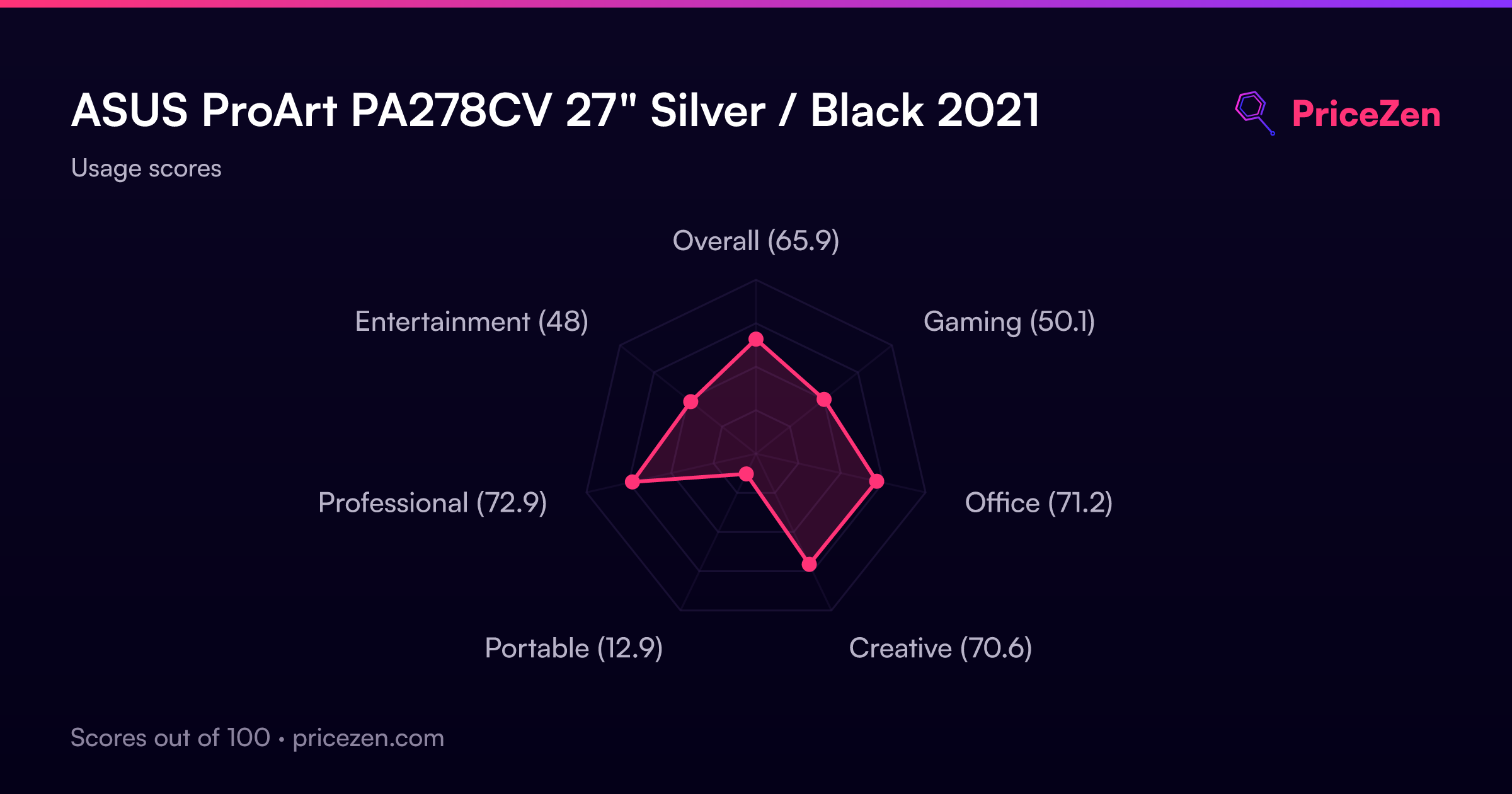
Usage Scores
- Overall65.8
- Gaming50.1
- Office71.2
- Creative70.6
- Portable12.9
- Professional72.9
- Entertainment48