MSI MAG 275CQDF X24 27" Matte Black 2026
The 27-inch 1500R curved VA panel delivers QHD at 240Hz or Full HD at 400Hz via Dual Mode, with a 0.5ms response time and Adaptive-Sync for smooth gameplay. Its 96% DCI-P3 color coverage and 5000:1 static contrast ratio make HDR content look richer than typical gaming monitors. Best for competitive FPS and racing gamers who want the flexibility to switch between high resolution and extreme refresh rates.












Snapshot
The 30-Second Version
The MSI MAG 275CQDF X24 is a 27-inch curved gaming monitor with a dual mode that switches between 1440p at 240Hz and 1080p at 400Hz. We currently track it between $180 and $230 USD, which makes it one of the cheapest ways to get a high-refresh curved QHD panel. The VA panel has great contrast but mediocre brightness and some motion smearing, so it's best for budget-conscious gamers who want speed and immersion over HDR quality.
Pros & Cons
Pros
- Dual mode 1440p 240Hz and 1080p 400Hz is genuinely useful for esports 94th
- Strong contrast from the VA panel, 5000:1 static ratio 91st
- Good color coverage, 96% DCI-P3 and 131% sRGB 77th
- Curved 1500R panel adds immersion for racing and RPG games
- Aggressive price, currently $180 to $230 USD
Cons
- VA panel means some dark smearing in fast motion
- 300 nits brightness is mediocre, HDR is basically a sticker
- No height adjustment, tilt only
- HDMI 2.0b limits 400Hz mode to DisplayPort only
- Bulky and heavy at 4650g, not great for small desks
The proof
Performance
The performance numbers here are genuinely strong. Our database puts this monitor in the 94th percentile for performance, which is one of the best on the market for this category. The 240Hz refresh rate at 1440p is smooth, and the dual mode switch to 400Hz at 1080p is a standout feature for esports titles like Valorant, CS2, or Overwatch 2. You won't find many monitors at this price that offer both high resolution and ultra-high refresh in one box.
The 0.5ms response time is a GtG number, and like most VA panels, real-world pixel transitions won't always hit that. Dark smearing is a known VA weakness, and while MSI has tuned this panel to be faster than older VA tech, it's not going to match a good IPS or OLED in motion clarity. For fast-paced shooters at 400Hz, you'll notice some ghosting in high-contrast scenes. But for the price, the speed is impressive. Adaptive-Sync works over both HDMI 2.0b and DisplayPort 1.4a, so tearing is handled whether you're on AMD or Nvidia (via G-Sync compatibility, though MSI only officially lists FreeSync Premium).
Specifications
Full Specifications
Display
| Size | 27" |
| Resolution | 2560x1440 (QHD) |
| Panel Type | VA |
| Aspect Ratio | 16:9 |
| Curved | Yes |
| Curvature | 1500 |
| Screen Finish | matte |
Performance
| Refresh Rate | 240 Hz |
| Response Time | 0.5 |
| Adaptive Sync | Adaptive-Sync |
Color & HDR
| Brightness | 300 nits |
| Color Gamut | 131% sRGB, 96% DCI-P3 |
| Color Depth | 8-bit + FRC |
| HDR | ✓ |
| HDR Support | HDR |
Connectivity
| HDMI Ports | 2 |
| DisplayPort | 1 |
| Speakers | No |
| Headphone Jack | Yes |
Ergonomics
| Height Adjustable | No |
| Tilt | Yes |
| Swivel | No |
| Pivot | No |
| VESA Mount | 100x100 |
Features
| Webcam | No |
| Touchscreen | No |
| PIP/PBP | No |
| Power | 65 |
| Weight | 4.7 kg / 10.3 lbs |
vs Competition
Our ranking compares every monitor against the others in its category, and the MSI's closest rivals right now are a mixed bag rather than a wall of OLEDs. The LG UltraGear 27G810A-B 27" is the most direct fight, another 27-inch gaming screen chasing the same high-refresh buyer. The Dell S2725QC 27" comes at things from the other direction, a 27-inch display aimed more at desk work than twitch shooters, so if your day is spreadsheets with games in the evening, that's the one to weigh against this MSI. The Samsung ViewFinity LS34C650UANXGO 34" is a much wider screen, and the choice there is really about shape: the MSI's 27-inch 1500R curve keeps everything in your field of view for shooters, while a 34-inch panel spreads out for sims and multitasking. The Gigabyte M Series OLED MO27Q28G 27" is the OLED in the group, and that's where the MSI gives ground on black levels, motion clarity and HDR.
So how does the MSI MAG 275CQDF X24 compare to the LG UltraGear 27G810A-B? On paper the MSI's party trick is the dual mode, 1440p at 240Hz for normal play and 1080p at 400Hz when you want raw speed, plus a 5000:1 static contrast ratio that gives dark scenes real depth. Against the Gigabyte OLED, the MSI can't match per-pixel blacks or clean motion, and its 300 nits and HDR Ready badge mean HDR is a checkbox rather than a feature. What it does have is price. At $180 to $230 USD it's the value pick of this group, and if you want high refresh and a curved QHD panel without stretching your budget, it earns its spot. If HDR and motion purity matter more than the savings, the OLED is the better screen.
| Spec | MSI MAG 275CQDF X24 27" | ASUS ROG Strix XG27AQDMG 26.5" | LG UltraGear 27G810A-B 27" | Dell S2725QC 27" | Samsung ViewFinity LS34C650UANXGO 34" | Gigabyte M Series OLED MO27Q28G 27" |
|---|---|---|---|---|---|---|
| Screen Size | 27 | 26.5 | 27 | 27 | 34 | 27 |
| Resolution | 2560 x 1440 | 2560 x 1440 | 3840 x 2160 | 3840 x 2160 | 3440 x 1440 | 2560 x 1440 |
| Panel Type | VA | OLED | IPS | IPS | VA | OLED |
| Refresh Rate | 240 | 240 | 180 | 120 | 100 | 280 |
| Response Time Ms | 0.5 | 0.03 | 1 | 8 | 5 | 0.03 |
| Adaptive Sync | Adaptive-Sync | FreeSync Premium Pro | FreeSync Premium | FreeSync Premium | FreeSync | FreeSync Premium Pro |
| Hdr | HDR | HDR10 | HDR400 | HDR | HDR10 | DisplayHDR True Black 500 |
| Compare | Compare | Compare | Compare | Compare |
| Product | Color | Portability | Display | Feature | Ergonomic | Performance | Connectivity | Social Proof |
|---|---|---|---|---|---|---|---|---|
| MSI MAG 275CQDF X24 27" | 76.8 | 12.7 | 61.9 | 90.8 | 47.1 | 93.5 | 53 | 12.6 |
| ASUS ROG Strix XG27AQDMG 26.5" Compare | 97.1 | 67.9 | 72.5 | 70.1 | 90.8 | 97.9 | 93 | 67.1 |
| LG UltraGear 27G810A-B 27" Compare | 93.7 | 67.9 | 87 | 70.1 | 90.8 | 81.7 | 98.2 | 67.1 |
| Dell S2725QC 27" Compare | 71.7 | 76.5 | 87 | 70.1 | 90.8 | 44.2 | 87.4 | 96.8 |
| Samsung ViewFinity LS34C650UANXGO 34" Compare | 87.2 | 76.5 | 76 | 96.3 | 73.4 | 52.6 | 96.9 | 96.8 |
| Gigabyte M Series OLED MO27Q28G 27" Compare | 99.6 | 79.4 | 73.4 | 85 | 90.8 | 99.2 | 95.3 | 70 |
Price
Value & Pricing
At $180 to $230 USD right now, this monitor is a lot of screen for the money, and the drop toward the bottom of that range makes the pitch stronger than it was. You're getting 1440p, 240Hz, a curved VA panel, and the 400Hz dual mode, which is a feature set that usually costs more. We track prices across stores over time, partly through our community browser extension, so if you see it near the low end, that's a good moment to pull the trigger rather than wait. Compared to flat IPS 1440p 240Hz monitors, you're trading some motion clarity and viewing angles for better contrast and the curve. If you mainly play competitive shooters and want the 400Hz mode, this is a smart buy. If you're more into single-player eye candy, the 300 nits brightness and HDR Ready label won't blow you away.
Amazon 1 offer From $180
Newegg 1 offer From $180
Price history
Read more
Overview
The MSI MAG 275CQDF X24 is a 27-inch curved gaming monitor that sits in the budget-to-midrange bracket, and we currently track it between $180 and $230 USD. It's built around a VA panel with a 1500R curve, QHD resolution, and a dual mode trick that lets you swap between 1440p at 240Hz and 1080p at 400Hz. That's the headline feature, and it's aimed squarely at competitive FPS players who want one screen for both sharp daily use and twitchy esports sessions.
MSI is pitching this as a monitor for FPS, RPG, and racing sim fans. The curve is aggressive enough to feel immersive without being silly, and the VA panel brings a 5000:1 static contrast ratio, which means deeper blacks than your typical IPS panel in this price range. You also get AMD FreeSync Premium, HDR Ready support, and a 0.5ms GtG response time claim that's more marketing than reality, but we'll get into that.
If you're searching for a 240Hz 1440p curved gaming monitor under $250, this one shows up a lot, and at the low end of its current price range it's an even easier recommendation. The question is whether the dual mode gimmick and VA panel trade-offs make it worth your cash compared to flat IPS alternatives or pricier OLED options.
Common Questions
Q: Is the MSI MAG 275CQDF X24 good for gaming?
Yes, it's built for gaming with a 240Hz refresh rate at 1440p and a dual mode that boosts to 400Hz at 1080p for competitive shooters. The 0.5ms response time and Adaptive-Sync support make it a strong budget pick for fast-paced titles.
Q: Does the MSI MAG 275CQDF X24 support 400Hz?
Yes, but only in Full HD 1080p mode and only over DisplayPort 1.4a. The HDMI 2.0b ports max out at 240Hz, so you'll need a DisplayPort cable to use the 400Hz dual mode.
Q: Is the MSI MAG 275CQDF X24 good for PS5 or Xbox?
It works with consoles over HDMI, but you won't get the full 240Hz or 400Hz modes since HDMI 2.0b caps out at 1440p 120Hz or 1080p 120Hz. It's really designed for PC gaming, not console high-refresh setups.
Q: Does the MSI MAG 275CQDF X24 have good HDR?
No, the HDR is basically a label. With 300 nits brightness and no local dimming, HDR content won't look dramatically better than SDR. If you want real HDR, you'll need to spend more on an OLED or a brighter IPS panel.
Who Should Skip This
Skip this monitor if you're a competitive esports player who wants the absolute cleanest motion. The VA panel's dark smearing will annoy you in fast flick shots, and a 1080p 360Hz or 400Hz IPS panel will feel snappier. Also skip it if you care about HDR or bright rooms, since 300 nits is underwhelming and the HDR Ready badge is mostly marketing. If you do color-critical work or need wide viewing angles for multi-person viewing, the VA panel's color shift off-axis will frustrate you. For those users, a flat IPS 1440p 240Hz monitor or an OLED like the Gigabyte M Series OLED MO27Q28G 27" is a better fit, though you'll pay more.
Verdict
Should you buy the MSI MAG 275CQDF X24? If you want a 240Hz 1440p curved gaming monitor under $250 and you play a mix of competitive and casual games, yes, and at the $180 end of its current range it's close to a no-brainer. The dual mode is a real feature, not just a checkbox. Switching to 1080p 400Hz for a Valorant session and back to 1440p for everything else is genuinely handy, and the VA contrast makes games look richer than a budget IPS panel.
But if you're sensitive to ghosting or you care about HDR, this isn't the monitor for you. The 300 nits brightness and HDR Ready label are weak, and the VA panel's dark smearing will bug you in fast-paced scenes. For pure esports players who want the absolute fastest motion clarity, a 1080p 360Hz or 400Hz IPS panel might serve you better. For everyone else who wants a big, curved, high-refresh screen without spending OLED money, this MSI is a solid pick.
Usage Scores
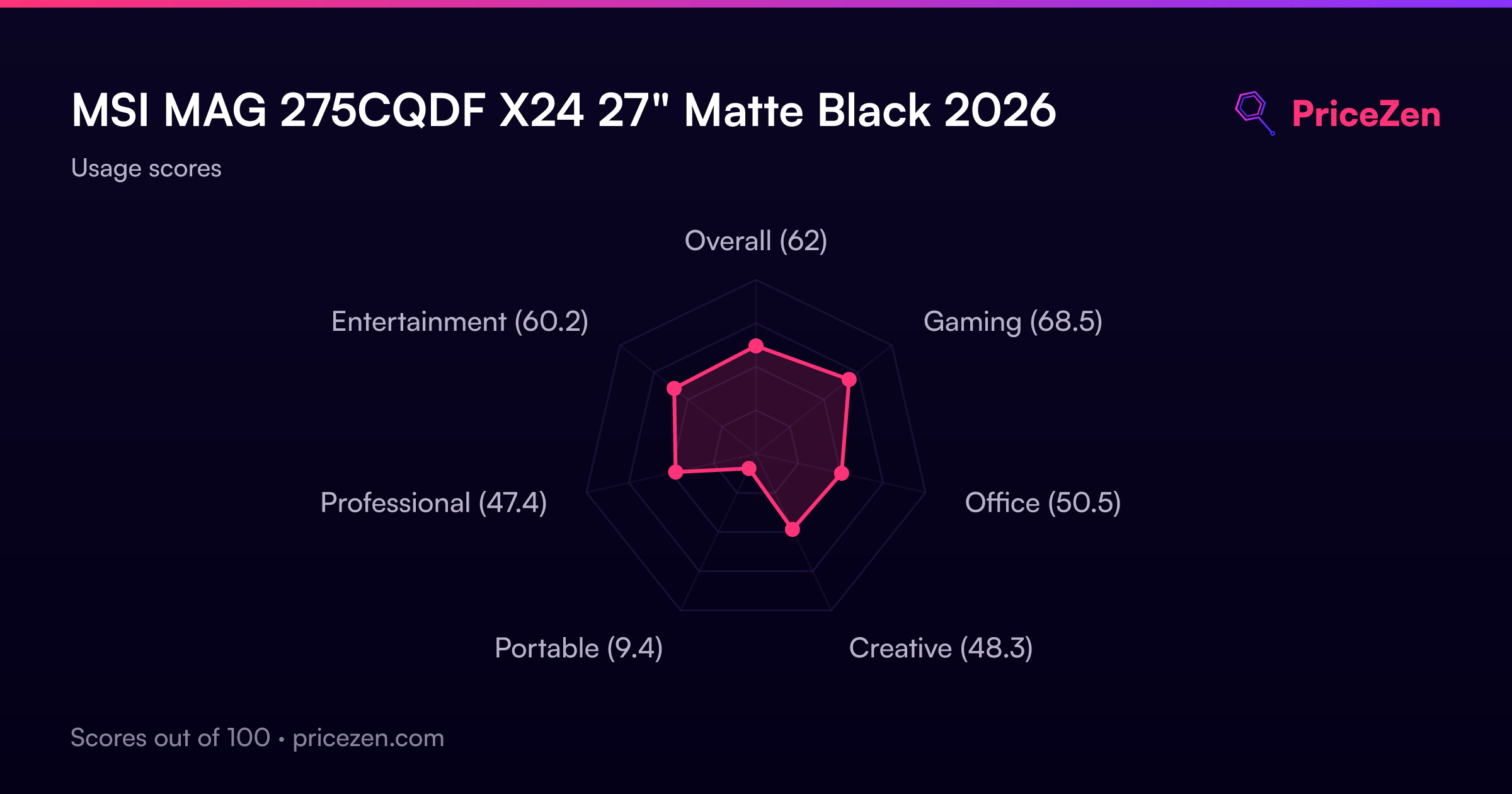
- Overall62
- Gaming68.5
- Office50.5
- Creative48.3
- Portable9.4
- Professional47.4
- Entertainment60.2