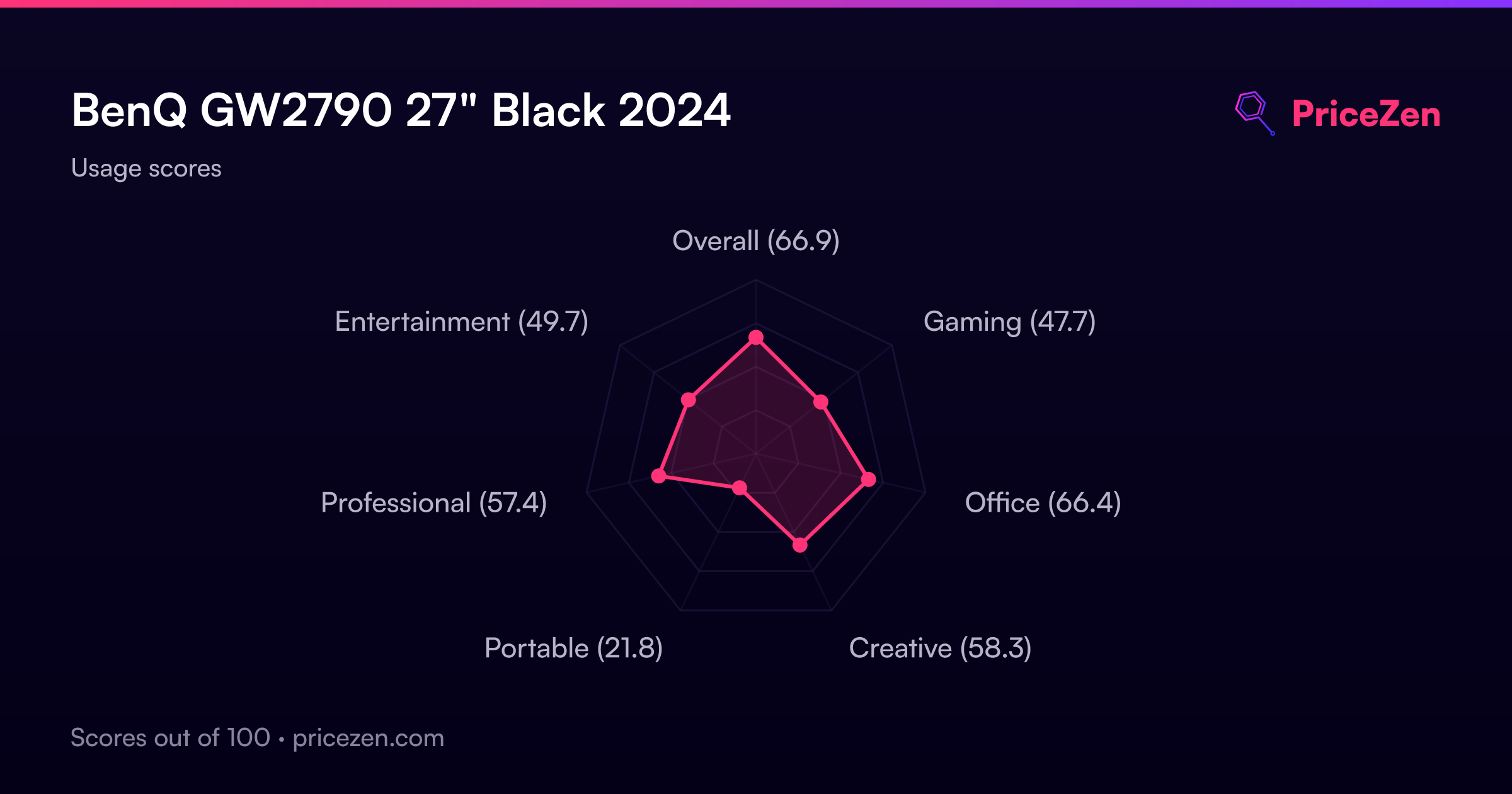
BenQ GW2790 27" Black 2024
A 27-inch 1080p IPS panel with 100Hz refresh and 5ms response time separates this display, backed by flicker-free Eye-Care tech and an adaptive brightness sensor. USB-C input joins dual HDMI and DisplayPort, while ePaper and Coding modes minimize eye strain during extended reading or coding. It’s best for office workers and programmers prioritizing smooth scrolling and all-day comfort over color-critical accuracy.


Snapshot
The 30-Second Version
A comfortable 27-inch workhorse with a smooth 100Hz refresh rate and eye-care tech that actually helps. Buy it at the low end of the price range and you'll be happy.
Pros & Cons
Pros
- 100Hz refresh rate makes everything feel smoother 97th
- Eye-care tech actually reduces strain during long sessions 89th
- Slim bezels are great for multi-monitor setups 84th
- Cable management keeps your desk looking clean 67th
Cons
- 250 nits is dim for bright rooms
- No height adjustment, tilt only
- 1080p on 27 inches looks a bit soft up close
- Built-in speakers are weak
What owners think
The Word on the Street
How owner sentiment changed over time
ExclusiveBased on when customers actually wrote their reviews - so you can see whether early praise held up.
23 written reviews, May 2024 – Apr 2026: 18 happy, 5 without stars
Across all 174 store ratings: 4.5★. Most owners rate without writing a review. The chart counts the 23 written reviews.
Each dot is one written review, in the month it was written. Happy = 4-5★, mixed = 3★, unhappy = 1-2★.
The proof
Performance
The 100Hz refresh rate is the star of the show. Paired with a 5ms response time, it's quick enough to make fast action videos and light gaming feel fluid, and VESA MediaSync certification keeps jitter out of the picture. The 250 nits brightness is fine for a typical indoor desk, but don't expect HDR fireworks just because it says HDR10 on the box. Color coverage at 99% sRGB is solid for office work and web browsing, though it sits right around the middle of the pack in our database. The built-in speakers are there if you need them, but they're not going to replace a decent pair of headphones.
Specifications
Full Specifications
Display
| Size | 27" |
| Resolution | 1920x1080 (Full HD) |
| Panel Type | IPS |
| Aspect Ratio | 16:9 |
| Curved | No |
| Screen Finish | matte |
Performance
| Refresh Rate | 100 Hz |
| Response Time | 5 |
Color & HDR
| Brightness | 250 nits |
| Color Gamut | 99% sRGB |
| Color Depth | 8-bit |
| HDR | HDR10 |
Connectivity
| HDMI Ports | 2 |
| DisplayPort | 1 |
| USB-C | 1 |
| Thunderbolt | N/A |
| Speakers | Yes |
| Headphone Jack | Yes |
Ergonomics
| Height Adjustable | No |
| Tilt | Yes |
| Swivel | No |
| Pivot | No |
| VESA Mount | 100x100 |
Features
| Webcam | No |
| Touchscreen | No |
| PIP/PBP | No |
| Power | 25 |
| Weight | 5.0 kg / 11.0 lbs |
vs Competition
Against the Dell S2725QC, the BenQ gives up 4K resolution and USB-C connectivity, but it costs a fraction of the price and still delivers a smooth 100Hz experience. The ASUS TUF Gaming VG34VQL1B is a completely different beast, ultrawide, curved, and built for gaming, but it's also way more expensive and overkill for office work. The HP OMEN 27qs G2 is a closer rival with a higher refresh rate, but it's aimed at gamers and lacks the eye-care focus that makes the BenQ comfortable for all-day use. For pure productivity on a budget, the BenQ holds its own.
| Spec | BenQ GW2790 27" | ASUS ROG Strix XG27JCG 27" | Dell S2725QC 27" | Acer Nitro XV272U W2bmiiprx 27" | HP OMEN 27QS G2 27" | Gigabyte M Series M27UP SA 27" |
|---|---|---|---|---|---|---|
| Screen Size | 27 | 27 | 27 | 27 | 27 | 27 |
| Resolution | 1920 x 1080 | 5120 x 2880 | 3840 x 2160 | 2560 x 1440 | 2560 x 1440 | 3840 x 2160 |
| Panel Type | IPS | IPS | IPS | IPS | IPS | IPS |
| Refresh Rate | 100 | 330 | 120 | 240 | 280 | 160 |
| Response Time Ms | 5 | 0.30000001192092896 | 8 | 0.5 | 1 | 1 |
| Adaptive Sync | - | FreeSync Premium Pro | FreeSync Premium | FreeSync Premium | G-Sync Compatible | FreeSync Premium |
| Hdr | HDR10 | DisplayHDR 600 | HDR | HDR400 | DisplayHDR 400 | DisplayHDR 400 |
| Compare | Compare | Compare | Compare | Compare |
| Product | Color | Portability | Display | Feature | Ergonomic | Performance | Connectivity | Social Proof |
|---|---|---|---|---|---|---|---|---|
| BenQ GW2790 27" | 53.7 | 83.9 | 52.4 | 67.1 | 47.6 | 48 | 97 | 89.3 |
| ASUS ROG Strix XG27JCG 27" Compare | 93.1 | 68 | 99.5 | 67.1 | 90.8 | 95.6 | 81.3 | 89.3 |
| Dell S2725QC 27" Compare | 71.6 | 76.6 | 88.4 | 67.1 | 90.8 | 44.3 | 87.6 | 97.9 |
| Acer Nitro XV272U W2bmiiprx 27" Compare | 90.1 | 54.5 | 70.5 | 67.1 | 90.8 | 93.6 | 91.1 | 74.5 |
| HP OMEN 27QS G2 27" Compare | 75.3 | 81.3 | 70.5 | 67.1 | 90.8 | 89.5 | 97 | 99.3 |
| Gigabyte M Series M27UP SA 27" Compare | 84 | 76.6 | 88.4 | 83.8 | 90.8 | 74.7 | 87.6 | 66.8 |
Price
Value & Pricing
Pricing is all over the place depending on where you shop. In the US, listings range from USD 100 to USD 200, which is a huge spread for the same panel. If you're in Canada, the CAD 150 to CAD 170 range is much tighter and honestly a better deal relative to the US high end. The best US price we're seeing is at the low end of that range, so shop around before you buy. At USD 100, this is an easy recommendation. At USD 200, you're getting into territory where a 1440p panel starts to make more sense.
Amazon 1 offer From $140
Price history
Read more
Overview
The BenQ GW2790 is a 27-inch 1080p IPS monitor that nails the basics and skips the fluff. The headline here is the 100Hz refresh rate, which makes everyday scrolling and casual gaming feel noticeably smoother than the 60Hz panels most people are still using. It's not a gaming monitor, but it's also not pretending to be one. This is a workhorse display for people who want eye comfort and a clean setup without spending a fortune.
Common Questions
Q: Is this monitor good for gaming?
It's fine for casual gaming. The 100Hz refresh rate and 5ms response time are a step up from 60Hz office panels, but serious gamers will want something faster with adaptive sync. For games like Stardew Valley or Rocket League, it's perfectly enjoyable.
Q: Can I mount this on a monitor arm?
Yes, it has a standard VESA 100x100 mount. The included stand only tilts, so if you want height adjustment, a monitor arm is a solid upgrade.
Q: Does it work with a MacBook?
Absolutely. It has HDMI and DisplayPort, so you'll need an adapter or cable that matches your MacBook's ports, but plenty of owners use it with Macs without issues.
Who Should Skip This
If you're a competitive gamer chasing high frame rates, this isn't your monitor. Go grab something with a 144Hz or higher refresh rate and proper adaptive sync. And if you do color-critical work like photo editing or design, the 1080p resolution and mid-tier color accuracy will frustrate you. Look at a 1440p or 4K panel with better color coverage instead.
Verdict
The BenQ GW2790 is a smart buy if you want a comfortable, smooth 27-inch monitor for work and light play without spending a lot. The 100Hz refresh rate and eye-care features are genuinely useful, and the slim bezels make it a great candidate for a dual-monitor setup. Just don't expect it to blow you away with brightness or color accuracy. If you can find it near the USD 100 mark, grab it. If it's closer to USD 200, hold out for a sale or consider stepping up to 1440p.
Usage Scores
- Overall67
- Gaming47.8
- Office67.1
- Creative57.8
- Portable21.9
- Professional57.4
- Entertainment49.6