ASUS VA27EHF 27" Black 2024
The 100Hz refresh rate and 1ms response time on its IPS panel provide smoother motion than standard 60Hz office displays, with FreeSync support to reduce screen tearing. Its Eye Care technology with ultra-low blue light and a non-glare screen makes it comfortable for extended work sessions, and it is frequently sold in a dual-monitor bundle for expanded multitasking. This monitor is best for office workers and students who want a fluid, flicker-free dual-screen setup for productivity, not color-critical creative work.


Snapshot
The 30-Second Version
The ASUS VA27EHF is a 27-inch 1080p IPS monitor with a surprisingly smooth 100Hz refresh rate that makes everyday work feel great. Its color and brightness are its biggest weaknesses, requiring immediate adjustment out of the box. Pricing is all over the place, so it's a fantastic buy under $150 but a bad one over $200. Owner sentiment in our data lands at 78 out of 100, and we recommend it for budget-conscious office users who want a big, fluid display and don't mind tweaking settings.
Pros & Cons
Pros
- 100Hz refresh rate makes everyday use feel much smoother than 60Hz 84th
- IPS panel provides wide viewing angles, great for sharing your screen 68th
- 1ms response time keeps motion blur to a minimum for casual gaming 67th
- VESA mount compatibility lets you ditch the basic stand
- Eye care features like flicker-free and low blue light are genuinely helpful for long workdays
- Owners rate it well overall, with sentiment in our data sitting at 78 out of 100
Cons
- Out-of-box brightness and saturation are painfully high and need immediate adjustment
- Color performance is weak, landing in the bottom 20th percentile
- Stand is tilt-only with no height adjustment, which is a real ergonomic letdown
- On-screen display controls are unintuitive and frustrating to navigate
- 1080p resolution on a 27-inch screen means visible pixels and less sharp text
What owners think
The Word on the Street
How owner sentiment changed over time
ExclusiveBased on when customers actually wrote their reviews - so you can see whether early praise held up.
18 written reviews, Aug 2023 – Apr 2026: 17 happy, 1 unhappy
Across all 409 store ratings: 4.5★. Most owners rate without writing a review. The chart counts the 18 written reviews.
Each dot is one written review, in the month it was written. Happy = 4-5★, mixed = 3★, unhappy = 1-2★.
The proof
Performance
That 100Hz refresh rate paired with a 1ms response time is doing the heavy lifting here. In our database, the overall performance sits in the 73rd percentile, which is well above average for a budget-focused monitor. For everyday productivity, the jump from 60Hz to 100Hz is genuinely noticeable. Dragging windows feels fluid, and scrolling through long articles is buttery smooth. It's not going to blow the doors off a dedicated 240Hz esports monitor, but for a bit of casual Rocket League or an RPG after work, the Adaptive-Sync keeps things tear-free and responsive. It's a real step up from a basic office display.
The 1080p resolution on a 27-inch panel is the classic trade-off. You get a large screen that's easy to read without scaling, which is great for tired eyes, but you will see individual pixels if you lean in close. Text isn't as razor-sharp as it would be on a 1440p display of the same size. The display score in our database is a solid 56th percentile, which sums it up perfectly: it's a capable panel for the price, but it's not going to win any clarity awards. The matte coating does a good job of killing reflections, so you won't be staring at your own face all day, which is a plus in a bright office.
Specifications
Full Specifications
Display
| Size | 27" |
| Resolution | 1920x1080 (Full HD) |
| Panel Type | IPS |
| Aspect Ratio | 16:9 |
| Curved | No |
| Screen Finish | matte |
Performance
| Refresh Rate | 100 Hz |
| Response Time | 1 |
| Adaptive Sync | Adaptive-Sync |
Color & HDR
| Brightness | 250 nits |
| Color Gamut | 72% NTSC |
| Color Depth | 8-bit |
| HDR | No |
Connectivity
| HDMI Ports | 1 |
| DisplayPort | 0 |
| USB-C | 0 |
| Thunderbolt | No |
| Speakers | No |
| Headphone Jack | No |
Ergonomics
| Height Adjustable | No |
| Tilt | Yes |
| Swivel | No |
| Pivot | No |
| VESA Mount | 100x100 |
Features
| Webcam | No |
| Touchscreen | No |
| PIP/PBP | No |
| Power | 15 |
| Weight | 3.9 kg / 8.5 lbs |
vs Competition
The ASUS VA27EHF's main rival in spirit is something like the Acer Nitro XV272U. The Acer steps up to a 1440p resolution, which solves the sharpness issue on a 27-inch screen and generally offers better color performance. You'll lose a bit of that silky smoothness if you can't push the higher resolution in games, but for pure productivity and media, the Acer is a clear step up. The trade-off is price, but with the ASUS's price fluctuating so wildly, the Acer can sometimes be the smarter buy even on a budget.
Then you have monitors like the Dell S2725QC, which brings 4K resolution and a USB-C hub into the mix, aimed squarely at productivity users who want a super sharp, clean desk setup. The Dell is in a different league for image clarity and connectivity, but it's also typically more expensive. The ASUS's 100Hz panel is actually smoother than many 4K office monitors stuck at 60Hz, so if you value motion fluidity over pixel density, the ASUS has a weird little advantage. For pure gaming on a budget, the Gigabyte M27UP is a strong alternative with a higher refresh rate, but again, you'll pay for it. The ASUS carves out a niche by being a cheap, large, and smooth office monitor that can game in a pinch, as long as you don't look too closely at the pixels.
| Spec | ASUS VA27EHF 27" | Dell S2725QC 27" | HP OMEN 27QS G2 27" | Acer Nitro XV272U W2bmiiprx 27" | LG UltraGear 27GS75Q-B 27" | Gigabyte M Series M27UP SA 27" |
|---|---|---|---|---|---|---|
| Screen Size | 27 | 27 | 27 | 27 | 27 | 27 |
| Resolution | 1920 x 1080 | 3840 x 2160 | 2560 x 1440 | 2560 x 1440 | 2560 x 1440 | 3840 x 2160 |
| Panel Type | IPS | IPS | IPS | IPS | IPS | IPS |
| Refresh Rate | 100 | 120 | 280 | 240 | 200 | 160 |
| Response Time Ms | 1 | 8 | 1 | 0.5 | 1 | 1 |
| Adaptive Sync | Adaptive-Sync | FreeSync Premium | G-Sync Compatible | FreeSync Premium | G-Sync Compatible | FreeSync Premium |
| Hdr | No | HDR | DisplayHDR 400 | HDR400 | HDR10 | DisplayHDR 400 |
| Compare | Compare | Compare | Compare | Compare |
| Product | Color | Portability | Display | Feature | User Sentiment | Ergonomic | Performance | Connectivity | Social Proof |
|---|---|---|---|---|---|---|---|---|---|
| ASUS VA27EHF 27" | 15.7 | 57.5 | 52.4 | 66.9 | 48.1 | 47.6 | 67.8 | 47.9 | 84.1 |
| Dell S2725QC 27" Compare | 71.6 | 76.5 | 88.4 | 66.9 | 95.7 | 90.8 | 44.3 | 87.6 | 96.9 |
| HP OMEN 27QS G2 27" Compare | 75.2 | 81.3 | 70.5 | 66.9 | 95.7 | 90.8 | 89.5 | 97 | 98.9 |
| Acer Nitro XV272U W2bmiiprx 27" Compare | 90.1 | 54.4 | 70.5 | 66.9 | 95.7 | 90.8 | 93.6 | 91.1 | 62.3 |
| LG UltraGear 27GS75Q-B 27" Compare | 82.9 | 49.6 | 70.5 | 66.9 | 76.4 | 78.8 | 84.7 | 87.6 | 74.9 |
| Gigabyte M Series M27UP SA 27" Compare | 84 | 76.5 | 88.4 | 83.7 | 76.4 | 90.8 | 74.7 | 87.6 | 50.8 |
Price
Value & Pricing
Pricing on this monitor is all over the map, which is something to watch out for. We've seen it listed across different vendors in a wild range from $125 all the way up to $386. At the low end, near that $125 mark, this monitor is an absolute steal for a 27-inch 100Hz IPS panel. You're getting a ton of screen real estate and smooth performance for the price of a fancy dinner. At the high end, though, you're wandering dangerously close to much better 1440p high-refresh-rate monitors, and the VA27EHF's weak color performance and basic stand make it a terrible deal.
For the best value, you'll want to hunt down the listing from the vendor with the lowest price. The value proposition crumbles quickly as the price climbs. If you can snag it for under $150, it's a fantastic budget option. If you're seeing it for over $200, close the tab and look at competitors like the Acer Nitro XV272U, which will give you a sharper 1440p picture for not much more money.
Newegg 1 offer From $100
Amazon 1 offer From $106
Price history
Read more
Overview
The ASUS VA27EHF is one of those monitors that sneaks up on you. On paper, a 27-inch 1080p screen sounds like a pixelated compromise in a world obsessed with 4K. But for a lot of people, this is the sweet spot. You get a big, immersive canvas for spreadsheets and browser tabs without needing a pricey graphics card to push all those extra pixels. The 100Hz refresh rate is the real hook here. It makes everything from scrolling through documents to casual gaming feel noticeably smoother than a standard 60Hz office monitor, and it does it at a price that doesn't make your wallet wince.
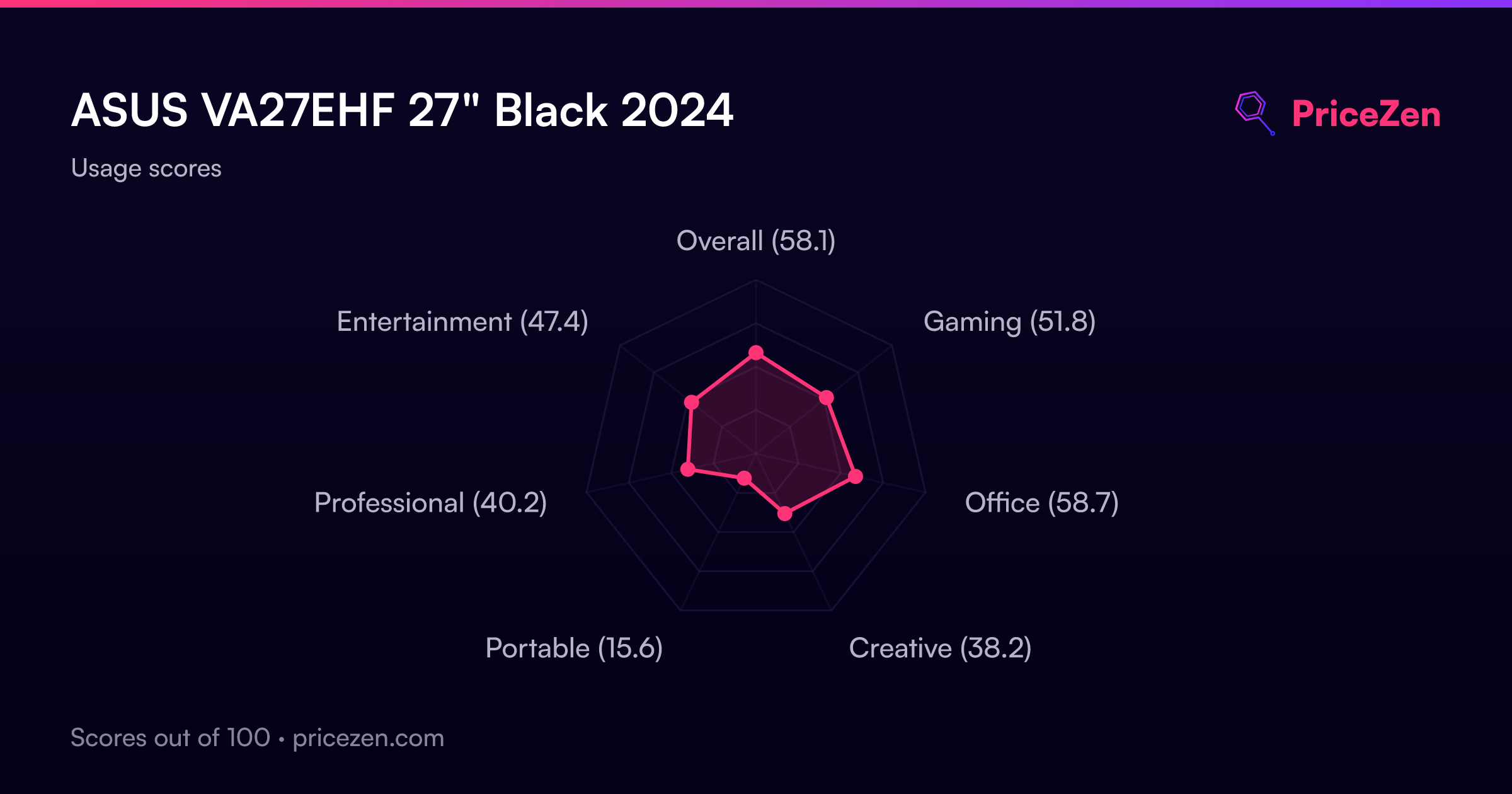
ASUS is pitching this as an Eye Care monitor, and they've backed that up with flicker-free tech and a low blue light filter. The IPS panel means colors don't wash out when you're slouching in your chair, which is a genuine quality-of-life upgrade over the old TN panels many of us are still using. It's clearly built for the daily grind, with a dash of after-hours fun. The 'gaming' score in our database is a middle-of-the-pack 52.8, but the office score is a much more respectable 57.6, which tells you exactly where this monitor's heart is.
But there's a catch, and it's a big one for anyone who cares about image quality. The brightness and color performance are, frankly, not great. We're talking 250 nits and a color score that lands in the bottom 20th percentile of all monitors we track. Out of the box, it's going to look overly bright and washed out. You'll need to spend a few minutes wrestling with the admittedly clunky on-screen controls to dial in a picture that doesn't feel like it's actively trying to give you a headache. If you're willing to do that, you'll find a solid, no-frills workhorse underneath.
Common Questions
Q: Is 1080p on a 27-inch monitor too blurry?
It depends on how close you sit and what you're used to. You will be able to see individual pixels if you lean in, and text won't be as razor-sharp as on a 1440p or 4K screen of the same size. However, at a normal viewing distance of a couple of feet, it's perfectly usable for gaming and productivity, and the larger text can actually be easier on the eyes without needing to mess with scaling settings.
Q: Can I mount this monitor on a monitor arm?
Yes, it has a standard VESA 100x100 mount on the back. Given that the included stand only offers tilt adjustment and no height or swivel, putting it on an aftermarket arm is a popular and highly recommended upgrade to get the ergonomics dialed in just right.
Q: Is the 100Hz refresh rate good for gaming?
It's a solid entry-level gaming refresh rate and a huge step up from a standard 60Hz monitor. The 1ms response time and Adaptive-Sync support mean you'll get a smooth, tear-free experience in casual games. It's not going to compete with a 240Hz esports monitor for competitive shooters, but for RPGs, strategy games, and single-player titles, it feels great.
Q: Does this monitor have built-in speakers?
No, the ASUS VA27EHF does not have built-in speakers. You'll need to use external speakers or a headset connected to your computer's audio output, as the monitor only handles video over its HDMI port.
Who Should Skip This
If you do any kind of creative work that relies on accurate colors, like photo editing, graphic design, or video production, you should absolutely skip this monitor. Its color performance is in the bottom 20th percentile of our database, which means you'll be fighting an uphill battle to get a decent picture, and you'll never be able to trust what you're seeing. Look for a monitor with a higher color score and better factory calibration, like a Dell UltraSharp or a BenQ DesignVue series display.
Competitive gamers should also look elsewhere. While 100Hz is nice for casual play, serious players will want a 144Hz, 240Hz, or even faster panel for the competitive edge. A monitor like the Acer Nitro XV272U offers a higher refresh rate and a sharper 1440p resolution, making it a much better fit for gaming-first setups. This ASUS is a work monitor that can game, not the other way around.
Verdict
If you're kitting out a home office on a tight budget and you just want a big, smooth screen for documents, web browsing, and the occasional YouTube video, the ASUS VA27EHF is a solid pick, provided you find it at a good price. The 100Hz refresh rate is a genuine quality-of-life upgrade that you'll appreciate every single day, and the IPS panel means you can slouch in any direction without the picture going negative. Owners back that up: sentiment in our data sits at 78 out of 100, which is a healthy score for a monitor this cheap. Just be prepared to immediately dive into the settings and turn the brightness way, way down. It's a monitor that needs a little tough love out of the box.
For anyone doing even hobby-level photo editing, graphic design, or who just appreciates a vibrant, accurate picture, this monitor is going to be a constant disappointment. The weak color performance is the dealbreaker here. You'd be much happier saving up a bit more for a 1440p display from Acer or Dell. And if you're a competitive gamer, the 100Hz cap will feel limiting. This is a monitor for the practical user who values smoothness and screen size above all else, and who knows a good deal when they see one.
Usage Scores
- Overall58.1
- Gaming51.8
- Office58.7
- Creative38.2
- Portable15.6
- Professional40.2
- Entertainment47.4