Lenovo ThinkPad X13 Yoga Gen 2 2021, Core i5-1145G7, 16GB, 256GB SSD, Black

A 13.3-inch laptop that slips into any bag verified Nov 29
52/100 overall score
- CPU
- Intel Core i5 1145G7
- RAM
- 16 GB
- Storage
- 256 GB
- Screen
- 13.3" 1920x1080
- GPU
- Intel Iris Xe
- OS
- Windows 11 Pro
- Weight
- 1.4 kg
Compare prices at 1 store
Cheapest first. New, refurbished and bundled offers are kept apart, so you compare like with like.
| Store | Sold by | Colour and condition | Price | vs lowest | Last checked | Link |
|---|---|---|---|---|---|---|
| Refurbished and renewed1 offerNot new: condition and warranty vary by seller | ||||||
| Not checked in the last 7 days, so these prices may have changed | ||||||
| Newegg | Marketplace seller | Refurbished | Price not confirmed | Not known | Go to store | |
 Source: PriceZen
A price counts as current when we checked it in the last 7 days. “Marketplace seller” means a third-party seller on that store, not the store itself.


Snapshot
The 30-Second Version
Great ports and build quality, but that 720p screen is a crime against your eyes. Buy it only if you're in Canada, get it under CAD 400, and plan to dock it to a real monitor.
Pros & Cons
Pros
- Excellent port selection with Thunderbolt and Ethernet 95th
- 16GB of RAM keeps multitasking smooth 93rd
- Classic ThinkPad build quality and keyboard 84th
- 360-degree hinge with touchscreen is genuinely useful 82nd
Cons
- 1280x720 display is one of the worst we've seen
- 256GB SSD fills up fast
- 3.00kg weight is heavy for a 13-inch convertible
- Refurbished Grade B means visible wear and tear
The proof
Performance
The Core i5-1145G7 is fine for office work, email, and light multitasking. It's a 4-core chip from Intel's 11th gen, so it's not going to blow anyone away, but it holds up for spreadsheets and video calls. The 16GB of RAM is the real saving grace here, it keeps Windows 11 Pro from choking when you have 20 browser tabs open. The Iris Xe graphics are integrated and about what you'd expect, fine for streaming, useless for gaming. The 256GB SSD is on the small side, and it's in the 25th percentile for storage, so you'll be leaning on cloud storage or an external drive sooner than you'd like. The port selection is actually a standout, with Thunderbolt, three USB-A ports, HDMI, and Ethernet, which puts it in the 82nd percentile for connectivity. That's rare on a convertible this size.
Specifications
Full Specifications
Processor
| CPU | Intel Core i5 1145G7 |
| Cores | 4 |
| Frequency | 2.6 GHz |
| L3 Cache | 8 MB |
Graphics
| GPU | Intel Iris Xe |
| Type | Integrated |
Memory & Storage
| RAM | 16 GB |
| RAM Generation | DDR4 |
| Storage | 256 GB |
| Storage Type | SSD |
Display
| Size | 13.3" |
| Resolution | 1920x1080 (Full HD) |
| Panel | IPS |
| Refresh Rate | 60 Hz |
Connectivity
| USB-C Ports | 2 |
| USB Ports | 3 |
| Thunderbolt | Thunderbolt 4 |
| HDMI | 1 x HDMI |
| Wi-Fi | Wi-Fi 6 |
| Bluetooth | Bluetooth 5.0 |
| Ethernet | 10/100/1000Mbps |
Physical
| Weight | 1.4 kg / 3.0 lbs |
| OS | Windows 11 Pro |
vs Competition
Against the Apple MacBook Pro M3 Pro, this ThinkPad gets absolutely destroyed on screen quality, performance, and battery life. The MacBook is in a different league, but it also costs way more. The HP OmniBook X Flip 14 is a more direct competitor as a convertible, and it has a much better display and newer internals. The ASUS Zenbook UX3405CA is lighter and has a far superior OLED screen, but you'll pay more for it. If you need a cheap business convertible with great ports, the ThinkPad wins on price alone. If you care about the screen at all, look at the HP or ASUS.
| Spec | Lenovo ThinkPad X13 Yoga Gen 2 | Apple MacBook Air 13.6" M5 | HP OmniBook X Flip | ASUS Vivobook S 14" S5406SA-DH76 | MSI Summit E14 Flip Evo A13MT-610US | Dell 14 Plus LDB14250-7711BLU-PUS |
|---|---|---|---|---|---|---|
| CPU | Intel Core i5 1145G7 | Apple M5 | AMD Ryzen AI 7 350 | Intel Core Ultra 7 258V | Intel Core i7 1360P | Intel Core Ultra 7 258V |
| RAM (GB) | 16 | 16 | 24 | 32 | 32 | 32 |
| Storage (GB) | 256 | 1024 | 1024 | 1024 | 1024 | 1024 |
| Screen | 13.3" 1920x1080 | 13.6" 2560x1664 | 14" 1920x1200 | 14" 1920x1200 | 14" 2880x1800 | 14" 2560x1600 |
| GPU | Intel Iris Xe | Apple M5 10-core | AMD Radeon 860M | Intel Arc Graphics | Intel Iris Xe Graphics | Intel Arc Graphics |
| OS | Windows 11 Pro | macOS | Windows 11 Home | Windows 11 Home | Windows 11 Home | Windows 11 Home |
| Weight (kg) | 1.4 | 1.2 | 1.4 | 1.3 | 1.6 | 1.6 |
| Battery (Wh) | - | 54 | 59 | 75 | 72 | - |
| Compare | Compare | Compare | Compare | Compare |
| Product | CPU | GPU | RAM | Ports | Screen | Portability | Storage | Reliability | Affordability |
|---|---|---|---|---|---|---|---|---|---|
| Lenovo ThinkPad X13 Yoga Gen 2 | 30.6 | 47.9 | 36.4 | 94.6 | 37.5 | 93.3 | 15.8 | 82 | 84 |
| Apple MacBook Air 13.6" M5 Compare | 83 | 77.1 | 49.9 | 89.4 | 85 | 91.8 | 65.4 | 98.2 | 29.6 |
| HP OmniBook X Flip Compare | 80 | 64.6 | 82.3 | 89.4 | 71.7 | 79.3 | 65.4 | 33.7 | 44.5 |
| ASUS Vivobook S 14" S5406SA-DH76 Compare | 65.8 | 69.6 | 92 | 83.5 | 80.7 | 86.2 | 79.3 | 60.6 | 34.5 |
| MSI Summit E14 Flip Evo A13MT-610US Compare | 63.1 | 47.9 | 83.3 | 64.4 | 88 | 73.1 | 79.3 | 60.6 | 34.8 |
| Dell 14 Plus LDB14250-7711BLU-PUS Compare | 65.8 | 69.6 | 92 | 58.3 | 82.7 | 73.9 | 65.4 | 33.7 | 29.1 |
Price
Value & Pricing
At CAD 380 to CAD 430 from Canadian sellers, this is a budget-friendly way into a ThinkPad convertible. The USD 999 listing in the US is a much worse deal, so if you're south of the border, skip it or find a better config. For Canadians, the CAD 380 listing is the one to grab if you're set on this model. Just know you're paying for the ThinkPad name and ports, not the screen.
Price history
Read more
Overview
The Lenovo ThinkPad X13 Yoga Gen 2 is a weird mix of great bones and a genuinely bad screen. You get the classic ThinkPad build, a 360-degree hinge, Thunderbolt, and 16GB of RAM, which sounds like a solid business convertible. But that 13.3-inch 1280x720 display is a dealbreaker for most people in 2025. It lands in the 2nd percentile for screens, and honestly, that feels generous. If you can live with a dim, low-res panel, the rest of this machine is a tank. But most people shouldn't have to.
Common Questions
Q: Is the 1280x720 screen really that bad?
Yes. It's in the 2nd percentile for laptop screens. Text looks soft, colors are washed out, and you'll notice the low resolution constantly. If you do a lot of reading or spreadsheet work, this screen will annoy you daily.
Q: Can this laptop handle gaming?
No. The integrated Iris Xe graphics put it in the 14th percentile for GPU performance. You can play old indie games or stream via cloud gaming, but anything modern will struggle. This is not a gaming machine.
Q: Is 256GB of storage enough?
For basic office work and cloud storage, it's manageable. But it's in the 25th percentile for storage, so if you keep a lot of files, photos, or videos locally, you'll run out fast. Budget for an external drive or cloud subscription.
Who Should Skip This
If you care about screen quality at all, skip this. The 720p panel is a dealbreaker for anyone who reads, edits photos, or watches video on the laptop itself. Go get a used HP OmniBook X Flip or an ASUS Zenbook instead. If you want to game, this isn't it either. And if you're in the US looking at the USD 999 listing, absolutely skip it, that price is way too high for this config.
Verdict
The ThinkPad X13 Yoga Gen 2 is a tough sell unless you get it at the low end of the Canadian price range and you genuinely don't care about the display. The 720p screen is a constant reminder that you bought a refurbished budget machine, and the 3.00kg weight makes the 'compact' label feel like a stretch. But if you need a durable, port-rich convertible for basic office work and you can find it around CAD 380, it's a functional beater laptop. Just don't expect to enjoy looking at it.
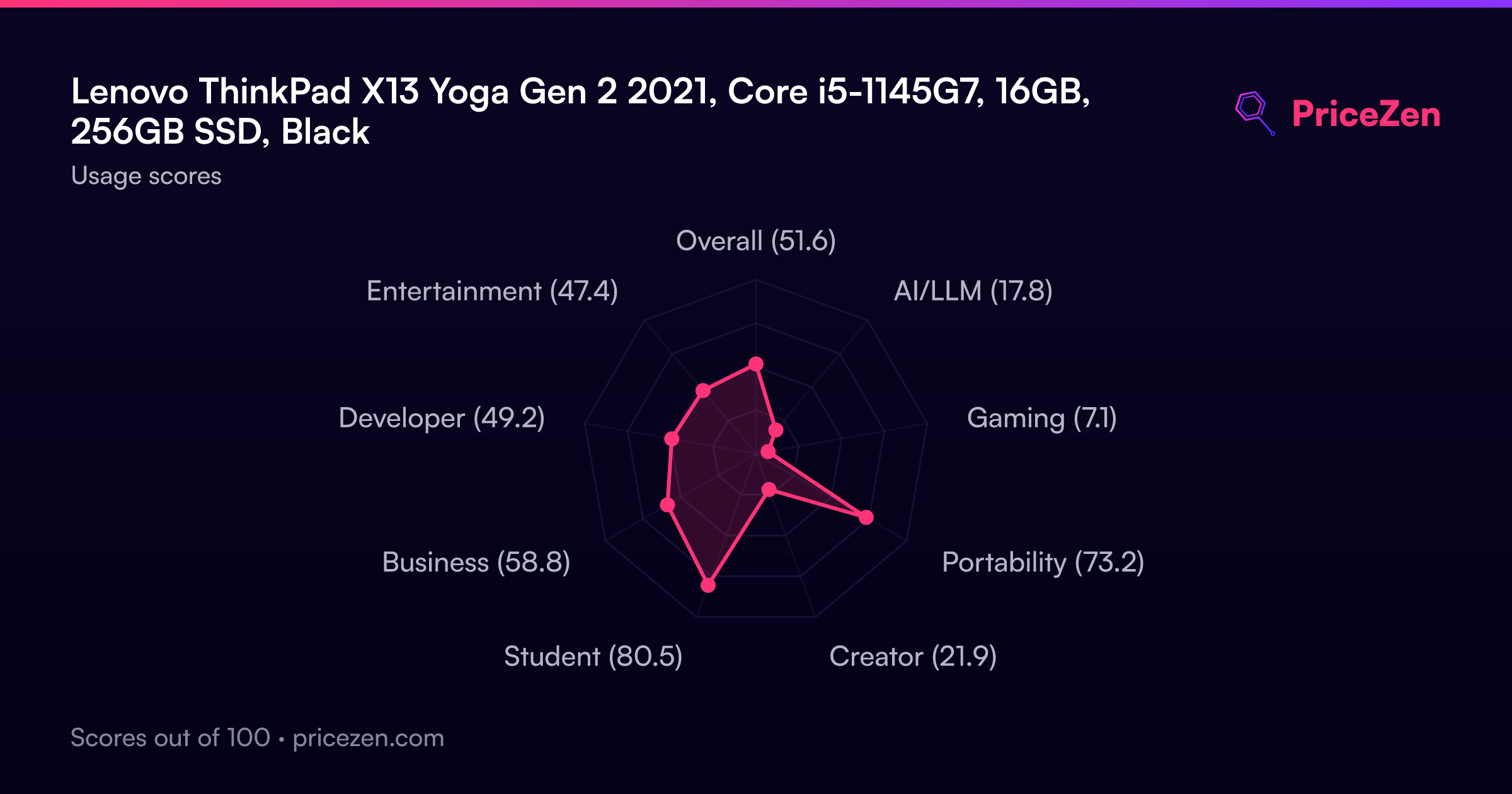
Usage Scores
- Overall51.6
- AI/LLM17.8
- Gaming7.1
- Portability73.2
- Creator21.9
- Student80.5
- Business58.8
- Developer49.2
- Entertainment47.4