HP ZBook Firefly 14 G8 2021, Core i5-1135G7, 32GB, 1TB SSD, Dark Gray

32 GB of RAM, plenty for multitasking verified Nov 28
50/100 overall score
- CPU
- Intel Core i5 1135G7
- RAM
- 32 GB
- Storage
- 1 TB
- Screen
- 14" 1920x1080
- GPU
- Intel Iris Xe Graphics
- OS
- Windows 11 Pro
- Weight
- 1.4 kg
Compare prices at 2 stores
Cheapest first. New, refurbished and bundled offers are kept apart, so you compare like with like.
| Store | Sold by | Colour and condition | Price | vs lowest | Last checked | Link |
|---|---|---|---|---|---|---|
| Refurbished and renewed3 offersNot new: condition and warranty vary by seller | ||||||
| Not checked in the last 7 days, so these prices may have changed | ||||||
| Newegg | Newegg | Refurbished, Dark Gray | Price not confirmed | Not known | Go to store | |
| Out of stock when last checked | ||||||
| Amazon | Not known | Renewed, Black | No price | Out of stock | Nov 21 | Go to store |
| Amazon | Not known | Renewed | No price | Out of stock | Nov 17 | Go to store |
 Source: PriceZen, checked Nov 21, 2026
A price counts as current when we checked it in the last 7 days. “Marketplace seller” means a third-party seller on that store, not the store itself.
Price history
No offers of this kind in this period.
Checked that dayNot checked that day, still on offer
Source: PriceZen, checked Aug 8, 2026










Snapshot
The 30-Second Version
The HP ZBook Firefly 14 G8 is a lightweight business laptop with a standout 32GB of RAM and 1TB SSD at a reasonable USD 719. The CPU and display are weak spots, landing in the 24th and 21st percentiles respectively. It's a great value for office work and multitasking, but a poor choice for gaming or creative tasks. Buy it for the memory, storage, and portability, not the processing power.
Pros & Cons
Pros
- 32GB of RAM is generous for this class, 73rd percentile overall 85th
- 1TB NVMe SSD gives you serious storage headroom, 80th percentile 79th
- Lightweight at 1.36kg, great for travel and commuting 72nd
- Excellent port selection including Thunderbolt, dual USB-C, dual USB-A, HDMI, and Ethernet
- Compact form factor scores 84th percentile, a genuine strength
Cons
- CPU performance is weak, 24th percentile, will struggle with heavy workloads
- Display quality is disappointing, 21st percentile, basic 1080p panel
- Reliability scores are mediocre at 33rd percentile
- Integrated graphics can't handle gaming or GPU-intensive tasks
- No dedicated GPU despite the workstation branding
The proof
Performance
The Core i5-1135G7 is a 4-core, 8-thread chip from Intel's Tiger Lake generation, running at a 2.4GHz base clock. In our database, this CPU sits at the 24th percentile compared to all laptops we track. That's not a typo. It's a weak spot, plain and simple. For everyday office work, web browsing, and light multitasking, you'll be fine. But throw heavy video editing or serious data crunching at it and you'll feel the ceiling pretty quickly.
The 32GB of RAM is the real story here. That's a lot of memory for a laptop in this class, and it lands in the 73rd percentile overall. Combined with the 1TB NVMe SSD at the 80th percentile for storage, you've got a machine that can keep a ton of apps and files open without breaking a sweat. The integrated Iris Xe graphics are about average, sitting at the 49th percentile. Fine for driving a second monitor or light photo work, but not built for 3D rendering or modern games. The 1080p display is where things get rough, landing at the 21st percentile for screen quality. It's a basic panel, and the scores reflect that.
Specifications
Full Specifications
Processor
| CPU | Intel Core i5 1135G7 |
| Cores | 4 |
| Frequency | 2.4 GHz |
| L3 Cache | 8 MB |
Graphics
| GPU | Intel Iris Xe Graphics |
| Type | Integrated |
| VRAM Type | Shared |
Memory & Storage
| RAM | 32 GB |
| Storage | 1 TB |
| Storage Type | NVMe SSD |
Display
| Size | 14" |
| Resolution | 1920x1080 (Full HD) |
Connectivity
| USB-C Ports | 2 |
| USB Ports | 2 |
| Thunderbolt | Thunderbolt 4 |
| HDMI | 1 x HDMI 2.0 |
| Ethernet | 1 x RJ-45 |
Physical
| Weight | 1.4 kg / 3.0 lbs |
| OS | Windows 11 Pro |
vs Competition
The obvious comparison is the Apple MacBook Pro M5. Apple's silicon runs circles around the i5-1135G7 in both CPU and GPU performance, and the display quality isn't even in the same conversation. But you'll pay significantly more for that privilege, and you lose the Ethernet port and the easy RAM upgrade path. The MacBook is the better machine for creative work. The Firefly is the better value for office work.
The Lenovo Legion 5i and ASUS ROG Zephyrus are gaming laptops that happen to have business-friendly specs. They'll crush the Firefly in graphics performance, but they're heavier, louder, and often more expensive. The Microsoft Surface Laptop 7th Edition is a closer competitor in spirit, with better build quality and a nicer screen, but you'll typically get less RAM and storage for the same money. The Acer Predator Helios Neo is another gaming-focused option that makes the Firefly look underpowered, but again, portability and price tell a different story.
| Spec | HP ZBook Firefly 14 G8 | Apple MacBook Air 13.6" M5 | Lenovo Legion 5i Gen 10 15.1" | Samsung Galaxy Book5 Pro 14" NP944XHA-KG3US | ASUS Zenbook 14" UX3405CA-U9321TB | Dell Premium 14.5" LDA14250-7667SLV-PUS |
|---|---|---|---|---|---|---|
| CPU | Intel Core i5 1135G7 | Apple M5 | Intel Core i9 14900HX | Intel Core Ultra 7 258V | Intel Core Ultra 9 285H | Intel Core Ultra 7 255H |
| RAM (GB) | 32 | 16 | 16 | 32 | 32 | 32 |
| Storage (GB) | 1024 | 1024 | 512 | 1024 | 1024 | 1024 |
| Screen | 14" 1920x1080 | 13.6" 2560x1664 | 15.1" 2560x1600 | 14" 2880x1800 | 14" 1920x1200 | 14.5" 3200x2000 |
| GPU | Intel Iris Xe Graphics | Apple M5 10-core | NVIDIA GeForce RTX 5070 | Intel Arc Graphics 140V | Intel Arc Graphics | Intel Arc Graphics |
| OS | Windows 11 Pro | macOS | Windows 11 Home | Windows 11 Pro | Windows 11 Home | Windows 11 Home |
| Weight (kg) | 1.4 | 1.2 | 1.9 | 1.2 | 1.3 | 1.7 |
| Battery (Wh) | - | 54 | 80 | 63 | 75 | 62 |
| Compare | Compare | Compare | Compare | Compare |
| Product | CPU | GPU | RAM | Ports | Screen | Portability | Storage | Reliability | Affordability |
|---|---|---|---|---|---|---|---|---|---|
| HP ZBook Firefly 14 G8 | 32.2 | 47.9 | 72.1 | 64.4 | 20.3 | 84.7 | 79.3 | 33.7 | 61 |
| Apple MacBook Air 13.6" M5 Compare | 83 | 77.1 | 49.9 | 89.4 | 85 | 91.7 | 65.4 | 98.2 | 29.6 |
| Lenovo Legion 5i Gen 10 15.1" Compare | 93.2 | 93.5 | 59.9 | 98.6 | 93.5 | 57.2 | 51.1 | 82 | 16.2 |
| Samsung Galaxy Book5 Pro 14" NP944XHA-KG3US Compare | 65.8 | 69.6 | 79.5 | 83.5 | 90.3 | 89.4 | 79.3 | 82 | 21.3 |
| ASUS Zenbook 14" UX3405CA-U9321TB Compare | 90.1 | 69.6 | 89.7 | 58.3 | 79.7 | 86.9 | 65.4 | 60.6 | 16.8 |
| Dell Premium 14.5" LDA14250-7667SLV-PUS Compare | 87 | 69.6 | 89 | 66.7 | 96.8 | 61.3 | 65.4 | 33.7 | 14.9 |
Price
Value & Pricing
At USD 719 from the single US listing we track, this machine is priced like a mid-range consumer laptop but specced like a budget workstation. The 32GB of RAM and 1TB SSD alone would cost you a decent chunk of change as upgrades on many competing models. When you factor in the Thunderbolt port and the full-size Ethernet jack, the value proposition gets even stronger for business users who need to dock at a desk.
That said, the weak CPU and mediocre display mean you're not getting a premium experience across the board. You're paying for memory, storage, and portability, not raw processing power or screen quality. If your workload is mostly browser tabs, spreadsheets, and remote desktop sessions, this is a lot of machine for the money. If you need to render video or run local AI models, you'll outgrow it fast.
Read more
Overview
The HP ZBook Firefly 14 G8 is one of those machines that makes more sense the longer you look at it. On paper, it's a business laptop with a mid-range Intel Core i5-1135G7, integrated Iris Xe graphics, and a 14-inch 1080p display. Nothing flashy. But then you notice the 32GB of RAM and the 1TB NVMe SSD, and suddenly this thing starts looking like a sleeper pick for anyone who needs a portable workhorse without paying workstation prices.
HP positions the Firefly line as a mobile workstation for people who don't need the full-throttle ZBook Fury experience. This G8 model sits at the compact end of that spectrum, weighing in at 1.36kg. That's light enough to toss in a bag and forget about until you need it. The port selection backs up the workstation claim too: Thunderbolt, two USB-C ports, two USB-A ports, HDMI 2.0, and even Ethernet. You won't need a dongle for your desk setup.
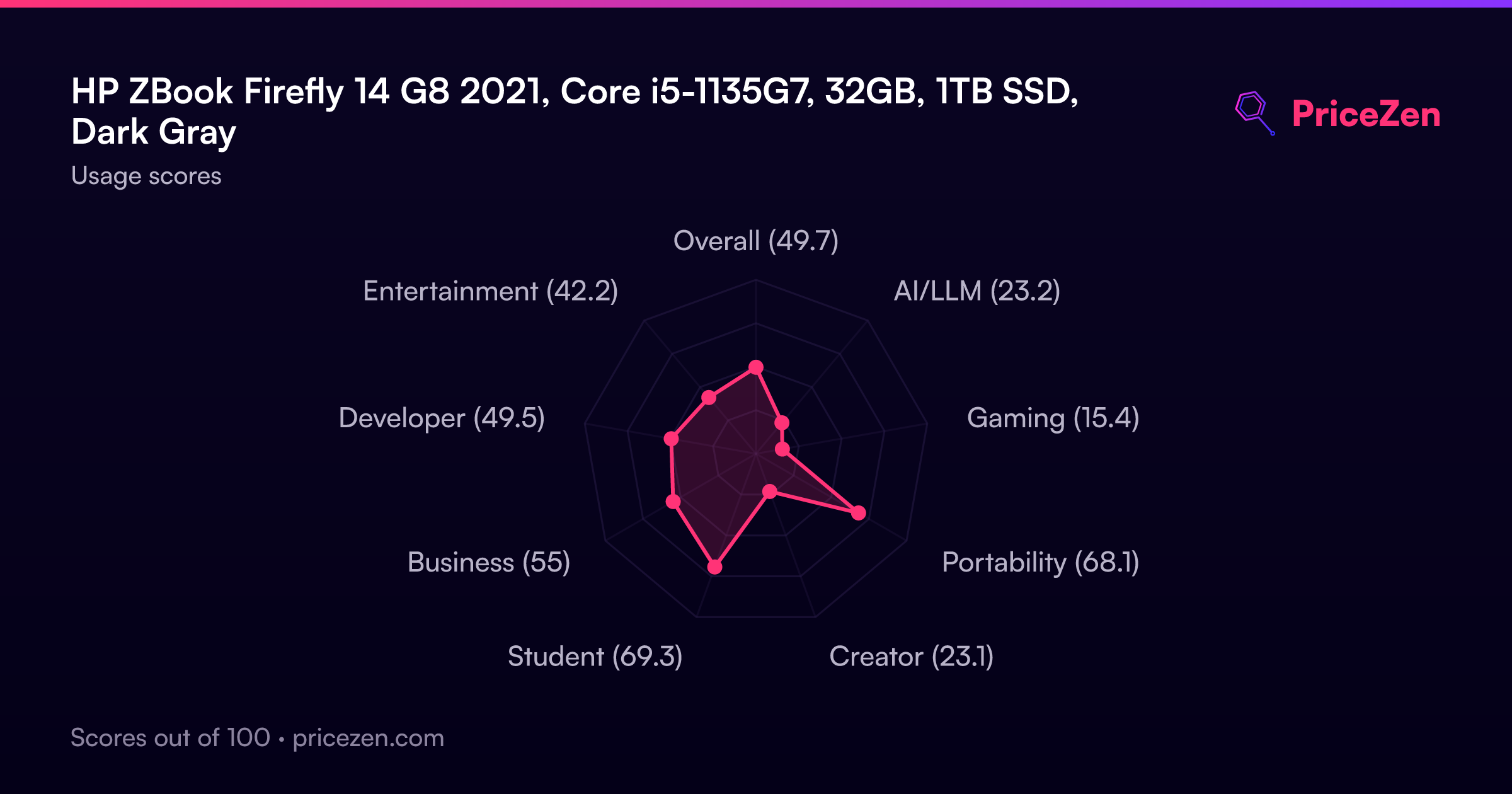
Who's this for? Based on our scoring, it's clearly aimed at the compact and business crowd. It scores 66.9 out of 100 for compact use, which puts it in the 84th percentile for that category. Students and general business users land around 56, which is fine but not exciting. And if you're thinking about gaming, don't. This thing scores 15.5 out of 100 for gaming, which is about as useful as a chocolate teapot for that purpose.
Common Questions
Q: Can this laptop handle video editing or 3D rendering?
Not well. The Core i5-1135G7 sits at the 24th percentile for CPU performance in our database, and the integrated Iris Xe graphics are only average. Light 1080p editing might be tolerable for short clips, but anything serious will be slow. If you need real rendering power, look at something with a dedicated GPU like the Lenovo Legion 5i or ASUS ROG Zephyrus.
Q: Is the 32GB of RAM overkill for a business laptop?
It depends on your workflow. For basic office tasks, 16GB would be plenty. But if you run virtual machines, keep dozens of browser tabs open, or work with large spreadsheets, the 32GB here is a genuine advantage. It's in the 73rd percentile for RAM, which means most laptops in this class ship with less. At this price, it's a nice bonus rather than a waste.
Q: How is the battery life on the Firefly 14 G8?
We don't have specific battery benchmarks for this model in our database, so we can't give you a concrete number. The compact form factor and efficient Tiger Lake chip suggest it should be decent for a business laptop, but the 1080p display and 32GB of RAM will draw some power. If battery life is your top priority, the Microsoft Surface Laptop 7th Edition is worth a look.
Q: Does the Firefly 14 G8 support external monitors?
Yes, and this is one of its strengths. You get Thunderbolt, two USB-C ports, and HDMI 2.0, so you can drive at least two external displays without much fuss. The port selection is in the 65th percentile overall, which is solid for a laptop this size. The integrated Iris Xe graphics can handle dual 1080p or even 4K displays for productivity work, just don't expect gaming performance on them.
Who Should Skip This
Gamers should skip this without a second thought. The gaming score of 15.5 out of 100 tells you everything you need to know. The integrated Iris Xe graphics and weak CPU simply can't handle modern titles at acceptable frame rates. If you want to game on a laptop, the Lenovo Legion 5i or Acer Predator Helios Neo are far better choices in a similar price bracket.
Creative professionals should also look elsewhere. The display at the 21st percentile means color accuracy and brightness are likely mediocre, which is a dealbreaker for photo or video work. The CPU will bottleneck rendering and export times. If you're in this camp, the Apple MacBook Pro M5 is the obvious upgrade path, though you'll pay more. Students who need a machine for general coursework might find better all-around options too, since the student score of 56.3 is nothing special.
Verdict
If you're a business user who lives in Excel, Outlook, and a dozen browser tabs, the Firefly 14 G8 is a genuinely smart buy at this price. The 32GB of RAM means you can keep everything open without slowdowns, and the 1TB SSD means you won't be juggling files to free up space. The port selection is better than most ultrabooks, and the 1.36kg weight makes it easy to carry between meetings or on flights.
But if you're a student or a creative professional, look elsewhere. The display is too mediocre for photo or video work, and the CPU will frustrate you if you're compiling code or running demanding applications. The reliability score at the 33rd percentile is also worth considering if this is going to be your only machine. For the right buyer, this is a bargain. For everyone else, it's a compromise.
Usage Scores
- Overall49.7
- AI/LLM23.2
- Gaming15.4
- Portability68.1
- Creator23.1
- Student69.3
- Business55
- Developer49.5
- Entertainment42.2