Apple MacBook Pro 16" 2019, Core i9, 16GB, 1TB SSD, Radeon Pro 5500M, Silver
Equipped with an 8-core Intel Core i9 and Radeon Pro 5500M graphics with 8GB of VRAM, this 16-inch MacBook Pro delivers strong performance for demanding workflows on its 3072x1920 Retina display. The six-speaker sound system and True Tone technology enhance the media experience, while the 1TB SSD provides fast, ample storage in a 1.95kg chassis. This refurbished model is best for content creators and developers who need a large, color-accurate screen and macOS without paying for a new machine.

No current retailer price
Snapshot
The 30-Second Version
A stunning 16-inch screen and rock-solid build trapped in a hot, RAM-starved Intel body. Only worth it if you find a screaming deal and know exactly what you're getting into.
Pros & Cons
Pros
- That 16-inch Retina display is still stunning and best-in-class for color and brightness. 100th
- Build quality and reliability are top-tier, sitting in the 97th percentile. 98th
- Port selection is fantastic with four Thunderbolt 3 ports, literally the best we've seen. 90th
- The 1TB SSD is fast and spacious enough for most project files. 79th
Cons
- The 9th-gen Core i9 runs hot and loud, a notorious thermal throttler.
- 16GB of RAM is a joke for a 'Pro' machine in this day and age.
- Battery life on Intel MacBooks was never great, and a used one will be worse.
- It's heavy and chunky compared to modern laptops, falling in the 22nd percentile for compactness.
What owners think
The Word on the Street
How owner sentiment changed over time
ExclusiveBased on when customers actually wrote their reviews - so you can see whether early praise held up.
Happy owners: 79% lately, 82% in 2023
Too few reviews to call that a change.
Across all 155 store ratings: 3.9★. Most owners rate without writing a review. The chart counts the 35 written reviews with stars and their own date.
Show the numbers
| Period | Reviews | Happy | Mixed | Unhappy | Happy share |
|---|---|---|---|---|---|
| 2023 | 11 | 9 | 0 | 2 | 82% |
| Jan 2024 – Apr 2025 | 24 | 19 | 0 | 5 | 79% |
Each column joins calendar quarters until it holds at least 10 reviews with stars and their own date. Happy = 4-5★, mixed = 3★, unhappy = 1-2★.
The proof
Performance
What surprised us most is how well that AMD Radeon Pro 5500M holds up for a five-year-old GPU, landing in the 70th percentile. It's not going to set any speed records, but it's still a capable card for creative tasks that lean on the GPU. The real shocker is the RAM situation. 16GB in a 'Pro' machine puts it in a disappointing 27th percentile in our database. For a laptop aimed at creators and developers, that's a serious bottleneck that will have you swapping to the speedy 1TB SSD more often than you'd like.
Specifications
Full Specifications
Processor
| CPU | Intel Core i9 |
| Cores | 8 |
| Frequency | 2.3 GHz |
Graphics
| GPU | AMD Radeon Pro 5500M |
| Type | Discrete |
| VRAM | 8 GB |
Memory & Storage
| RAM | 16 GB |
| RAM Generation | DDR4 |
| Storage | 1 TB |
| Storage Type | SSD |
Display
| Size | 16" |
| Resolution | 3072x1920 |
| Panel | IPS |
Connectivity
| USB-C Ports | 4 |
| USB Ports | 4 |
| Thunderbolt | Thunderbolt 3 |
| Wi-Fi | 802.11ac |
| Bluetooth | Yes |
Physical
| Weight | 1.9 kg / 4.3 lbs |
| OS | macOS |
vs Competition
The elephant in the room is any Apple Silicon Mac. A used M1 MacBook Air will feel snappier for everyday tasks, run completely silent, and have actual all-day battery life, though its screen and GPU are a step down. On the PC side, something like a modern ASUS Zenbook UX3405CA will be lighter, have a much better CPU, and double the RAM, but you'll lose macOS and that glorious 16-inch mini-LED display. You're choosing between a world-class screen and build versus modern efficiency and performance.
| Spec | Apple MacBook Pro 16" | Lenovo Slim 7 14" 83MC0001US | HP OmniBook X Flip | ASUS Vivobook S 14" S5406SA-DH76 | Samsung Galaxy Book5 Pro 14" NP944XHA-KG2US | Microsoft Surface Laptop 15" 7th Edition |
|---|---|---|---|---|---|---|
| CPU | Intel Core i9 | Intel Core Ultra 7 256V | AMD Ryzen AI 7 350 | Intel Core Ultra 7 258V | Intel Core Ultra 7 256V | Qualcomm Snapdragon X Elite X1E-84-100 |
| RAM (GB) | 16 | 16 | 24 | 32 | 16 | 32 |
| Storage (GB) | 1024 | 1024 | 1024 | 1024 | 512 | 1024 |
| Screen | 16" 3072x1920 | 14" 1920x1200 | 14" 1920x1200 | 14" 1920x1200 | 14" 2880x1800 | 15" 2496x1664 |
| GPU | AMD Radeon Pro 5500M | Intel Arc 140V | AMD Radeon 860M | Intel Arc Graphics | Intel Arc Graphics | Qualcomm Adreno |
| OS | macOS | Windows 11 Home | Windows 11 Home | Windows 11 Home | Windows 11 Pro | Windows 11 Home |
| Weight (kg) | 2 | 1.3 | 1.4 | 1.3 | 1.2 | 1.7 |
| Battery (Wh) | - | 70 | 59 | 75 | 63 | 66 |
| Compare | Compare | Compare | Compare | Compare |
| Product | CPU | GPU | RAM | Ports | Screen | Portability | Storage | Reliability | Social Proof | Affordability |
|---|---|---|---|---|---|---|---|---|---|---|
| Apple MacBook Pro 16" | 37.1 | 75.6 | 26.3 | 99.6 | 90.4 | 21.4 | 65.3 | 98.1 | 78.6 | 0 |
| Lenovo Slim 7 14" 83MC0001US Compare | 68.5 | 66 | 66.6 | 83.2 | 83.2 | 86.9 | 79.4 | 81.8 | 98.1 | 39.5 |
| HP OmniBook X Flip Compare | 80.1 | 64.6 | 82.4 | 77.2 | 74 | 79.4 | 65.3 | 33.5 | 94.2 | 43.6 |
| ASUS Vivobook S 14" S5406SA-DH76 Compare | 65.9 | 69.7 | 92.2 | 83.2 | 83.2 | 86.2 | 79.4 | 60.4 | 79.4 | 34.4 |
| Samsung Galaxy Book5 Pro 14" NP944XHA-KG2US Compare | 68.5 | 69.7 | 49.9 | 83.2 | 91.6 | 89.4 | 51 | 81.8 | 96.5 | 37.6 |
| Microsoft Surface Laptop 15" 7th Edition Compare | 79.4 | 13.4 | 79.6 | 57.8 | 89.3 | 59.3 | 79.4 | 81.8 | 88.4 | 14.3 |
Price
Value & Pricing
With a price spread from $455 to $760, this is a game of 'how low can you go'. At $455, you're getting a fantastic screen, great speakers, and a solid GPU in a premium shell. That's a decent deal for a secondary editing rig. At $760, you're dangerously close to used M1 MacBook Air territory, which will run circles around this i9 in single-core tasks and do it silently without melting your lap. Hunt for the lower end of that price range.
Best Buy 2 offers From $600
Price history
Read more
Overview
The 2019 MacBook Pro with the Core i9 is a bit of a throwback, and honestly, it's a mixed bag in 2024. The one thing you need to know is that this machine is a screen and build quality champ that's held back by a hot, aging Intel chip and a paltry 16GB of RAM. It's a refurb, so the value proposition is different, but you're buying a gorgeous chassis with a processor that's been thoroughly lapped by Apple's own M-series silicon. For the right price and the right user, it still has some life left, but you need to go in with your eyes wide open.
Common Questions
Q: Can I upgrade the RAM in this MacBook Pro?
Nope, you're stuck with it. The RAM is soldered to the motherboard, so the 16GB it comes with is all you'll ever have. That's a big reason to think twice before buying.
Q: Is this good for video editing in 2024?
It's a mixed bag. The screen is fantastic for color work and the Radeon Pro 5500M GPU is still decent. But the CPU will get toasty and loud under load, and 16GB of RAM will choke on complex 4K timelines. It's okay for 1080p work or as a secondary editing station.
Q: Does this Intel MacBook support the latest macOS updates?
It runs macOS Sonoma now, but it's on the chopping block. Apple is aggressively phasing out Intel Macs, so don't expect more than a year or two of major OS updates with full feature support.
Who Should Skip This
If you're looking for a quiet, portable laptop with all-day battery life, this isn't it. Go get a used M1 MacBook Air instead. It'll be faster for everyday tasks, completely silent, and last for years on a single charge.
Verdict
Buy this only if you absolutely need a large, color-accurate Intel Mac screen on a tight budget and can find it for under $500. It's a specialized tool for a specific job, like a budget video editing station that needs to run older Intel-native software or Boot Camp. For everyone else, this is a relic. The RAM limitation and thermal issues are just too big to ignore for a daily driver. Save up a little more and find a used M1 Pro MacBook Pro instead.
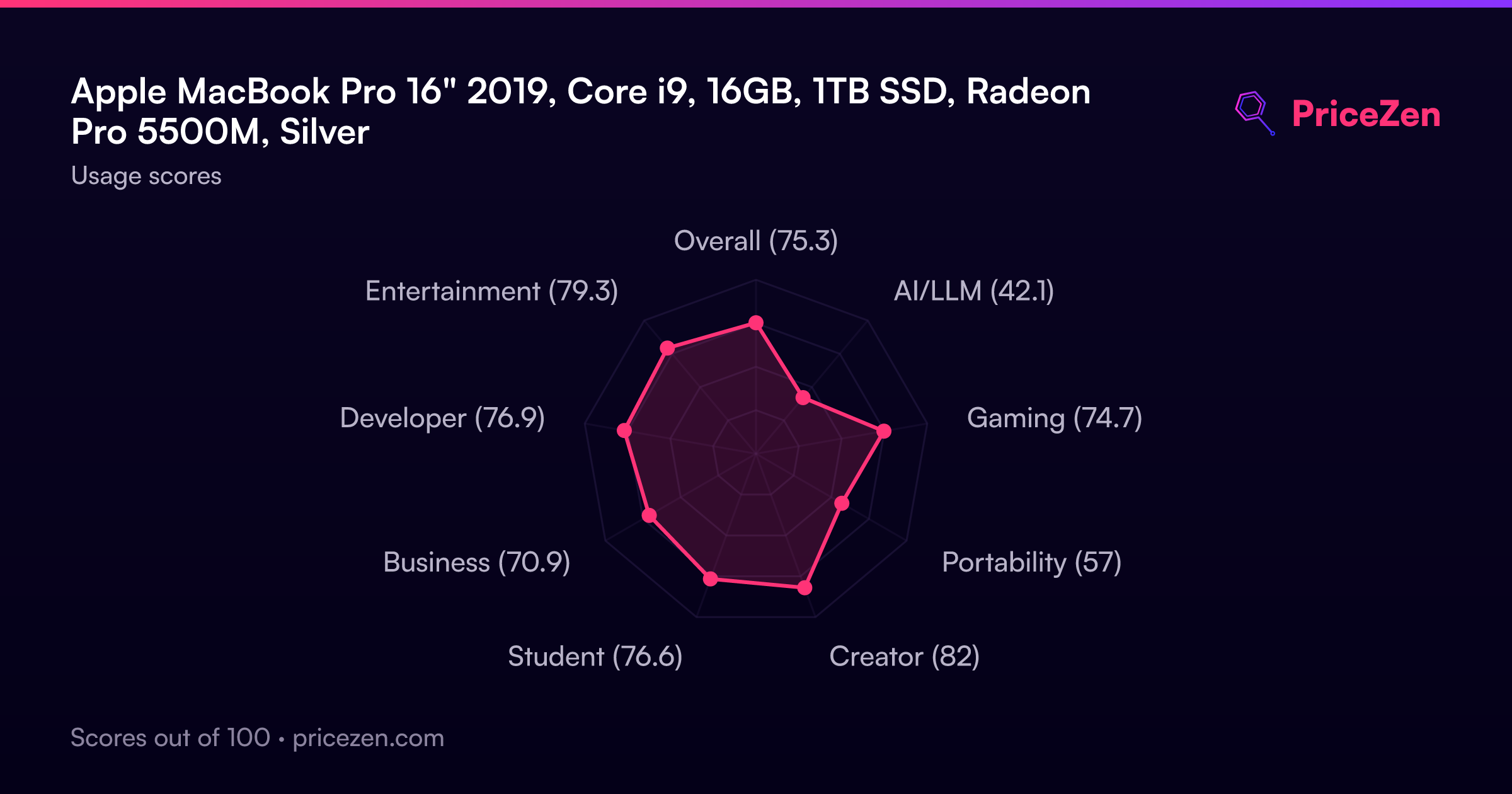
Usage Scores
- Overall67.5
- AI/LLM39.3
- Gaming72.5
- Portability54.8
- Creator77.8
- Student59.2
- Business67.5
- Developer70.1
- Entertainment76.2